

ZoomSounds 6.91 – WordPress Wave Audio Player with Playlist
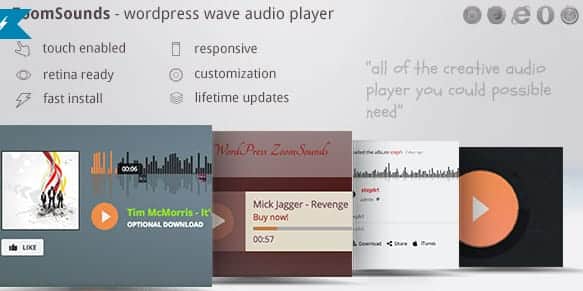
Overview of ZoomSounds
Elevate your website’s audio experience with ZoomSounds, the premier WordPress Wave Audio Player with Playlist functionality. This robust plugin is meticulously designed for musicians, podcasters, educators, and anyone looking to integrate high-quality, interactive audio content seamlessly into their WordPress site. ZoomSounds transforms static audio files into dynamic, engaging elements that captivate your audience and enhance user interaction.
Key Features of ZoomSounds
- Responsive Design: ZoomSounds ensures your audio player looks stunning and functions perfectly on any device, from desktops to smartphones, providing an optimal listening experience for all users.
- Waveform Visualizer: Engage your audience with beautiful, customizable waveform visualizations that react in real-time to the audio, making the listening experience more dynamic and interactive.
- Comprehensive Playlist Management: Easily create, organize, and display multiple playlists. ZoomSounds supports various audio sources and offers intuitive controls for playback order, looping, and shuffling.
- Multiple Skins & Customization Options: Tailor the appearance of your audio player to match your brand. ZoomSounds comes with a variety of pre-designed skins and extensive customization options for colors, fonts, and controls.
- Audio Statistics & Tracking: Gain insights into your audience’s listening habits. ZoomSounds provides basic tracking capabilities to understand which tracks are most popular.
- Self-Hosted & External Audio Support: Whether your audio files are hosted directly on your server or integrated from external sources like SoundCloud, ZoomSounds handles them with ease, offering flexibility in your content delivery.
- Shortcode & WPBakery Page Builder Integration: Effortlessly embed audio players and playlists anywhere on your site using simple shortcodes or through seamless integration with popular page builders like WPBakery.
- Social Sharing Options: Empower your listeners to share their favorite tracks directly from the player, extending your reach and promoting your content across various social media platforms.
Why Choose ZoomSounds?
Choosing ZoomSounds means opting for a superior audio experience on your WordPress website. In an increasingly multimedia-driven world, providing rich, interactive content is paramount to engaging your audience and distinguishing your brand. ZoomSounds goes beyond a simple play button, offering a visually stunning and functionally rich player that captivates listeners from the first note. Its intuitive interface ensures that managing your audio content is a breeze, while the extensive customization options guarantee that the player seamlessly integrates with your site’s aesthetic.
The value of ZoomSounds extends to its robust performance and versatility. Whether you’re showcasing a portfolio of musical compositions, delivering podcast episodes, or providing educational audio lessons, ZoomSounds handles it all with grace. Its responsive design ensures that your audio content is accessible and enjoyable on any device, crucial for today’s diverse internet users. Furthermore, the inclusion of waveform visualizations adds a professional touch, making your audio content not just heard, but also seen and experienced. With ZoomSounds, you’re not just adding an audio player; you’re investing in an interactive sound experience that enhances user engagement and keeps visitors coming back.
Who Should Use ZoomSounds?
ZoomSounds is the ideal solution for a broad spectrum of users. Musicians, bands, and DJs will find it indispensable for showcasing their tracks and albums with professional flair. Podcasters can leverage its playlist features to organize episodes and provide a seamless listening journey. Educators and e-learning platforms can use ZoomSounds to deliver audio lectures and supplementary materials effectively. Businesses and marketers looking to add audio testimonials, jingles, or voiceovers will appreciate its ease of use and customizable design. Essentially, anyone who needs to present audio content on their WordPress site in an engaging, professional, and user-friendly manner will benefit immensely from ZoomSounds.
How to Install ZoomSounds
- Download the Plugin: After purchasing, download the ZoomSounds plugin file (a .zip archive) from your account on GPLUniverse.
- Upload to WordPress: Log in to your WordPress admin dashboard. Navigate to ‘Plugins’ > ‘Add New’. Click the ‘Upload Plugin’ button at the top of the page.
- Choose File: Click ‘Choose File’, select the ZoomSounds .zip file you downloaded, and then click ‘Install Now’.
- Activate Plugin: Once the installation is complete, click the ‘Activate Plugin’ button. You will now see ZoomSounds listed in your installed plugins.
- Configure ZoomSounds: After activation, a new menu item for ZoomSounds will appear in your WordPress dashboard. Navigate to its settings to configure your player options, create playlists, and customize its appearance.
Frequently Asked Questions About ZoomSounds
Is ZoomSounds compatible with all WordPress themes?
Yes, ZoomSounds is designed for broad compatibility with most well-coded WordPress themes. Its flexible structure and shortcode integration ensure it can be embedded seamlessly into various theme layouts. If you encounter any rare conflicts, our support team can offer guidance.
Can I use ZoomSounds for both self-hosted and external audio files?
Absolutely! ZoomSounds offers robust support for both. You can upload your audio files directly to your WordPress media library and use them with ZoomSounds, or integrate tracks from external platforms like SoundCloud with ease.
Does ZoomSounds support responsive design for mobile devices?
Yes, responsiveness is a core feature of ZoomSounds. The player automatically adapts its layout and controls to fit any screen size, ensuring an optimal and consistent listening experience for your audience, whether they’re on a desktop, tablet, or smartphone.
Get ZoomSounds Today
Transform your website’s audio capabilities and captivate your audience with the power of ZoomSounds. This feature-rich audio player is an essential addition for anyone serious about presenting high-quality sound content on WordPress. Enhance user engagement, showcase your work professionally, and provide an unparalleled listening experience. Don’t miss out on optimizing your site’s audio delivery. Explore our wide range of WordPress Plugins and other premium GPL WordPress Products to elevate your website even further. Get ZoomSounds today and let your audio content truly shine!
Related Products You May Like
Here's everything you need to know about your purchase:
- 100% original files — Every product is the genuine, virus-free file, exactly as released by the original developer.
- Instant download — Access your files immediately after purchase from your account.
- Lifetime access — Re-download your purchased files anytime. No expiry, no limits.
- Free updates — Newer version released? Just request an update from us, free for all customers.
- Dedicated support — Our team is available 24/7 for installation and file-related help.
- Easy refunds — Not satisfied? Review our Refund Policy. We offer a hassle-free 7-day guarantee.
$59.00 Original price was: $59.00.$2.00Current price is: $2.00.
Version
6.91
Last Updated
03/04/2026
License
GPL v2
Compatibility
WordPress 5.0+
Need latest version?
Newer version released? Request an update from us — free for all customers!
Request Update →🎁 Your Purchase Includes
Overview of ZoomSounds
Elevate your website’s audio experience with ZoomSounds, the premier WordPress Wave Audio Player with Playlist functionality. This robust plugin is meticulously designed for musicians, podcasters, educators, and anyone looking to integrate high-quality, interactive audio content seamlessly into their WordPress site. ZoomSounds transforms static audio files into dynamic, engaging elements that captivate your audience and enhance user interaction.
Key Features of ZoomSounds
- Responsive Design: ZoomSounds ensures your audio player looks stunning and functions perfectly on any device, from desktops to smartphones, providing an optimal listening experience for all users.
- Waveform Visualizer: Engage your audience with beautiful, customizable waveform visualizations that react in real-time to the audio, making the listening experience more dynamic and interactive.
- Comprehensive Playlist Management: Easily create, organize, and display multiple playlists. ZoomSounds supports various audio sources and offers intuitive controls for playback order, looping, and shuffling.
- Multiple Skins & Customization Options: Tailor the appearance of your audio player to match your brand. ZoomSounds comes with a variety of pre-designed skins and extensive customization options for colors, fonts, and controls.
- Audio Statistics & Tracking: Gain insights into your audience’s listening habits. ZoomSounds provides basic tracking capabilities to understand which tracks are most popular.
- Self-Hosted & External Audio Support: Whether your audio files are hosted directly on your server or integrated from external sources like SoundCloud, ZoomSounds handles them with ease, offering flexibility in your content delivery.
- Shortcode & WPBakery Page Builder Integration: Effortlessly embed audio players and playlists anywhere on your site using simple shortcodes or through seamless integration with popular page builders like WPBakery.
- Social Sharing Options: Empower your listeners to share their favorite tracks directly from the player, extending your reach and promoting your content across various social media platforms.
Why Choose ZoomSounds?
Choosing ZoomSounds means opting for a superior audio experience on your WordPress website. In an increasingly multimedia-driven world, providing rich, interactive content is paramount to engaging your audience and distinguishing your brand. ZoomSounds goes beyond a simple play button, offering a visually stunning and functionally rich player that captivates listeners from the first note. Its intuitive interface ensures that managing your audio content is a breeze, while the extensive customization options guarantee that the player seamlessly integrates with your site’s aesthetic.
The value of ZoomSounds extends to its robust performance and versatility. Whether you’re showcasing a portfolio of musical compositions, delivering podcast episodes, or providing educational audio lessons, ZoomSounds handles it all with grace. Its responsive design ensures that your audio content is accessible and enjoyable on any device, crucial for today’s diverse internet users. Furthermore, the inclusion of waveform visualizations adds a professional touch, making your audio content not just heard, but also seen and experienced. With ZoomSounds, you’re not just adding an audio player; you’re investing in an interactive sound experience that enhances user engagement and keeps visitors coming back.
Who Should Use ZoomSounds?
ZoomSounds is the ideal solution for a broad spectrum of users. Musicians, bands, and DJs will find it indispensable for showcasing their tracks and albums with professional flair. Podcasters can leverage its playlist features to organize episodes and provide a seamless listening journey. Educators and e-learning platforms can use ZoomSounds to deliver audio lectures and supplementary materials effectively. Businesses and marketers looking to add audio testimonials, jingles, or voiceovers will appreciate its ease of use and customizable design. Essentially, anyone who needs to present audio content on their WordPress site in an engaging, professional, and user-friendly manner will benefit immensely from ZoomSounds.
How to Install ZoomSounds
- Download the Plugin: After purchasing, download the ZoomSounds plugin file (a .zip archive) from your account on GPLUniverse.
- Upload to WordPress: Log in to your WordPress admin dashboard. Navigate to ‘Plugins’ > ‘Add New’. Click the ‘Upload Plugin’ button at the top of the page.
- Choose File: Click ‘Choose File’, select the ZoomSounds .zip file you downloaded, and then click ‘Install Now’.
- Activate Plugin: Once the installation is complete, click the ‘Activate Plugin’ button. You will now see ZoomSounds listed in your installed plugins.
- Configure ZoomSounds: After activation, a new menu item for ZoomSounds will appear in your WordPress dashboard. Navigate to its settings to configure your player options, create playlists, and customize its appearance.
Frequently Asked Questions About ZoomSounds
Is ZoomSounds compatible with all WordPress themes?
Yes, ZoomSounds is designed for broad compatibility with most well-coded WordPress themes. Its flexible structure and shortcode integration ensure it can be embedded seamlessly into various theme layouts. If you encounter any rare conflicts, our support team can offer guidance.
Can I use ZoomSounds for both self-hosted and external audio files?
Absolutely! ZoomSounds offers robust support for both. You can upload your audio files directly to your WordPress media library and use them with ZoomSounds, or integrate tracks from external platforms like SoundCloud with ease.
Does ZoomSounds support responsive design for mobile devices?
Yes, responsiveness is a core feature of ZoomSounds. The player automatically adapts its layout and controls to fit any screen size, ensuring an optimal and consistent listening experience for your audience, whether they’re on a desktop, tablet, or smartphone.
Get ZoomSounds Today
Transform your website’s audio capabilities and captivate your audience with the power of ZoomSounds. This feature-rich audio player is an essential addition for anyone serious about presenting high-quality sound content on WordPress. Enhance user engagement, showcase your work professionally, and provide an unparalleled listening experience. Don’t miss out on optimizing your site’s audio delivery. Explore our wide range of WordPress Plugins and other premium GPL WordPress Products to elevate your website even further. Get ZoomSounds today and let your audio content truly shine!
Related Products You May Like
Reviews
There are no reviews yet.
Here's everything you need to know about your purchase:
- 100% original files — Every product is the genuine, virus-free file, exactly as released by the original developer.
- Instant download — Access your files immediately after purchase from your account.
- Lifetime access — Re-download your purchased files anytime. No expiry, no limits.
- Free updates — Newer version released? Just request an update from us, free for all customers.
- Dedicated support — Our team is available 24/7 for installation and file-related help.
- Easy refunds — Not satisfied? Review our Refund Policy. We offer a hassle-free 7-day guarantee.
Reviews
There are no reviews yet.