

WPCodeBox 2 1.3.1 – Complete WordPress Snippet Manager
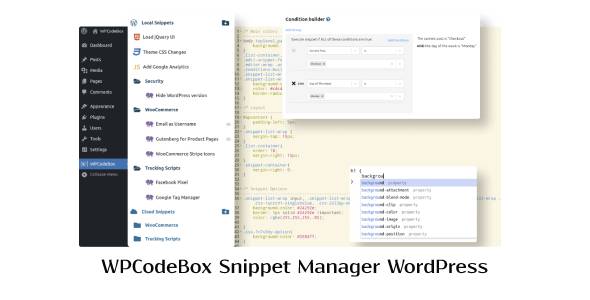
Overview of WPCodeBox Snippet Manager
The WPCodeBox Snippet Manager is an indispensable tool for any WordPress developer or site owner looking to efficiently manage custom code snippets without modifying theme files. This powerful plugin allows you to add, edit, and organize PHP, CSS, JavaScript, HTML, and even SVG code directly within your WordPress dashboard, ensuring a cleaner, more stable, and easily maintainable website. It’s designed for anyone who regularly adds custom functionalities or styling to their WordPress sites, from seasoned developers to DIY enthusiasts.
Key Features of WPCodeBox Snippet Manager
- Intuitive Code Editor: Experience a professional code editing environment directly in WordPress, complete with syntax highlighting, auto-completion, and error checking for various languages.
- Snippet Organization: Easily categorize, tag, and search your snippets, making it simple to find and manage hundreds of code pieces across multiple projects.
- Conditional Logic: Implement snippets only when and where they are needed, based on specific pages, user roles, device types, or custom conditions, optimizing performance.
- Version Control & Revisions: Never lose a change with built-in revision history, allowing you to track modifications, revert to previous versions, and maintain full control over your code.
- Secure & Isolated Execution: WPCodeBox Snippet Manager executes code safely, preventing conflicts and ensuring that your custom snippets don’t break your site or interfere with other plugins.
- Import/Export Functionality: Migrate your snippets effortlessly between different WordPress installations, saving time and ensuring consistency across your development workflow.
- Live Code Previews: See the effects of your CSS and JavaScript snippets in real-time before publishing them, accelerating your development and debugging process.
- Multi-site Compatibility: Perfect for agencies and large networks, WPCodeBox Snippet Manager supports WordPress Multisite, allowing centralized snippet management across your entire network.
Why Choose WPCodeBox Snippet Manager?
Choosing WPCodeBox Snippet Manager means embracing a smarter, more efficient way to customize your WordPress website. Gone are the days of editing `functions.php` or `style.css` directly, which often leads to lost changes during theme updates or accidental site breakage. With WPCodeBox Snippet Manager, all your custom code is housed in one secure, organized, and easily accessible location. This not only streamlines your development process but also significantly enhances the stability and long-term maintainability of your WordPress projects.
Beyond convenience, WPCodeBox Snippet Manager offers unparalleled control and flexibility. Its robust conditional logic ensures that your code only runs precisely when and where it’s required, reducing unnecessary server load and improving site performance. The integrated revision control provides peace of mind, allowing you to experiment freely and revert any changes with a click. For anyone serious about WordPress customization, investing in the WPCodeBox Snippet Manager is an investment in efficiency, security, and professional-grade code management.
Who Should Use WPCodeBox Snippet Manager?
WPCodeBox Snippet Manager is ideal for a wide range of WordPress users. Developers and agencies will appreciate its advanced features for managing code across multiple client sites, ensuring consistency and easy deployment. Freelancers and site builders will find it invaluable for adding custom functionalities without writing full plugins or themes. Even individual site owners who frequently add small CSS tweaks, JavaScript enhancements, or PHP functions will benefit from its user-friendly interface and robust organization capabilities, making custom code management simple and safe.
How to Install WPCodeBox Snippet Manager
- Download the Plugin: After your purchase, download the WPCodeBox Snippet Manager plugin file from your GPLUniverse account.
- Upload to WordPress: Log in to your WordPress dashboard, navigate to ‘Plugins’ > ‘Add New’, and then click ‘Upload Plugin’.
- Choose File: Click ‘Choose File’, select the downloaded `wpcodebox.zip` file, and then click ‘Install Now’.
- Activate Plugin: Once the installation is complete, click the ‘Activate Plugin’ button.
- Start Managing Snippets: You will now find ‘WPCodeBox’ in your WordPress admin menu, ready for you to add and manage your custom code snippets.
Frequently Asked Questions About WPCodeBox Snippet Manager
Can I use WPCodeBox Snippet Manager with any WordPress theme?
Yes, WPCodeBox Snippet Manager is designed to be theme-agnostic. It works seamlessly with any WordPress theme, as it manages custom code independently of your theme’s files, ensuring your customizations remain intact even after theme updates.
Is WPCodeBox Snippet Manager safe for my website?
Absolutely. The WPCodeBox Snippet Manager executes code in a controlled environment and includes features like error checking and conditional logic to prevent common issues. Its revision history also allows you to quickly revert any problematic changes, making it a very safe way to manage custom code.
Does WPCodeBox Snippet Manager slow down my website?
On the contrary, WPCodeBox Snippet Manager is built for performance. By allowing you to precisely control where and when snippets execute using conditional logic, it can actually help optimize your site by preventing unnecessary code from loading on every page. It’s a lightweight and efficient solution.
Get WPCodeBox Snippet Manager Today
Elevate your WordPress customization game with the WPCodeBox Snippet Manager. Say goodbye to messy code, lost changes, and update anxieties. This essential tool provides a professional, secure, and highly organized environment for all your custom PHP, CSS, and JavaScript needs. Enhance your workflow, maintain cleaner sites, and build with confidence. Explore WPCodeBox Snippet Manager and other powerful WordPress Plugins available at GPLUniverse, your trusted source for premium GPL WordPress Products.
Related Products You May Like
Here's everything you need to know about your purchase:
- 100% original files — Every product is the genuine, virus-free file, exactly as released by the original developer.
- Instant download — Access your files immediately after purchase from your account.
- Lifetime access — Re-download your purchased files anytime. No expiry, no limits.
- Free updates — Newer version released? Just request an update from us, free for all customers.
- Dedicated support — Our team is available 24/7 for installation and file-related help.
- Easy refunds — Not satisfied? Review our Refund Policy. We offer a hassle-free 7-day guarantee.
$100.00 Original price was: $100.00.$2.00Current price is: $2.00.
Version
2 1.3.1
Last Updated
23/2/2026
License
GPL v2
Compatibility
WordPress 5.0+
Need latest version?
Newer version released? Request an update from us — free for all customers!
Request Update →🎁 Your Purchase Includes
Overview of WPCodeBox Snippet Manager
The WPCodeBox Snippet Manager is an indispensable tool for any WordPress developer or site owner looking to efficiently manage custom code snippets without modifying theme files. This powerful plugin allows you to add, edit, and organize PHP, CSS, JavaScript, HTML, and even SVG code directly within your WordPress dashboard, ensuring a cleaner, more stable, and easily maintainable website. It’s designed for anyone who regularly adds custom functionalities or styling to their WordPress sites, from seasoned developers to DIY enthusiasts.
Key Features of WPCodeBox Snippet Manager
- Intuitive Code Editor: Experience a professional code editing environment directly in WordPress, complete with syntax highlighting, auto-completion, and error checking for various languages.
- Snippet Organization: Easily categorize, tag, and search your snippets, making it simple to find and manage hundreds of code pieces across multiple projects.
- Conditional Logic: Implement snippets only when and where they are needed, based on specific pages, user roles, device types, or custom conditions, optimizing performance.
- Version Control & Revisions: Never lose a change with built-in revision history, allowing you to track modifications, revert to previous versions, and maintain full control over your code.
- Secure & Isolated Execution: WPCodeBox Snippet Manager executes code safely, preventing conflicts and ensuring that your custom snippets don’t break your site or interfere with other plugins.
- Import/Export Functionality: Migrate your snippets effortlessly between different WordPress installations, saving time and ensuring consistency across your development workflow.
- Live Code Previews: See the effects of your CSS and JavaScript snippets in real-time before publishing them, accelerating your development and debugging process.
- Multi-site Compatibility: Perfect for agencies and large networks, WPCodeBox Snippet Manager supports WordPress Multisite, allowing centralized snippet management across your entire network.
Why Choose WPCodeBox Snippet Manager?
Choosing WPCodeBox Snippet Manager means embracing a smarter, more efficient way to customize your WordPress website. Gone are the days of editing `functions.php` or `style.css` directly, which often leads to lost changes during theme updates or accidental site breakage. With WPCodeBox Snippet Manager, all your custom code is housed in one secure, organized, and easily accessible location. This not only streamlines your development process but also significantly enhances the stability and long-term maintainability of your WordPress projects.
Beyond convenience, WPCodeBox Snippet Manager offers unparalleled control and flexibility. Its robust conditional logic ensures that your code only runs precisely when and where it’s required, reducing unnecessary server load and improving site performance. The integrated revision control provides peace of mind, allowing you to experiment freely and revert any changes with a click. For anyone serious about WordPress customization, investing in the WPCodeBox Snippet Manager is an investment in efficiency, security, and professional-grade code management.
Who Should Use WPCodeBox Snippet Manager?
WPCodeBox Snippet Manager is ideal for a wide range of WordPress users. Developers and agencies will appreciate its advanced features for managing code across multiple client sites, ensuring consistency and easy deployment. Freelancers and site builders will find it invaluable for adding custom functionalities without writing full plugins or themes. Even individual site owners who frequently add small CSS tweaks, JavaScript enhancements, or PHP functions will benefit from its user-friendly interface and robust organization capabilities, making custom code management simple and safe.
How to Install WPCodeBox Snippet Manager
- Download the Plugin: After your purchase, download the WPCodeBox Snippet Manager plugin file from your GPLUniverse account.
- Upload to WordPress: Log in to your WordPress dashboard, navigate to ‘Plugins’ > ‘Add New’, and then click ‘Upload Plugin’.
- Choose File: Click ‘Choose File’, select the downloaded `wpcodebox.zip` file, and then click ‘Install Now’.
- Activate Plugin: Once the installation is complete, click the ‘Activate Plugin’ button.
- Start Managing Snippets: You will now find ‘WPCodeBox’ in your WordPress admin menu, ready for you to add and manage your custom code snippets.
Frequently Asked Questions About WPCodeBox Snippet Manager
Can I use WPCodeBox Snippet Manager with any WordPress theme?
Yes, WPCodeBox Snippet Manager is designed to be theme-agnostic. It works seamlessly with any WordPress theme, as it manages custom code independently of your theme’s files, ensuring your customizations remain intact even after theme updates.
Is WPCodeBox Snippet Manager safe for my website?
Absolutely. The WPCodeBox Snippet Manager executes code in a controlled environment and includes features like error checking and conditional logic to prevent common issues. Its revision history also allows you to quickly revert any problematic changes, making it a very safe way to manage custom code.
Does WPCodeBox Snippet Manager slow down my website?
On the contrary, WPCodeBox Snippet Manager is built for performance. By allowing you to precisely control where and when snippets execute using conditional logic, it can actually help optimize your site by preventing unnecessary code from loading on every page. It’s a lightweight and efficient solution.
Get WPCodeBox Snippet Manager Today
Elevate your WordPress customization game with the WPCodeBox Snippet Manager. Say goodbye to messy code, lost changes, and update anxieties. This essential tool provides a professional, secure, and highly organized environment for all your custom PHP, CSS, and JavaScript needs. Enhance your workflow, maintain cleaner sites, and build with confidence. Explore WPCodeBox Snippet Manager and other powerful WordPress Plugins available at GPLUniverse, your trusted source for premium GPL WordPress Products.
Related Products You May Like
Reviews
There are no reviews yet.
Here's everything you need to know about your purchase:
- 100% original files — Every product is the genuine, virus-free file, exactly as released by the original developer.
- Instant download — Access your files immediately after purchase from your account.
- Lifetime access — Re-download your purchased files anytime. No expiry, no limits.
- Free updates — Newer version released? Just request an update from us, free for all customers.
- Dedicated support — Our team is available 24/7 for installation and file-related help.
- Easy refunds — Not satisfied? Review our Refund Policy. We offer a hassle-free 7-day guarantee.
Reviews
There are no reviews yet.