

WooCommerce Freshbooks 3.14.1
Overview of WooCommerce Freshbooks
Seamlessly integrate your WooCommerce store with FreshBooks, the leading cloud-based accounting software, using WooCommerce Freshbooks. This powerful plugin is designed for e-commerce businesses and online service providers who seek to automate their financial workflows, ensuring every sale, refund, and customer detail from WooCommerce is accurately reflected in FreshBooks. WooCommerce Freshbooks simplifies your accounting, saving you valuable time and reducing manual data entry errors.
Key Features of WooCommerce Freshbooks
- Automated Invoice Creation: Instantly generate professional invoices in FreshBooks for every order placed in your WooCommerce store. WooCommerce Freshbooks ensures that all necessary transaction details are captured and synced without manual intervention.
- Customer Synchronization: Keep your client lists consistent across platforms. WooCommerce Freshbooks automatically syncs new and existing WooCommerce customers with your FreshBooks client database, avoiding duplicate entries and ensuring accurate contact information.
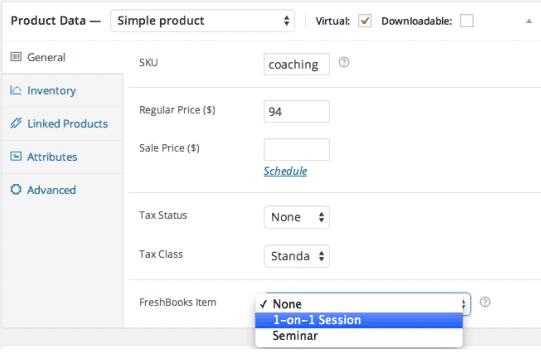
- Product and Service Mapping: Easily map your WooCommerce products and services to corresponding items in FreshBooks. This feature ensures that your revenue is categorized correctly in your accounting software, providing clear financial insights.
- Comprehensive Tax Handling: Configure WooCommerce Freshbooks to accurately transfer tax details from your WooCommerce orders to FreshBooks, ensuring compliance and simplifying tax reporting.
- Payment Gateway Integration: Supports various WooCommerce payment gateways, ensuring that payment information, including transaction fees, is correctly recorded in FreshBooks alongside your invoices.
- Refund Management: Streamline your refund process. WooCommerce Freshbooks intelligently handles refunds initiated in WooCommerce, creating corresponding credit notes or adjustments in FreshBooks to maintain accurate financial records.
- Real-time Synchronization Options: Choose between immediate synchronization for real-time updates or scheduled synchronization to process data in batches, offering flexibility based on your store’s volume and operational needs.
- Flexible Configuration Settings: Customize how WooCommerce Freshbooks operates with a range of settings, allowing you to define which order statuses trigger invoice creation, how items are mapped, and more, tailoring the integration to your specific business requirements.
Why Choose WooCommerce Freshbooks?
Choosing WooCommerce Freshbooks means investing in efficiency, accuracy, and peace of mind for your online business. The demands of managing an e-commerce store are significant, and manual accounting can quickly become a bottleneck, consuming precious hours that could be spent on growth and customer engagement. WooCommerce Freshbooks eliminates this burden by automating the critical link between your sales platform and your accounting system. Imagine the time saved when every sale, every customer, and every tax detail is automatically and accurately recorded in FreshBooks, ready for reporting, without you lifting a finger.
Beyond time savings, the precision offered by WooCommerce Freshbooks is invaluable. Manual data entry is prone to human error, which can lead to discrepancies in your financial records, complicate tax season, and even impact business decisions. By automating this process, WooCommerce Freshbooks ensures that your financial data is consistently accurate, providing a reliable foundation for understanding your business’s health. This allows you to focus on what you do best – selling great products and services – while knowing your books are always in order. WooCommerce Freshbooks empowers you with reliable financial insights, enabling smarter strategic planning and fostering sustainable growth.
Furthermore, WooCommerce Freshbooks is designed to grow with your business. Whether you’re processing a handful of orders a day or hundreds, the integration scales effortlessly, maintaining its performance and accuracy. It’s an indispensable tool for any WooCommerce store owner seeking to professionalize their financial operations, reduce administrative overhead, and gain clearer visibility into their revenue streams. Optimize your workflow, enhance accuracy, and reclaim your valuable time with the robust capabilities of WooCommerce Freshbooks.
Who Should Use WooCommerce Freshbooks?
WooCommerce Freshbooks is an essential tool for any e-commerce business, online retailer, or service provider that utilizes both WooCommerce for their online store and FreshBooks for their accounting needs. It’s particularly beneficial for small to medium-sized businesses looking to streamline their operations, reduce manual data entry, and ensure accurate financial reporting without hiring additional accounting staff. If you’re tired of manually transferring sales data or reconciling discrepancies between your sales and accounting platforms, WooCommerce Freshbooks is designed specifically for you.
How to Install WooCommerce Freshbooks
- Download the Plugin: Obtain the WooCommerce Freshbooks plugin file from our GPL store. Ensure you have the latest version for optimal compatibility and features.
- Upload to WordPress: Log in to your WordPress admin dashboard. Navigate to ‘Plugins’ > ‘Add New’ > ‘Upload Plugin’. Choose the downloaded WooCommerce Freshbooks .zip file and click ‘Install Now’.
- Activate the Plugin: Once the installation is complete, click on the ‘Activate Plugin’ link. This will enable WooCommerce Freshbooks on your WordPress site.
- Connect to FreshBooks: After activation, go to the WooCommerce Freshbooks settings page (usually found under ‘WooCommerce’ > ‘Settings’ or a dedicated menu item). You will need to connect your FreshBooks account by providing your FreshBooks API credentials, which typically involves generating an API key from your FreshBooks dashboard.
- Configure Settings: Explore the various settings offered by WooCommerce Freshbooks. Configure how invoices are generated, customer and product mapping, tax handling, and synchronization preferences to align with your business processes. Test the integration with a sample order to ensure everything is working correctly.
Frequently Asked Questions About WooCommerce Freshbooks
What is FreshBooks and why integrate it with WooCommerce?
FreshBooks is a popular cloud-based accounting software designed for small business owners and freelancers, known for its user-friendly interface for invoicing, expense tracking, time tracking, and financial reporting. Integrating FreshBooks with WooCommerce via WooCommerce Freshbooks automates the transfer of sales and customer data from your online store directly into your accounting system, eliminating manual data entry, reducing errors, and providing a real-time, accurate overview of your business finances.
Does WooCommerce Freshbooks support refunds and partial refunds?
Yes, WooCommerce Freshbooks is designed to handle refunds efficiently. When a refund or partial refund is processed within your WooCommerce store, the plugin will automatically create the corresponding credit note or adjust the invoice in FreshBooks, ensuring that your financial records accurately reflect all transactions, including returns and cancellations.
Is WooCommerce Freshbooks difficult to set up for someone without technical expertise?
Not at all! WooCommerce Freshbooks is developed with user-friendliness in mind. The installation process is straightforward, following standard WordPress plugin procedures. Connecting to your FreshBooks account typically involves a simple API key setup, and the configuration options are clearly laid out, allowing even users without deep technical expertise to set up and manage the integration effectively. Comprehensive documentation is often available to guide you through each step.
Get WooCommerce Freshbooks Today
Elevate your e-commerce accounting to a new level of efficiency and accuracy with WooCommerce Freshbooks. Stop wasting time on manual data entry and start focusing on growing your business. This essential tool will transform how you manage your finances, providing seamless integration between your sales and accounting platforms. Explore WooCommerce Freshbooks and other powerful WordPress Plugins available in our collection of premium GPL WordPress Products. Streamline your operations and ensure your financial records are always impeccable by acquiring WooCommerce Freshbooks today.
Related Products You May Like
Here's everything you need to know about your purchase:
- 100% original files — Every product is the genuine, virus-free file, exactly as released by the original developer.
- Instant download — Access your files immediately after purchase from your account.
- Lifetime access — Re-download your purchased files anytime. No expiry, no limits.
- Free updates — Newer version released? Just request an update from us, free for all customers.
- Dedicated support — Our team is available 24/7 for installation and file-related help.
- Easy refunds — Not satisfied? Review our Refund Policy. We offer a hassle-free 7-day guarantee.
$59.00 Original price was: $59.00.$2.00Current price is: $2.00.
Version
3.14.1
Last Updated
27/1/2020
License
GPL v2
Compatibility
WordPress 5.0+
Need latest version?
Newer version released? Request an update from us — free for all customers!
Request Update →🎁 Your Purchase Includes
Overview of WooCommerce Freshbooks
Seamlessly integrate your WooCommerce store with FreshBooks, the leading cloud-based accounting software, using WooCommerce Freshbooks. This powerful plugin is designed for e-commerce businesses and online service providers who seek to automate their financial workflows, ensuring every sale, refund, and customer detail from WooCommerce is accurately reflected in FreshBooks. WooCommerce Freshbooks simplifies your accounting, saving you valuable time and reducing manual data entry errors.
Key Features of WooCommerce Freshbooks
- Automated Invoice Creation: Instantly generate professional invoices in FreshBooks for every order placed in your WooCommerce store. WooCommerce Freshbooks ensures that all necessary transaction details are captured and synced without manual intervention.
- Customer Synchronization: Keep your client lists consistent across platforms. WooCommerce Freshbooks automatically syncs new and existing WooCommerce customers with your FreshBooks client database, avoiding duplicate entries and ensuring accurate contact information.
- Product and Service Mapping: Easily map your WooCommerce products and services to corresponding items in FreshBooks. This feature ensures that your revenue is categorized correctly in your accounting software, providing clear financial insights.
- Comprehensive Tax Handling: Configure WooCommerce Freshbooks to accurately transfer tax details from your WooCommerce orders to FreshBooks, ensuring compliance and simplifying tax reporting.
- Payment Gateway Integration: Supports various WooCommerce payment gateways, ensuring that payment information, including transaction fees, is correctly recorded in FreshBooks alongside your invoices.
- Refund Management: Streamline your refund process. WooCommerce Freshbooks intelligently handles refunds initiated in WooCommerce, creating corresponding credit notes or adjustments in FreshBooks to maintain accurate financial records.
- Real-time Synchronization Options: Choose between immediate synchronization for real-time updates or scheduled synchronization to process data in batches, offering flexibility based on your store’s volume and operational needs.
- Flexible Configuration Settings: Customize how WooCommerce Freshbooks operates with a range of settings, allowing you to define which order statuses trigger invoice creation, how items are mapped, and more, tailoring the integration to your specific business requirements.
Why Choose WooCommerce Freshbooks?
Choosing WooCommerce Freshbooks means investing in efficiency, accuracy, and peace of mind for your online business. The demands of managing an e-commerce store are significant, and manual accounting can quickly become a bottleneck, consuming precious hours that could be spent on growth and customer engagement. WooCommerce Freshbooks eliminates this burden by automating the critical link between your sales platform and your accounting system. Imagine the time saved when every sale, every customer, and every tax detail is automatically and accurately recorded in FreshBooks, ready for reporting, without you lifting a finger.
Beyond time savings, the precision offered by WooCommerce Freshbooks is invaluable. Manual data entry is prone to human error, which can lead to discrepancies in your financial records, complicate tax season, and even impact business decisions. By automating this process, WooCommerce Freshbooks ensures that your financial data is consistently accurate, providing a reliable foundation for understanding your business’s health. This allows you to focus on what you do best – selling great products and services – while knowing your books are always in order. WooCommerce Freshbooks empowers you with reliable financial insights, enabling smarter strategic planning and fostering sustainable growth.
Furthermore, WooCommerce Freshbooks is designed to grow with your business. Whether you’re processing a handful of orders a day or hundreds, the integration scales effortlessly, maintaining its performance and accuracy. It’s an indispensable tool for any WooCommerce store owner seeking to professionalize their financial operations, reduce administrative overhead, and gain clearer visibility into their revenue streams. Optimize your workflow, enhance accuracy, and reclaim your valuable time with the robust capabilities of WooCommerce Freshbooks.
Who Should Use WooCommerce Freshbooks?
WooCommerce Freshbooks is an essential tool for any e-commerce business, online retailer, or service provider that utilizes both WooCommerce for their online store and FreshBooks for their accounting needs. It’s particularly beneficial for small to medium-sized businesses looking to streamline their operations, reduce manual data entry, and ensure accurate financial reporting without hiring additional accounting staff. If you’re tired of manually transferring sales data or reconciling discrepancies between your sales and accounting platforms, WooCommerce Freshbooks is designed specifically for you.
How to Install WooCommerce Freshbooks
- Download the Plugin: Obtain the WooCommerce Freshbooks plugin file from our GPL store. Ensure you have the latest version for optimal compatibility and features.
- Upload to WordPress: Log in to your WordPress admin dashboard. Navigate to ‘Plugins’ > ‘Add New’ > ‘Upload Plugin’. Choose the downloaded WooCommerce Freshbooks .zip file and click ‘Install Now’.
- Activate the Plugin: Once the installation is complete, click on the ‘Activate Plugin’ link. This will enable WooCommerce Freshbooks on your WordPress site.
- Connect to FreshBooks: After activation, go to the WooCommerce Freshbooks settings page (usually found under ‘WooCommerce’ > ‘Settings’ or a dedicated menu item). You will need to connect your FreshBooks account by providing your FreshBooks API credentials, which typically involves generating an API key from your FreshBooks dashboard.
- Configure Settings: Explore the various settings offered by WooCommerce Freshbooks. Configure how invoices are generated, customer and product mapping, tax handling, and synchronization preferences to align with your business processes. Test the integration with a sample order to ensure everything is working correctly.
Frequently Asked Questions About WooCommerce Freshbooks
What is FreshBooks and why integrate it with WooCommerce?
FreshBooks is a popular cloud-based accounting software designed for small business owners and freelancers, known for its user-friendly interface for invoicing, expense tracking, time tracking, and financial reporting. Integrating FreshBooks with WooCommerce via WooCommerce Freshbooks automates the transfer of sales and customer data from your online store directly into your accounting system, eliminating manual data entry, reducing errors, and providing a real-time, accurate overview of your business finances.
Does WooCommerce Freshbooks support refunds and partial refunds?
Yes, WooCommerce Freshbooks is designed to handle refunds efficiently. When a refund or partial refund is processed within your WooCommerce store, the plugin will automatically create the corresponding credit note or adjust the invoice in FreshBooks, ensuring that your financial records accurately reflect all transactions, including returns and cancellations.
Is WooCommerce Freshbooks difficult to set up for someone without technical expertise?
Not at all! WooCommerce Freshbooks is developed with user-friendliness in mind. The installation process is straightforward, following standard WordPress plugin procedures. Connecting to your FreshBooks account typically involves a simple API key setup, and the configuration options are clearly laid out, allowing even users without deep technical expertise to set up and manage the integration effectively. Comprehensive documentation is often available to guide you through each step.
Get WooCommerce Freshbooks Today
Elevate your e-commerce accounting to a new level of efficiency and accuracy with WooCommerce Freshbooks. Stop wasting time on manual data entry and start focusing on growing your business. This essential tool will transform how you manage your finances, providing seamless integration between your sales and accounting platforms. Explore WooCommerce Freshbooks and other powerful WordPress Plugins available in our collection of premium GPL WordPress Products. Streamline your operations and ensure your financial records are always impeccable by acquiring WooCommerce Freshbooks today.
Related Products You May Like
Reviews
There are no reviews yet.
Here's everything you need to know about your purchase:
- 100% original files — Every product is the genuine, virus-free file, exactly as released by the original developer.
- Instant download — Access your files immediately after purchase from your account.
- Lifetime access — Re-download your purchased files anytime. No expiry, no limits.
- Free updates — Newer version released? Just request an update from us, free for all customers.
- Dedicated support — Our team is available 24/7 for installation and file-related help.
- Easy refunds — Not satisfied? Review our Refund Policy. We offer a hassle-free 7-day guarantee.
Reviews
There are no reviews yet.