

WP Table Builder Pro 1.3.16
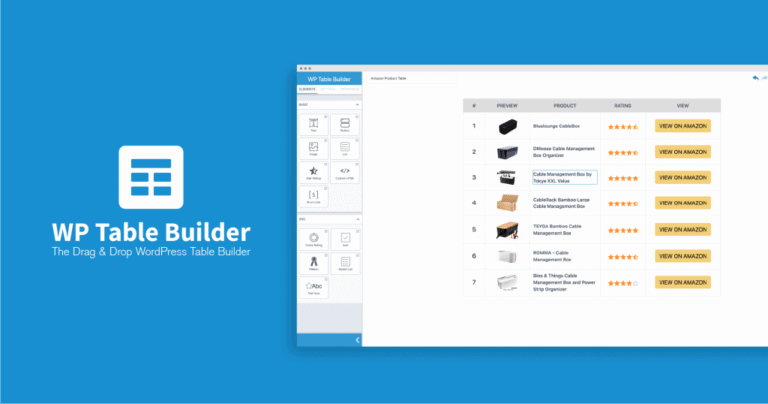
Overview of WP Table Builder Pro
Transform the way you display data on your WordPress website with WP Table Builder Pro. This powerful, drag-and-drop table builder plugin is designed to help users of all skill levels create responsive, feature-rich tables with unparalleled ease. Whether you need to showcase product comparisons, pricing plans, data lists, or any other structured information, WP Table Builder Pro provides an intuitive interface and robust functionalities to make your content shine.
Key Features of WP Table Builder Pro
- Drag & Drop Interface: Effortlessly design your tables using a visual, real-time editor. Simply drag elements into cells and arrange them as you see fit, making table creation a breeze with WP Table Builder Pro.
- Responsive Design: Ensure your tables look perfect on any device, from desktops to smartphones. WP Table Builder Pro automatically optimizes tables for various screen sizes, providing an excellent user experience for all visitors.
- Cell Merging & Splitting: Gain complete control over your table layout by merging multiple cells horizontally or vertically, or splitting them to create complex and organized data structures.
- Advanced Elements: Populate your tables with a diverse range of elements including text, images, buttons, star ratings, lists, shortcodes, and even custom HTML, all integrated seamlessly into WP Table Builder Pro.
- Pre-built Templates: Kickstart your table creation with a selection of professionally designed templates. These ready-to-use layouts save you time and provide inspiration for your own unique designs using WP Table Builder Pro.
- Customization Options: Style every aspect of your tables, from cell padding and borders to typography and background colors. WP Table Builder Pro offers extensive customization to match your website’s branding perfectly.
- Import/Export Functionality: Easily import tables from CSV or XML files, and export your creations for backup or use on other sites. This feature enhances workflow efficiency for users of WP Table Builder Pro.
- Shortcode Integration: Embed your beautifully crafted tables anywhere on your WordPress site – posts, pages, or even widget areas – using simple shortcodes generated by WP Table Builder Pro.
Why Choose WP Table Builder Pro?
Choosing WP Table Builder Pro means opting for efficiency, flexibility, and professional presentation. In today’s content-driven world, presenting data clearly and engagingly is paramount. Clunky, hard-to-read tables can deter visitors and diminish your site’s credibility. WP Table Builder Pro eliminates these frustrations, offering a solution that is both powerful for developers and incredibly user-friendly for beginners. Its intuitive drag-and-drop interface significantly cuts down the time and effort traditionally associated with table creation, allowing you to focus more on your content and less on complex coding.
Beyond its ease of use, WP Table Builder Pro stands out for its robust feature set designed to meet a wide array of needs. Whether you’re building intricate pricing tables that convert, detailed product comparison charts that inform, or simple data lists that organize, this plugin provides all the tools necessary to achieve a polished, professional look. The responsiveness built into WP Table Builder Pro ensures that your visitors will have an optimal viewing experience, regardless of their device, which is crucial for maintaining engagement and SEO performance. By integrating seamlessly with WordPress, WP Table Builder Pro becomes an indispensable tool in your website building arsenal, enhancing your site’s functionality and aesthetic appeal.
Moreover, opting for WP Table Builder Pro from GPLUniverse.com provides you with peace of mind. You gain access to a premium plugin under the GPL license, allowing you to use it on unlimited websites. This value proposition, combined with the plugin’s exceptional capabilities, makes WP Table Builder Pro an intelligent investment for anyone looking to elevate their data presentation within WordPress.
Who Should Use WP Table Builder Pro?
WP Table Builder Pro is ideal for a diverse range of WordPress users, including:
- Bloggers and Content Creators: To present data, statistics, or comparison charts in an engaging and easy-to-digest format.
- eCommerce Store Owners: For creating compelling product comparison tables, pricing charts, or specification lists that help customers make informed decisions.
- Affiliate Marketers: To build high-converting review tables and comparison grids for affiliate products.
- Business Websites: To showcase service packages, team member lists, or financial data in a professional layout.
- Web Developers and Designers: To quickly implement complex table designs for clients without writing extensive custom code.
- Anyone Needing Data Presentation: If you frequently need to display structured information on your website, WP Table Builder Pro is your go-to solution.
How to Install WP Table Builder Pro
- Download the Plugin: After purchasing WP Table Builder Pro from GPLUniverse.com, download the plugin zip file to your computer.
- Access WordPress Dashboard: Log in to your WordPress admin area.
- Upload Plugin: Navigate to ‘Plugins’ > ‘Add New’. Click the ‘Upload Plugin’ button at the top of the page.
- Choose File and Install: Click ‘Choose File’, select the WP Table Builder Pro zip file you downloaded, and then click ‘Install Now’.
- Activate Plugin: Once the installation is complete, click ‘Activate Plugin’. You will now find WP Table Builder Pro available in your WordPress dashboard, ready for use.
Frequently Asked Questions About WP Table Builder Pro
Is WP Table Builder Pro compatible with all WordPress themes?
Yes, WP Table Builder Pro is designed to be highly compatible with most standard-compliant WordPress themes. It uses its own styling system, which integrates well without conflicting with your theme’s default styles. Any minor adjustments can typically be made using the plugin’s extensive customization options or custom CSS.
Can I import existing data into WP Table Builder Pro?
Absolutely! WP Table Builder Pro supports importing data from CSV and XML files, making it easy to migrate your existing spreadsheets or database exports directly into your WordPress tables. This saves significant time and effort when dealing with large datasets.
Will I receive updates for WP Table Builder Pro?
When you acquire WP Table Builder Pro from GPLUniverse.com, you receive the exact same plugin files as the developer, licensed under the GNU General Public License (GPL). We regularly update our products to ensure you have access to the latest versions. While direct developer support is not included, you always get the most current and secure version of WP Table Builder Pro.
Get WP Table Builder Pro Today
Don’t let complicated table creation hold back your website’s potential. Unlock a world of elegant data presentation with WP Table Builder Pro. Enhance user engagement, improve readability, and save countless hours of development time. Browse our extensive range of WordPress Plugins and discover why thousands trust GPLUniverse.com for their digital needs. Elevate your site with the best GPL WordPress Products available and start building stunning tables with WP Table Builder Pro today!
Related Products You May Like
Here's everything you need to know about your purchase:
- 100% original files — Every product is the genuine, virus-free file, exactly as released by the original developer.
- Instant download — Access your files immediately after purchase from your account.
- Lifetime access — Re-download your purchased files anytime. No expiry, no limits.
- Free updates — Newer version released? Just request an update from us, free for all customers.
- Dedicated support — Our team is available 24/7 for installation and file-related help.
- Easy refunds — Not satisfied? Review our Refund Policy. We offer a hassle-free 7-day guarantee.
$100.00 Original price was: $100.00.$2.00Current price is: $2.00.
Version
1.3.16
Last Updated
02/03/2026
License
GPL v2
Compatibility
WordPress 5.0+
Need latest version?
Newer version released? Request an update from us — free for all customers!
Request Update →🎁 Your Purchase Includes
Overview of WP Table Builder Pro
Transform the way you display data on your WordPress website with WP Table Builder Pro. This powerful, drag-and-drop table builder plugin is designed to help users of all skill levels create responsive, feature-rich tables with unparalleled ease. Whether you need to showcase product comparisons, pricing plans, data lists, or any other structured information, WP Table Builder Pro provides an intuitive interface and robust functionalities to make your content shine.
Key Features of WP Table Builder Pro
- Drag & Drop Interface: Effortlessly design your tables using a visual, real-time editor. Simply drag elements into cells and arrange them as you see fit, making table creation a breeze with WP Table Builder Pro.
- Responsive Design: Ensure your tables look perfect on any device, from desktops to smartphones. WP Table Builder Pro automatically optimizes tables for various screen sizes, providing an excellent user experience for all visitors.
- Cell Merging & Splitting: Gain complete control over your table layout by merging multiple cells horizontally or vertically, or splitting them to create complex and organized data structures.
- Advanced Elements: Populate your tables with a diverse range of elements including text, images, buttons, star ratings, lists, shortcodes, and even custom HTML, all integrated seamlessly into WP Table Builder Pro.
- Pre-built Templates: Kickstart your table creation with a selection of professionally designed templates. These ready-to-use layouts save you time and provide inspiration for your own unique designs using WP Table Builder Pro.
- Customization Options: Style every aspect of your tables, from cell padding and borders to typography and background colors. WP Table Builder Pro offers extensive customization to match your website’s branding perfectly.
- Import/Export Functionality: Easily import tables from CSV or XML files, and export your creations for backup or use on other sites. This feature enhances workflow efficiency for users of WP Table Builder Pro.
- Shortcode Integration: Embed your beautifully crafted tables anywhere on your WordPress site – posts, pages, or even widget areas – using simple shortcodes generated by WP Table Builder Pro.
Why Choose WP Table Builder Pro?
Choosing WP Table Builder Pro means opting for efficiency, flexibility, and professional presentation. In today’s content-driven world, presenting data clearly and engagingly is paramount. Clunky, hard-to-read tables can deter visitors and diminish your site’s credibility. WP Table Builder Pro eliminates these frustrations, offering a solution that is both powerful for developers and incredibly user-friendly for beginners. Its intuitive drag-and-drop interface significantly cuts down the time and effort traditionally associated with table creation, allowing you to focus more on your content and less on complex coding.
Beyond its ease of use, WP Table Builder Pro stands out for its robust feature set designed to meet a wide array of needs. Whether you’re building intricate pricing tables that convert, detailed product comparison charts that inform, or simple data lists that organize, this plugin provides all the tools necessary to achieve a polished, professional look. The responsiveness built into WP Table Builder Pro ensures that your visitors will have an optimal viewing experience, regardless of their device, which is crucial for maintaining engagement and SEO performance. By integrating seamlessly with WordPress, WP Table Builder Pro becomes an indispensable tool in your website building arsenal, enhancing your site’s functionality and aesthetic appeal.
Moreover, opting for WP Table Builder Pro from GPLUniverse.com provides you with peace of mind. You gain access to a premium plugin under the GPL license, allowing you to use it on unlimited websites. This value proposition, combined with the plugin’s exceptional capabilities, makes WP Table Builder Pro an intelligent investment for anyone looking to elevate their data presentation within WordPress.
Who Should Use WP Table Builder Pro?
WP Table Builder Pro is ideal for a diverse range of WordPress users, including:
- Bloggers and Content Creators: To present data, statistics, or comparison charts in an engaging and easy-to-digest format.
- eCommerce Store Owners: For creating compelling product comparison tables, pricing charts, or specification lists that help customers make informed decisions.
- Affiliate Marketers: To build high-converting review tables and comparison grids for affiliate products.
- Business Websites: To showcase service packages, team member lists, or financial data in a professional layout.
- Web Developers and Designers: To quickly implement complex table designs for clients without writing extensive custom code.
- Anyone Needing Data Presentation: If you frequently need to display structured information on your website, WP Table Builder Pro is your go-to solution.
How to Install WP Table Builder Pro
- Download the Plugin: After purchasing WP Table Builder Pro from GPLUniverse.com, download the plugin zip file to your computer.
- Access WordPress Dashboard: Log in to your WordPress admin area.
- Upload Plugin: Navigate to ‘Plugins’ > ‘Add New’. Click the ‘Upload Plugin’ button at the top of the page.
- Choose File and Install: Click ‘Choose File’, select the WP Table Builder Pro zip file you downloaded, and then click ‘Install Now’.
- Activate Plugin: Once the installation is complete, click ‘Activate Plugin’. You will now find WP Table Builder Pro available in your WordPress dashboard, ready for use.
Frequently Asked Questions About WP Table Builder Pro
Is WP Table Builder Pro compatible with all WordPress themes?
Yes, WP Table Builder Pro is designed to be highly compatible with most standard-compliant WordPress themes. It uses its own styling system, which integrates well without conflicting with your theme’s default styles. Any minor adjustments can typically be made using the plugin’s extensive customization options or custom CSS.
Can I import existing data into WP Table Builder Pro?
Absolutely! WP Table Builder Pro supports importing data from CSV and XML files, making it easy to migrate your existing spreadsheets or database exports directly into your WordPress tables. This saves significant time and effort when dealing with large datasets.
Will I receive updates for WP Table Builder Pro?
When you acquire WP Table Builder Pro from GPLUniverse.com, you receive the exact same plugin files as the developer, licensed under the GNU General Public License (GPL). We regularly update our products to ensure you have access to the latest versions. While direct developer support is not included, you always get the most current and secure version of WP Table Builder Pro.
Get WP Table Builder Pro Today
Don’t let complicated table creation hold back your website’s potential. Unlock a world of elegant data presentation with WP Table Builder Pro. Enhance user engagement, improve readability, and save countless hours of development time. Browse our extensive range of WordPress Plugins and discover why thousands trust GPLUniverse.com for their digital needs. Elevate your site with the best GPL WordPress Products available and start building stunning tables with WP Table Builder Pro today!
Related Products You May Like
Reviews
There are no reviews yet.
Here's everything you need to know about your purchase:
- 100% original files — Every product is the genuine, virus-free file, exactly as released by the original developer.
- Instant download — Access your files immediately after purchase from your account.
- Lifetime access — Re-download your purchased files anytime. No expiry, no limits.
- Free updates — Newer version released? Just request an update from us, free for all customers.
- Dedicated support — Our team is available 24/7 for installation and file-related help.
- Easy refunds — Not satisfied? Review our Refund Policy. We offer a hassle-free 7-day guarantee.
Reviews
There are no reviews yet.