

WP Sheet Editor Custom Tables Pro 1.2.25
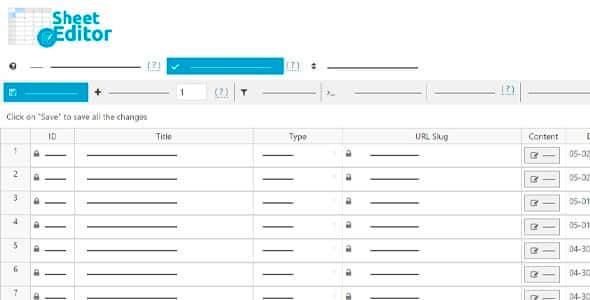
Overview of WP Sheet Editor Custom Tables Pro
WP Sheet Editor Custom Tables Pro is an indispensable WordPress plugin designed to empower site administrators, developers, and agencies to effortlessly create, manage, and edit custom database tables directly within the WordPress dashboard. This powerful tool transforms complex data management into a familiar spreadsheet-like experience, enabling you to build robust custom data structures without writing a single line of code. Whether you need to store product catalogs, user-generated content, event listings, or any other structured data, WP Sheet Editor Custom Tables Pro provides the flexibility and efficiency you need to keep your WordPress site organized and high-performing.
Key Features of WP Sheet Editor Custom Tables Pro
- Effortless Custom Table Creation: Define new database tables and their columns with an intuitive interface. WP Sheet Editor Custom Tables Pro allows you to specify column names, data types (text, numbers, dates, etc.), and other properties, making custom data storage straightforward and accessible for any project.
- Spreadsheet-Like Data Management: Edit, add, and delete rows of data within your custom tables using a powerful, familiar spreadsheet interface. This feature significantly streamlines bulk editing tasks, allowing you to update thousands of entries in minutes with filtering, searching, and bulk modification tools.
- Advanced Filtering and Searching: Quickly locate specific data entries within your custom tables using comprehensive search and filter options. Filter by any column, combine multiple criteria, and save your searches for future use, ensuring you always find exactly what you need with WP Sheet Editor Custom Tables Pro.
- Frontend Display Integration: Seamlessly display data from your custom tables on the frontend of your website using shortcodes or hooks. This allows you to present dynamic content, directories, or listings to your visitors, fully leveraging the structured data you’ve created.
- Data Export and Import Capabilities: Easily export your custom table data to CSV files for external analysis or backup, and import data from CSV files to populate or update your tables. This ensures smooth data migration and integration with other systems.
- User Role and Permissions Control: Define who can access and edit your custom tables by assigning specific user role permissions. This granular control helps maintain data integrity and security, ensuring that only authorized personnel can manage sensitive information.
- Extensible with Hooks and Filters: For developers requiring deeper customization, WP Sheet Editor Custom Tables Pro offers a robust set of hooks and filters. Extend its functionality, integrate with other plugins, or automate specific tasks to perfectly fit your unique development workflow.
- No-Code Solution for Complex Data: Eliminate the need for custom database development or complex SQL queries. WP Sheet Editor Custom Tables Pro provides a complete no-code environment for building and managing custom data, making advanced WordPress development accessible to a broader audience.
Why Choose WP Sheet Editor Custom Tables Pro?
Choosing WP Sheet Editor Custom Tables Pro means opting for unparalleled efficiency and control over your WordPress site’s data. In today’s dynamic web environment, managing custom data effectively is crucial for many businesses and projects. This plugin simplifies what would otherwise be a complex, time-consuming, and error-prone process involving database queries and custom code. With its intuitive spreadsheet interface, you can perform bulk edits, conduct sophisticated searches, and manage thousands of data entries with remarkable speed and accuracy. This translates directly into significant time savings and reduced development costs, allowing you to focus on content creation and site growth rather than tedious data management.
Furthermore, WP Sheet Editor Custom Tables Pro enhances your site’s performance and scalability. By storing custom data in dedicated tables, you avoid bloating the core WordPress posts and post_meta tables, which can slow down your website over time. This separation ensures that your database remains optimized, leading to faster page loads and a smoother user experience. It’s a robust solution for anyone looking to build custom directories, product catalogs, CRMs, or any other data-intensive application within WordPress, all while maintaining peak performance. The ability to manage data without coding barriers empowers a wider range of users, from site owners to advanced developers, to achieve their goals more effectively.
Investing in WP Sheet Editor Custom Tables Pro from our store means you’re getting a powerful tool that streamlines your workflow, improves site performance, and provides a flexible framework for managing any type of custom data. It’s an essential addition for anyone serious about optimizing their WordPress site’s data architecture and operational efficiency. Elevate your data management capabilities and unlock new possibilities for your WordPress projects today.
Who Should Use WP Sheet Editor Custom Tables Pro?
WP Sheet Editor Custom Tables Pro is ideal for a wide range of WordPress users, including:
- WordPress Developers and Agencies: For building custom applications, directories, or CRM systems where efficient custom data storage and management are critical.
- E-commerce Store Owners: To manage complex product attributes, additional product information, or custom catalogs that go beyond standard WooCommerce fields.
- Content Creators and Publishers: For organizing large datasets like event listings, movie databases, book catalogs, or any custom content requiring structured storage.
- Businesses with Custom Data Needs: Any organization that needs to store and manage specific types of data not easily handled by standard WordPress post types, such as employee directories, client databases, or project management data.
- Site Administrators: Who want to maintain a clean, optimized database and streamline data entry and editing processes without relying on custom code.
How to Install WP Sheet Editor Custom Tables Pro
Installing WP Sheet Editor Custom Tables Pro is a straightforward process, similar to installing any other WordPress plugin. Follow these steps to get started:
- Download the Plugin: After purchasing, download the WP Sheet Editor Custom Tables Pro plugin file (a .zip archive) from your account on our website.
- Log In to Your WordPress Dashboard: Access your WordPress admin area using your credentials.
- Navigate to Plugins: In the WordPress dashboard, go to “Plugins” > “Add New.”
- Upload the Plugin: Click on the “Upload Plugin” button at the top of the page. Then, click “Choose File,” select the downloaded .zip file for WP Sheet Editor Custom Tables Pro from your computer, and click “Install Now.”
- Activate the Plugin: Once the installation is complete, WordPress will prompt you to activate the plugin. Click on the “Activate Plugin” link. You will then find WP Sheet Editor Custom Tables Pro available in your WordPress admin menu, ready for configuration and use.
Frequently Asked Questions About WP Sheet Editor Custom Tables Pro
What are the primary benefits of using custom tables over custom post types for data storage?
While custom post types are excellent for content, custom tables, managed efficiently by WP Sheet Editor Custom Tables Pro, offer superior performance and scalability for large, non-post-related datasets. They keep your core WordPress tables lean, leading to faster queries and better overall site performance, especially crucial for sites with extensive structured data like directories or catalogs. Custom tables also allow for more precise control over data structure and indexing.
Does WP Sheet Editor Custom Tables Pro require any coding knowledge to use?
No, WP Sheet Editor Custom Tables Pro is designed to be user-friendly and requires absolutely no coding knowledge for its core functionalities. You can create tables, define columns, and manage data all through its intuitive graphical interface. However, for advanced users and developers, it does offer hooks and filters for deeper customization and integration with custom code if desired.
Can I migrate existing data into custom tables created with WP Sheet Editor Custom Tables Pro?
Yes, you can! WP Sheet Editor Custom Tables Pro includes robust import functionalities that allow you to bring in existing data from CSV files. This makes it incredibly easy to migrate data from spreadsheets, other database systems, or even existing custom post types (after exporting them to CSV) into your newly created custom tables, ensuring a smooth transition without manual data entry.
Get WP Sheet Editor Custom Tables Pro Today
Ready to revolutionize your WordPress data management? WP Sheet Editor Custom Tables Pro is the ultimate solution for creating, editing, and organizing custom database tables with unparalleled ease and efficiency. Stop struggling with complex data structures and embrace a powerful, spreadsheet-like interface that saves you time and enhances your site’s performance. Explore our collection of WordPress Plugins and discover the full potential of your website. Invest in WP Sheet Editor Custom Tables Pro today and elevate your data management strategy. Browse all our premium GPL WordPress Products and unlock a world of possibilities for your online presence.
Related Products You May Like
Here's everything you need to know about your purchase:
- 100% original files — Every product is the genuine, virus-free file, exactly as released by the original developer.
- Instant download — Access your files immediately after purchase from your account.
- Lifetime access — Re-download your purchased files anytime. No expiry, no limits.
- Free updates — Newer version released? Just request an update from us, free for all customers.
- Dedicated support — Our team is available 24/7 for installation and file-related help.
- Easy refunds — Not satisfied? Review our Refund Policy. We offer a hassle-free 7-day guarantee.
$100.00 Original price was: $100.00.$2.00Current price is: $2.00.
Version
1.2.25
Last Updated
15/03/2026
License
GPL v2
Compatibility
WordPress 5.0+
Need latest version?
Newer version released? Request an update from us — free for all customers!
Request Update →🎁 Your Purchase Includes
Overview of WP Sheet Editor Custom Tables Pro
WP Sheet Editor Custom Tables Pro is an indispensable WordPress plugin designed to empower site administrators, developers, and agencies to effortlessly create, manage, and edit custom database tables directly within the WordPress dashboard. This powerful tool transforms complex data management into a familiar spreadsheet-like experience, enabling you to build robust custom data structures without writing a single line of code. Whether you need to store product catalogs, user-generated content, event listings, or any other structured data, WP Sheet Editor Custom Tables Pro provides the flexibility and efficiency you need to keep your WordPress site organized and high-performing.
Key Features of WP Sheet Editor Custom Tables Pro
- Effortless Custom Table Creation: Define new database tables and their columns with an intuitive interface. WP Sheet Editor Custom Tables Pro allows you to specify column names, data types (text, numbers, dates, etc.), and other properties, making custom data storage straightforward and accessible for any project.
- Spreadsheet-Like Data Management: Edit, add, and delete rows of data within your custom tables using a powerful, familiar spreadsheet interface. This feature significantly streamlines bulk editing tasks, allowing you to update thousands of entries in minutes with filtering, searching, and bulk modification tools.
- Advanced Filtering and Searching: Quickly locate specific data entries within your custom tables using comprehensive search and filter options. Filter by any column, combine multiple criteria, and save your searches for future use, ensuring you always find exactly what you need with WP Sheet Editor Custom Tables Pro.
- Frontend Display Integration: Seamlessly display data from your custom tables on the frontend of your website using shortcodes or hooks. This allows you to present dynamic content, directories, or listings to your visitors, fully leveraging the structured data you’ve created.
- Data Export and Import Capabilities: Easily export your custom table data to CSV files for external analysis or backup, and import data from CSV files to populate or update your tables. This ensures smooth data migration and integration with other systems.
- User Role and Permissions Control: Define who can access and edit your custom tables by assigning specific user role permissions. This granular control helps maintain data integrity and security, ensuring that only authorized personnel can manage sensitive information.
- Extensible with Hooks and Filters: For developers requiring deeper customization, WP Sheet Editor Custom Tables Pro offers a robust set of hooks and filters. Extend its functionality, integrate with other plugins, or automate specific tasks to perfectly fit your unique development workflow.
- No-Code Solution for Complex Data: Eliminate the need for custom database development or complex SQL queries. WP Sheet Editor Custom Tables Pro provides a complete no-code environment for building and managing custom data, making advanced WordPress development accessible to a broader audience.
Why Choose WP Sheet Editor Custom Tables Pro?
Choosing WP Sheet Editor Custom Tables Pro means opting for unparalleled efficiency and control over your WordPress site’s data. In today’s dynamic web environment, managing custom data effectively is crucial for many businesses and projects. This plugin simplifies what would otherwise be a complex, time-consuming, and error-prone process involving database queries and custom code. With its intuitive spreadsheet interface, you can perform bulk edits, conduct sophisticated searches, and manage thousands of data entries with remarkable speed and accuracy. This translates directly into significant time savings and reduced development costs, allowing you to focus on content creation and site growth rather than tedious data management.
Furthermore, WP Sheet Editor Custom Tables Pro enhances your site’s performance and scalability. By storing custom data in dedicated tables, you avoid bloating the core WordPress posts and post_meta tables, which can slow down your website over time. This separation ensures that your database remains optimized, leading to faster page loads and a smoother user experience. It’s a robust solution for anyone looking to build custom directories, product catalogs, CRMs, or any other data-intensive application within WordPress, all while maintaining peak performance. The ability to manage data without coding barriers empowers a wider range of users, from site owners to advanced developers, to achieve their goals more effectively.
Investing in WP Sheet Editor Custom Tables Pro from our store means you’re getting a powerful tool that streamlines your workflow, improves site performance, and provides a flexible framework for managing any type of custom data. It’s an essential addition for anyone serious about optimizing their WordPress site’s data architecture and operational efficiency. Elevate your data management capabilities and unlock new possibilities for your WordPress projects today.
Who Should Use WP Sheet Editor Custom Tables Pro?
WP Sheet Editor Custom Tables Pro is ideal for a wide range of WordPress users, including:
- WordPress Developers and Agencies: For building custom applications, directories, or CRM systems where efficient custom data storage and management are critical.
- E-commerce Store Owners: To manage complex product attributes, additional product information, or custom catalogs that go beyond standard WooCommerce fields.
- Content Creators and Publishers: For organizing large datasets like event listings, movie databases, book catalogs, or any custom content requiring structured storage.
- Businesses with Custom Data Needs: Any organization that needs to store and manage specific types of data not easily handled by standard WordPress post types, such as employee directories, client databases, or project management data.
- Site Administrators: Who want to maintain a clean, optimized database and streamline data entry and editing processes without relying on custom code.
How to Install WP Sheet Editor Custom Tables Pro
Installing WP Sheet Editor Custom Tables Pro is a straightforward process, similar to installing any other WordPress plugin. Follow these steps to get started:
- Download the Plugin: After purchasing, download the WP Sheet Editor Custom Tables Pro plugin file (a .zip archive) from your account on our website.
- Log In to Your WordPress Dashboard: Access your WordPress admin area using your credentials.
- Navigate to Plugins: In the WordPress dashboard, go to “Plugins” > “Add New.”
- Upload the Plugin: Click on the “Upload Plugin” button at the top of the page. Then, click “Choose File,” select the downloaded .zip file for WP Sheet Editor Custom Tables Pro from your computer, and click “Install Now.”
- Activate the Plugin: Once the installation is complete, WordPress will prompt you to activate the plugin. Click on the “Activate Plugin” link. You will then find WP Sheet Editor Custom Tables Pro available in your WordPress admin menu, ready for configuration and use.
Frequently Asked Questions About WP Sheet Editor Custom Tables Pro
What are the primary benefits of using custom tables over custom post types for data storage?
While custom post types are excellent for content, custom tables, managed efficiently by WP Sheet Editor Custom Tables Pro, offer superior performance and scalability for large, non-post-related datasets. They keep your core WordPress tables lean, leading to faster queries and better overall site performance, especially crucial for sites with extensive structured data like directories or catalogs. Custom tables also allow for more precise control over data structure and indexing.
Does WP Sheet Editor Custom Tables Pro require any coding knowledge to use?
No, WP Sheet Editor Custom Tables Pro is designed to be user-friendly and requires absolutely no coding knowledge for its core functionalities. You can create tables, define columns, and manage data all through its intuitive graphical interface. However, for advanced users and developers, it does offer hooks and filters for deeper customization and integration with custom code if desired.
Can I migrate existing data into custom tables created with WP Sheet Editor Custom Tables Pro?
Yes, you can! WP Sheet Editor Custom Tables Pro includes robust import functionalities that allow you to bring in existing data from CSV files. This makes it incredibly easy to migrate data from spreadsheets, other database systems, or even existing custom post types (after exporting them to CSV) into your newly created custom tables, ensuring a smooth transition without manual data entry.
Get WP Sheet Editor Custom Tables Pro Today
Ready to revolutionize your WordPress data management? WP Sheet Editor Custom Tables Pro is the ultimate solution for creating, editing, and organizing custom database tables with unparalleled ease and efficiency. Stop struggling with complex data structures and embrace a powerful, spreadsheet-like interface that saves you time and enhances your site’s performance. Explore our collection of WordPress Plugins and discover the full potential of your website. Invest in WP Sheet Editor Custom Tables Pro today and elevate your data management strategy. Browse all our premium GPL WordPress Products and unlock a world of possibilities for your online presence.
Related Products You May Like
Reviews
There are no reviews yet.
Here's everything you need to know about your purchase:
- 100% original files — Every product is the genuine, virus-free file, exactly as released by the original developer.
- Instant download — Access your files immediately after purchase from your account.
- Lifetime access — Re-download your purchased files anytime. No expiry, no limits.
- Free updates — Newer version released? Just request an update from us, free for all customers.
- Dedicated support — Our team is available 24/7 for installation and file-related help.
- Easy refunds — Not satisfied? Review our Refund Policy. We offer a hassle-free 7-day guarantee.
Reviews
There are no reviews yet.