

WordPress WhatsApp Support 2.5.3
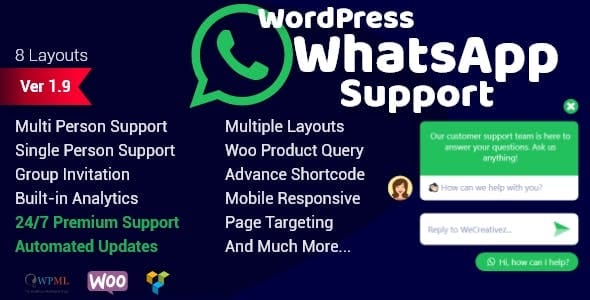
Overview of WordPress WhatsApp Support
Elevate your customer service and engagement with **WordPress WhatsApp Support**, the essential plugin for integrating direct WhatsApp communication into your WordPress website. This powerful tool is designed for businesses, e-commerce stores, and service providers who want to offer real-time, personal support to their visitors and customers directly through the world’s most popular messaging app. **WordPress WhatsApp Support** streamlines customer interactions, making it easier than ever for your audience to connect with you instantly.
Key Features of WordPress WhatsApp Support
- Direct WhatsApp Chat: Provide your website visitors with an immediate and familiar way to reach out, fostering trust and improving response times with direct access to your support team via WhatsApp.
- Multiple Support Agents: Configure multiple WhatsApp numbers for different departments or support agents, allowing customers to choose who they want to connect with for more efficient and targeted assistance using **WordPress WhatsApp Support**.
- Customizable Pre-filled Messages: Set up pre-filled messages for your customers, guiding their initial queries and ensuring you receive all necessary information from the start, enhancing the effectiveness of your **WordPress WhatsApp Support**.
- Display Conditions: Control where and when the WhatsApp support button appears on your site. Show it on specific pages, posts, or categories, ensuring relevance and optimal user experience for your **WordPress WhatsApp Support** integration.
- Customizable Button & Icon: Personalize the appearance of your WhatsApp support button to match your brand’s aesthetic. Choose colors, icons, and positions to seamlessly integrate it into your website design.
- Working Hours & Availability: Define your support team’s working hours, ensuring customers only see the option to chat when someone is available. This prevents frustration and sets clear expectations for your **WordPress WhatsApp Support**.
- Mobile-Responsive Design: The **WordPress WhatsApp Support** button and chat interface are fully responsive, providing a consistent and excellent user experience across all devices, from desktops to smartphones.
- Easy-to-Use Admin Interface: Manage all settings, agents, and display options through an intuitive and user-friendly WordPress admin panel, making the setup and configuration of **WordPress WhatsApp Support** straightforward.
Why Choose WordPress WhatsApp Support?
In today’s fast-paced digital world, instant communication is paramount for customer satisfaction and business growth. Choosing **WordPress WhatsApp Support** empowers your website to meet these demands by offering a direct, personal, and universally accessible communication channel. This plugin doesn’t just add a button; it transforms your customer service strategy, making it more proactive and responsive. By integrating WhatsApp, you leverage an app that billions of people already use daily, reducing friction and making it incredibly easy for your customers to get the help they need, when they need it.
The benefits extend beyond just convenience. **WordPress WhatsApp Support** helps build stronger customer relationships by providing a more intimate and less formal support experience than traditional methods like email or contact forms. This personal touch can significantly boost customer loyalty and trust. Furthermore, by streamlining communication, your support team can handle queries more efficiently, leading to faster resolutions and a better overall brand perception. The ability to customize agents, messages, and display conditions means you have full control over how you present your support, ensuring it aligns perfectly with your brand and operational needs.
Investing in **WordPress WhatsApp Support** is investing in superior customer engagement. It’s a strategic move for any WordPress site looking to enhance its digital presence, improve conversion rates through immediate assistance, and stand out in a competitive market. With its robust features and user-friendly interface, it’s the ideal solution for anyone serious about providing top-tier customer service and fostering direct, meaningful connections with their audience.
Who Should Use WordPress WhatsApp Support?
**WordPress WhatsApp Support** is ideal for virtually any WordPress website that interacts with customers or clients. This includes e-commerce stores looking to provide instant sales support and order queries, service-based businesses offering quick consultations or booking assistance, blogs and informational sites seeking to engage their readers, and even educational platforms for student support. Any business or individual aiming to enhance their customer service, generate leads through direct communication, or simply offer a modern and convenient way for visitors to connect will find immense value in **WordPress WhatsApp Support**.
How to Install WordPress WhatsApp Support
- Download the Plugin: After acquiring **WordPress WhatsApp Support**, download the plugin file (usually a .zip file) to your computer from your GPLUniverse account.
- Upload via WordPress Dashboard: Log in to your WordPress admin panel. Navigate to ‘Plugins’ > ‘Add New’. Click the ‘Upload Plugin’ button at the top of the page.
- Choose and Install: Click ‘Choose File’, select the downloaded **WordPress WhatsApp Support** .zip file from your computer, and then click ‘Install Now’.
- Activate the Plugin: Once the installation is complete, WordPress will prompt you to activate the plugin. Click ‘Activate Plugin’ to enable **WordPress WhatsApp Support** on your website.
- Configure Settings: After activation, you’ll typically find a new menu item in your WordPress dashboard (e.g., ‘WhatsApp Support’ or similar). Click on it to access the plugin settings and configure your WhatsApp numbers, agents, display options, and other preferences for **WordPress WhatsApp Support**.
Frequently Asked Questions About WordPress WhatsApp Support
Can I use multiple WhatsApp numbers with WordPress WhatsApp Support?
Yes, **WordPress WhatsApp Support** is designed to allow you to add multiple WhatsApp numbers. This feature is perfect for businesses with different departments (e.g., sales, support, billing) or multiple support agents, enabling customers to choose the most relevant contact.
Is WordPress WhatsApp Support mobile-friendly?
Absolutely. **WordPress WhatsApp Support** is built with responsiveness in mind. The chat button and interface will adapt seamlessly to any screen size, ensuring a consistent and user-friendly experience whether your visitors are on a desktop, tablet, or smartphone.
Can I customize the appearance of the WhatsApp chat button?
Yes, **WordPress WhatsApp Support** offers extensive customization options. You can easily change the button’s color, icon, text, and position to perfectly match your website’s design and branding directly from the plugin’s settings panel.
Get WordPress WhatsApp Support Today
Don’t let potential customers slip away due to slow or inconvenient communication channels. Revolutionize your customer engagement and provide an unparalleled support experience by integrating **WordPress WhatsApp Support** into your website. This essential plugin empowers your business to connect instantly and personally with your audience, boosting satisfaction and fostering loyalty. Explore our wide range of WordPress Plugins and elevate your site’s functionality. For all your website enhancement needs, browse our extensive collection of GPL WordPress Products and discover the tools that will drive your online success.
Related Products You May Like
Here's everything you need to know about your purchase:
- 100% original files — Every product is the genuine, virus-free file, exactly as released by the original developer.
- Instant download — Access your files immediately after purchase from your account.
- Lifetime access — Re-download your purchased files anytime. No expiry, no limits.
- Free updates — Newer version released? Just request an update from us, free for all customers.
- Dedicated support — Our team is available 24/7 for installation and file-related help.
- Easy refunds — Not satisfied? Review our Refund Policy. We offer a hassle-free 7-day guarantee.
$59.00 Original price was: $59.00.$2.00Current price is: $2.00.
Version
2.5.3
Last Updated
01/14/2025
License
GPL v2
Compatibility
WordPress 5.0+
Need latest version?
Newer version released? Request an update from us — free for all customers!
Request Update →🎁 Your Purchase Includes
Overview of WordPress WhatsApp Support
Elevate your customer service and engagement with **WordPress WhatsApp Support**, the essential plugin for integrating direct WhatsApp communication into your WordPress website. This powerful tool is designed for businesses, e-commerce stores, and service providers who want to offer real-time, personal support to their visitors and customers directly through the world’s most popular messaging app. **WordPress WhatsApp Support** streamlines customer interactions, making it easier than ever for your audience to connect with you instantly.
Key Features of WordPress WhatsApp Support
- Direct WhatsApp Chat: Provide your website visitors with an immediate and familiar way to reach out, fostering trust and improving response times with direct access to your support team via WhatsApp.
- Multiple Support Agents: Configure multiple WhatsApp numbers for different departments or support agents, allowing customers to choose who they want to connect with for more efficient and targeted assistance using **WordPress WhatsApp Support**.
- Customizable Pre-filled Messages: Set up pre-filled messages for your customers, guiding their initial queries and ensuring you receive all necessary information from the start, enhancing the effectiveness of your **WordPress WhatsApp Support**.
- Display Conditions: Control where and when the WhatsApp support button appears on your site. Show it on specific pages, posts, or categories, ensuring relevance and optimal user experience for your **WordPress WhatsApp Support** integration.
- Customizable Button & Icon: Personalize the appearance of your WhatsApp support button to match your brand’s aesthetic. Choose colors, icons, and positions to seamlessly integrate it into your website design.
- Working Hours & Availability: Define your support team’s working hours, ensuring customers only see the option to chat when someone is available. This prevents frustration and sets clear expectations for your **WordPress WhatsApp Support**.
- Mobile-Responsive Design: The **WordPress WhatsApp Support** button and chat interface are fully responsive, providing a consistent and excellent user experience across all devices, from desktops to smartphones.
- Easy-to-Use Admin Interface: Manage all settings, agents, and display options through an intuitive and user-friendly WordPress admin panel, making the setup and configuration of **WordPress WhatsApp Support** straightforward.
Why Choose WordPress WhatsApp Support?
In today’s fast-paced digital world, instant communication is paramount for customer satisfaction and business growth. Choosing **WordPress WhatsApp Support** empowers your website to meet these demands by offering a direct, personal, and universally accessible communication channel. This plugin doesn’t just add a button; it transforms your customer service strategy, making it more proactive and responsive. By integrating WhatsApp, you leverage an app that billions of people already use daily, reducing friction and making it incredibly easy for your customers to get the help they need, when they need it.
The benefits extend beyond just convenience. **WordPress WhatsApp Support** helps build stronger customer relationships by providing a more intimate and less formal support experience than traditional methods like email or contact forms. This personal touch can significantly boost customer loyalty and trust. Furthermore, by streamlining communication, your support team can handle queries more efficiently, leading to faster resolutions and a better overall brand perception. The ability to customize agents, messages, and display conditions means you have full control over how you present your support, ensuring it aligns perfectly with your brand and operational needs.
Investing in **WordPress WhatsApp Support** is investing in superior customer engagement. It’s a strategic move for any WordPress site looking to enhance its digital presence, improve conversion rates through immediate assistance, and stand out in a competitive market. With its robust features and user-friendly interface, it’s the ideal solution for anyone serious about providing top-tier customer service and fostering direct, meaningful connections with their audience.
Who Should Use WordPress WhatsApp Support?
**WordPress WhatsApp Support** is ideal for virtually any WordPress website that interacts with customers or clients. This includes e-commerce stores looking to provide instant sales support and order queries, service-based businesses offering quick consultations or booking assistance, blogs and informational sites seeking to engage their readers, and even educational platforms for student support. Any business or individual aiming to enhance their customer service, generate leads through direct communication, or simply offer a modern and convenient way for visitors to connect will find immense value in **WordPress WhatsApp Support**.
How to Install WordPress WhatsApp Support
- Download the Plugin: After acquiring **WordPress WhatsApp Support**, download the plugin file (usually a .zip file) to your computer from your GPLUniverse account.
- Upload via WordPress Dashboard: Log in to your WordPress admin panel. Navigate to ‘Plugins’ > ‘Add New’. Click the ‘Upload Plugin’ button at the top of the page.
- Choose and Install: Click ‘Choose File’, select the downloaded **WordPress WhatsApp Support** .zip file from your computer, and then click ‘Install Now’.
- Activate the Plugin: Once the installation is complete, WordPress will prompt you to activate the plugin. Click ‘Activate Plugin’ to enable **WordPress WhatsApp Support** on your website.
- Configure Settings: After activation, you’ll typically find a new menu item in your WordPress dashboard (e.g., ‘WhatsApp Support’ or similar). Click on it to access the plugin settings and configure your WhatsApp numbers, agents, display options, and other preferences for **WordPress WhatsApp Support**.
Frequently Asked Questions About WordPress WhatsApp Support
Can I use multiple WhatsApp numbers with WordPress WhatsApp Support?
Yes, **WordPress WhatsApp Support** is designed to allow you to add multiple WhatsApp numbers. This feature is perfect for businesses with different departments (e.g., sales, support, billing) or multiple support agents, enabling customers to choose the most relevant contact.
Is WordPress WhatsApp Support mobile-friendly?
Absolutely. **WordPress WhatsApp Support** is built with responsiveness in mind. The chat button and interface will adapt seamlessly to any screen size, ensuring a consistent and user-friendly experience whether your visitors are on a desktop, tablet, or smartphone.
Can I customize the appearance of the WhatsApp chat button?
Yes, **WordPress WhatsApp Support** offers extensive customization options. You can easily change the button’s color, icon, text, and position to perfectly match your website’s design and branding directly from the plugin’s settings panel.
Get WordPress WhatsApp Support Today
Don’t let potential customers slip away due to slow or inconvenient communication channels. Revolutionize your customer engagement and provide an unparalleled support experience by integrating **WordPress WhatsApp Support** into your website. This essential plugin empowers your business to connect instantly and personally with your audience, boosting satisfaction and fostering loyalty. Explore our wide range of WordPress Plugins and elevate your site’s functionality. For all your website enhancement needs, browse our extensive collection of GPL WordPress Products and discover the tools that will drive your online success.
Related Products You May Like
Reviews
There are no reviews yet.
Here's everything you need to know about your purchase:
- 100% original files — Every product is the genuine, virus-free file, exactly as released by the original developer.
- Instant download — Access your files immediately after purchase from your account.
- Lifetime access — Re-download your purchased files anytime. No expiry, no limits.
- Free updates — Newer version released? Just request an update from us, free for all customers.
- Dedicated support — Our team is available 24/7 for installation and file-related help.
- Easy refunds — Not satisfied? Review our Refund Policy. We offer a hassle-free 7-day guarantee.
Reviews
There are no reviews yet.