

TFPricing table Addon For Elementor 1.0.2
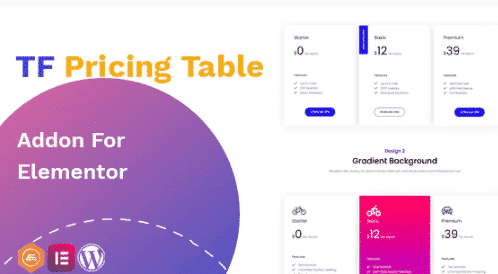
Overview of TFPricing table Addon For Elementor
Elevate your website’s presentation of services and products with the powerful TFPricing table Addon For Elementor. This essential Elementor addon empowers you to create stunning, highly customizable pricing tables that effectively showcase different plans, features, and pricing tiers to your audience. Designed for businesses, freelancers, and agencies, TFPricing table Addon For Elementor simplifies the process of building engaging pricing sections without writing a single line of code.
Key Features of TFPricing table Addon For Elementor
- Intuitive Drag & Drop Interface: Seamlessly design and arrange your pricing tables directly within the Elementor page builder. The TFPricing table Addon For Elementor integrates perfectly for a fluid editing experience.
- Fully Responsive Design: Ensure your pricing tables look impeccable and function flawlessly across all devices, from desktops to tablets and smartphones, thanks to the inherent responsiveness of TFPricing table Addon For Elementor.
- Extensive Customization Options: Gain complete control over typography, colors, backgrounds, borders, icons, and more. Tailor every aspect to match your brand’s aesthetic with the flexible settings offered by TFPricing table Addon For Elementor.
- Feature-Rich Columns: Easily add and manage multiple columns for different plans, highlighting key features, call-to-action buttons, and special offers within each tier.
- Toggle Between Monthly/Yearly Pricing: Provide flexibility to your customers by allowing them to switch between different billing cycles (e.g., monthly and yearly) with a sleek toggle feature, enhancing user experience with TFPricing table Addon For Elementor.
- Icon & Image Support: Visually distinguish features and benefits by incorporating custom icons or images into your pricing table columns, making your offers more appealing and easier to digest.
- Call-to-Action Buttons: Drive conversions with prominent, customizable call-to-action buttons for each pricing plan, guiding users directly to purchase or learn more.
- Ribbon/Badge Support: Highlight popular or recommended plans with eye-catching ribbons or badges, drawing immediate attention to your best offers using TFPricing table Addon For Elementor.
Why Choose TFPricing table Addon For Elementor?
Choosing TFPricing table Addon For Elementor means investing in clarity, professionalism, and conversion for your website. In today’s competitive digital landscape, presenting your pricing in an organized, attractive, and easy-to-understand manner is paramount. This addon not only beautifies your pricing sections but also optimizes them for better user engagement and decision-making. Its deep integration with Elementor ensures that anyone, regardless of their coding knowledge, can create sophisticated pricing tables that look and perform exceptionally.
The flexibility and comprehensive feature set of TFPricing table Addon For Elementor make it an indispensable tool for any WordPress user. You no longer need to rely on complex custom coding or expensive third-party services to achieve a professional pricing layout. With its user-friendly interface and robust customization options, you can design tables that perfectly align with your brand identity and effectively communicate the value of your offerings. This leads to improved user experience and, ultimately, higher conversion rates for your services or products.
Who Should Use TFPricing table Addon For Elementor?
TFPricing table Addon For Elementor is ideal for a wide range of users looking to present their pricing in a clear and compelling way. This includes SaaS companies showcasing different subscription tiers, service providers detailing their packages (e.g., web designers, consultants, coaches), e-commerce stores offering various product bundles, and even bloggers or content creators promoting premium content access. If you use Elementor and need to display pricing, plans, or feature comparisons beautifully and effectively, then TFPricing table Addon For Elementor is the perfect solution for you.
How to Install TFPricing table Addon For Elementor
- First, ensure you have Elementor and WordPress installed and activated on your website.
- Download the TFPricing table Addon For Elementor plugin file from your purchase area.
- Navigate to your WordPress dashboard, go to “Plugins” > “Add New” > “Upload Plugin”.
- Click “Choose File”, select the downloaded zip file for TFPricing table Addon For Elementor, and then click “Install Now”.
- Once installed, click “Activate Plugin”. The addon will now be available within your Elementor editor.
Frequently Asked Questions About TFPricing table Addon For Elementor
Is TFPricing table Addon For Elementor compatible with all WordPress themes?
Yes, TFPricing table Addon For Elementor is designed to be fully compatible with any WordPress theme that supports the Elementor page builder. Its functionality is independent of the theme’s core design, allowing for seamless integration.
Can I create multiple pricing tables on different pages using TFPricing table Addon For Elementor?
Absolutely! You can create an unlimited number of pricing tables on various pages or posts throughout your website. Each instance of TFPricing table Addon For Elementor can be uniquely customized to suit the specific content and context of that page.
Does TFPricing table Addon For Elementor support custom CSS for advanced styling?
While TFPricing table Addon For Elementor offers extensive built-in customization options, it also allows for custom CSS. Users familiar with CSS can further tweak the appearance of their pricing tables to achieve highly specific design requirements, directly through Elementor’s custom CSS options.
Get TFPricing table Addon For Elementor Today
Transform how you present your services and products online. With TFPricing table Addon For Elementor, you gain a powerful, flexible, and easy-to-use tool that enhances your website’s professionalism and drives conversions. Don’t miss out on the opportunity to create stunning, responsive pricing tables that captivate your audience. Explore our wide range of WordPress Plugins and other high-quality GPL WordPress Products to further enhance your site.
Related Products You May Like
Here's everything you need to know about your purchase:
- 100% original files — Every product is the genuine, virus-free file, exactly as released by the original developer.
- Instant download — Access your files immediately after purchase from your account.
- Lifetime access — Re-download your purchased files anytime. No expiry, no limits.
- Free updates — Newer version released? Just request an update from us, free for all customers.
- Dedicated support — Our team is available 24/7 for installation and file-related help.
- Easy refunds — Not satisfied? Review our Refund Policy. We offer a hassle-free 7-day guarantee.
$59.00 Original price was: $59.00.$2.00Current price is: $2.00.
Version
1.0.2
Last Updated
13/1/2025
License
GPL v2
Compatibility
WordPress 5.0+
Need latest version?
Newer version released? Request an update from us — free for all customers!
Request Update →🎁 Your Purchase Includes
Overview of TFPricing table Addon For Elementor
Elevate your website’s presentation of services and products with the powerful TFPricing table Addon For Elementor. This essential Elementor addon empowers you to create stunning, highly customizable pricing tables that effectively showcase different plans, features, and pricing tiers to your audience. Designed for businesses, freelancers, and agencies, TFPricing table Addon For Elementor simplifies the process of building engaging pricing sections without writing a single line of code.
Key Features of TFPricing table Addon For Elementor
- Intuitive Drag & Drop Interface: Seamlessly design and arrange your pricing tables directly within the Elementor page builder. The TFPricing table Addon For Elementor integrates perfectly for a fluid editing experience.
- Fully Responsive Design: Ensure your pricing tables look impeccable and function flawlessly across all devices, from desktops to tablets and smartphones, thanks to the inherent responsiveness of TFPricing table Addon For Elementor.
- Extensive Customization Options: Gain complete control over typography, colors, backgrounds, borders, icons, and more. Tailor every aspect to match your brand’s aesthetic with the flexible settings offered by TFPricing table Addon For Elementor.
- Feature-Rich Columns: Easily add and manage multiple columns for different plans, highlighting key features, call-to-action buttons, and special offers within each tier.
- Toggle Between Monthly/Yearly Pricing: Provide flexibility to your customers by allowing them to switch between different billing cycles (e.g., monthly and yearly) with a sleek toggle feature, enhancing user experience with TFPricing table Addon For Elementor.
- Icon & Image Support: Visually distinguish features and benefits by incorporating custom icons or images into your pricing table columns, making your offers more appealing and easier to digest.
- Call-to-Action Buttons: Drive conversions with prominent, customizable call-to-action buttons for each pricing plan, guiding users directly to purchase or learn more.
- Ribbon/Badge Support: Highlight popular or recommended plans with eye-catching ribbons or badges, drawing immediate attention to your best offers using TFPricing table Addon For Elementor.
Why Choose TFPricing table Addon For Elementor?
Choosing TFPricing table Addon For Elementor means investing in clarity, professionalism, and conversion for your website. In today’s competitive digital landscape, presenting your pricing in an organized, attractive, and easy-to-understand manner is paramount. This addon not only beautifies your pricing sections but also optimizes them for better user engagement and decision-making. Its deep integration with Elementor ensures that anyone, regardless of their coding knowledge, can create sophisticated pricing tables that look and perform exceptionally.
The flexibility and comprehensive feature set of TFPricing table Addon For Elementor make it an indispensable tool for any WordPress user. You no longer need to rely on complex custom coding or expensive third-party services to achieve a professional pricing layout. With its user-friendly interface and robust customization options, you can design tables that perfectly align with your brand identity and effectively communicate the value of your offerings. This leads to improved user experience and, ultimately, higher conversion rates for your services or products.
Who Should Use TFPricing table Addon For Elementor?
TFPricing table Addon For Elementor is ideal for a wide range of users looking to present their pricing in a clear and compelling way. This includes SaaS companies showcasing different subscription tiers, service providers detailing their packages (e.g., web designers, consultants, coaches), e-commerce stores offering various product bundles, and even bloggers or content creators promoting premium content access. If you use Elementor and need to display pricing, plans, or feature comparisons beautifully and effectively, then TFPricing table Addon For Elementor is the perfect solution for you.
How to Install TFPricing table Addon For Elementor
- First, ensure you have Elementor and WordPress installed and activated on your website.
- Download the TFPricing table Addon For Elementor plugin file from your purchase area.
- Navigate to your WordPress dashboard, go to “Plugins” > “Add New” > “Upload Plugin”.
- Click “Choose File”, select the downloaded zip file for TFPricing table Addon For Elementor, and then click “Install Now”.
- Once installed, click “Activate Plugin”. The addon will now be available within your Elementor editor.
Frequently Asked Questions About TFPricing table Addon For Elementor
Is TFPricing table Addon For Elementor compatible with all WordPress themes?
Yes, TFPricing table Addon For Elementor is designed to be fully compatible with any WordPress theme that supports the Elementor page builder. Its functionality is independent of the theme’s core design, allowing for seamless integration.
Can I create multiple pricing tables on different pages using TFPricing table Addon For Elementor?
Absolutely! You can create an unlimited number of pricing tables on various pages or posts throughout your website. Each instance of TFPricing table Addon For Elementor can be uniquely customized to suit the specific content and context of that page.
Does TFPricing table Addon For Elementor support custom CSS for advanced styling?
While TFPricing table Addon For Elementor offers extensive built-in customization options, it also allows for custom CSS. Users familiar with CSS can further tweak the appearance of their pricing tables to achieve highly specific design requirements, directly through Elementor’s custom CSS options.
Get TFPricing table Addon For Elementor Today
Transform how you present your services and products online. With TFPricing table Addon For Elementor, you gain a powerful, flexible, and easy-to-use tool that enhances your website’s professionalism and drives conversions. Don’t miss out on the opportunity to create stunning, responsive pricing tables that captivate your audience. Explore our wide range of WordPress Plugins and other high-quality GPL WordPress Products to further enhance your site.
Related Products You May Like
Reviews
There are no reviews yet.
Here's everything you need to know about your purchase:
- 100% original files — Every product is the genuine, virus-free file, exactly as released by the original developer.
- Instant download — Access your files immediately after purchase from your account.
- Lifetime access — Re-download your purchased files anytime. No expiry, no limits.
- Free updates — Newer version released? Just request an update from us, free for all customers.
- Dedicated support — Our team is available 24/7 for installation and file-related help.
- Easy refunds — Not satisfied? Review our Refund Policy. We offer a hassle-free 7-day guarantee.
Reviews
There are no reviews yet.