

WooCommerce Lead Time 2.2.0
Overview of WooCommerce Lead Time
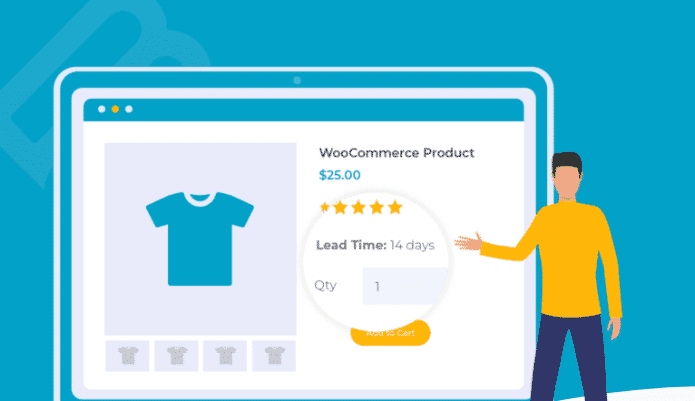
WooCommerce Lead Time is an essential plugin designed to enhance customer transparency and manage expectations by clearly displaying product lead times on your WooCommerce store. This powerful tool allows store owners to communicate estimated shipping or production times directly on product pages, empowering customers with crucial information before they make a purchase. It’s perfect for businesses selling custom-made items, products with variable stock, or those operating with a made-to-order model, ensuring a smoother shopping experience for everyone involved.
Key Features of WooCommerce Lead Time
- Flexible Lead Time Display: Easily configure and display lead times in various formats, such as “Ships in 3-5 days,” “Allow 2 weeks for delivery,” or “Made to order (4-6 weeks).”
- Product-Specific Lead Times: Set unique lead times for individual products, variations, or even categories, providing granular control over your inventory communication.
- Global Default Lead Time: Establish a store-wide default lead time that applies to all products unless overridden by specific settings, saving you time and ensuring consistency.
- Customizable Lead Time Text: Tailor the exact wording and messaging for your lead times to match your brand voice and provide clear, unambiguous information to customers.
- Visibility Control: Choose where lead times are displayed, including product pages, shop archives, and even cart or checkout pages, maximizing customer awareness.
- Supports Backorders and Pre-orders: Seamlessly integrate lead time information with products that are available for backorder or pre-order, further managing customer expectations.
- Easy-to-Use Interface: Manage all lead time settings directly from your WooCommerce product data, offering an intuitive and user-friendly experience for store administrators.
- Conditional Logic for Lead Times: Apply lead times based on specific product attributes or stock statuses, providing dynamic and accurate information to your shoppers.
Why Choose WooCommerce Lead Time?
In today’s competitive e-commerce landscape, clear communication is paramount to building customer trust and reducing support queries. WooCommerce Lead Time provides a robust solution to a common challenge: managing customer expectations regarding delivery times. By prominently displaying lead times, you empower your customers to make informed purchasing decisions, significantly reducing cart abandonment rates and post-purchase anxiety. This transparency not only enhances the customer experience but also streamlines your operational workflow by minimizing “where is my order?” inquiries, allowing your team to focus on fulfilling orders efficiently.
Choosing WooCommerce Lead Time means investing in a tool that directly contributes to customer satisfaction and loyalty. It’s especially beneficial for businesses with longer fulfillment cycles, custom products, or those dealing with supply chain complexities. The flexibility to set lead times per product, variation, or globally ensures that your messaging is always accurate and relevant. With its intuitive interface and powerful features, WooCommerce Lead Time is more than just a plugin; it’s a strategic asset for any WooCommerce store looking to improve its communication, reduce customer service overhead, and foster a more positive shopping environment.
Who Should Use WooCommerce Lead Time?
WooCommerce Lead Time is ideal for any online store that needs to clearly communicate delivery or production estimates to its customers. This includes businesses selling handmade goods, custom-configured products, items with fluctuating stock levels, print-on-demand services, or dropshippers. If your products are not always available for immediate dispatch, or if certain items require a specific production period, WooCommerce Lead Time is an indispensable tool for maintaining transparency and managing customer expectations effectively.
How to Install WooCommerce Lead Time
- Download the Plugin: After purchasing WooCommerce Lead Time from GPLUniverse, download the plugin .zip file to your computer.
- Upload to WordPress: Log in to your WordPress admin dashboard. Navigate to ‘Plugins’ > ‘Add New’ > ‘Upload Plugin’. Choose the downloaded .zip file and click ‘Install Now’.
- Activate the Plugin: Once the installation is complete, click the ‘Activate Plugin’ button to enable WooCommerce Lead Time on your site.
- Configure Settings: Go to ‘WooCommerce’ > ‘Settings’ > ‘Products’ > ‘Lead Time’ (or similar path within your WordPress admin) to configure global lead time settings.
- Set Product-Specific Lead Times: Edit individual products in your WooCommerce catalog. You will find new options in the ‘Product Data’ meta box to set specific lead times for each product or variation.
Frequently Asked Questions About WooCommerce Lead Time
Can I set different lead times for product variations?
Yes, WooCommerce Lead Time fully supports variable products. You can specify unique lead times for each individual product variation, allowing you to accurately communicate different production or shipping times based on the customer’s selection, ensuring precision for complex product offerings.
Where does WooCommerce Lead Time display the lead time information?
WooCommerce Lead Time offers flexible display options. Typically, lead time information is shown prominently on the single product page, often near the price or add-to-cart button. Depending on your configuration, it can also appear on shop archive pages, in the cart, or even on the checkout page, providing consistent information throughout the customer journey.
Is WooCommerce Lead Time compatible with other WooCommerce extensions?
WooCommerce Lead Time is developed to be highly compatible with standard WooCommerce functionalities and most well-coded themes and plugins. While comprehensive testing is conducted, specific interactions with highly customized themes or niche plugins might require minor adjustments. We always recommend testing new plugins in a staging environment first.
Get WooCommerce Lead Time Today
Enhance your customer communication and streamline your store’s operations by integrating WooCommerce Lead Time into your e-commerce platform. Provide clear, accurate delivery expectations and build stronger customer trust. Explore this and many other premium WordPress Plugins available at GPLUniverse. Don’t miss out on optimizing your online store with our range of high-quality GPL WordPress Products. Get WooCommerce Lead Time now and transform your customer’s shopping experience!
Related Products You May Like
Here's everything you need to know about your purchase:
- 100% original files — Every product is the genuine, virus-free file, exactly as released by the original developer.
- Instant download — Access your files immediately after purchase from your account.
- Lifetime access — Re-download your purchased files anytime. No expiry, no limits.
- Free updates — Newer version released? Just request an update from us, free for all customers.
- Dedicated support — Our team is available 24/7 for installation and file-related help.
- Easy refunds — Not satisfied? Review our Refund Policy. We offer a hassle-free 7-day guarantee.
$59.00 Original price was: $59.00.$2.00Current price is: $2.00.
Version
2.2.0
Last Updated
25/2/2026
License
GPL v2
Compatibility
WordPress 5.0+
Need latest version?
Newer version released? Request an update from us — free for all customers!
Request Update →🎁 Your Purchase Includes
Overview of WooCommerce Lead Time
WooCommerce Lead Time is an essential plugin designed to enhance customer transparency and manage expectations by clearly displaying product lead times on your WooCommerce store. This powerful tool allows store owners to communicate estimated shipping or production times directly on product pages, empowering customers with crucial information before they make a purchase. It’s perfect for businesses selling custom-made items, products with variable stock, or those operating with a made-to-order model, ensuring a smoother shopping experience for everyone involved.
Key Features of WooCommerce Lead Time
- Flexible Lead Time Display: Easily configure and display lead times in various formats, such as “Ships in 3-5 days,” “Allow 2 weeks for delivery,” or “Made to order (4-6 weeks).”
- Product-Specific Lead Times: Set unique lead times for individual products, variations, or even categories, providing granular control over your inventory communication.
- Global Default Lead Time: Establish a store-wide default lead time that applies to all products unless overridden by specific settings, saving you time and ensuring consistency.
- Customizable Lead Time Text: Tailor the exact wording and messaging for your lead times to match your brand voice and provide clear, unambiguous information to customers.
- Visibility Control: Choose where lead times are displayed, including product pages, shop archives, and even cart or checkout pages, maximizing customer awareness.
- Supports Backorders and Pre-orders: Seamlessly integrate lead time information with products that are available for backorder or pre-order, further managing customer expectations.
- Easy-to-Use Interface: Manage all lead time settings directly from your WooCommerce product data, offering an intuitive and user-friendly experience for store administrators.
- Conditional Logic for Lead Times: Apply lead times based on specific product attributes or stock statuses, providing dynamic and accurate information to your shoppers.
Why Choose WooCommerce Lead Time?
In today’s competitive e-commerce landscape, clear communication is paramount to building customer trust and reducing support queries. WooCommerce Lead Time provides a robust solution to a common challenge: managing customer expectations regarding delivery times. By prominently displaying lead times, you empower your customers to make informed purchasing decisions, significantly reducing cart abandonment rates and post-purchase anxiety. This transparency not only enhances the customer experience but also streamlines your operational workflow by minimizing “where is my order?” inquiries, allowing your team to focus on fulfilling orders efficiently.
Choosing WooCommerce Lead Time means investing in a tool that directly contributes to customer satisfaction and loyalty. It’s especially beneficial for businesses with longer fulfillment cycles, custom products, or those dealing with supply chain complexities. The flexibility to set lead times per product, variation, or globally ensures that your messaging is always accurate and relevant. With its intuitive interface and powerful features, WooCommerce Lead Time is more than just a plugin; it’s a strategic asset for any WooCommerce store looking to improve its communication, reduce customer service overhead, and foster a more positive shopping environment.
Who Should Use WooCommerce Lead Time?
WooCommerce Lead Time is ideal for any online store that needs to clearly communicate delivery or production estimates to its customers. This includes businesses selling handmade goods, custom-configured products, items with fluctuating stock levels, print-on-demand services, or dropshippers. If your products are not always available for immediate dispatch, or if certain items require a specific production period, WooCommerce Lead Time is an indispensable tool for maintaining transparency and managing customer expectations effectively.
How to Install WooCommerce Lead Time
- Download the Plugin: After purchasing WooCommerce Lead Time from GPLUniverse, download the plugin .zip file to your computer.
- Upload to WordPress: Log in to your WordPress admin dashboard. Navigate to ‘Plugins’ > ‘Add New’ > ‘Upload Plugin’. Choose the downloaded .zip file and click ‘Install Now’.
- Activate the Plugin: Once the installation is complete, click the ‘Activate Plugin’ button to enable WooCommerce Lead Time on your site.
- Configure Settings: Go to ‘WooCommerce’ > ‘Settings’ > ‘Products’ > ‘Lead Time’ (or similar path within your WordPress admin) to configure global lead time settings.
- Set Product-Specific Lead Times: Edit individual products in your WooCommerce catalog. You will find new options in the ‘Product Data’ meta box to set specific lead times for each product or variation.
Frequently Asked Questions About WooCommerce Lead Time
Can I set different lead times for product variations?
Yes, WooCommerce Lead Time fully supports variable products. You can specify unique lead times for each individual product variation, allowing you to accurately communicate different production or shipping times based on the customer’s selection, ensuring precision for complex product offerings.
Where does WooCommerce Lead Time display the lead time information?
WooCommerce Lead Time offers flexible display options. Typically, lead time information is shown prominently on the single product page, often near the price or add-to-cart button. Depending on your configuration, it can also appear on shop archive pages, in the cart, or even on the checkout page, providing consistent information throughout the customer journey.
Is WooCommerce Lead Time compatible with other WooCommerce extensions?
WooCommerce Lead Time is developed to be highly compatible with standard WooCommerce functionalities and most well-coded themes and plugins. While comprehensive testing is conducted, specific interactions with highly customized themes or niche plugins might require minor adjustments. We always recommend testing new plugins in a staging environment first.
Get WooCommerce Lead Time Today
Enhance your customer communication and streamline your store’s operations by integrating WooCommerce Lead Time into your e-commerce platform. Provide clear, accurate delivery expectations and build stronger customer trust. Explore this and many other premium WordPress Plugins available at GPLUniverse. Don’t miss out on optimizing your online store with our range of high-quality GPL WordPress Products. Get WooCommerce Lead Time now and transform your customer’s shopping experience!
Related Products You May Like
Reviews
There are no reviews yet.
Here's everything you need to know about your purchase:
- 100% original files — Every product is the genuine, virus-free file, exactly as released by the original developer.
- Instant download — Access your files immediately after purchase from your account.
- Lifetime access — Re-download your purchased files anytime. No expiry, no limits.
- Free updates — Newer version released? Just request an update from us, free for all customers.
- Dedicated support — Our team is available 24/7 for installation and file-related help.
- Easy refunds — Not satisfied? Review our Refund Policy. We offer a hassle-free 7-day guarantee.
Reviews
There are no reviews yet.