

Woo Product Table Pro – Woo Product Table view solution 9.1.0
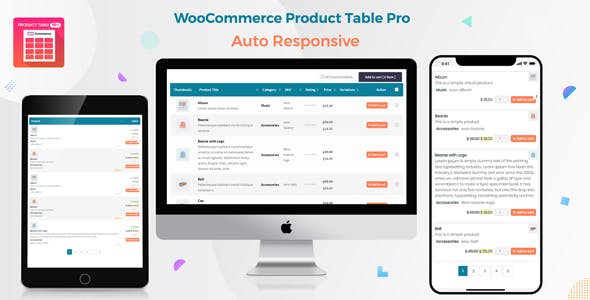
Overview of Woo Product Table
Transform the way your customers browse and purchase products on your WooCommerce store with the powerful Woo Product Table plugin. This essential solution allows you to display your products in a highly customizable, searchable, and filterable table layout, making it incredibly easy for customers to find exactly what they need and add it to their cart quickly. Whether you run a wholesale store, a restaurant menu, a parts catalog, or any e-commerce site with a large inventory, Woo Product Table is designed to enhance user experience and streamline the buying process.
Key Features of Woo Product Table
- Customizable Product Columns: Gain complete control over which product information is displayed in your table. Choose from various fields like product image, name, description, SKU, price, stock, ratings, custom fields, and an add-to-cart button to create the perfect display for your audience.
- Advanced Search & Filtering: Empower your customers with robust search functionality and intuitive filters based on categories, tags, attributes, price range, and more. This significantly reduces browsing time and helps users pinpoint specific products with ease when using Woo Product Table.
- Quick Add to Cart Functionality: Enable customers to add multiple products to their cart directly from the table, often with quantity selectors, without having to visit individual product pages. This feature is a game-changer for bulk orders and rapid purchasing.
- Responsive Design: Ensure your product tables look impeccable and function flawlessly on any device, from desktops to tablets and smartphones. The responsive nature of Woo Product Table guarantees a consistent and user-friendly experience for all visitors.
- Pagination & Sorting Options: Manage large product inventories effectively with built-in pagination. Allow customers to sort products by various criteria such as name, price, or date, further enhancing product discoverability and navigation.
- Support for Product Variations: Seamlessly display and allow selection of product variations directly within the table. Customers can choose sizes, colors, and other attributes without leaving the product table view, making the purchasing process smoother.
- Shortcode Integration: Easily insert your custom product tables anywhere on your site – pages, posts, or widgets – using a simple shortcode. This flexibility allows you to showcase specific product sets wherever they are most relevant.
- Bulk Add to Cart and Quantity Control: Ideal for wholesale or B2B stores, this feature allows buyers to specify quantities for multiple products and add them all to the cart with a single click, drastically speeding up large orders facilitated by Woo Product Table.
Why Choose Woo Product Table?
Choosing Woo Product Table means investing in a significant upgrade for your WooCommerce store’s user experience and operational efficiency. This plugin is not just about displaying products; it’s about optimizing the entire purchasing journey. For customers, it transforms tedious browsing into a swift, intuitive process, allowing them to compare products side-by-side, filter results instantly, and add items to their cart without unnecessary clicks. This streamlined interaction not only saves time but also reduces frustration, leading to higher customer satisfaction and repeat business.
For store owners, the benefits of implementing Woo Product Table are equally profound. It’s an invaluable tool for managing extensive product catalogs, making them accessible and easy to navigate. By presenting products in a clear, organized table format, you can significantly boost conversion rates, especially for businesses that deal with bulk orders, B2B sales, or complex product ranges. The flexibility in customization ensures that the product tables perfectly align with your brand’s aesthetic and functional requirements, providing a professional and efficient shopping environment. Ultimately, Woo Product Table is a strategic asset that enhances sales, improves customer engagement, and simplifies store management.
Who Should Use Woo Product Table?
The Woo Product Table plugin is an indispensable tool for a wide array of WooCommerce store owners, particularly those who benefit from displaying products in a structured, list-like format. It is perfect for wholesale businesses and B2B suppliers who need to enable quick, bulk ordering for their clients. Restaurants and food delivery services can use it to create interactive menu displays. Hardware stores, electronics retailers, and spare parts suppliers will find it ideal for organizing vast inventories where customers often know what they need and want to quickly locate items by SKU or specific attributes. Any store that sells products in quantity, offers a large catalog, or requires a comparison-friendly layout will thrive with the enhanced functionality provided by Woo Product Table.
How to Install Woo Product Table
- Download the Plugin: After acquiring your copy of Woo Product Table, download the plugin zip file to your computer.
- Upload to WordPress: Log in to your WordPress admin dashboard. Navigate to ‘Plugins’ > ‘Add New’ and then click the ‘Upload Plugin’ button at the top of the page.
- Choose File & Install: Click ‘Choose File’, select the downloaded plugin zip file, and then click ‘Install Now’.
- Activate Plugin: Once the installation is complete, click ‘Activate Plugin’. You will then see Woo Product Table listed among your active plugins.
- Configure Settings: Go to the new ‘Woo Product Table’ menu item in your WordPress dashboard to access its settings and begin customizing your product tables.
Frequently Asked Questions About Woo Product Table
Can I customize the columns displayed in the Woo Product Table?
Yes, absolutely! Woo Product Table offers extensive customization options for columns. You can choose which product fields to display, reorder them, and even include custom fields or taxonomies to perfectly match your store’s specific needs and product data. This flexibility ensures your product tables are as informative as they are functional.
Is Woo Product Table compatible with other WooCommerce extensions?
Woo Product Table is designed with broad compatibility in mind. While it generally works well with most standard WooCommerce extensions and themes, specific integrations can vary. We recommend testing it in a staging environment if you have a highly customized setup or use many third-party plugins. For any specific compatibility concerns, documentation and support resources are available.
Can customers add multiple products to their cart from the table view?
Yes, one of the core strengths of Woo Product Table is its ability to facilitate quick, multi-product additions to the cart. Customers can specify quantities for several items directly within the table and add them all to their cart with a single click, significantly streamlining the checkout process, especially for bulk purchases.
Get Woo Product Table Today
Ready to revolutionize your WooCommerce store’s product display and boost your sales? Get Woo Product Table today and provide your customers with an unparalleled shopping experience. Browse our extensive range of WordPress Plugins and discover other powerful tools to enhance your website. Explore all our premium GPL WordPress Products to find everything you need to build and grow a successful online business.
Related Products You May Like
Here's everything you need to know about your purchase:
- 100% original files — Every product is the genuine, virus-free file, exactly as released by the original developer.
- Instant download — Access your files immediately after purchase from your account.
- Lifetime access — Re-download your purchased files anytime. No expiry, no limits.
- Free updates — Newer version released? Just request an update from us, free for all customers.
- Dedicated support — Our team is available 24/7 for installation and file-related help.
- Easy refunds — Not satisfied? Review our Refund Policy. We offer a hassle-free 7-day guarantee.
$59.00 Original price was: $59.00.$2.00Current price is: $2.00.
Version
9.1.0
Last Updated
13/1/2025
License
GPL v2
Compatibility
WordPress 5.0+
Need latest version?
Newer version released? Request an update from us — free for all customers!
Request Update →🎁 Your Purchase Includes
Overview of Woo Product Table
Transform the way your customers browse and purchase products on your WooCommerce store with the powerful Woo Product Table plugin. This essential solution allows you to display your products in a highly customizable, searchable, and filterable table layout, making it incredibly easy for customers to find exactly what they need and add it to their cart quickly. Whether you run a wholesale store, a restaurant menu, a parts catalog, or any e-commerce site with a large inventory, Woo Product Table is designed to enhance user experience and streamline the buying process.
Key Features of Woo Product Table
- Customizable Product Columns: Gain complete control over which product information is displayed in your table. Choose from various fields like product image, name, description, SKU, price, stock, ratings, custom fields, and an add-to-cart button to create the perfect display for your audience.
- Advanced Search & Filtering: Empower your customers with robust search functionality and intuitive filters based on categories, tags, attributes, price range, and more. This significantly reduces browsing time and helps users pinpoint specific products with ease when using Woo Product Table.
- Quick Add to Cart Functionality: Enable customers to add multiple products to their cart directly from the table, often with quantity selectors, without having to visit individual product pages. This feature is a game-changer for bulk orders and rapid purchasing.
- Responsive Design: Ensure your product tables look impeccable and function flawlessly on any device, from desktops to tablets and smartphones. The responsive nature of Woo Product Table guarantees a consistent and user-friendly experience for all visitors.
- Pagination & Sorting Options: Manage large product inventories effectively with built-in pagination. Allow customers to sort products by various criteria such as name, price, or date, further enhancing product discoverability and navigation.
- Support for Product Variations: Seamlessly display and allow selection of product variations directly within the table. Customers can choose sizes, colors, and other attributes without leaving the product table view, making the purchasing process smoother.
- Shortcode Integration: Easily insert your custom product tables anywhere on your site – pages, posts, or widgets – using a simple shortcode. This flexibility allows you to showcase specific product sets wherever they are most relevant.
- Bulk Add to Cart and Quantity Control: Ideal for wholesale or B2B stores, this feature allows buyers to specify quantities for multiple products and add them all to the cart with a single click, drastically speeding up large orders facilitated by Woo Product Table.
Why Choose Woo Product Table?
Choosing Woo Product Table means investing in a significant upgrade for your WooCommerce store’s user experience and operational efficiency. This plugin is not just about displaying products; it’s about optimizing the entire purchasing journey. For customers, it transforms tedious browsing into a swift, intuitive process, allowing them to compare products side-by-side, filter results instantly, and add items to their cart without unnecessary clicks. This streamlined interaction not only saves time but also reduces frustration, leading to higher customer satisfaction and repeat business.
For store owners, the benefits of implementing Woo Product Table are equally profound. It’s an invaluable tool for managing extensive product catalogs, making them accessible and easy to navigate. By presenting products in a clear, organized table format, you can significantly boost conversion rates, especially for businesses that deal with bulk orders, B2B sales, or complex product ranges. The flexibility in customization ensures that the product tables perfectly align with your brand’s aesthetic and functional requirements, providing a professional and efficient shopping environment. Ultimately, Woo Product Table is a strategic asset that enhances sales, improves customer engagement, and simplifies store management.
Who Should Use Woo Product Table?
The Woo Product Table plugin is an indispensable tool for a wide array of WooCommerce store owners, particularly those who benefit from displaying products in a structured, list-like format. It is perfect for wholesale businesses and B2B suppliers who need to enable quick, bulk ordering for their clients. Restaurants and food delivery services can use it to create interactive menu displays. Hardware stores, electronics retailers, and spare parts suppliers will find it ideal for organizing vast inventories where customers often know what they need and want to quickly locate items by SKU or specific attributes. Any store that sells products in quantity, offers a large catalog, or requires a comparison-friendly layout will thrive with the enhanced functionality provided by Woo Product Table.
How to Install Woo Product Table
- Download the Plugin: After acquiring your copy of Woo Product Table, download the plugin zip file to your computer.
- Upload to WordPress: Log in to your WordPress admin dashboard. Navigate to ‘Plugins’ > ‘Add New’ and then click the ‘Upload Plugin’ button at the top of the page.
- Choose File & Install: Click ‘Choose File’, select the downloaded plugin zip file, and then click ‘Install Now’.
- Activate Plugin: Once the installation is complete, click ‘Activate Plugin’. You will then see Woo Product Table listed among your active plugins.
- Configure Settings: Go to the new ‘Woo Product Table’ menu item in your WordPress dashboard to access its settings and begin customizing your product tables.
Frequently Asked Questions About Woo Product Table
Can I customize the columns displayed in the Woo Product Table?
Yes, absolutely! Woo Product Table offers extensive customization options for columns. You can choose which product fields to display, reorder them, and even include custom fields or taxonomies to perfectly match your store’s specific needs and product data. This flexibility ensures your product tables are as informative as they are functional.
Is Woo Product Table compatible with other WooCommerce extensions?
Woo Product Table is designed with broad compatibility in mind. While it generally works well with most standard WooCommerce extensions and themes, specific integrations can vary. We recommend testing it in a staging environment if you have a highly customized setup or use many third-party plugins. For any specific compatibility concerns, documentation and support resources are available.
Can customers add multiple products to their cart from the table view?
Yes, one of the core strengths of Woo Product Table is its ability to facilitate quick, multi-product additions to the cart. Customers can specify quantities for several items directly within the table and add them all to their cart with a single click, significantly streamlining the checkout process, especially for bulk purchases.
Get Woo Product Table Today
Ready to revolutionize your WooCommerce store’s product display and boost your sales? Get Woo Product Table today and provide your customers with an unparalleled shopping experience. Browse our extensive range of WordPress Plugins and discover other powerful tools to enhance your website. Explore all our premium GPL WordPress Products to find everything you need to build and grow a successful online business.
Related Products You May Like
Reviews
There are no reviews yet.
Here's everything you need to know about your purchase:
- 100% original files — Every product is the genuine, virus-free file, exactly as released by the original developer.
- Instant download — Access your files immediately after purchase from your account.
- Lifetime access — Re-download your purchased files anytime. No expiry, no limits.
- Free updates — Newer version released? Just request an update from us, free for all customers.
- Dedicated support — Our team is available 24/7 for installation and file-related help.
- Easy refunds — Not satisfied? Review our Refund Policy. We offer a hassle-free 7-day guarantee.
Reviews
There are no reviews yet.