

Material 8.7 – White Label WordPress Admin Theme
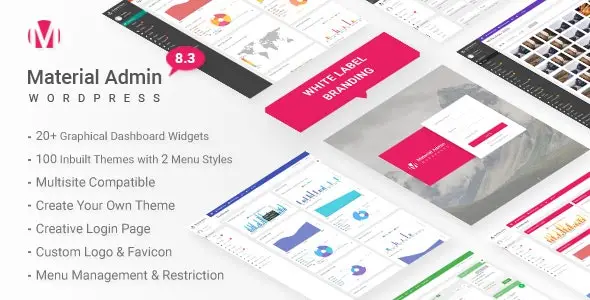
Overview of Material
Transform your WordPress admin area into a sleek, professional, and fully branded environment with Material. This powerful WordPress admin theme allows you to completely redesign the backend experience, making it perfect for agencies, developers, and freelancers who manage client websites or wish to enhance their own administrative interface. Material provides unparalleled customization options, ensuring a consistent brand identity across all touchpoints.
Key Features of Material
- Complete White Labeling: Remove all WordPress branding and replace it with your own logos, colors, and custom login page. Material ensures your clients only see your brand.
- Extensive Customization Options: Tailor every aspect of the admin theme, from fonts and color schemes to dashboard widgets and menu layouts, giving you full control over the aesthetic and functionality of Material.
- Intuitive User Interface: Enjoy a modern, clean, and user-friendly interface that simplifies navigation and improves the overall admin experience for you and your clients.
- Custom Login Page Designer: Easily design stunning, branded login pages that perfectly match your website’s design and reinforce your brand identity from the very first interaction with Material.
- User Role-Based Access: Control which admin menu items are visible to different user roles, streamlining the dashboard for clients and ensuring they only see what’s relevant to them.
- Dark Mode Support: Offer a comfortable viewing experience with a built-in dark mode option, reducing eye strain for those long working sessions within Material.
- Flexible Dashboard Widgets: Create and manage custom dashboard widgets to provide quick access to important information or specific functionalities for your users.
- RTL (Right-to-Left) Support: Material is fully compatible with RTL languages, ensuring a seamless experience for users around the globe.
Why Choose Material?
Choosing Material means elevating your professional presence and streamlining your workflow. For agencies and developers, it’s an indispensable tool for delivering polished, branded WordPress sites to clients. Imagine handing over a website where the backend is not just functional, but also a seamless extension of your client’s brand, free from generic WordPress branding. Material makes this a reality, fostering client trust and reinforcing your professionalism. It’s more than just a visual overhaul; it’s about creating a cohesive and intuitive administrative experience that reflects the quality of your work.
Furthermore, Material significantly enhances the user experience for anyone interacting with the WordPress admin. Its modern design and extensive customization capabilities mean you can simplify complex interfaces, hide unnecessary options for specific user roles, and present a clean, focused dashboard. This not only reduces confusion for clients but also boosts efficiency for your team. The flexibility of Material ensures that whether you’re managing a single site or a portfolio of client projects, the admin area always feels tailored, efficient, and distinctly yours.
Investing in Material is investing in your brand’s consistency and your clients’ satisfaction. It’s a powerful way to add value to your services, ensuring that every aspect of the WordPress experience, from the frontend to the backend, aligns with your professional standards. With Material, you’re not just installing a theme; you’re implementing a comprehensive branding solution that sets you apart.
Who Should Use Material?
Material is ideal for web development agencies, freelance WordPress developers, theme and plugin developers, and anyone who manages multiple WordPress websites for clients. It’s also perfect for businesses or individuals who want to maintain a strong brand identity across all aspects of their online presence, including their WordPress backend. If you aim to provide a truly white-label solution or simply desire a more customized and aesthetically pleasing administrative interface, Material is designed for you.
How to Install Material
- Download Material: After purchase, download the Material plugin file (.zip) from your account.
- Upload to WordPress: Log in to your WordPress admin dashboard, navigate to ‘Plugins’ > ‘Add New’, then click ‘Upload Plugin’ and choose the Material .zip file.
- Activate the Plugin: Once uploaded, click ‘Install Now’ and then ‘Activate Plugin’ to enable Material on your site.
- Configure Material Settings: Go to the new ‘Material Admin’ menu item in your dashboard to access all customization options and begin branding your admin area.
- Save Changes: Explore the various settings for colors, branding, login page, and more, then save your changes to apply the new Material design.
Frequently Asked Questions About Material
Is Material compatible with other WordPress plugins and themes?
Material is designed to work seamlessly with most WordPress themes and plugins, as it primarily customizes the administrative interface without interfering with frontend display or core plugin functionalities. We always recommend testing in a staging environment if you have a highly customized setup.
Can I customize the login page with Material?
Absolutely! Material includes a powerful login page designer that allows you to fully customize the appearance of your WordPress login screen, including logos, background images, colors, and more, to perfectly match your brand.
Does Material support multisite installations?
Yes, Material is fully compatible with WordPress multisite installations, allowing network administrators to apply the custom admin theme across all sites in the network or configure it on a per-site basis.
Get Material Today
Ready to transform your WordPress admin into a professional, branded powerhouse? Get Material today and start delivering a truly white-label experience to your clients or simply enjoy a more personalized backend for yourself. Explore Material and our wide array of WordPress Themes and other premium GPL WordPress Products to empower your online presence.
Related Products You May Like
Here's everything you need to know about your purchase:
- 100% original files — Every product is the genuine, virus-free file, exactly as released by the original developer.
- Instant download — Access your files immediately after purchase from your account.
- Lifetime access — Re-download your purchased files anytime. No expiry, no limits.
- Free updates — Newer version released? Just request an update from us, free for all customers.
- Dedicated support — Our team is available 24/7 for installation and file-related help.
- Easy refunds — Not satisfied? Review our Refund Policy. We offer a hassle-free 7-day guarantee.
$59.00 Original price was: $59.00.$2.00Current price is: $2.00.
Version
8.7
Last Updated
25/2/2026
License
GPL v2
Compatibility
WordPress 5.0+
Need latest version?
Newer version released? Request an update from us — free for all customers!
Request Update →🎁 Your Purchase Includes
Overview of Material
Transform your WordPress admin area into a sleek, professional, and fully branded environment with Material. This powerful WordPress admin theme allows you to completely redesign the backend experience, making it perfect for agencies, developers, and freelancers who manage client websites or wish to enhance their own administrative interface. Material provides unparalleled customization options, ensuring a consistent brand identity across all touchpoints.
Key Features of Material
- Complete White Labeling: Remove all WordPress branding and replace it with your own logos, colors, and custom login page. Material ensures your clients only see your brand.
- Extensive Customization Options: Tailor every aspect of the admin theme, from fonts and color schemes to dashboard widgets and menu layouts, giving you full control over the aesthetic and functionality of Material.
- Intuitive User Interface: Enjoy a modern, clean, and user-friendly interface that simplifies navigation and improves the overall admin experience for you and your clients.
- Custom Login Page Designer: Easily design stunning, branded login pages that perfectly match your website’s design and reinforce your brand identity from the very first interaction with Material.
- User Role-Based Access: Control which admin menu items are visible to different user roles, streamlining the dashboard for clients and ensuring they only see what’s relevant to them.
- Dark Mode Support: Offer a comfortable viewing experience with a built-in dark mode option, reducing eye strain for those long working sessions within Material.
- Flexible Dashboard Widgets: Create and manage custom dashboard widgets to provide quick access to important information or specific functionalities for your users.
- RTL (Right-to-Left) Support: Material is fully compatible with RTL languages, ensuring a seamless experience for users around the globe.
Why Choose Material?
Choosing Material means elevating your professional presence and streamlining your workflow. For agencies and developers, it’s an indispensable tool for delivering polished, branded WordPress sites to clients. Imagine handing over a website where the backend is not just functional, but also a seamless extension of your client’s brand, free from generic WordPress branding. Material makes this a reality, fostering client trust and reinforcing your professionalism. It’s more than just a visual overhaul; it’s about creating a cohesive and intuitive administrative experience that reflects the quality of your work.
Furthermore, Material significantly enhances the user experience for anyone interacting with the WordPress admin. Its modern design and extensive customization capabilities mean you can simplify complex interfaces, hide unnecessary options for specific user roles, and present a clean, focused dashboard. This not only reduces confusion for clients but also boosts efficiency for your team. The flexibility of Material ensures that whether you’re managing a single site or a portfolio of client projects, the admin area always feels tailored, efficient, and distinctly yours.
Investing in Material is investing in your brand’s consistency and your clients’ satisfaction. It’s a powerful way to add value to your services, ensuring that every aspect of the WordPress experience, from the frontend to the backend, aligns with your professional standards. With Material, you’re not just installing a theme; you’re implementing a comprehensive branding solution that sets you apart.
Who Should Use Material?
Material is ideal for web development agencies, freelance WordPress developers, theme and plugin developers, and anyone who manages multiple WordPress websites for clients. It’s also perfect for businesses or individuals who want to maintain a strong brand identity across all aspects of their online presence, including their WordPress backend. If you aim to provide a truly white-label solution or simply desire a more customized and aesthetically pleasing administrative interface, Material is designed for you.
How to Install Material
- Download Material: After purchase, download the Material plugin file (.zip) from your account.
- Upload to WordPress: Log in to your WordPress admin dashboard, navigate to ‘Plugins’ > ‘Add New’, then click ‘Upload Plugin’ and choose the Material .zip file.
- Activate the Plugin: Once uploaded, click ‘Install Now’ and then ‘Activate Plugin’ to enable Material on your site.
- Configure Material Settings: Go to the new ‘Material Admin’ menu item in your dashboard to access all customization options and begin branding your admin area.
- Save Changes: Explore the various settings for colors, branding, login page, and more, then save your changes to apply the new Material design.
Frequently Asked Questions About Material
Is Material compatible with other WordPress plugins and themes?
Material is designed to work seamlessly with most WordPress themes and plugins, as it primarily customizes the administrative interface without interfering with frontend display or core plugin functionalities. We always recommend testing in a staging environment if you have a highly customized setup.
Can I customize the login page with Material?
Absolutely! Material includes a powerful login page designer that allows you to fully customize the appearance of your WordPress login screen, including logos, background images, colors, and more, to perfectly match your brand.
Does Material support multisite installations?
Yes, Material is fully compatible with WordPress multisite installations, allowing network administrators to apply the custom admin theme across all sites in the network or configure it on a per-site basis.
Get Material Today
Ready to transform your WordPress admin into a professional, branded powerhouse? Get Material today and start delivering a truly white-label experience to your clients or simply enjoy a more personalized backend for yourself. Explore Material and our wide array of WordPress Themes and other premium GPL WordPress Products to empower your online presence.
Related Products You May Like
Reviews
There are no reviews yet.
Here's everything you need to know about your purchase:
- 100% original files — Every product is the genuine, virus-free file, exactly as released by the original developer.
- Instant download — Access your files immediately after purchase from your account.
- Lifetime access — Re-download your purchased files anytime. No expiry, no limits.
- Free updates — Newer version released? Just request an update from us, free for all customers.
- Dedicated support — Our team is available 24/7 for installation and file-related help.
- Easy refunds — Not satisfied? Review our Refund Policy. We offer a hassle-free 7-day guarantee.
Reviews
There are no reviews yet.