

WPZOOM Videozoom 4.2.0
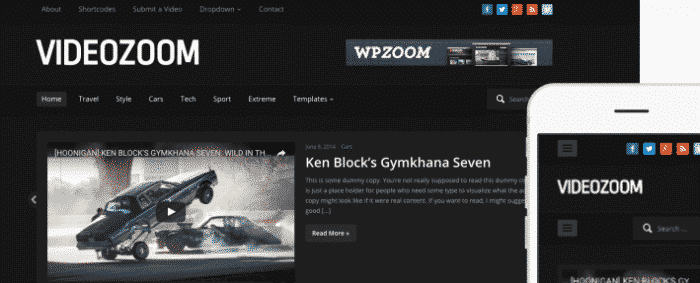
Overview of WPZOOM Videozoom
Step into the world of professional video content with WPZOOM Videozoom, a powerful and intuitive WordPress theme designed specifically for video bloggers, filmmakers, and anyone looking to showcase their video content with style. This theme transforms your WordPress site into a dynamic video portal, offering a sleek design and robust features that put your visual stories front and center. WPZOOM Videozoom is the perfect solution for creators who demand a high-quality, engaging platform for their multimedia projects.
Key Features of WPZOOM Videozoom
- Responsive Design: WPZOOM Videozoom ensures your video content looks stunning and performs flawlessly on any device, from desktops to tablets and smartphones, providing an optimal viewing experience for all your visitors.
- Video Embedding Support: Seamlessly embed videos from popular platforms like YouTube, Vimeo, and self-hosted options directly into your posts and pages, making content creation effortless and versatile.
- Featured Video Slider: Highlight your most important or latest videos with an eye-catching, customizable slider on your homepage, drawing immediate attention to your best work.
- Customizable Layouts: Tailor the look and feel of your site with various layout options, including different post styles and archive views, allowing you to create a unique brand presence with WPZOOM Videozoom.
- WPZOOM Framework: Built on the reliable WPZOOM Framework, the theme offers a robust set of options for easy customization and powerful performance, ensuring your site runs smoothly.
- Ad Management Integration: Monetize your video content effectively with built-in ad management areas, allowing you to place advertisements strategically without needing additional plugins.
- Social Media Integration: Encourage sharing and expand your reach with integrated social media buttons, making it simple for viewers to share your videos across their networks.
- Translation Ready: Reach a global audience with WPZOOM Videozoom’s translation-ready features, allowing you to easily translate your site into multiple languages.
Why Choose WPZOOM Videozoom?
Choosing WPZOOM Videozoom means investing in a theme that is meticulously crafted for the unique demands of video-centric websites. It goes beyond mere aesthetics, offering a comprehensive suite of tools that simplify the management and presentation of your video library. With its focus on user experience, WPZOOM Videozoom provides a clean, distraction-free environment that keeps your audience engaged with your content, encouraging longer viewing times and repeat visits. Its intuitive interface means less time wrestling with technicalities and more time creating the compelling videos your audience loves.
Furthermore, WPZOOM Videozoom is designed for scalability, making it suitable for everyone from aspiring vloggers to established media professionals. Its robust framework ensures stability and performance, even as your video collection grows. The integrated customization options empower you to align the theme perfectly with your brand’s identity, creating a professional and memorable online presence. For anyone serious about showcasing video content, WPZOOM Videozoom offers an unparalleled blend of functionality, design, and ease of use.
Who Should Use WPZOOM Videozoom?
WPZOOM Videozoom is ideal for video bloggers, YouTubers, independent filmmakers, documentary makers, online course creators, and anyone who primarily uses video to communicate their message. It’s also perfect for businesses looking to integrate video marketing heavily into their content strategy, providing a dedicated and professional platform for their video campaigns and tutorials.
How to Install WPZOOM Videozoom
- Download the Theme File: After acquiring WPZOOM Videozoom, download the theme .zip file to your computer. Do not unzip it.
- Upload via WordPress Dashboard: Log in to your WordPress admin panel. Navigate to ‘Appearance’ > ‘Themes’ > ‘Add New’ > ‘Upload Theme’. Choose the downloaded .zip file and click ‘Install Now’.
- Activate the Theme: Once the installation is complete, click the ‘Activate’ link to make WPZOOM Videozoom your active theme.
- Install Required Plugins: WPZOOM Videozoom may recommend or require certain plugins for full functionality. Follow the prompts to install and activate these.
- Import Demo Content (Optional): To get started quickly, consider importing the demo content provided by WPZOOM (if available) through the theme options panel. This will give you a pre-designed layout to customize.
Frequently Asked Questions About WPZOOM Videozoom
Does WPZOOM Videozoom support all video platforms?
WPZOOM Videozoom offers robust support for embedding videos from popular platforms like YouTube and Vimeo. It also generally supports self-hosted MP4 videos. For less common platforms, you can often use their provided embed codes directly within the WordPress editor.
Is WPZOOM Videozoom compatible with page builders?
While WPZOOM Videozoom provides extensive customization options through its theme panel, it is generally compatible with popular WordPress page builders like Elementor or Beaver Builder. This allows for even greater flexibility in designing your pages and posts, beyond the theme’s default layouts.
Can I customize the colors and fonts in WPZOOM Videozoom?
Yes, WPZOOM Videozoom comes with comprehensive customization options built into the WordPress Customizer and the WPZOOM Framework. You can easily adjust colors, typography, layout settings, and more to match your brand’s aesthetic without needing to write any code.
Get WPZOOM Videozoom Today
Elevate your video content presentation with the professional power of WPZOOM Videozoom. This theme provides everything you need to create a stunning, high-performance video website that captivates your audience. Don’t miss out on the opportunity to transform your online presence. Explore this and many other premium WordPress Themes and GPL WordPress Products available in our store. Enhance your site and engage your viewers like never before!
Related Products You May Like
Here's everything you need to know about your purchase:
- 100% original files — Every product is the genuine, virus-free file, exactly as released by the original developer.
- Instant download — Access your files immediately after purchase from your account.
- Lifetime access — Re-download your purchased files anytime. No expiry, no limits.
- Free updates — Newer version released? Just request an update from us, free for all customers.
- Dedicated support — Our team is available 24/7 for installation and file-related help.
- Easy refunds — Not satisfied? Review our Refund Policy. We offer a hassle-free 7-day guarantee.
$59.00 Original price was: $59.00.$2.00Current price is: $2.00.
Version
4.2.0
Last Updated
03/04/2026
License
GPL v2
Compatibility
WordPress 5.0+
Need latest version?
Newer version released? Request an update from us — free for all customers!
Request Update →🎁 Your Purchase Includes
Overview of WPZOOM Videozoom
Step into the world of professional video content with WPZOOM Videozoom, a powerful and intuitive WordPress theme designed specifically for video bloggers, filmmakers, and anyone looking to showcase their video content with style. This theme transforms your WordPress site into a dynamic video portal, offering a sleek design and robust features that put your visual stories front and center. WPZOOM Videozoom is the perfect solution for creators who demand a high-quality, engaging platform for their multimedia projects.
Key Features of WPZOOM Videozoom
- Responsive Design: WPZOOM Videozoom ensures your video content looks stunning and performs flawlessly on any device, from desktops to tablets and smartphones, providing an optimal viewing experience for all your visitors.
- Video Embedding Support: Seamlessly embed videos from popular platforms like YouTube, Vimeo, and self-hosted options directly into your posts and pages, making content creation effortless and versatile.
- Featured Video Slider: Highlight your most important or latest videos with an eye-catching, customizable slider on your homepage, drawing immediate attention to your best work.
- Customizable Layouts: Tailor the look and feel of your site with various layout options, including different post styles and archive views, allowing you to create a unique brand presence with WPZOOM Videozoom.
- WPZOOM Framework: Built on the reliable WPZOOM Framework, the theme offers a robust set of options for easy customization and powerful performance, ensuring your site runs smoothly.
- Ad Management Integration: Monetize your video content effectively with built-in ad management areas, allowing you to place advertisements strategically without needing additional plugins.
- Social Media Integration: Encourage sharing and expand your reach with integrated social media buttons, making it simple for viewers to share your videos across their networks.
- Translation Ready: Reach a global audience with WPZOOM Videozoom’s translation-ready features, allowing you to easily translate your site into multiple languages.
Why Choose WPZOOM Videozoom?
Choosing WPZOOM Videozoom means investing in a theme that is meticulously crafted for the unique demands of video-centric websites. It goes beyond mere aesthetics, offering a comprehensive suite of tools that simplify the management and presentation of your video library. With its focus on user experience, WPZOOM Videozoom provides a clean, distraction-free environment that keeps your audience engaged with your content, encouraging longer viewing times and repeat visits. Its intuitive interface means less time wrestling with technicalities and more time creating the compelling videos your audience loves.
Furthermore, WPZOOM Videozoom is designed for scalability, making it suitable for everyone from aspiring vloggers to established media professionals. Its robust framework ensures stability and performance, even as your video collection grows. The integrated customization options empower you to align the theme perfectly with your brand’s identity, creating a professional and memorable online presence. For anyone serious about showcasing video content, WPZOOM Videozoom offers an unparalleled blend of functionality, design, and ease of use.
Who Should Use WPZOOM Videozoom?
WPZOOM Videozoom is ideal for video bloggers, YouTubers, independent filmmakers, documentary makers, online course creators, and anyone who primarily uses video to communicate their message. It’s also perfect for businesses looking to integrate video marketing heavily into their content strategy, providing a dedicated and professional platform for their video campaigns and tutorials.
How to Install WPZOOM Videozoom
- Download the Theme File: After acquiring WPZOOM Videozoom, download the theme .zip file to your computer. Do not unzip it.
- Upload via WordPress Dashboard: Log in to your WordPress admin panel. Navigate to ‘Appearance’ > ‘Themes’ > ‘Add New’ > ‘Upload Theme’. Choose the downloaded .zip file and click ‘Install Now’.
- Activate the Theme: Once the installation is complete, click the ‘Activate’ link to make WPZOOM Videozoom your active theme.
- Install Required Plugins: WPZOOM Videozoom may recommend or require certain plugins for full functionality. Follow the prompts to install and activate these.
- Import Demo Content (Optional): To get started quickly, consider importing the demo content provided by WPZOOM (if available) through the theme options panel. This will give you a pre-designed layout to customize.
Frequently Asked Questions About WPZOOM Videozoom
Does WPZOOM Videozoom support all video platforms?
WPZOOM Videozoom offers robust support for embedding videos from popular platforms like YouTube and Vimeo. It also generally supports self-hosted MP4 videos. For less common platforms, you can often use their provided embed codes directly within the WordPress editor.
Is WPZOOM Videozoom compatible with page builders?
While WPZOOM Videozoom provides extensive customization options through its theme panel, it is generally compatible with popular WordPress page builders like Elementor or Beaver Builder. This allows for even greater flexibility in designing your pages and posts, beyond the theme’s default layouts.
Can I customize the colors and fonts in WPZOOM Videozoom?
Yes, WPZOOM Videozoom comes with comprehensive customization options built into the WordPress Customizer and the WPZOOM Framework. You can easily adjust colors, typography, layout settings, and more to match your brand’s aesthetic without needing to write any code.
Get WPZOOM Videozoom Today
Elevate your video content presentation with the professional power of WPZOOM Videozoom. This theme provides everything you need to create a stunning, high-performance video website that captivates your audience. Don’t miss out on the opportunity to transform your online presence. Explore this and many other premium WordPress Themes and GPL WordPress Products available in our store. Enhance your site and engage your viewers like never before!
Related Products You May Like
Reviews
There are no reviews yet.
Here's everything you need to know about your purchase:
- 100% original files — Every product is the genuine, virus-free file, exactly as released by the original developer.
- Instant download — Access your files immediately after purchase from your account.
- Lifetime access — Re-download your purchased files anytime. No expiry, no limits.
- Free updates — Newer version released? Just request an update from us, free for all customers.
- Dedicated support — Our team is available 24/7 for installation and file-related help.
- Easy refunds — Not satisfied? Review our Refund Policy. We offer a hassle-free 7-day guarantee.
Reviews
There are no reviews yet.