

Kreatura 7.14.3 – Slider Plugin for WordPress
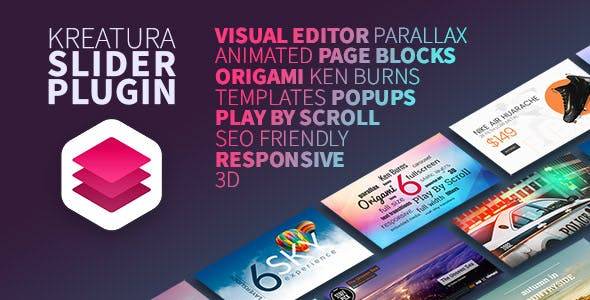
Overview of Kreatura
Kreatura is a powerful and versatile slider plugin for WordPress, designed to help you create stunning, responsive, and engaging sliders for any website. Whether you’re showcasing portfolio items, promoting products, or highlighting important announcements, Kreatura provides an intuitive platform to bring your visual content to life. It’s the perfect solution for web designers, bloggers, e-commerce store owners, and anyone looking to add dynamic, interactive elements to their WordPress site without needing to write a single line of code.
Key Features of Kreatura
- Drag & Drop Visual Editor: Craft beautiful slides with ease using Kreatura’s intuitive drag and drop interface. Arrange layers, images, videos, and text exactly how you envision them without any coding.
- Fully Responsive Design: Ensure your sliders look impeccable on any device, from desktops to tablets and smartphones. Kreatura automatically adapts your content for optimal viewing experience across all screen sizes.
- Layered Animation Builder: Bring your slides to life with sophisticated layered animations. Kreatura offers a wide array of transition effects and customization options to make your content truly stand out.
- Advanced Parallax Effects: Add depth and dynamism to your sliders with stunning parallax scrolling effects. Kreatura allows you to create captivating visual experiences that engage visitors.
- Rich Media Support: Seamlessly integrate images, YouTube and Vimeo videos, HTML5 videos, and even audio files into your Kreatura sliders, offering diverse content presentation options.
- Pre-defined Templates & Demos: Get a head start on your projects with a rich library of professionally designed templates and demos. Kreatura helps you quickly create impressive sliders.
- SEO Friendly: Kreatura is built with search engine optimization in mind, helping your slider content be discoverable and contribute positively to your site’s overall SEO performance.
- Cross-Browser Compatibility: Your sliders created with Kreatura will perform flawlessly across all major web browsers, ensuring a consistent user experience for all your visitors.
Why Choose Kreatura?
Choosing Kreatura means opting for a slider solution that combines powerful functionality with user-friendliness. In today’s competitive online landscape, captivating visuals are non-negotiable, and Kreatura empowers you to create exactly that. Its robust set of features, from the intuitive drag-and-drop editor to advanced animation capabilities, ensures that you can design anything from a simple image carousel to a complex, multi-layered presentation. The responsiveness of Kreatura is a major advantage, guaranteeing that your beautifully crafted sliders will look perfect on any device, enhancing user experience and reducing bounce rates.
Beyond its aesthetic appeal, Kreatura is designed for performance and ease of use. You don’t need to be a coding expert to build stunning sliders; the visual editor handles all the heavy lifting, allowing you to focus on creativity. The extensive documentation and active community support mean you’re never alone if you encounter a challenge. By integrating Kreatura into your WordPress site, you’re not just adding a slider; you’re investing in a tool that will elevate your site’s visual appeal, improve user engagement, and ultimately help you achieve your online goals. Kreatura truly stands out as a premium choice for dynamic content.
Furthermore, Kreatura’s focus on SEO friendliness ensures that your dynamic content doesn’t come at the cost of search engine visibility. This is a critical consideration for any website aiming for organic traffic. With Kreatura, you can create engaging content that both delights your visitors and is discoverable by search engines. It’s a comprehensive solution that addresses both the visual and technical needs of modern WordPress websites, making Kreatura an indispensable tool for anyone serious about their online presence.
Who Should Use Kreatura?
Kreatura is ideal for a wide range of WordPress users. Web designers and developers will appreciate its flexibility and advanced customization options for client projects. Bloggers and content creators can use Kreatura to highlight featured posts, image galleries, or video content in an engaging way. E-commerce store owners can leverage Kreatura to showcase new products, promotions, or bestsellers directly on their homepage or product pages, driving sales. Marketing professionals will find Kreatura invaluable for creating high-impact landing page heroes or promotional banners. Essentially, anyone who wants to add dynamic, visually appealing, and responsive content sliders to their WordPress website without extensive coding knowledge will find Kreatura to be an exceptional tool.
How to Install Kreatura
- Download the Plugin: After purchase, download the Kreatura plugin ZIP file from your account on GPLUniverse.
- Access WordPress Dashboard: Log in to your WordPress admin area.
- Upload the Plugin: Navigate to ‘Plugins’ > ‘Add New’ and then click the ‘Upload Plugin’ button at the top of the page.
- Choose and Install: Click ‘Choose File’, select the Kreatura ZIP file you downloaded, and then click ‘Install Now’.
- Activate Kreatura: Once the installation is complete, click ‘Activate Plugin’. Kreatura will now appear in your WordPress dashboard menu, ready for you to start creating stunning sliders.
Frequently Asked Questions About Kreatura
Can Kreatura be used with any WordPress theme?
Yes, Kreatura is designed to be highly compatible with virtually any well-coded WordPress theme. It integrates seamlessly into your existing site structure, allowing you to add sliders wherever you need them without conflicts. Kreatura ensures your content looks great regardless of your theme choice.
Is Kreatura optimized for mobile devices?
Absolutely! Kreatura is built with a strong focus on responsiveness. All sliders created with Kreatura automatically adapt to different screen sizes, ensuring an optimal viewing experience on desktops, tablets, and smartphones. This mobile-first approach is central to Kreatura’s design.
Does Kreatura support video content?
Yes, Kreatura offers comprehensive support for various video formats. You can easily embed videos from popular platforms like YouTube and Vimeo, as well as self-hosted HTML5 videos, directly into your sliders. This makes Kreatura incredibly versatile for multimedia presentations.
Get Kreatura Today
Elevate your WordPress website with the dynamic and engaging power of Kreatura. Transform static pages into captivating visual experiences that grab attention and drive engagement. With its intuitive interface and powerful features, Kreatura is the ultimate tool for creating professional-grade sliders without any coding hassle. Don’t miss out on the opportunity to enhance your site’s visual appeal and functionality. Explore Kreatura and other premium WordPress Plugins available on our store, and discover the full range of GPL WordPress Products that can revolutionize your online presence today.
Related Products You May Like
Here's everything you need to know about your purchase:
- 100% original files — Every product is the genuine, virus-free file, exactly as released by the original developer.
- Instant download — Access your files immediately after purchase from your account.
- Lifetime access — Re-download your purchased files anytime. No expiry, no limits.
- Free updates — Newer version released? Just request an update from us, free for all customers.
- Dedicated support — Our team is available 24/7 for installation and file-related help.
- Easy refunds — Not satisfied? Review our Refund Policy. We offer a hassle-free 7-day guarantee.
$100.00 Original price was: $100.00.$2.00Current price is: $2.00.
Version
7.14.3
Last Updated
08/04/2025
License
GPL v2
Compatibility
WordPress 5.0+
Need latest version?
Newer version released? Request an update from us — free for all customers!
Request Update →🎁 Your Purchase Includes
Overview of Kreatura
Kreatura is a powerful and versatile slider plugin for WordPress, designed to help you create stunning, responsive, and engaging sliders for any website. Whether you’re showcasing portfolio items, promoting products, or highlighting important announcements, Kreatura provides an intuitive platform to bring your visual content to life. It’s the perfect solution for web designers, bloggers, e-commerce store owners, and anyone looking to add dynamic, interactive elements to their WordPress site without needing to write a single line of code.
Key Features of Kreatura
- Drag & Drop Visual Editor: Craft beautiful slides with ease using Kreatura’s intuitive drag and drop interface. Arrange layers, images, videos, and text exactly how you envision them without any coding.
- Fully Responsive Design: Ensure your sliders look impeccable on any device, from desktops to tablets and smartphones. Kreatura automatically adapts your content for optimal viewing experience across all screen sizes.
- Layered Animation Builder: Bring your slides to life with sophisticated layered animations. Kreatura offers a wide array of transition effects and customization options to make your content truly stand out.
- Advanced Parallax Effects: Add depth and dynamism to your sliders with stunning parallax scrolling effects. Kreatura allows you to create captivating visual experiences that engage visitors.
- Rich Media Support: Seamlessly integrate images, YouTube and Vimeo videos, HTML5 videos, and even audio files into your Kreatura sliders, offering diverse content presentation options.
- Pre-defined Templates & Demos: Get a head start on your projects with a rich library of professionally designed templates and demos. Kreatura helps you quickly create impressive sliders.
- SEO Friendly: Kreatura is built with search engine optimization in mind, helping your slider content be discoverable and contribute positively to your site’s overall SEO performance.
- Cross-Browser Compatibility: Your sliders created with Kreatura will perform flawlessly across all major web browsers, ensuring a consistent user experience for all your visitors.
Why Choose Kreatura?
Choosing Kreatura means opting for a slider solution that combines powerful functionality with user-friendliness. In today’s competitive online landscape, captivating visuals are non-negotiable, and Kreatura empowers you to create exactly that. Its robust set of features, from the intuitive drag-and-drop editor to advanced animation capabilities, ensures that you can design anything from a simple image carousel to a complex, multi-layered presentation. The responsiveness of Kreatura is a major advantage, guaranteeing that your beautifully crafted sliders will look perfect on any device, enhancing user experience and reducing bounce rates.
Beyond its aesthetic appeal, Kreatura is designed for performance and ease of use. You don’t need to be a coding expert to build stunning sliders; the visual editor handles all the heavy lifting, allowing you to focus on creativity. The extensive documentation and active community support mean you’re never alone if you encounter a challenge. By integrating Kreatura into your WordPress site, you’re not just adding a slider; you’re investing in a tool that will elevate your site’s visual appeal, improve user engagement, and ultimately help you achieve your online goals. Kreatura truly stands out as a premium choice for dynamic content.
Furthermore, Kreatura’s focus on SEO friendliness ensures that your dynamic content doesn’t come at the cost of search engine visibility. This is a critical consideration for any website aiming for organic traffic. With Kreatura, you can create engaging content that both delights your visitors and is discoverable by search engines. It’s a comprehensive solution that addresses both the visual and technical needs of modern WordPress websites, making Kreatura an indispensable tool for anyone serious about their online presence.
Who Should Use Kreatura?
Kreatura is ideal for a wide range of WordPress users. Web designers and developers will appreciate its flexibility and advanced customization options for client projects. Bloggers and content creators can use Kreatura to highlight featured posts, image galleries, or video content in an engaging way. E-commerce store owners can leverage Kreatura to showcase new products, promotions, or bestsellers directly on their homepage or product pages, driving sales. Marketing professionals will find Kreatura invaluable for creating high-impact landing page heroes or promotional banners. Essentially, anyone who wants to add dynamic, visually appealing, and responsive content sliders to their WordPress website without extensive coding knowledge will find Kreatura to be an exceptional tool.
How to Install Kreatura
- Download the Plugin: After purchase, download the Kreatura plugin ZIP file from your account on GPLUniverse.
- Access WordPress Dashboard: Log in to your WordPress admin area.
- Upload the Plugin: Navigate to ‘Plugins’ > ‘Add New’ and then click the ‘Upload Plugin’ button at the top of the page.
- Choose and Install: Click ‘Choose File’, select the Kreatura ZIP file you downloaded, and then click ‘Install Now’.
- Activate Kreatura: Once the installation is complete, click ‘Activate Plugin’. Kreatura will now appear in your WordPress dashboard menu, ready for you to start creating stunning sliders.
Frequently Asked Questions About Kreatura
Can Kreatura be used with any WordPress theme?
Yes, Kreatura is designed to be highly compatible with virtually any well-coded WordPress theme. It integrates seamlessly into your existing site structure, allowing you to add sliders wherever you need them without conflicts. Kreatura ensures your content looks great regardless of your theme choice.
Is Kreatura optimized for mobile devices?
Absolutely! Kreatura is built with a strong focus on responsiveness. All sliders created with Kreatura automatically adapt to different screen sizes, ensuring an optimal viewing experience on desktops, tablets, and smartphones. This mobile-first approach is central to Kreatura’s design.
Does Kreatura support video content?
Yes, Kreatura offers comprehensive support for various video formats. You can easily embed videos from popular platforms like YouTube and Vimeo, as well as self-hosted HTML5 videos, directly into your sliders. This makes Kreatura incredibly versatile for multimedia presentations.
Get Kreatura Today
Elevate your WordPress website with the dynamic and engaging power of Kreatura. Transform static pages into captivating visual experiences that grab attention and drive engagement. With its intuitive interface and powerful features, Kreatura is the ultimate tool for creating professional-grade sliders without any coding hassle. Don’t miss out on the opportunity to enhance your site’s visual appeal and functionality. Explore Kreatura and other premium WordPress Plugins available on our store, and discover the full range of GPL WordPress Products that can revolutionize your online presence today.
Related Products You May Like
Reviews
There are no reviews yet.
Here's everything you need to know about your purchase:
- 100% original files — Every product is the genuine, virus-free file, exactly as released by the original developer.
- Instant download — Access your files immediately after purchase from your account.
- Lifetime access — Re-download your purchased files anytime. No expiry, no limits.
- Free updates — Newer version released? Just request an update from us, free for all customers.
- Dedicated support — Our team is available 24/7 for installation and file-related help.
- Easy refunds — Not satisfied? Review our Refund Policy. We offer a hassle-free 7-day guarantee.
Reviews
There are no reviews yet.