

Product Condition for WooCommerce 1.4.6
Overview of Product Condition for WooCommerce
Enhance transparency and boost customer trust on your online store with Product Condition for WooCommerce. This powerful plugin empowers you to clearly display the condition of your products, whether they’re brand new, pre-owned, refurbished, or anything in between. It’s an indispensable tool for any WooCommerce store owner selling items that can exist in various states, providing clarity that drives purchasing decisions.
Key Features of Product Condition for WooCommerce
- Flexible Condition Management: Easily create, edit, and manage an unlimited number of custom product conditions to perfectly match your inventory needs. From ‘New’ to ‘Used – Like New’ or ‘Refurbished with Warranty’, Product Condition for WooCommerce gives you full control.
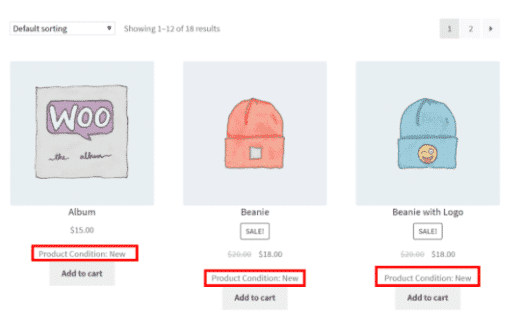
- Prominent Display Options: Showcase product conditions directly on individual product pages, ensuring customers have vital information at a glance before adding to cart. This immediate visibility is crucial for building confidence.
- Archive Page Integration: Optionally display product conditions on shop and category archive pages, allowing customers to quickly scan and filter products based on their desired condition, streamlining their shopping experience.
- Customizable Labels and Styles: Tailor the appearance of your condition labels to seamlessly integrate with your store’s design. Choose colors, fonts, and positions to maintain a consistent brand aesthetic with Product Condition for WooCommerce.
- WooCommerce Compatibility: Designed to work flawlessly with your existing WooCommerce setup, ensuring a smooth integration without conflicts or performance issues. It’s built for the WooCommerce ecosystem.
- Support for Variable Products: Assign different conditions to variations of a single product, providing precise details for each option your customers can choose, which is a key advantage of Product Condition for WooCommerce.
- Easy-to-Use Interface: Configure and manage all aspects of your product conditions through an intuitive interface within the WordPress dashboard, requiring no coding knowledge.
- Enhanced Product Filtering: Improve user navigation by enabling customers to filter products by condition, helping them find exactly what they’re looking for faster and more efficiently.
Why Choose Product Condition for WooCommerce?
In today’s competitive e-commerce landscape, transparency is paramount. Product Condition for WooCommerce offers a straightforward yet highly effective way to communicate essential product details to your customers. By clearly stating whether an item is new, used, or refurbished, you eliminate guesswork, build immediate trust, and significantly reduce potential customer service inquiries related to product state. This clarity not only enhances the user experience but also leads to higher conversion rates as customers feel more confident in their purchases.
Choosing Product Condition for WooCommerce means investing in a solution that professionalizes your online store. It allows you to diversify your product offerings, catering to a wider audience interested in items of various conditions, from budget-conscious buyers to those seeking premium, untouched goods. The ability to manage and display conditions efficiently across your entire product catalog saves you valuable time and effort, ensuring consistency and accuracy without manual descriptions for every single item. This plugin is an essential addition for any store aiming for clarity, customer satisfaction, and increased sales.
Who Should Use Product Condition for WooCommerce?
Product Condition for WooCommerce is ideal for a wide range of online businesses. This includes stores selling electronics, refurbished goods, vintage items, second-hand apparel, collectibles, books, or any product where its condition significantly impacts its value and desirability. Retailers who want to offer both new and pre-owned versions of the same product will find it invaluable. Essentially, if your inventory contains items with varying states of wear or newness, and you want to provide clear, actionable information to your customers, Product Condition for WooCommerce is the perfect solution for you.
How to Install Product Condition for WooCommerce
- Download the Plugin: After purchasing, download the Product Condition for WooCommerce plugin file from your account on our site.
- Upload via WordPress Dashboard: Log in to your WordPress admin area. Navigate to ‘Plugins’ > ‘Add New’. Click on ‘Upload Plugin’ and choose the downloaded ZIP file.
- Activate the Plugin: Once the upload is complete, click ‘Install Now’ and then ‘Activate Plugin’. Product Condition for WooCommerce will now be active on your site.
- Configure Settings: Go to the new ‘Product Conditions’ menu item (or similar, depending on the plugin’s exact integration) in your WordPress dashboard. Here you can create and manage your custom conditions.
- Assign Conditions to Products: Edit your existing or new WooCommerce products. You will find an option to select or assign a condition to each product directly within the product data meta box.
Frequently Asked Questions About Product Condition for WooCommerce
Can I create unlimited custom conditions with Product Condition for WooCommerce?
Yes, Product Condition for WooCommerce allows you to create an unlimited number of custom product conditions to precisely fit your inventory and business model. You have full flexibility to define conditions like ‘New’, ‘Used – Excellent’, ‘Refurbished’, ‘Vintage’, etc.
Does Product Condition for WooCommerce support variable products?
Absolutely. Product Condition for WooCommerce is designed to work seamlessly with variable products. You can assign different conditions to each specific product variation, ensuring accuracy for every option your customers can choose.
Will Product Condition for WooCommerce affect my website’s performance?
Product Condition for WooCommerce is developed with performance in mind. It integrates efficiently with WooCommerce and WordPress, ensuring that it adds valuable functionality without negatively impacting your site’s speed or overall performance.
Get Product Condition for WooCommerce Today
Elevate your WooCommerce store’s professionalism and customer confidence by adding crystal-clear product condition information. Product Condition for WooCommerce is the essential tool for any merchant dealing with varied product states. Explore this and other powerful WordPress Plugins to enhance your site’s functionality. Browse our extensive collection of high-quality GPL WordPress Products and empower your online business today!
Related Products You May Like
Here's everything you need to know about your purchase:
- 100% original files — Every product is the genuine, virus-free file, exactly as released by the original developer.
- Instant download — Access your files immediately after purchase from your account.
- Lifetime access — Re-download your purchased files anytime. No expiry, no limits.
- Free updates — Newer version released? Just request an update from us, free for all customers.
- Dedicated support — Our team is available 24/7 for installation and file-related help.
- Easy refunds — Not satisfied? Review our Refund Policy. We offer a hassle-free 7-day guarantee.
$59.00 Original price was: $59.00.$2.00Current price is: $2.00.
Version
1.4.6
Last Updated
18/02/2026
License
GPL v2
Compatibility
WordPress 5.0+
Need latest version?
Newer version released? Request an update from us — free for all customers!
Request Update →🎁 Your Purchase Includes
Overview of Product Condition for WooCommerce
Enhance transparency and boost customer trust on your online store with Product Condition for WooCommerce. This powerful plugin empowers you to clearly display the condition of your products, whether they’re brand new, pre-owned, refurbished, or anything in between. It’s an indispensable tool for any WooCommerce store owner selling items that can exist in various states, providing clarity that drives purchasing decisions.
Key Features of Product Condition for WooCommerce
- Flexible Condition Management: Easily create, edit, and manage an unlimited number of custom product conditions to perfectly match your inventory needs. From ‘New’ to ‘Used – Like New’ or ‘Refurbished with Warranty’, Product Condition for WooCommerce gives you full control.
- Prominent Display Options: Showcase product conditions directly on individual product pages, ensuring customers have vital information at a glance before adding to cart. This immediate visibility is crucial for building confidence.
- Archive Page Integration: Optionally display product conditions on shop and category archive pages, allowing customers to quickly scan and filter products based on their desired condition, streamlining their shopping experience.
- Customizable Labels and Styles: Tailor the appearance of your condition labels to seamlessly integrate with your store’s design. Choose colors, fonts, and positions to maintain a consistent brand aesthetic with Product Condition for WooCommerce.
- WooCommerce Compatibility: Designed to work flawlessly with your existing WooCommerce setup, ensuring a smooth integration without conflicts or performance issues. It’s built for the WooCommerce ecosystem.
- Support for Variable Products: Assign different conditions to variations of a single product, providing precise details for each option your customers can choose, which is a key advantage of Product Condition for WooCommerce.
- Easy-to-Use Interface: Configure and manage all aspects of your product conditions through an intuitive interface within the WordPress dashboard, requiring no coding knowledge.
- Enhanced Product Filtering: Improve user navigation by enabling customers to filter products by condition, helping them find exactly what they’re looking for faster and more efficiently.
Why Choose Product Condition for WooCommerce?
In today’s competitive e-commerce landscape, transparency is paramount. Product Condition for WooCommerce offers a straightforward yet highly effective way to communicate essential product details to your customers. By clearly stating whether an item is new, used, or refurbished, you eliminate guesswork, build immediate trust, and significantly reduce potential customer service inquiries related to product state. This clarity not only enhances the user experience but also leads to higher conversion rates as customers feel more confident in their purchases.
Choosing Product Condition for WooCommerce means investing in a solution that professionalizes your online store. It allows you to diversify your product offerings, catering to a wider audience interested in items of various conditions, from budget-conscious buyers to those seeking premium, untouched goods. The ability to manage and display conditions efficiently across your entire product catalog saves you valuable time and effort, ensuring consistency and accuracy without manual descriptions for every single item. This plugin is an essential addition for any store aiming for clarity, customer satisfaction, and increased sales.
Who Should Use Product Condition for WooCommerce?
Product Condition for WooCommerce is ideal for a wide range of online businesses. This includes stores selling electronics, refurbished goods, vintage items, second-hand apparel, collectibles, books, or any product where its condition significantly impacts its value and desirability. Retailers who want to offer both new and pre-owned versions of the same product will find it invaluable. Essentially, if your inventory contains items with varying states of wear or newness, and you want to provide clear, actionable information to your customers, Product Condition for WooCommerce is the perfect solution for you.
How to Install Product Condition for WooCommerce
- Download the Plugin: After purchasing, download the Product Condition for WooCommerce plugin file from your account on our site.
- Upload via WordPress Dashboard: Log in to your WordPress admin area. Navigate to ‘Plugins’ > ‘Add New’. Click on ‘Upload Plugin’ and choose the downloaded ZIP file.
- Activate the Plugin: Once the upload is complete, click ‘Install Now’ and then ‘Activate Plugin’. Product Condition for WooCommerce will now be active on your site.
- Configure Settings: Go to the new ‘Product Conditions’ menu item (or similar, depending on the plugin’s exact integration) in your WordPress dashboard. Here you can create and manage your custom conditions.
- Assign Conditions to Products: Edit your existing or new WooCommerce products. You will find an option to select or assign a condition to each product directly within the product data meta box.
Frequently Asked Questions About Product Condition for WooCommerce
Can I create unlimited custom conditions with Product Condition for WooCommerce?
Yes, Product Condition for WooCommerce allows you to create an unlimited number of custom product conditions to precisely fit your inventory and business model. You have full flexibility to define conditions like ‘New’, ‘Used – Excellent’, ‘Refurbished’, ‘Vintage’, etc.
Does Product Condition for WooCommerce support variable products?
Absolutely. Product Condition for WooCommerce is designed to work seamlessly with variable products. You can assign different conditions to each specific product variation, ensuring accuracy for every option your customers can choose.
Will Product Condition for WooCommerce affect my website’s performance?
Product Condition for WooCommerce is developed with performance in mind. It integrates efficiently with WooCommerce and WordPress, ensuring that it adds valuable functionality without negatively impacting your site’s speed or overall performance.
Get Product Condition for WooCommerce Today
Elevate your WooCommerce store’s professionalism and customer confidence by adding crystal-clear product condition information. Product Condition for WooCommerce is the essential tool for any merchant dealing with varied product states. Explore this and other powerful WordPress Plugins to enhance your site’s functionality. Browse our extensive collection of high-quality GPL WordPress Products and empower your online business today!
Related Products You May Like
Reviews
There are no reviews yet.
Here's everything you need to know about your purchase:
- 100% original files — Every product is the genuine, virus-free file, exactly as released by the original developer.
- Instant download — Access your files immediately after purchase from your account.
- Lifetime access — Re-download your purchased files anytime. No expiry, no limits.
- Free updates — Newer version released? Just request an update from us, free for all customers.
- Dedicated support — Our team is available 24/7 for installation and file-related help.
- Easy refunds — Not satisfied? Review our Refund Policy. We offer a hassle-free 7-day guarantee.
Reviews
There are no reviews yet.