

BWD Restaurant Price Menu 1.6 – Addon For Elementor
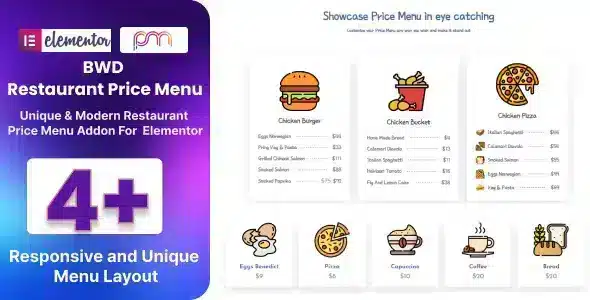
Overview of BWD Restaurant Price Menu
Transform the way you display your culinary offerings online with the WordPress Plugin, BWD Restaurant Price Menu. This powerful Elementor addon is specifically designed for restaurants, cafes, bistros, and any food-related business looking to present their menu items in a visually appealing and highly customizable format. With BWD Restaurant Price Menu, you can effortlessly create stunning, responsive price lists that engage your customers and highlight your delicious dishes.
Key Features of BWD Restaurant Price Menu
- Drag-and-Drop Interface: Leverage Elementor’s intuitive drag-and-drop builder to easily create and customize your price menus without any coding knowledge.
- Multiple Layout Options: Choose from a diverse range of pre-designed layouts and styles to perfectly match your brand’s aesthetic and menu presentation needs.
- Fully Responsive Design: Ensure your beautiful price menus look impeccable on any device, from desktops to tablets and smartphones, providing an optimal viewing experience for all customers.
- Customizable Elements: Take full control over every aspect of your menu, including fonts, colors, images, descriptions, prices, and currency symbols, to reflect your unique brand identity.
- Highlight Special Dishes: Easily mark new arrivals, popular items, or chef’s specials with dedicated badges and visual cues to draw customer attention.
- Image and Icon Support: Enhance your menu items with high-quality images and engaging icons to make your dishes even more enticing and informative.
- Advanced Typography Controls: Utilize Elementor’s extensive typography options to ensure your menu text is clear, legible, and aesthetically pleasing.
- Seamless Elementor Integration: As a dedicated Elementor addon, BWD Restaurant Price Menu integrates flawlessly into your existing Elementor workflow, ensuring a smooth and efficient design process.
Why Choose BWD Restaurant Price Menu?
Choosing BWD Restaurant Price Menu means investing in a tool that will significantly elevate your online presence and streamline your menu management. In today’s digital age, a professional and attractive online menu is crucial for attracting and retaining customers. This addon empowers you to create menus that not only inform but also entice, reflecting the quality and ambiance of your establishment before customers even step through your doors.
The flexibility and ease of use offered by BWD Restaurant Price Menu are unparalleled. You don’t need to be a web designer or have advanced coding skills to create a sophisticated menu. Its tight integration with Elementor means you can design, update, and publish your menus with remarkable speed and efficiency. This saves you valuable time and resources, allowing you to focus more on what you do best – creating delightful culinary experiences.
Furthermore, BWD Restaurant Price Menu is built with performance in mind. Its optimized code ensures that your website remains fast and responsive, which is vital for SEO and user experience. By presenting your menu in a clear, engaging, and mobile-friendly format, you improve customer satisfaction and encourage repeat visits, making BWD Restaurant Price Menu an invaluable asset for any food business aiming for digital excellence.
Who Should Use BWD Restaurant Price Menu?
BWD Restaurant Price Menu is an essential tool for a wide range of food and beverage businesses. This includes traditional restaurants, cozy cafes, vibrant bistros, modern diners, mobile food trucks, catering services, juice bars, bakeries, and even online food delivery services. Anyone who needs to display a price list for food, drinks, or related services in a professional and dynamic way on their WordPress website will find BWD Restaurant Price Menu to be an indispensable addon for Elementor.
How to Install BWD Restaurant Price Menu
- Download the Plugin: After purchasing, download the BWD Restaurant Price Menu plugin file (a .zip archive) from your account.
- Upload to WordPress: Log in to your WordPress dashboard, navigate to ‘Plugins’ > ‘Add New’, then click ‘Upload Plugin’. Choose the downloaded .zip file and click ‘Install Now’.
- Activate the Plugin: Once the installation is complete, click ‘Activate Plugin’. Ensure that Elementor is also installed and active on your website, as BWD Restaurant Price Menu is an addon.
- Access in Elementor: Edit any page or post with Elementor. Search for “BWD Restaurant Price Menu” widgets in the Elementor sidebar.
- Drag, Drop, and Customize: Drag the desired BWD Restaurant Price Menu widget onto your page and start customizing your menu items, layouts, styles, and content directly within the Elementor editor.
Frequently Asked Questions About BWD Restaurant Price Menu
Is BWD Restaurant Price Menu compatible with all WordPress themes?
BWD Restaurant Price Menu is an Elementor addon, meaning it works seamlessly with any WordPress theme that is compatible with Elementor. As long as Elementor is installed and active, you can utilize the full functionality of BWD Restaurant Price Menu on your site.
Can I create multiple price menus on different pages using BWD Restaurant Price Menu?
Yes, absolutely! BWD Restaurant Price Menu allows you to create an unlimited number of price menus across various pages or sections of your website. Each menu can be uniquely customized to suit specific offerings or promotions.
Does BWD Restaurant Price Menu support different currencies?
Yes, BWD Restaurant Price Menu offers full flexibility for currency symbols. You can easily set and customize the currency symbol for your menu items to match your local currency or any other currency you require.
Get BWD Restaurant Price Menu Today
Ready to showcase your culinary delights with a professional and engaging online menu? Enhance your website’s appeal and functionality by integrating BWD Restaurant Price Menu into your Elementor workflow. This powerful addon is available as part of our extensive collection of WordPress Plugins. Elevate your restaurant’s digital presence and attract more customers by exploring BWD Restaurant Price Menu and other premium GPL WordPress Products on our store today!
Related Products You May Like
Here's everything you need to know about your purchase:
- 100% original files — Every product is the genuine, virus-free file, exactly as released by the original developer.
- Instant download — Access your files immediately after purchase from your account.
- Lifetime access — Re-download your purchased files anytime. No expiry, no limits.
- Free updates — Newer version released? Just request an update from us, free for all customers.
- Dedicated support — Our team is available 24/7 for installation and file-related help.
- Easy refunds — Not satisfied? Review our Refund Policy. We offer a hassle-free 7-day guarantee.
$59.00 Original price was: $59.00.$2.00Current price is: $2.00.
Version
1.6
Last Updated
24/12/2024
License
GPL v2
Compatibility
WordPress 5.0+
Need latest version?
Newer version released? Request an update from us — free for all customers!
Request Update →🎁 Your Purchase Includes
Overview of BWD Restaurant Price Menu
Transform the way you display your culinary offerings online with the WordPress Plugin, BWD Restaurant Price Menu. This powerful Elementor addon is specifically designed for restaurants, cafes, bistros, and any food-related business looking to present their menu items in a visually appealing and highly customizable format. With BWD Restaurant Price Menu, you can effortlessly create stunning, responsive price lists that engage your customers and highlight your delicious dishes.
Key Features of BWD Restaurant Price Menu
- Drag-and-Drop Interface: Leverage Elementor’s intuitive drag-and-drop builder to easily create and customize your price menus without any coding knowledge.
- Multiple Layout Options: Choose from a diverse range of pre-designed layouts and styles to perfectly match your brand’s aesthetic and menu presentation needs.
- Fully Responsive Design: Ensure your beautiful price menus look impeccable on any device, from desktops to tablets and smartphones, providing an optimal viewing experience for all customers.
- Customizable Elements: Take full control over every aspect of your menu, including fonts, colors, images, descriptions, prices, and currency symbols, to reflect your unique brand identity.
- Highlight Special Dishes: Easily mark new arrivals, popular items, or chef’s specials with dedicated badges and visual cues to draw customer attention.
- Image and Icon Support: Enhance your menu items with high-quality images and engaging icons to make your dishes even more enticing and informative.
- Advanced Typography Controls: Utilize Elementor’s extensive typography options to ensure your menu text is clear, legible, and aesthetically pleasing.
- Seamless Elementor Integration: As a dedicated Elementor addon, BWD Restaurant Price Menu integrates flawlessly into your existing Elementor workflow, ensuring a smooth and efficient design process.
Why Choose BWD Restaurant Price Menu?
Choosing BWD Restaurant Price Menu means investing in a tool that will significantly elevate your online presence and streamline your menu management. In today’s digital age, a professional and attractive online menu is crucial for attracting and retaining customers. This addon empowers you to create menus that not only inform but also entice, reflecting the quality and ambiance of your establishment before customers even step through your doors.
The flexibility and ease of use offered by BWD Restaurant Price Menu are unparalleled. You don’t need to be a web designer or have advanced coding skills to create a sophisticated menu. Its tight integration with Elementor means you can design, update, and publish your menus with remarkable speed and efficiency. This saves you valuable time and resources, allowing you to focus more on what you do best – creating delightful culinary experiences.
Furthermore, BWD Restaurant Price Menu is built with performance in mind. Its optimized code ensures that your website remains fast and responsive, which is vital for SEO and user experience. By presenting your menu in a clear, engaging, and mobile-friendly format, you improve customer satisfaction and encourage repeat visits, making BWD Restaurant Price Menu an invaluable asset for any food business aiming for digital excellence.
Who Should Use BWD Restaurant Price Menu?
BWD Restaurant Price Menu is an essential tool for a wide range of food and beverage businesses. This includes traditional restaurants, cozy cafes, vibrant bistros, modern diners, mobile food trucks, catering services, juice bars, bakeries, and even online food delivery services. Anyone who needs to display a price list for food, drinks, or related services in a professional and dynamic way on their WordPress website will find BWD Restaurant Price Menu to be an indispensable addon for Elementor.
How to Install BWD Restaurant Price Menu
- Download the Plugin: After purchasing, download the BWD Restaurant Price Menu plugin file (a .zip archive) from your account.
- Upload to WordPress: Log in to your WordPress dashboard, navigate to ‘Plugins’ > ‘Add New’, then click ‘Upload Plugin’. Choose the downloaded .zip file and click ‘Install Now’.
- Activate the Plugin: Once the installation is complete, click ‘Activate Plugin’. Ensure that Elementor is also installed and active on your website, as BWD Restaurant Price Menu is an addon.
- Access in Elementor: Edit any page or post with Elementor. Search for “BWD Restaurant Price Menu” widgets in the Elementor sidebar.
- Drag, Drop, and Customize: Drag the desired BWD Restaurant Price Menu widget onto your page and start customizing your menu items, layouts, styles, and content directly within the Elementor editor.
Frequently Asked Questions About BWD Restaurant Price Menu
Is BWD Restaurant Price Menu compatible with all WordPress themes?
BWD Restaurant Price Menu is an Elementor addon, meaning it works seamlessly with any WordPress theme that is compatible with Elementor. As long as Elementor is installed and active, you can utilize the full functionality of BWD Restaurant Price Menu on your site.
Can I create multiple price menus on different pages using BWD Restaurant Price Menu?
Yes, absolutely! BWD Restaurant Price Menu allows you to create an unlimited number of price menus across various pages or sections of your website. Each menu can be uniquely customized to suit specific offerings or promotions.
Does BWD Restaurant Price Menu support different currencies?
Yes, BWD Restaurant Price Menu offers full flexibility for currency symbols. You can easily set and customize the currency symbol for your menu items to match your local currency or any other currency you require.
Get BWD Restaurant Price Menu Today
Ready to showcase your culinary delights with a professional and engaging online menu? Enhance your website’s appeal and functionality by integrating BWD Restaurant Price Menu into your Elementor workflow. This powerful addon is available as part of our extensive collection of WordPress Plugins. Elevate your restaurant’s digital presence and attract more customers by exploring BWD Restaurant Price Menu and other premium GPL WordPress Products on our store today!
Related Products You May Like
Reviews
There are no reviews yet.
Here's everything you need to know about your purchase:
- 100% original files — Every product is the genuine, virus-free file, exactly as released by the original developer.
- Instant download — Access your files immediately after purchase from your account.
- Lifetime access — Re-download your purchased files anytime. No expiry, no limits.
- Free updates — Newer version released? Just request an update from us, free for all customers.
- Dedicated support — Our team is available 24/7 for installation and file-related help.
- Easy refunds — Not satisfied? Review our Refund Policy. We offer a hassle-free 7-day guarantee.
Reviews
There are no reviews yet.