

WP Timeline 3.7.3 – Responsive Vertical and Horizontal timeline plugin
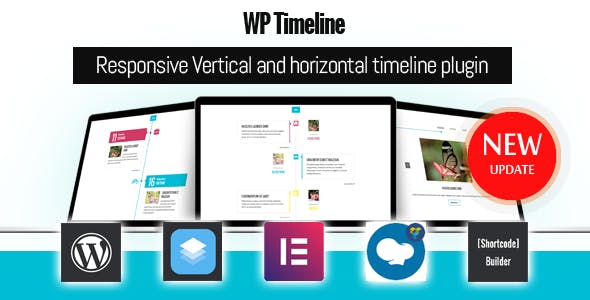
Overview of WP Timeline
Transform the way you present chronological information on your WordPress site with **WP Timeline**. This powerful and versatile plugin allows you to effortlessly create stunning vertical and horizontal timelines, perfect for showcasing company histories, project milestones, event schedules, personal achievements, and much more. Designed for both beginners and experienced users, **WP Timeline** provides an intuitive interface to bring your stories to life with engaging visual flows.
Key Features of WP Timeline
- Responsive Design: Enjoy a flawless viewing experience on any device, from desktops to tablets and smartphones. **WP Timeline** automatically adjusts its layout to look great, ensuring your timelines are always accessible and engaging.
- Vertical & Horizontal Layouts: Choose the perfect orientation to suit your content and design preferences. Easily switch between striking vertical timelines and sleek horizontal displays with just a few clicks.
- Extensive Customization Options: Tailor every aspect of your timeline’s appearance. Control colors, fonts, icons, date formats, and animation effects to perfectly match your brand and website aesthetic.
- Animation Effects: Captivate your audience with a range of smooth and engaging animation effects that bring your timeline elements to life as users scroll, enhancing the overall user experience.
- Shortcode Integration: Seamlessly embed your beautifully crafted timelines anywhere on your WordPress site using simple shortcodes, making it compatible with posts, pages, and even popular page builders.
- Supports Multiple Post Types: Not just for standard posts, **WP Timeline** can display content from various post types, including custom post types, allowing for incredible flexibility in how you manage and present your data.
- Flexible Date Formats: Configure dates to display in any format you prefer, ensuring clarity and consistency with your site’s regional or stylistic requirements.
- Advanced Filtering & Navigation: Provide users with easy ways to navigate through extensive timelines using built-in filtering options and intuitive navigation controls, improving content discoverability.
Why Choose WP Timeline?
Choosing **WP Timeline** means investing in a solution that brings both beauty and functionality to your WordPress website. In today’s visually-driven digital landscape, static text can often fail to capture attention. **WP Timeline** solves this by transforming mundane lists of events or dates into captivating, interactive narratives. It’s an invaluable tool for businesses telling their brand story, educators presenting historical events, or individuals showcasing their portfolios. The plugin’s robust feature set allows for deep customization, ensuring that your timelines not only look professional but also perfectly align with your site’s overall design language.
Beyond aesthetics, **WP Timeline** is engineered for ease of use. You don’t need to be a coding expert to create stunning timelines. Its intuitive backend interface empowers you to construct complex timelines with minimal effort, saving you valuable time and resources. The responsiveness of **WP Timeline** ensures that your content is accessible and engaging across all devices, a critical factor for SEO and user satisfaction. By providing a structured and visually appealing way to present chronological data, **WP Timeline** can significantly enhance user engagement, encourage longer visits, and help convey your message more effectively. It’s more than just a plugin; it’s a storytelling powerhouse for your WordPress site.
Who Should Use WP Timeline?
**WP Timeline** is ideal for a diverse range of WordPress users. Bloggers and content creators can use it to illustrate historical events, product development journeys, or personal milestones. Businesses can effectively showcase company history, project timelines, or upcoming events. Educators will find it invaluable for presenting historical periods, scientific discoveries, or biographical information in an engaging format. Event organizers can display conference schedules or festival lineups. Portfolio creators can highlight career achievements or project progression. Essentially, anyone needing to present chronological information in an organized, visually appealing, and interactive manner will benefit immensely from **WP Timeline**.
How to Install WP Timeline
- Download WP Timeline: Obtain the plugin file from your purchase source. Ensure it’s a `.zip` file.
- Upload to WordPress: Log in to your WordPress admin dashboard. Navigate to `Plugins > Add New > Upload Plugin`. Click “Choose File” and select the **WP Timeline** `.zip` file, then click “Install Now”.
- Activate the Plugin: Once the installation is complete, click the “Activate Plugin” button. You will then see **WP Timeline** listed among your installed plugins.
- Configure WP Timeline: A new menu item for **WP Timeline** will appear in your WordPress dashboard. Click on it to access the settings and begin creating your first timeline.
- Add to Your Site: Create a new timeline item or select an existing one, then use the provided shortcode to embed your timeline on any page, post, or widget area.
Frequently Asked Questions About WP Timeline
Is WP Timeline fully responsive and mobile-friendly?
Yes, absolutely. **WP Timeline** is built with responsiveness at its core, ensuring that your timelines adapt seamlessly to any screen size, providing an optimal viewing experience for users on desktops, tablets, and mobile phones alike. The layouts adjust automatically, maintaining visual integrity and functionality.
Can I use WP Timeline with custom post types?
Indeed! **WP Timeline** offers excellent flexibility. It’s designed to work not only with standard WordPress posts but also supports custom post types. This allows you to integrate your timelines with virtually any type of content you have on your site, making it incredibly versatile for various use cases.
Is WP Timeline compatible with popular WordPress page builders?
Yes, **WP Timeline** is highly compatible with popular WordPress page builders such as Elementor, Beaver Builder, WPBakery, and others. You can easily integrate your timelines by simply inserting the generated shortcode into any text or shortcode module within your page builder interface.
Get WP Timeline Today
Ready to revolutionize your content presentation? Unlock the full potential of your WordPress site by adding engaging and dynamic timelines with **WP Timeline**. Enhance user experience, tell your stories more effectively, and give your website a professional edge. Explore this and other essential WordPress Plugins available. Dive into our extensive collection of GPL WordPress Products and find everything you need to build, optimize, and grow your online presence.
Related Products You May Like
Here's everything you need to know about your purchase:
- 100% original files — Every product is the genuine, virus-free file, exactly as released by the original developer.
- Instant download — Access your files immediately after purchase from your account.
- Lifetime access — Re-download your purchased files anytime. No expiry, no limits.
- Free updates — Newer version released? Just request an update from us, free for all customers.
- Dedicated support — Our team is available 24/7 for installation and file-related help.
- Easy refunds — Not satisfied? Review our Refund Policy. We offer a hassle-free 7-day guarantee.
$100.00 Original price was: $100.00.$2.00Current price is: $2.00.
Version
3.7.3
Last Updated
15/03/2026
License
GPL v2
Compatibility
WordPress 5.0+
Need latest version?
Newer version released? Request an update from us — free for all customers!
Request Update →🎁 Your Purchase Includes
Overview of WP Timeline
Transform the way you present chronological information on your WordPress site with **WP Timeline**. This powerful and versatile plugin allows you to effortlessly create stunning vertical and horizontal timelines, perfect for showcasing company histories, project milestones, event schedules, personal achievements, and much more. Designed for both beginners and experienced users, **WP Timeline** provides an intuitive interface to bring your stories to life with engaging visual flows.
Key Features of WP Timeline
- Responsive Design: Enjoy a flawless viewing experience on any device, from desktops to tablets and smartphones. **WP Timeline** automatically adjusts its layout to look great, ensuring your timelines are always accessible and engaging.
- Vertical & Horizontal Layouts: Choose the perfect orientation to suit your content and design preferences. Easily switch between striking vertical timelines and sleek horizontal displays with just a few clicks.
- Extensive Customization Options: Tailor every aspect of your timeline’s appearance. Control colors, fonts, icons, date formats, and animation effects to perfectly match your brand and website aesthetic.
- Animation Effects: Captivate your audience with a range of smooth and engaging animation effects that bring your timeline elements to life as users scroll, enhancing the overall user experience.
- Shortcode Integration: Seamlessly embed your beautifully crafted timelines anywhere on your WordPress site using simple shortcodes, making it compatible with posts, pages, and even popular page builders.
- Supports Multiple Post Types: Not just for standard posts, **WP Timeline** can display content from various post types, including custom post types, allowing for incredible flexibility in how you manage and present your data.
- Flexible Date Formats: Configure dates to display in any format you prefer, ensuring clarity and consistency with your site’s regional or stylistic requirements.
- Advanced Filtering & Navigation: Provide users with easy ways to navigate through extensive timelines using built-in filtering options and intuitive navigation controls, improving content discoverability.
Why Choose WP Timeline?
Choosing **WP Timeline** means investing in a solution that brings both beauty and functionality to your WordPress website. In today’s visually-driven digital landscape, static text can often fail to capture attention. **WP Timeline** solves this by transforming mundane lists of events or dates into captivating, interactive narratives. It’s an invaluable tool for businesses telling their brand story, educators presenting historical events, or individuals showcasing their portfolios. The plugin’s robust feature set allows for deep customization, ensuring that your timelines not only look professional but also perfectly align with your site’s overall design language.
Beyond aesthetics, **WP Timeline** is engineered for ease of use. You don’t need to be a coding expert to create stunning timelines. Its intuitive backend interface empowers you to construct complex timelines with minimal effort, saving you valuable time and resources. The responsiveness of **WP Timeline** ensures that your content is accessible and engaging across all devices, a critical factor for SEO and user satisfaction. By providing a structured and visually appealing way to present chronological data, **WP Timeline** can significantly enhance user engagement, encourage longer visits, and help convey your message more effectively. It’s more than just a plugin; it’s a storytelling powerhouse for your WordPress site.
Who Should Use WP Timeline?
**WP Timeline** is ideal for a diverse range of WordPress users. Bloggers and content creators can use it to illustrate historical events, product development journeys, or personal milestones. Businesses can effectively showcase company history, project timelines, or upcoming events. Educators will find it invaluable for presenting historical periods, scientific discoveries, or biographical information in an engaging format. Event organizers can display conference schedules or festival lineups. Portfolio creators can highlight career achievements or project progression. Essentially, anyone needing to present chronological information in an organized, visually appealing, and interactive manner will benefit immensely from **WP Timeline**.
How to Install WP Timeline
- Download WP Timeline: Obtain the plugin file from your purchase source. Ensure it’s a `.zip` file.
- Upload to WordPress: Log in to your WordPress admin dashboard. Navigate to `Plugins > Add New > Upload Plugin`. Click “Choose File” and select the **WP Timeline** `.zip` file, then click “Install Now”.
- Activate the Plugin: Once the installation is complete, click the “Activate Plugin” button. You will then see **WP Timeline** listed among your installed plugins.
- Configure WP Timeline: A new menu item for **WP Timeline** will appear in your WordPress dashboard. Click on it to access the settings and begin creating your first timeline.
- Add to Your Site: Create a new timeline item or select an existing one, then use the provided shortcode to embed your timeline on any page, post, or widget area.
Frequently Asked Questions About WP Timeline
Is WP Timeline fully responsive and mobile-friendly?
Yes, absolutely. **WP Timeline** is built with responsiveness at its core, ensuring that your timelines adapt seamlessly to any screen size, providing an optimal viewing experience for users on desktops, tablets, and mobile phones alike. The layouts adjust automatically, maintaining visual integrity and functionality.
Can I use WP Timeline with custom post types?
Indeed! **WP Timeline** offers excellent flexibility. It’s designed to work not only with standard WordPress posts but also supports custom post types. This allows you to integrate your timelines with virtually any type of content you have on your site, making it incredibly versatile for various use cases.
Is WP Timeline compatible with popular WordPress page builders?
Yes, **WP Timeline** is highly compatible with popular WordPress page builders such as Elementor, Beaver Builder, WPBakery, and others. You can easily integrate your timelines by simply inserting the generated shortcode into any text or shortcode module within your page builder interface.
Get WP Timeline Today
Ready to revolutionize your content presentation? Unlock the full potential of your WordPress site by adding engaging and dynamic timelines with **WP Timeline**. Enhance user experience, tell your stories more effectively, and give your website a professional edge. Explore this and other essential WordPress Plugins available. Dive into our extensive collection of GPL WordPress Products and find everything you need to build, optimize, and grow your online presence.
Related Products You May Like
Reviews
There are no reviews yet.
Here's everything you need to know about your purchase:
- 100% original files — Every product is the genuine, virus-free file, exactly as released by the original developer.
- Instant download — Access your files immediately after purchase from your account.
- Lifetime access — Re-download your purchased files anytime. No expiry, no limits.
- Free updates — Newer version released? Just request an update from us, free for all customers.
- Dedicated support — Our team is available 24/7 for installation and file-related help.
- Easy refunds — Not satisfied? Review our Refund Policy. We offer a hassle-free 7-day guarantee.
Reviews
There are no reviews yet.