

WP Sheet Editor WooCommerce Orders Pro 1.3.22
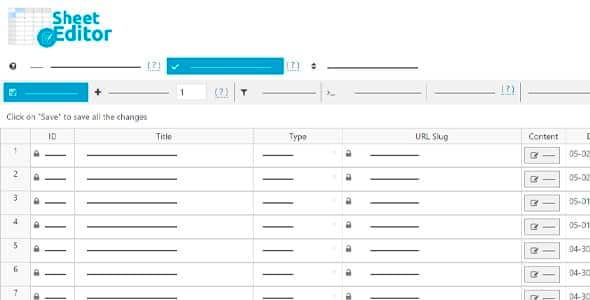
Overview of WP Sheet Editor WooCommerce Orders Pro
Managing WooCommerce orders can be a time-consuming task, especially for busy online stores. WP Sheet Editor WooCommerce Orders Pro revolutionizes how you interact with your order data, transforming the tedious process of individual order editing into a streamlined, spreadsheet-like experience. This powerful plugin is designed for store owners, administrators, and anyone who needs to efficiently manage, bulk edit, export, or import thousands of WooCommerce orders directly from a user-friendly spreadsheet interface within their WordPress dashboard.
Key Features of WP Sheet Editor WooCommerce Orders Pro
- Intuitive Spreadsheet Interface: Edit orders in a familiar, Excel-like spreadsheet, making bulk modifications and data entry incredibly fast and straightforward, significantly boosting your productivity with WP Sheet Editor WooCommerce Orders Pro.
- Advanced Bulk Editing Capabilities: Effortlessly update multiple order statuses, shipping details, billing information, customer notes, or even specific order items for hundreds or thousands of orders simultaneously with just a few clicks.
- Powerful Search and Filtering: Locate specific orders or groups of orders instantly using advanced filters based on criteria like order status, customer name, date range, product purchased, payment method, and more, allowing precise management with WP Sheet Editor WooCommerce Orders Pro.
- Comprehensive Data Export: Export all your WooCommerce order data, including custom fields and order items, to a CSV file for detailed analysis, reporting, or migration purposes, providing invaluable insights into your sales.
- Efficient Order Import Functionality: Easily import new orders or update existing ones from a CSV file, perfect for migrating data, integrating with external systems, or quickly adding large batches of orders.
- Direct Order Creation: Create new WooCommerce orders directly within the spreadsheet, complete with billing, shipping, and product details, saving time compared to the standard backend process.
- Edit Individual Order Items: Gain granular control by editing specific line items within an order, such as product quantities, prices, or variations, all from the centralized spreadsheet.
- Support for Custom Fields and Plugins: Seamlessly integrate and manage data from custom fields added by other WooCommerce extensions or your own developments, ensuring all your order data is accessible and editable.
Why Choose WP Sheet Editor WooCommerce Orders Pro?
In the fast-paced world of e-commerce, efficiency is paramount. Choosing WP Sheet Editor WooCommerce Orders Pro means investing in a tool that will drastically cut down the time you spend on order management. Imagine updating the status of hundreds of pending orders to “completed” with a single action, rather than opening each one individually. Or needing to adjust the shipping method for a specific batch of orders – with this plugin, it’s a matter of a quick filter and a bulk edit. This level of control and speed not only saves you countless hours but also minimizes the potential for human error that often accompanies repetitive manual tasks.
Beyond just saving time, WP Sheet Editor WooCommerce Orders Pro empowers you with unprecedented control over your store’s most critical data. The ability to easily export and import orders facilitates better reporting, smoother integrations with accounting software, and simplified data migrations. For stores with high order volumes, this plugin transitions order management from a bottleneck into a streamlined operation, allowing you to focus on growth and customer satisfaction. It’s an indispensable asset for any serious WooCommerce store looking to optimize its backend processes and improve overall productivity.
Who Should Use WP Sheet Editor WooCommerce Orders Pro?
WP Sheet Editor WooCommerce Orders Pro is an ideal solution for a wide range of users within the e-commerce ecosystem. This includes small business owners juggling multiple responsibilities, e-commerce managers overseeing large teams and complex operations, and dropshippers who need to quickly process and update numerous orders. It’s also perfect for developers and agencies managing client stores, or anyone who frequently interacts with WooCommerce order data and seeks a more efficient, less error-prone method than the default WordPress interface. If you’re looking to save time, enhance data accuracy, and streamline your WooCommerce order workflows, then WP Sheet Editor WooCommerce Orders Pro is built for you.
How to Install WP Sheet Editor WooCommerce Orders Pro
Getting started with WP Sheet Editor WooCommerce Orders Pro is a straightforward process. Follow these simple steps to integrate this powerful plugin into your WooCommerce store:
- First, download the plugin file for WP Sheet Editor WooCommerce Orders Pro from our secure store at GPLUniverse.
- Log in to your WordPress administration panel using your credentials.
- Navigate to the ‘Plugins’ menu on the left sidebar and click on ‘Add New’.
- At the top of the ‘Add Plugins’ page, click the ‘Upload Plugin’ button.
- Click ‘Choose File’, locate the downloaded .zip file for WP Sheet Editor WooCommerce Orders Pro on your computer, and then click ‘Install Now’.
- Once the installation is complete, click the ‘Activate Plugin’ button to enable WP Sheet Editor WooCommerce Orders Pro on your website. You will then find the new order spreadsheet interface under your WooCommerce menu.
Frequently Asked Questions About WP Sheet Editor WooCommerce Orders Pro
Does WP Sheet Editor WooCommerce Orders Pro support custom order fields?
Yes, WP Sheet Editor WooCommerce Orders Pro is designed to be highly extensible. It automatically detects and allows you to manage custom fields associated with your WooCommerce orders, whether they are added by other plugins or custom code. This ensures all your valuable order data can be edited and managed from the spreadsheet.
Can I revert changes made with WP Sheet Editor WooCommerce Orders Pro?
While WP Sheet Editor WooCommerce Orders Pro is a powerful tool, it’s always recommended to back up your website before performing large-scale bulk edits. The plugin itself does not include an undo feature for bulk operations, reflecting the immediate impact of its efficiency. For critical changes, consider testing on a staging site first.
Is WP Sheet Editor WooCommerce Orders Pro compatible with all WooCommerce versions?
We strive to ensure that WP Sheet Editor WooCommerce Orders Pro maintains broad compatibility with the latest versions of WordPress and WooCommerce. Our products are regularly updated to ensure seamless integration and optimal performance with the most current platforms, providing reliability for your store.
Get WP Sheet Editor WooCommerce Orders Pro Today
Transform your WooCommerce order management from a chore into a seamless, efficient process. With WP Sheet Editor WooCommerce Orders Pro, you’ll gain unparalleled control, save valuable time, and significantly boost your store’s productivity. Don’t let manual order processing slow down your growth. Explore our extensive collection of WordPress Plugins and other premium GPL WordPress Products to find everything you need to enhance your website. Purchase WP Sheet Editor WooCommerce Orders Pro today and experience the difference efficiency makes!
Related Products You May Like
Here's everything you need to know about your purchase:
- 100% original files — Every product is the genuine, virus-free file, exactly as released by the original developer.
- Instant download — Access your files immediately after purchase from your account.
- Lifetime access — Re-download your purchased files anytime. No expiry, no limits.
- Free updates — Newer version released? Just request an update from us, free for all customers.
- Dedicated support — Our team is available 24/7 for installation and file-related help.
- Easy refunds — Not satisfied? Review our Refund Policy. We offer a hassle-free 7-day guarantee.
$100.00 Original price was: $100.00.$2.00Current price is: $2.00.
Version
1.3.22
Last Updated
02/02/2026
License
GPL v2
Compatibility
WordPress 5.0+
Need latest version?
Newer version released? Request an update from us — free for all customers!
Request Update →🎁 Your Purchase Includes
Overview of WP Sheet Editor WooCommerce Orders Pro
Managing WooCommerce orders can be a time-consuming task, especially for busy online stores. WP Sheet Editor WooCommerce Orders Pro revolutionizes how you interact with your order data, transforming the tedious process of individual order editing into a streamlined, spreadsheet-like experience. This powerful plugin is designed for store owners, administrators, and anyone who needs to efficiently manage, bulk edit, export, or import thousands of WooCommerce orders directly from a user-friendly spreadsheet interface within their WordPress dashboard.
Key Features of WP Sheet Editor WooCommerce Orders Pro
- Intuitive Spreadsheet Interface: Edit orders in a familiar, Excel-like spreadsheet, making bulk modifications and data entry incredibly fast and straightforward, significantly boosting your productivity with WP Sheet Editor WooCommerce Orders Pro.
- Advanced Bulk Editing Capabilities: Effortlessly update multiple order statuses, shipping details, billing information, customer notes, or even specific order items for hundreds or thousands of orders simultaneously with just a few clicks.
- Powerful Search and Filtering: Locate specific orders or groups of orders instantly using advanced filters based on criteria like order status, customer name, date range, product purchased, payment method, and more, allowing precise management with WP Sheet Editor WooCommerce Orders Pro.
- Comprehensive Data Export: Export all your WooCommerce order data, including custom fields and order items, to a CSV file for detailed analysis, reporting, or migration purposes, providing invaluable insights into your sales.
- Efficient Order Import Functionality: Easily import new orders or update existing ones from a CSV file, perfect for migrating data, integrating with external systems, or quickly adding large batches of orders.
- Direct Order Creation: Create new WooCommerce orders directly within the spreadsheet, complete with billing, shipping, and product details, saving time compared to the standard backend process.
- Edit Individual Order Items: Gain granular control by editing specific line items within an order, such as product quantities, prices, or variations, all from the centralized spreadsheet.
- Support for Custom Fields and Plugins: Seamlessly integrate and manage data from custom fields added by other WooCommerce extensions or your own developments, ensuring all your order data is accessible and editable.
Why Choose WP Sheet Editor WooCommerce Orders Pro?
In the fast-paced world of e-commerce, efficiency is paramount. Choosing WP Sheet Editor WooCommerce Orders Pro means investing in a tool that will drastically cut down the time you spend on order management. Imagine updating the status of hundreds of pending orders to “completed” with a single action, rather than opening each one individually. Or needing to adjust the shipping method for a specific batch of orders – with this plugin, it’s a matter of a quick filter and a bulk edit. This level of control and speed not only saves you countless hours but also minimizes the potential for human error that often accompanies repetitive manual tasks.
Beyond just saving time, WP Sheet Editor WooCommerce Orders Pro empowers you with unprecedented control over your store’s most critical data. The ability to easily export and import orders facilitates better reporting, smoother integrations with accounting software, and simplified data migrations. For stores with high order volumes, this plugin transitions order management from a bottleneck into a streamlined operation, allowing you to focus on growth and customer satisfaction. It’s an indispensable asset for any serious WooCommerce store looking to optimize its backend processes and improve overall productivity.
Who Should Use WP Sheet Editor WooCommerce Orders Pro?
WP Sheet Editor WooCommerce Orders Pro is an ideal solution for a wide range of users within the e-commerce ecosystem. This includes small business owners juggling multiple responsibilities, e-commerce managers overseeing large teams and complex operations, and dropshippers who need to quickly process and update numerous orders. It’s also perfect for developers and agencies managing client stores, or anyone who frequently interacts with WooCommerce order data and seeks a more efficient, less error-prone method than the default WordPress interface. If you’re looking to save time, enhance data accuracy, and streamline your WooCommerce order workflows, then WP Sheet Editor WooCommerce Orders Pro is built for you.
How to Install WP Sheet Editor WooCommerce Orders Pro
Getting started with WP Sheet Editor WooCommerce Orders Pro is a straightforward process. Follow these simple steps to integrate this powerful plugin into your WooCommerce store:
- First, download the plugin file for WP Sheet Editor WooCommerce Orders Pro from our secure store at GPLUniverse.
- Log in to your WordPress administration panel using your credentials.
- Navigate to the ‘Plugins’ menu on the left sidebar and click on ‘Add New’.
- At the top of the ‘Add Plugins’ page, click the ‘Upload Plugin’ button.
- Click ‘Choose File’, locate the downloaded .zip file for WP Sheet Editor WooCommerce Orders Pro on your computer, and then click ‘Install Now’.
- Once the installation is complete, click the ‘Activate Plugin’ button to enable WP Sheet Editor WooCommerce Orders Pro on your website. You will then find the new order spreadsheet interface under your WooCommerce menu.
Frequently Asked Questions About WP Sheet Editor WooCommerce Orders Pro
Does WP Sheet Editor WooCommerce Orders Pro support custom order fields?
Yes, WP Sheet Editor WooCommerce Orders Pro is designed to be highly extensible. It automatically detects and allows you to manage custom fields associated with your WooCommerce orders, whether they are added by other plugins or custom code. This ensures all your valuable order data can be edited and managed from the spreadsheet.
Can I revert changes made with WP Sheet Editor WooCommerce Orders Pro?
While WP Sheet Editor WooCommerce Orders Pro is a powerful tool, it’s always recommended to back up your website before performing large-scale bulk edits. The plugin itself does not include an undo feature for bulk operations, reflecting the immediate impact of its efficiency. For critical changes, consider testing on a staging site first.
Is WP Sheet Editor WooCommerce Orders Pro compatible with all WooCommerce versions?
We strive to ensure that WP Sheet Editor WooCommerce Orders Pro maintains broad compatibility with the latest versions of WordPress and WooCommerce. Our products are regularly updated to ensure seamless integration and optimal performance with the most current platforms, providing reliability for your store.
Get WP Sheet Editor WooCommerce Orders Pro Today
Transform your WooCommerce order management from a chore into a seamless, efficient process. With WP Sheet Editor WooCommerce Orders Pro, you’ll gain unparalleled control, save valuable time, and significantly boost your store’s productivity. Don’t let manual order processing slow down your growth. Explore our extensive collection of WordPress Plugins and other premium GPL WordPress Products to find everything you need to enhance your website. Purchase WP Sheet Editor WooCommerce Orders Pro today and experience the difference efficiency makes!
Related Products You May Like
Reviews
There are no reviews yet.
Here's everything you need to know about your purchase:
- 100% original files — Every product is the genuine, virus-free file, exactly as released by the original developer.
- Instant download — Access your files immediately after purchase from your account.
- Lifetime access — Re-download your purchased files anytime. No expiry, no limits.
- Free updates — Newer version released? Just request an update from us, free for all customers.
- Dedicated support — Our team is available 24/7 for installation and file-related help.
- Easy refunds — Not satisfied? Review our Refund Policy. We offer a hassle-free 7-day guarantee.
Reviews
There are no reviews yet.