

WP Sheet Editor – WooCommerce Orders 1.3.22
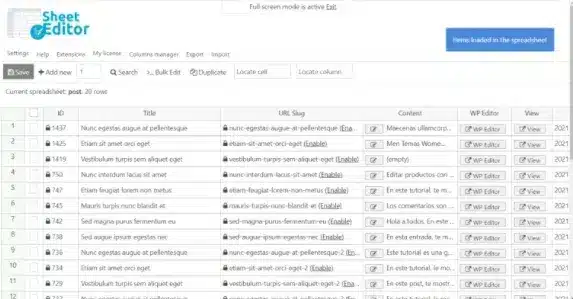
Overview of WP Sheet Editor – WooCommerce Orders
Streamline your e-commerce operations with **WP Sheet Editor – WooCommerce Orders**, the ultimate tool for managing your WooCommerce orders directly from a powerful spreadsheet interface. This indispensable plugin transforms your order management, allowing store owners, administrators, and e-commerce managers to quickly view, edit, and organize thousands of orders with unprecedented ease. Say goodbye to the tedious process of editing orders one by one and embrace efficiency with **WP Sheet Editor – WooCommerce Orders**.
Key Features of WP Sheet Editor – WooCommerce Orders
- Intuitive Spreadsheet Interface: Manage all your WooCommerce orders in a familiar, Excel-like spreadsheet, making bulk editing and data manipulation straightforward and highly efficient.
- Comprehensive Bulk Editing: Effortlessly update hundreds or thousands of orders simultaneously. Change statuses, modify billing/shipping details, adjust order items, and more with just a few clicks.
- Advanced Search and Filtering: Locate specific orders quickly using powerful search filters based on status, customer, date range, product, payment method, and any other order field, including custom metadata.
- Export and Import Functionality: Easily export your order data to CSV files for external analysis or backups, and import orders in bulk, perfect for migrating data or processing offline sales.
- Manage Order Items and Products: Gain granular control over the items within each order. Add, remove, or modify product quantities, prices, and variations directly from the spreadsheet.
- Custom Field Support: Fully compatible with custom fields added to your WooCommerce orders by other plugins or themes, allowing you to manage all order-related data in one place.
- History and Undo/Redo: Keep track of your changes with a built-in history log, allowing you to undo or redo operations, ensuring data integrity and peace of mind.
- Column Manager: Customize your spreadsheet view by showing or hiding specific columns, arranging them to suit your workflow, and saving your preferred layouts for quick access.
Why Choose WP Sheet Editor – WooCommerce Orders?
Choosing **WP Sheet Editor – WooCommerce Orders** is a strategic decision for any WooCommerce store looking to maximize efficiency and minimize manual workload. In the fast-paced world of e-commerce, time is money, and this plugin delivers significant time savings by eliminating the need to navigate through individual order pages for routine tasks. Imagine updating the status of hundreds of pending orders to “completed” in mere seconds, or correcting a common billing error across multiple customer orders almost instantly. This level of control and speed is simply unattainable with standard WooCommerce functionalities alone.
Beyond just saving time, **WP Sheet Editor – WooCommerce Orders** empowers you with a robust toolkit for data management and analysis. Its advanced filtering capabilities mean you can quickly segment your orders to identify trends, analyze customer behavior, or prepare specific reports. The ability to export and import data seamlessly provides flexibility for external processing or integration with other systems. By centralizing all your order management tasks into one intuitive interface, you reduce the likelihood of errors, improve data accuracy, and free up valuable resources that can be redirected towards growth and customer satisfaction. It’s an investment in your store’s operational excellence, ensuring your order management is as dynamic and efficient as your sales.
Who Should Use WP Sheet Editor – WooCommerce Orders?
**WP Sheet Editor – WooCommerce Orders** is an essential tool for a wide range of users within the e-commerce ecosystem. WooCommerce store owners will find it invaluable for daily operations, allowing them to maintain full control over their sales process without getting bogged down in administrative tasks. E-commerce managers and administrators can leverage its bulk editing features to implement policy changes, manage promotions, or conduct large-scale data cleanups efficiently. Customer service teams will benefit from quick access to order details and the ability to make rapid adjustments, improving response times and customer satisfaction. Furthermore, anyone involved in inventory management, shipping logistics, or financial reporting will appreciate the streamlined access to comprehensive order data that **WP Sheet Editor – WooCommerce Orders** provides.
How to Install WP Sheet Editor – WooCommerce Orders
- Download the Plugin: After acquiring **WP Sheet Editor – WooCommerce Orders**, you will receive a .zip file containing the plugin.
- Access Your WordPress Dashboard: Log in to your WordPress admin area, typically found at `yourdomain.com/wp-admin`.
- Navigate to Plugins: In the left-hand sidebar, hover over “Plugins” and click on “Add New”.
- Upload the Plugin: At the top of the “Add Plugins” page, click the “Upload Plugin” button. Click “Choose File”, select the .zip file for **WP Sheet Editor – WooCommerce Orders** you downloaded, and then click “Install Now”.
- Activate the Plugin: Once the installation is complete, click the “Activate Plugin” button. You will then find the new order spreadsheet menu item within your WooCommerce or main WordPress dashboard settings, ready to use.
Frequently Asked Questions About WP Sheet Editor – WooCommerce Orders
What kind of order data can I edit with WP Sheet Editor – WooCommerce Orders?
With **WP Sheet Editor – WooCommerce Orders**, you can edit virtually all standard WooCommerce order fields, including order status, billing details, shipping information, customer notes, payment methods, and more. Crucially, it also supports editing individual order items (products, quantities, prices) and any custom fields associated with your orders, providing comprehensive control over your order data.
Can I bulk update order statuses using WP Sheet Editor – WooCommerce Orders?
Absolutely! One of the most powerful features of **WP Sheet Editor – WooCommerce Orders** is its ability to bulk update order statuses. You can filter orders by current status, date, customer, or any other criteria, select them, and then change their status (e.g., from “Processing” to “Completed”) for all selected orders with a single action, saving immense amounts of time.
Is WP Sheet Editor – WooCommerce Orders compatible with other WooCommerce plugins?
Generally, yes. **WP Sheet Editor – WooCommerce Orders** is designed to work seamlessly within the standard WooCommerce environment. It is compatible with most plugins that adhere to WooCommerce’s data structures for orders and custom fields. If you use plugins that add unique custom fields to your orders, this plugin is often able to detect and allow you to manage them directly from the spreadsheet.
Get WP Sheet Editor – WooCommerce Orders Today
Transform the way you manage your e-commerce orders and unlock unparalleled efficiency for your WooCommerce store. **WP Sheet Editor – WooCommerce Orders** is the ultimate solution for anyone looking to save time, reduce errors, and gain complete control over their order data. Don’t let manual tasks slow down your business growth. Explore our extensive collection of WordPress Plugins and other premium GPL WordPress Products to find everything you need to build and manage a successful online presence.
Related Products You May Like
Here's everything you need to know about your purchase:
- 100% original files — Every product is the genuine, virus-free file, exactly as released by the original developer.
- Instant download — Access your files immediately after purchase from your account.
- Lifetime access — Re-download your purchased files anytime. No expiry, no limits.
- Free updates — Newer version released? Just request an update from us, free for all customers.
- Dedicated support — Our team is available 24/7 for installation and file-related help.
- Easy refunds — Not satisfied? Review our Refund Policy. We offer a hassle-free 7-day guarantee.
$59.00 Original price was: $59.00.$5.00Current price is: $5.00.
Version
1.3.22
Last Updated
18/02/2026
License
GPL v2
Compatibility
WordPress 5.0+
Need latest version?
Newer version released? Request an update from us — free for all customers!
Request Update →🎁 Your Purchase Includes
Overview of WP Sheet Editor – WooCommerce Orders
Streamline your e-commerce operations with **WP Sheet Editor – WooCommerce Orders**, the ultimate tool for managing your WooCommerce orders directly from a powerful spreadsheet interface. This indispensable plugin transforms your order management, allowing store owners, administrators, and e-commerce managers to quickly view, edit, and organize thousands of orders with unprecedented ease. Say goodbye to the tedious process of editing orders one by one and embrace efficiency with **WP Sheet Editor – WooCommerce Orders**.
Key Features of WP Sheet Editor – WooCommerce Orders
- Intuitive Spreadsheet Interface: Manage all your WooCommerce orders in a familiar, Excel-like spreadsheet, making bulk editing and data manipulation straightforward and highly efficient.
- Comprehensive Bulk Editing: Effortlessly update hundreds or thousands of orders simultaneously. Change statuses, modify billing/shipping details, adjust order items, and more with just a few clicks.
- Advanced Search and Filtering: Locate specific orders quickly using powerful search filters based on status, customer, date range, product, payment method, and any other order field, including custom metadata.
- Export and Import Functionality: Easily export your order data to CSV files for external analysis or backups, and import orders in bulk, perfect for migrating data or processing offline sales.
- Manage Order Items and Products: Gain granular control over the items within each order. Add, remove, or modify product quantities, prices, and variations directly from the spreadsheet.
- Custom Field Support: Fully compatible with custom fields added to your WooCommerce orders by other plugins or themes, allowing you to manage all order-related data in one place.
- History and Undo/Redo: Keep track of your changes with a built-in history log, allowing you to undo or redo operations, ensuring data integrity and peace of mind.
- Column Manager: Customize your spreadsheet view by showing or hiding specific columns, arranging them to suit your workflow, and saving your preferred layouts for quick access.
Why Choose WP Sheet Editor – WooCommerce Orders?
Choosing **WP Sheet Editor – WooCommerce Orders** is a strategic decision for any WooCommerce store looking to maximize efficiency and minimize manual workload. In the fast-paced world of e-commerce, time is money, and this plugin delivers significant time savings by eliminating the need to navigate through individual order pages for routine tasks. Imagine updating the status of hundreds of pending orders to “completed” in mere seconds, or correcting a common billing error across multiple customer orders almost instantly. This level of control and speed is simply unattainable with standard WooCommerce functionalities alone.
Beyond just saving time, **WP Sheet Editor – WooCommerce Orders** empowers you with a robust toolkit for data management and analysis. Its advanced filtering capabilities mean you can quickly segment your orders to identify trends, analyze customer behavior, or prepare specific reports. The ability to export and import data seamlessly provides flexibility for external processing or integration with other systems. By centralizing all your order management tasks into one intuitive interface, you reduce the likelihood of errors, improve data accuracy, and free up valuable resources that can be redirected towards growth and customer satisfaction. It’s an investment in your store’s operational excellence, ensuring your order management is as dynamic and efficient as your sales.
Who Should Use WP Sheet Editor – WooCommerce Orders?
**WP Sheet Editor – WooCommerce Orders** is an essential tool for a wide range of users within the e-commerce ecosystem. WooCommerce store owners will find it invaluable for daily operations, allowing them to maintain full control over their sales process without getting bogged down in administrative tasks. E-commerce managers and administrators can leverage its bulk editing features to implement policy changes, manage promotions, or conduct large-scale data cleanups efficiently. Customer service teams will benefit from quick access to order details and the ability to make rapid adjustments, improving response times and customer satisfaction. Furthermore, anyone involved in inventory management, shipping logistics, or financial reporting will appreciate the streamlined access to comprehensive order data that **WP Sheet Editor – WooCommerce Orders** provides.
How to Install WP Sheet Editor – WooCommerce Orders
- Download the Plugin: After acquiring **WP Sheet Editor – WooCommerce Orders**, you will receive a .zip file containing the plugin.
- Access Your WordPress Dashboard: Log in to your WordPress admin area, typically found at `yourdomain.com/wp-admin`.
- Navigate to Plugins: In the left-hand sidebar, hover over “Plugins” and click on “Add New”.
- Upload the Plugin: At the top of the “Add Plugins” page, click the “Upload Plugin” button. Click “Choose File”, select the .zip file for **WP Sheet Editor – WooCommerce Orders** you downloaded, and then click “Install Now”.
- Activate the Plugin: Once the installation is complete, click the “Activate Plugin” button. You will then find the new order spreadsheet menu item within your WooCommerce or main WordPress dashboard settings, ready to use.
Frequently Asked Questions About WP Sheet Editor – WooCommerce Orders
What kind of order data can I edit with WP Sheet Editor – WooCommerce Orders?
With **WP Sheet Editor – WooCommerce Orders**, you can edit virtually all standard WooCommerce order fields, including order status, billing details, shipping information, customer notes, payment methods, and more. Crucially, it also supports editing individual order items (products, quantities, prices) and any custom fields associated with your orders, providing comprehensive control over your order data.
Can I bulk update order statuses using WP Sheet Editor – WooCommerce Orders?
Absolutely! One of the most powerful features of **WP Sheet Editor – WooCommerce Orders** is its ability to bulk update order statuses. You can filter orders by current status, date, customer, or any other criteria, select them, and then change their status (e.g., from “Processing” to “Completed”) for all selected orders with a single action, saving immense amounts of time.
Is WP Sheet Editor – WooCommerce Orders compatible with other WooCommerce plugins?
Generally, yes. **WP Sheet Editor – WooCommerce Orders** is designed to work seamlessly within the standard WooCommerce environment. It is compatible with most plugins that adhere to WooCommerce’s data structures for orders and custom fields. If you use plugins that add unique custom fields to your orders, this plugin is often able to detect and allow you to manage them directly from the spreadsheet.
Get WP Sheet Editor – WooCommerce Orders Today
Transform the way you manage your e-commerce orders and unlock unparalleled efficiency for your WooCommerce store. **WP Sheet Editor – WooCommerce Orders** is the ultimate solution for anyone looking to save time, reduce errors, and gain complete control over their order data. Don’t let manual tasks slow down your business growth. Explore our extensive collection of WordPress Plugins and other premium GPL WordPress Products to find everything you need to build and manage a successful online presence.
Related Products You May Like
Reviews
There are no reviews yet.
Here's everything you need to know about your purchase:
- 100% original files — Every product is the genuine, virus-free file, exactly as released by the original developer.
- Instant download — Access your files immediately after purchase from your account.
- Lifetime access — Re-download your purchased files anytime. No expiry, no limits.
- Free updates — Newer version released? Just request an update from us, free for all customers.
- Dedicated support — Our team is available 24/7 for installation and file-related help.
- Easy refunds — Not satisfied? Review our Refund Policy. We offer a hassle-free 7-day guarantee.
Reviews
There are no reviews yet.