

WP Sheet Editor Events Pro 1.1.39
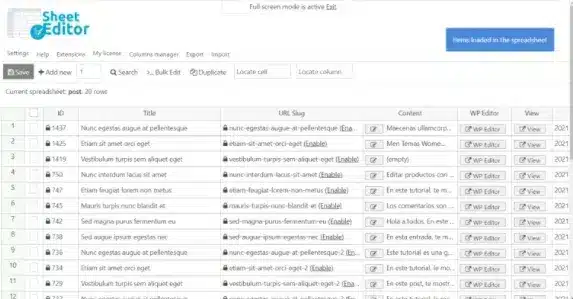
Overview of WP Sheet Editor Events Pro
WP Sheet Editor Events Pro is an indispensable WordPress plugin designed to revolutionize how you manage event data. It transforms your event listings into an intuitive, powerful spreadsheet interface, enabling you to view, edit, and organize all your event information with unprecedented speed and efficiency. This tool is perfect for event organizers, website administrators, and anyone needing to streamline the management of large volumes of event content on their WordPress site.
Key Features of WP Sheet Editor Events Pro
- Comprehensive Event Data Editing: Effortlessly edit all aspects of your events, including titles, descriptions, dates, times, locations, organizers, and custom fields, directly from a familiar spreadsheet interface.
- Advanced Bulk Editing Capabilities: Perform mass updates on thousands of events simultaneously. Change event statuses, categories, organizers, or any other field in bulk, saving countless hours of manual work.
- Powerful Search and Filtering: Locate specific events or groups of events instantly using advanced search queries and robust filtering options, allowing you to work only on the data you need.
- Import and Export Functionality: Seamlessly import event data from CSV files to quickly populate your site or update existing events. Export your event listings to CSV for external analysis, backups, or migration.
- Custom Field Support: WP Sheet Editor Events Pro fully supports custom fields associated with your events, ensuring that all unique data points are manageable within the spreadsheet.
- Formula-Based Editing: Apply formulas to event fields for dynamic updates, such as adjusting event times, calculating new prices, or modifying text strings across multiple events.
- User-Friendly Interface: Designed with ease of use in mind, the intuitive spreadsheet layout makes it accessible for users of all technical levels to manage complex event data.
- Integration with Popular Event Plugins: Built to integrate smoothly with leading WordPress event management plugins, ensuring compatibility and enhancing your existing setup.
Why Choose WP Sheet Editor Events Pro?
Choosing WP Sheet Editor Events Pro means opting for unparalleled efficiency and control over your event management. Manual editing of individual event posts can be incredibly time-consuming, especially when dealing with a large number of events or frequent updates. This powerful plugin eliminates that bottleneck by providing a centralized, spreadsheet-like environment where all your event data is at your fingertips. Imagine updating dozens of event dates, changing organizer details, or modifying event statuses with just a few clicks – that’s the power WP Sheet Editor Events Pro brings to your workflow.
Beyond saving time, WP Sheet Editor Events Pro significantly reduces the potential for errors. The visual nature of the spreadsheet allows for quick scanning and verification of data, ensuring accuracy across all your event listings. Its robust filtering and search tools mean you can always find exactly what you’re looking for, making targeted edits simple and precise. For anyone managing a dynamic events calendar, from small community gatherings to large-scale conferences, WP Sheet Editor Events Pro is an investment that pays dividends in productivity and peace of mind.
This plugin is not just a tool for bulk editing; it’s a comprehensive data management solution for your events. Whether you need to prepare for a new season of events, make global changes across your entire event database, or simply maintain a tidy and accurate record, WP Sheet Editor Events Pro provides the flexibility and power you need. It integrates seamlessly into your WordPress environment, enhancing your existing event plugins without requiring complex setup or coding knowledge.
Who Should Use WP Sheet Editor Events Pro?
WP Sheet Editor Events Pro is ideal for a wide range of users, including event organizers, festival managers, conference planners, ticketing agencies, educational institutions, and any website administrator responsible for managing event listings on a WordPress site. If you find yourself spending too much time manually updating event details, struggling with data consistency, or needing a more efficient way to manage event content, then WP Sheet Editor Events Pro is designed for you. Developers and agencies will also appreciate its ability to quickly import and export event data for client projects or migrations.
How to Install WP Sheet Editor Events Pro
- Download the Plugin: After purchasing WP Sheet Editor Events Pro from our store, download the plugin zip file to your computer.
- Upload via WordPress Dashboard: Log in to your WordPress admin area. Navigate to ‘Plugins’ > ‘Add New’. Click the ‘Upload Plugin’ button at the top of the page.
- Choose File and Install: Click ‘Choose File’, select the WP Sheet Editor Events Pro zip file you downloaded, and then click ‘Install Now’.
- Activate the Plugin: Once the installation is complete, click the ‘Activate Plugin’ button.
- Access the Editor: After activation, you will typically find the WP Sheet Editor Events Pro interface under a new menu item related to your event post type (e.g., ‘Events’ > ‘Edit Events’ or similar, depending on your event plugin).
Frequently Asked Questions About WP Sheet Editor Events Pro
Does WP Sheet Editor Events Pro work with my existing event plugin?
WP Sheet Editor Events Pro is designed to be highly compatible with many popular WordPress event management plugins. It generally works by detecting and integrating with the custom post types and fields created by these plugins. While we strive for broad compatibility, it’s always recommended to check specific integration details or test it in a staging environment if you’re using a less common event plugin to ensure full functionality with WP Sheet Editor Events Pro.
What kind of event data can I edit with WP Sheet Editor Events Pro?
You can edit virtually all types of event data. This includes standard WordPress post fields like title, content, status, and publish date, as well as custom fields added by your event plugin such as event start/end dates, times, locations, organizers, ticket prices, capacity, event categories, tags, and any other metadata associated with your events. WP Sheet Editor Events Pro provides a comprehensive view and editing capability for all event-related information.
Is it safe to perform bulk edits with WP Sheet Editor Events Pro?
Yes, WP Sheet Editor Events Pro is built with data safety in mind. It includes features like undo capabilities (where supported by the underlying event plugin) and robust data handling to prevent loss. However, as with any powerful data management tool, we always recommend creating a full backup of your WordPress site before performing any large-scale bulk edits. This ensures you can always revert to a previous state if an unintended change occurs.
Get WP Sheet Editor Events Pro Today
Ready to take control of your event management with unprecedented ease and efficiency? WP Sheet Editor Events Pro is the ultimate solution for simplifying complex event data workflows. Stop wasting time on manual edits and start optimizing your productivity today. Explore this and many other premium WordPress Plugins available. Elevate your website’s capabilities with top-tier GPL WordPress Products from our extensive collection.
Related Products You May Like
Here's everything you need to know about your purchase:
- 100% original files — Every product is the genuine, virus-free file, exactly as released by the original developer.
- Instant download — Access your files immediately after purchase from your account.
- Lifetime access — Re-download your purchased files anytime. No expiry, no limits.
- Free updates — Newer version released? Just request an update from us, free for all customers.
- Dedicated support — Our team is available 24/7 for installation and file-related help.
- Easy refunds — Not satisfied? Review our Refund Policy. We offer a hassle-free 7-day guarantee.
$59.00 Original price was: $59.00.$3.00Current price is: $3.00.
Version
1.1.39
Last Updated
18/02/2026
License
GPL v2
Compatibility
WordPress 5.0+
Need latest version?
Newer version released? Request an update from us — free for all customers!
Request Update →🎁 Your Purchase Includes
Overview of WP Sheet Editor Events Pro
WP Sheet Editor Events Pro is an indispensable WordPress plugin designed to revolutionize how you manage event data. It transforms your event listings into an intuitive, powerful spreadsheet interface, enabling you to view, edit, and organize all your event information with unprecedented speed and efficiency. This tool is perfect for event organizers, website administrators, and anyone needing to streamline the management of large volumes of event content on their WordPress site.
Key Features of WP Sheet Editor Events Pro
- Comprehensive Event Data Editing: Effortlessly edit all aspects of your events, including titles, descriptions, dates, times, locations, organizers, and custom fields, directly from a familiar spreadsheet interface.
- Advanced Bulk Editing Capabilities: Perform mass updates on thousands of events simultaneously. Change event statuses, categories, organizers, or any other field in bulk, saving countless hours of manual work.
- Powerful Search and Filtering: Locate specific events or groups of events instantly using advanced search queries and robust filtering options, allowing you to work only on the data you need.
- Import and Export Functionality: Seamlessly import event data from CSV files to quickly populate your site or update existing events. Export your event listings to CSV for external analysis, backups, or migration.
- Custom Field Support: WP Sheet Editor Events Pro fully supports custom fields associated with your events, ensuring that all unique data points are manageable within the spreadsheet.
- Formula-Based Editing: Apply formulas to event fields for dynamic updates, such as adjusting event times, calculating new prices, or modifying text strings across multiple events.
- User-Friendly Interface: Designed with ease of use in mind, the intuitive spreadsheet layout makes it accessible for users of all technical levels to manage complex event data.
- Integration with Popular Event Plugins: Built to integrate smoothly with leading WordPress event management plugins, ensuring compatibility and enhancing your existing setup.
Why Choose WP Sheet Editor Events Pro?
Choosing WP Sheet Editor Events Pro means opting for unparalleled efficiency and control over your event management. Manual editing of individual event posts can be incredibly time-consuming, especially when dealing with a large number of events or frequent updates. This powerful plugin eliminates that bottleneck by providing a centralized, spreadsheet-like environment where all your event data is at your fingertips. Imagine updating dozens of event dates, changing organizer details, or modifying event statuses with just a few clicks – that’s the power WP Sheet Editor Events Pro brings to your workflow.
Beyond saving time, WP Sheet Editor Events Pro significantly reduces the potential for errors. The visual nature of the spreadsheet allows for quick scanning and verification of data, ensuring accuracy across all your event listings. Its robust filtering and search tools mean you can always find exactly what you’re looking for, making targeted edits simple and precise. For anyone managing a dynamic events calendar, from small community gatherings to large-scale conferences, WP Sheet Editor Events Pro is an investment that pays dividends in productivity and peace of mind.
This plugin is not just a tool for bulk editing; it’s a comprehensive data management solution for your events. Whether you need to prepare for a new season of events, make global changes across your entire event database, or simply maintain a tidy and accurate record, WP Sheet Editor Events Pro provides the flexibility and power you need. It integrates seamlessly into your WordPress environment, enhancing your existing event plugins without requiring complex setup or coding knowledge.
Who Should Use WP Sheet Editor Events Pro?
WP Sheet Editor Events Pro is ideal for a wide range of users, including event organizers, festival managers, conference planners, ticketing agencies, educational institutions, and any website administrator responsible for managing event listings on a WordPress site. If you find yourself spending too much time manually updating event details, struggling with data consistency, or needing a more efficient way to manage event content, then WP Sheet Editor Events Pro is designed for you. Developers and agencies will also appreciate its ability to quickly import and export event data for client projects or migrations.
How to Install WP Sheet Editor Events Pro
- Download the Plugin: After purchasing WP Sheet Editor Events Pro from our store, download the plugin zip file to your computer.
- Upload via WordPress Dashboard: Log in to your WordPress admin area. Navigate to ‘Plugins’ > ‘Add New’. Click the ‘Upload Plugin’ button at the top of the page.
- Choose File and Install: Click ‘Choose File’, select the WP Sheet Editor Events Pro zip file you downloaded, and then click ‘Install Now’.
- Activate the Plugin: Once the installation is complete, click the ‘Activate Plugin’ button.
- Access the Editor: After activation, you will typically find the WP Sheet Editor Events Pro interface under a new menu item related to your event post type (e.g., ‘Events’ > ‘Edit Events’ or similar, depending on your event plugin).
Frequently Asked Questions About WP Sheet Editor Events Pro
Does WP Sheet Editor Events Pro work with my existing event plugin?
WP Sheet Editor Events Pro is designed to be highly compatible with many popular WordPress event management plugins. It generally works by detecting and integrating with the custom post types and fields created by these plugins. While we strive for broad compatibility, it’s always recommended to check specific integration details or test it in a staging environment if you’re using a less common event plugin to ensure full functionality with WP Sheet Editor Events Pro.
What kind of event data can I edit with WP Sheet Editor Events Pro?
You can edit virtually all types of event data. This includes standard WordPress post fields like title, content, status, and publish date, as well as custom fields added by your event plugin such as event start/end dates, times, locations, organizers, ticket prices, capacity, event categories, tags, and any other metadata associated with your events. WP Sheet Editor Events Pro provides a comprehensive view and editing capability for all event-related information.
Is it safe to perform bulk edits with WP Sheet Editor Events Pro?
Yes, WP Sheet Editor Events Pro is built with data safety in mind. It includes features like undo capabilities (where supported by the underlying event plugin) and robust data handling to prevent loss. However, as with any powerful data management tool, we always recommend creating a full backup of your WordPress site before performing any large-scale bulk edits. This ensures you can always revert to a previous state if an unintended change occurs.
Get WP Sheet Editor Events Pro Today
Ready to take control of your event management with unprecedented ease and efficiency? WP Sheet Editor Events Pro is the ultimate solution for simplifying complex event data workflows. Stop wasting time on manual edits and start optimizing your productivity today. Explore this and many other premium WordPress Plugins available. Elevate your website’s capabilities with top-tier GPL WordPress Products from our extensive collection.
Related Products You May Like
Reviews
There are no reviews yet.
Here's everything you need to know about your purchase:
- 100% original files — Every product is the genuine, virus-free file, exactly as released by the original developer.
- Instant download — Access your files immediately after purchase from your account.
- Lifetime access — Re-download your purchased files anytime. No expiry, no limits.
- Free updates — Newer version released? Just request an update from us, free for all customers.
- Dedicated support — Our team is available 24/7 for installation and file-related help.
- Easy refunds — Not satisfied? Review our Refund Policy. We offer a hassle-free 7-day guarantee.
Reviews
There are no reviews yet.