

WP Sheet Editor Editable Frontend Tables 2.4.45
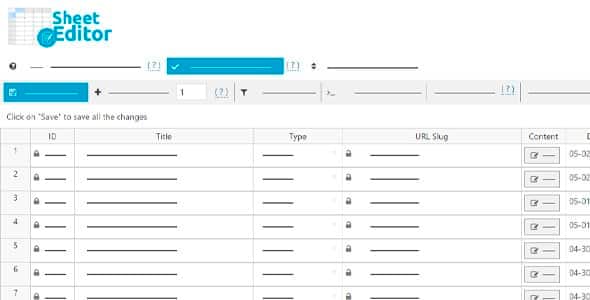
Overview of WP Sheet Editor Editable Frontend Tables
The WP Sheet Editor Editable Frontend Tables plugin revolutionizes how you manage and interact with your WordPress site’s data. It transforms any post type, page, custom post type, or even WooCommerce products into an intuitive, editable spreadsheet directly on your website’s frontend. This powerful tool is ideal for site administrators, content managers, and e-commerce store owners who need efficient, real-time data management without requiring backend access for every edit.
Key Features of WP Sheet Editor Editable Frontend Tables
- Intuitive Frontend Spreadsheet Interface: Access and edit all your WordPress content in a familiar, Excel-like spreadsheet directly from the frontend. This simplifies data management for various user roles.
- Support for All Post Types: Seamlessly edit posts, pages, custom post types, WooCommerce products, users, comments, and any other data type registered with WordPress, all within the WP Sheet Editor Editable Frontend Tables environment.
- Advanced Search and Filtering: Quickly locate specific data entries using robust search queries and advanced filters. This feature is crucial for managing large datasets and making targeted edits.
- Bulk Editing Capabilities: Save countless hours by performing bulk edits on thousands of items simultaneously. Update fields, change statuses, assign categories, and more with just a few clicks using WP Sheet Editor Editable Frontend Tables.
- User Role Permissions: Define precisely which user roles can view, edit, or add content to specific spreadsheets. This ensures data integrity and maintains security by limiting access to authorized personnel.
- Customizable Column Display: Choose exactly which columns (fields) are visible in your frontend spreadsheets, allowing you to tailor the editing interface to specific tasks or user needs.
- Export and Import Functionality: Easily export your spreadsheet data to CSV files for offline analysis or backup, and import data back into your site, making migrations and mass updates straightforward.
- Form Builder for New Entries: Create custom forms that allow users to add new items (posts, products, etc.) directly through the frontend, streamlining content submission workflows.
Why Choose WP Sheet Editor Editable Frontend Tables?
Choosing WP Sheet Editor Editable Frontend Tables means opting for unparalleled efficiency and flexibility in managing your WordPress content. This plugin dramatically simplifies complex data operations, transforming what might otherwise be a cumbersome backend task into a smooth, frontend experience. For site owners, it means empowering content creators or specific team members to update information without needing full administrator access, thereby enhancing security and reducing the risk of accidental site changes. Its intuitive interface reduces the learning curve, allowing even non-technical users to manage vast amounts of data effectively.
The value proposition of WP Sheet Editor Editable Frontend Tables extends beyond mere convenience. It’s a strategic tool for businesses and organizations that rely heavily on dynamic content or e-commerce operations. Imagine managing hundreds or thousands of product listings, user profiles, or directory entries with the same ease as editing a spreadsheet. This plugin makes bulk updates, data auditing, and content moderation incredibly efficient, freeing up valuable time and resources. Its robust filtering and search capabilities ensure you can always find and modify the exact data you need, precisely when you need it.
Furthermore, the ability to customize user permissions and column displays makes WP Sheet Editor Editable Frontend Tables incredibly adaptable to diverse workflows. Whether you’re running a multi-author blog, an extensive e-commerce store, a robust directory, or any other data-intensive WordPress site, this plugin provides the granular control and operational agility required to maintain peak performance and content accuracy. It’s an investment in streamlining your site management and enhancing productivity.
Who Should Use WP Sheet Editor Editable Frontend Tables?
WP Sheet Editor Editable Frontend Tables is an indispensable tool for a wide range of WordPress users and businesses:
- E-commerce Store Owners: Manage product details, inventory, pricing, and attributes for hundreds or thousands of WooCommerce products with ease.
- Content Managers & Editors: Efficiently update posts, pages, and custom content types across large websites.
- Directory & Listing Site Owners: Maintain business listings, event details, or property information in a structured, editable format.
- Membership Site Administrators: Manage user profiles, subscription statuses, and custom user meta fields.
- Developers & Agencies: Provide clients with a user-friendly frontend interface for content management, reducing their need for direct backend access.
- Anyone Managing Large Datasets: If your WordPress site involves extensive data entry, updates, or maintenance, WP Sheet Editor Editable Frontend Tables will significantly improve your workflow.
How to Install WP Sheet Editor Editable Frontend Tables
- Download the Plugin: After purchasing, download the WP Sheet Editor Editable Frontend Tables plugin file (a .zip archive) from your account on our site.
- Upload to WordPress: Log in to your WordPress admin dashboard. Navigate to “Plugins” > “Add New” and click the “Upload Plugin” button at the top of the page.
- Choose File and Install: Click “Choose File,” select the downloaded .zip file for WP Sheet Editor Editable Frontend Tables, then click “Install Now.”
- Activate the Plugin: Once the installation is complete, click the “Activate Plugin” button.
- Configure Settings: After activation, you’ll typically find new menu items under “Sheet Editor” or a similar name in your WordPress dashboard, where you can configure your frontend spreadsheets and permissions.
Frequently Asked Questions About WP Sheet Editor Editable Frontend Tables
What kind of data can I edit with WP Sheet Editor Editable Frontend Tables?
You can edit virtually any type of data stored in your WordPress database that is associated with a post type. This includes standard posts, pages, custom post types (like products, events, portfolios), users, comments, and even custom fields (meta data) associated with these items. The flexibility of WP Sheet Editor Editable Frontend Tables allows it to adapt to almost any data management need on your site.
Is it secure to allow frontend editing with WP Sheet Editor Editable Frontend Tables?
Yes, security is a core consideration for WP Sheet Editor Editable Frontend Tables. The plugin offers robust user role and capability-based permissions. You have granular control over which user roles can access, view, edit, or add specific types of content through the frontend spreadsheets. This ensures that only authorized individuals can make changes, maintaining the integrity and security of your website’s data.
Can I create different frontend spreadsheets for different user roles?
Absolutely. WP Sheet Editor Editable Frontend Tables allows you to create multiple frontend spreadsheets, each configured to display specific data and offer different editing capabilities. You can then assign these individual spreadsheets to be accessible only by certain user roles or even specific users. This is incredibly useful for tailoring the editing experience to various teams or departments within your organization.
Get WP Sheet Editor Editable Frontend Tables Today
Elevate your WordPress data management to new heights of efficiency and ease. With WP Sheet Editor Editable Frontend Tables, you gain a powerful, intuitive tool that transforms complex backend tasks into streamlined frontend operations. Don’t let data management slow you down; empower your team and optimize your workflow. Explore this and many other premium WordPress Plugins, and enhance your website with top-tier GPL WordPress Products available on our store.
Related Products You May Like
Here's everything you need to know about your purchase:
- 100% original files — Every product is the genuine, virus-free file, exactly as released by the original developer.
- Instant download — Access your files immediately after purchase from your account.
- Lifetime access — Re-download your purchased files anytime. No expiry, no limits.
- Free updates — Newer version released? Just request an update from us, free for all customers.
- Dedicated support — Our team is available 24/7 for installation and file-related help.
- Easy refunds — Not satisfied? Review our Refund Policy. We offer a hassle-free 7-day guarantee.
$100.00 Original price was: $100.00.$2.00Current price is: $2.00.
Version
2.4.45
Last Updated
02/02/2026
License
GPL v2
Compatibility
WordPress 5.0+
Need latest version?
Newer version released? Request an update from us — free for all customers!
Request Update →🎁 Your Purchase Includes
Overview of WP Sheet Editor Editable Frontend Tables
The WP Sheet Editor Editable Frontend Tables plugin revolutionizes how you manage and interact with your WordPress site’s data. It transforms any post type, page, custom post type, or even WooCommerce products into an intuitive, editable spreadsheet directly on your website’s frontend. This powerful tool is ideal for site administrators, content managers, and e-commerce store owners who need efficient, real-time data management without requiring backend access for every edit.
Key Features of WP Sheet Editor Editable Frontend Tables
- Intuitive Frontend Spreadsheet Interface: Access and edit all your WordPress content in a familiar, Excel-like spreadsheet directly from the frontend. This simplifies data management for various user roles.
- Support for All Post Types: Seamlessly edit posts, pages, custom post types, WooCommerce products, users, comments, and any other data type registered with WordPress, all within the WP Sheet Editor Editable Frontend Tables environment.
- Advanced Search and Filtering: Quickly locate specific data entries using robust search queries and advanced filters. This feature is crucial for managing large datasets and making targeted edits.
- Bulk Editing Capabilities: Save countless hours by performing bulk edits on thousands of items simultaneously. Update fields, change statuses, assign categories, and more with just a few clicks using WP Sheet Editor Editable Frontend Tables.
- User Role Permissions: Define precisely which user roles can view, edit, or add content to specific spreadsheets. This ensures data integrity and maintains security by limiting access to authorized personnel.
- Customizable Column Display: Choose exactly which columns (fields) are visible in your frontend spreadsheets, allowing you to tailor the editing interface to specific tasks or user needs.
- Export and Import Functionality: Easily export your spreadsheet data to CSV files for offline analysis or backup, and import data back into your site, making migrations and mass updates straightforward.
- Form Builder for New Entries: Create custom forms that allow users to add new items (posts, products, etc.) directly through the frontend, streamlining content submission workflows.
Why Choose WP Sheet Editor Editable Frontend Tables?
Choosing WP Sheet Editor Editable Frontend Tables means opting for unparalleled efficiency and flexibility in managing your WordPress content. This plugin dramatically simplifies complex data operations, transforming what might otherwise be a cumbersome backend task into a smooth, frontend experience. For site owners, it means empowering content creators or specific team members to update information without needing full administrator access, thereby enhancing security and reducing the risk of accidental site changes. Its intuitive interface reduces the learning curve, allowing even non-technical users to manage vast amounts of data effectively.
The value proposition of WP Sheet Editor Editable Frontend Tables extends beyond mere convenience. It’s a strategic tool for businesses and organizations that rely heavily on dynamic content or e-commerce operations. Imagine managing hundreds or thousands of product listings, user profiles, or directory entries with the same ease as editing a spreadsheet. This plugin makes bulk updates, data auditing, and content moderation incredibly efficient, freeing up valuable time and resources. Its robust filtering and search capabilities ensure you can always find and modify the exact data you need, precisely when you need it.
Furthermore, the ability to customize user permissions and column displays makes WP Sheet Editor Editable Frontend Tables incredibly adaptable to diverse workflows. Whether you’re running a multi-author blog, an extensive e-commerce store, a robust directory, or any other data-intensive WordPress site, this plugin provides the granular control and operational agility required to maintain peak performance and content accuracy. It’s an investment in streamlining your site management and enhancing productivity.
Who Should Use WP Sheet Editor Editable Frontend Tables?
WP Sheet Editor Editable Frontend Tables is an indispensable tool for a wide range of WordPress users and businesses:
- E-commerce Store Owners: Manage product details, inventory, pricing, and attributes for hundreds or thousands of WooCommerce products with ease.
- Content Managers & Editors: Efficiently update posts, pages, and custom content types across large websites.
- Directory & Listing Site Owners: Maintain business listings, event details, or property information in a structured, editable format.
- Membership Site Administrators: Manage user profiles, subscription statuses, and custom user meta fields.
- Developers & Agencies: Provide clients with a user-friendly frontend interface for content management, reducing their need for direct backend access.
- Anyone Managing Large Datasets: If your WordPress site involves extensive data entry, updates, or maintenance, WP Sheet Editor Editable Frontend Tables will significantly improve your workflow.
How to Install WP Sheet Editor Editable Frontend Tables
- Download the Plugin: After purchasing, download the WP Sheet Editor Editable Frontend Tables plugin file (a .zip archive) from your account on our site.
- Upload to WordPress: Log in to your WordPress admin dashboard. Navigate to “Plugins” > “Add New” and click the “Upload Plugin” button at the top of the page.
- Choose File and Install: Click “Choose File,” select the downloaded .zip file for WP Sheet Editor Editable Frontend Tables, then click “Install Now.”
- Activate the Plugin: Once the installation is complete, click the “Activate Plugin” button.
- Configure Settings: After activation, you’ll typically find new menu items under “Sheet Editor” or a similar name in your WordPress dashboard, where you can configure your frontend spreadsheets and permissions.
Frequently Asked Questions About WP Sheet Editor Editable Frontend Tables
What kind of data can I edit with WP Sheet Editor Editable Frontend Tables?
You can edit virtually any type of data stored in your WordPress database that is associated with a post type. This includes standard posts, pages, custom post types (like products, events, portfolios), users, comments, and even custom fields (meta data) associated with these items. The flexibility of WP Sheet Editor Editable Frontend Tables allows it to adapt to almost any data management need on your site.
Is it secure to allow frontend editing with WP Sheet Editor Editable Frontend Tables?
Yes, security is a core consideration for WP Sheet Editor Editable Frontend Tables. The plugin offers robust user role and capability-based permissions. You have granular control over which user roles can access, view, edit, or add specific types of content through the frontend spreadsheets. This ensures that only authorized individuals can make changes, maintaining the integrity and security of your website’s data.
Can I create different frontend spreadsheets for different user roles?
Absolutely. WP Sheet Editor Editable Frontend Tables allows you to create multiple frontend spreadsheets, each configured to display specific data and offer different editing capabilities. You can then assign these individual spreadsheets to be accessible only by certain user roles or even specific users. This is incredibly useful for tailoring the editing experience to various teams or departments within your organization.
Get WP Sheet Editor Editable Frontend Tables Today
Elevate your WordPress data management to new heights of efficiency and ease. With WP Sheet Editor Editable Frontend Tables, you gain a powerful, intuitive tool that transforms complex backend tasks into streamlined frontend operations. Don’t let data management slow you down; empower your team and optimize your workflow. Explore this and many other premium WordPress Plugins, and enhance your website with top-tier GPL WordPress Products available on our store.
Related Products You May Like
Reviews
There are no reviews yet.
Here's everything you need to know about your purchase:
- 100% original files — Every product is the genuine, virus-free file, exactly as released by the original developer.
- Instant download — Access your files immediately after purchase from your account.
- Lifetime access — Re-download your purchased files anytime. No expiry, no limits.
- Free updates — Newer version released? Just request an update from us, free for all customers.
- Dedicated support — Our team is available 24/7 for installation and file-related help.
- Easy refunds — Not satisfied? Review our Refund Policy. We offer a hassle-free 7-day guarantee.
Reviews
There are no reviews yet.