

WP Sheet Editor Editable Frontend Tables 2.4.45
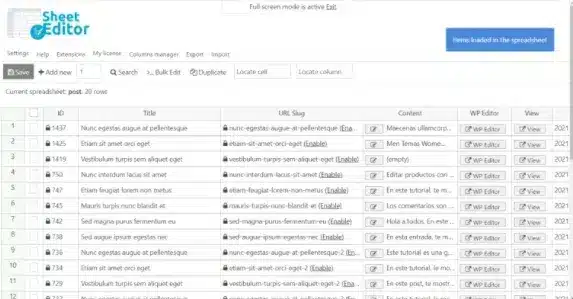
Overview of WP Sheet Editor Editable Frontend Tables
WP Sheet Editor Editable Frontend Tables empowers WordPress site administrators and content managers to create dynamic, editable data tables directly on the frontend of their websites. This powerful plugin is specifically designed for anyone needing to display and manage large datasets, product catalogs, user-submitted content, or any custom post type information in an intuitive, spreadsheet-like interface without ever touching the WordPress backend. WP Sheet Editor Editable Frontend Tables streamlines data management, making it accessible and efficient for users of all technical levels.
Key Features of WP Sheet Editor Editable Frontend Tables
- Intuitive Spreadsheet Interface: Transform complex data into easily digestible and editable tables that mimic the familiarity of a spreadsheet. WP Sheet Editor Editable Frontend Tables makes data manipulation straightforward for any user.
- Frontend Editing Capabilities: Grant specific user roles the ability to edit any field directly from the frontend, eliminating the need for backend access and simplifying content updates.
- Support for All Post Types: Whether you’re managing WooCommerce products, custom post types, or standard WordPress posts and pages, WP Sheet Editor Editable Frontend Tables provides comprehensive support for displaying and editing diverse content.
- Advanced Filtering and Searching: Enable users to quickly find specific data within large tables using powerful filtering and searching tools, enhancing usability and data access.
- Flexible Column Management: Customize which columns are displayed, their order, and even their editability, giving you complete control over the frontend table’s presentation and functionality.
- User Role-Based Permissions: Define precisely who can view, edit, or interact with your frontend tables, ensuring data integrity and security based on WordPress user roles.
- Bulk Editing Options: Perform mass updates on multiple rows or cells simultaneously, drastically reducing the time and effort required for large-scale data modifications.
- Export/Import Functionality: Easily export your frontend table data to CSV files for external analysis or import new data to populate or update existing tables, offering robust data portability.
Why Choose WP Sheet Editor Editable Frontend Tables?
Choosing WP Sheet Editor Editable Frontend Tables means investing in unparalleled efficiency and user empowerment for your WordPress site. This plugin drastically simplifies data management by bringing the editing process to the frontend, making it accessible to a wider range of users, including those without extensive WordPress backend knowledge. Imagine your content contributors, product managers, or even clients being able to update information directly on the live site, securely and without complex training. This not only saves valuable time but also reduces the potential for errors that can occur when managing data through traditional backend interfaces.
WP Sheet Editor Editable Frontend Tables is more than just a data display tool; it’s a productivity enhancer. Its intuitive spreadsheet-like interface makes managing hundreds or even thousands of entries as simple as working in Excel or Google Sheets. The robust filtering, searching, and bulk editing capabilities ensure that even the largest datasets remain manageable and easy to navigate. By centralizing data editing on the frontend, you create a seamless and integrated experience for anyone responsible for content updates, ultimately leading to a more dynamic, up-to-date, and efficient website.
Furthermore, the granular control over permissions provided by WP Sheet Editor Editable Frontend Tables ensures that you maintain full security and oversight. You can precisely define who sees what and who can edit which fields, safeguarding your critical data while still providing the necessary access. This balance of power and control makes WP Sheet Editor Editable Frontend Tables an indispensable tool for any serious WordPress professional or business looking to optimize their content and data management workflows.
Who Should Use WP Sheet Editor Editable Frontend Tables?
WP Sheet Editor Editable Frontend Tables is ideal for a diverse range of WordPress users and businesses. It’s perfect for e-commerce store owners needing to manage product inventories and details, content managers overseeing large article databases, directory websites displaying business listings, real estate agencies managing property listings, or any site that requires users to submit and view data. Developers and agencies will also find it invaluable for building custom solutions where clients need an easy way to update their own site content without backend complexities. Essentially, anyone who manages significant amounts of data on their WordPress site and wants to simplify the editing process for themselves or others will benefit immensely from WP Sheet Editor Editable Frontend Tables.
How to Install WP Sheet Editor Editable Frontend Tables
- Download the plugin zip file for WP Sheet Editor Editable Frontend Tables from your purchase source.
- Log in to your WordPress admin dashboard.
- Navigate to ‘Plugins’ > ‘Add New’ and then click the ‘Upload Plugin’ button at the top.
- Choose the downloaded zip file for WP Sheet Editor Editable Frontend Tables and click ‘Install Now’.
- Once installed, click ‘Activate Plugin’ to enable WP Sheet Editor Editable Frontend Tables on your site.
- Configure the settings for WP Sheet Editor Editable Frontend Tables via its dedicated menu in your WordPress dashboard to create your first editable frontend table.
Frequently Asked Questions About WP Sheet Editor Editable Frontend Tables
Can WP Sheet Editor Editable Frontend Tables work with custom fields?
Yes, WP Sheet Editor Editable Frontend Tables is designed to seamlessly integrate with custom fields, including those created by plugins like Advanced Custom Fields (ACF). You can display and edit these custom fields directly within your frontend tables, providing comprehensive data management capabilities.
Is WP Sheet Editor Editable Frontend Tables compatible with WooCommerce?
Absolutely! WP Sheet Editor Editable Frontend Tables offers robust compatibility with WooCommerce, allowing you to create editable frontend tables for your products, orders, coupons, and more. This makes managing your e-commerce store’s data incredibly efficient and user-friendly.
How do I control who can edit the frontend tables created by WP Sheet Editor Editable Frontend Tables?
WP Sheet Editor Editable Frontend Tables provides extensive user role-based permissions. You can define precisely which WordPress user roles have the ability to view, edit, or interact with specific frontend tables and even individual columns, ensuring secure and controlled data access.
Get WP Sheet Editor Editable Frontend Tables Today
Transform your WordPress data management with the power and flexibility of WP Sheet Editor Editable Frontend Tables. Say goodbye to cumbersome backend editing and empower your team or clients with an intuitive, efficient frontend solution. Explore our extensive range of WordPress Plugins and other premium GPL WordPress Products to further enhance your website’s capabilities. Don’t miss out on the opportunity to streamline your workflow and elevate your site’s functionality. Add WP Sheet Editor Editable Frontend Tables to your toolkit today!
Related Products You May Like
Here's everything you need to know about your purchase:
- 100% original files — Every product is the genuine, virus-free file, exactly as released by the original developer.
- Instant download — Access your files immediately after purchase from your account.
- Lifetime access — Re-download your purchased files anytime. No expiry, no limits.
- Free updates — Newer version released? Just request an update from us, free for all customers.
- Dedicated support — Our team is available 24/7 for installation and file-related help.
- Easy refunds — Not satisfied? Review our Refund Policy. We offer a hassle-free 7-day guarantee.
$59.00 Original price was: $59.00.$5.00Current price is: $5.00.
Version
2.4.45
Last Updated
18/02/2026
License
GPL v2
Compatibility
WordPress 5.0+
Need latest version?
Newer version released? Request an update from us — free for all customers!
Request Update →🎁 Your Purchase Includes
Overview of WP Sheet Editor Editable Frontend Tables
WP Sheet Editor Editable Frontend Tables empowers WordPress site administrators and content managers to create dynamic, editable data tables directly on the frontend of their websites. This powerful plugin is specifically designed for anyone needing to display and manage large datasets, product catalogs, user-submitted content, or any custom post type information in an intuitive, spreadsheet-like interface without ever touching the WordPress backend. WP Sheet Editor Editable Frontend Tables streamlines data management, making it accessible and efficient for users of all technical levels.
Key Features of WP Sheet Editor Editable Frontend Tables
- Intuitive Spreadsheet Interface: Transform complex data into easily digestible and editable tables that mimic the familiarity of a spreadsheet. WP Sheet Editor Editable Frontend Tables makes data manipulation straightforward for any user.
- Frontend Editing Capabilities: Grant specific user roles the ability to edit any field directly from the frontend, eliminating the need for backend access and simplifying content updates.
- Support for All Post Types: Whether you’re managing WooCommerce products, custom post types, or standard WordPress posts and pages, WP Sheet Editor Editable Frontend Tables provides comprehensive support for displaying and editing diverse content.
- Advanced Filtering and Searching: Enable users to quickly find specific data within large tables using powerful filtering and searching tools, enhancing usability and data access.
- Flexible Column Management: Customize which columns are displayed, their order, and even their editability, giving you complete control over the frontend table’s presentation and functionality.
- User Role-Based Permissions: Define precisely who can view, edit, or interact with your frontend tables, ensuring data integrity and security based on WordPress user roles.
- Bulk Editing Options: Perform mass updates on multiple rows or cells simultaneously, drastically reducing the time and effort required for large-scale data modifications.
- Export/Import Functionality: Easily export your frontend table data to CSV files for external analysis or import new data to populate or update existing tables, offering robust data portability.
Why Choose WP Sheet Editor Editable Frontend Tables?
Choosing WP Sheet Editor Editable Frontend Tables means investing in unparalleled efficiency and user empowerment for your WordPress site. This plugin drastically simplifies data management by bringing the editing process to the frontend, making it accessible to a wider range of users, including those without extensive WordPress backend knowledge. Imagine your content contributors, product managers, or even clients being able to update information directly on the live site, securely and without complex training. This not only saves valuable time but also reduces the potential for errors that can occur when managing data through traditional backend interfaces.
WP Sheet Editor Editable Frontend Tables is more than just a data display tool; it’s a productivity enhancer. Its intuitive spreadsheet-like interface makes managing hundreds or even thousands of entries as simple as working in Excel or Google Sheets. The robust filtering, searching, and bulk editing capabilities ensure that even the largest datasets remain manageable and easy to navigate. By centralizing data editing on the frontend, you create a seamless and integrated experience for anyone responsible for content updates, ultimately leading to a more dynamic, up-to-date, and efficient website.
Furthermore, the granular control over permissions provided by WP Sheet Editor Editable Frontend Tables ensures that you maintain full security and oversight. You can precisely define who sees what and who can edit which fields, safeguarding your critical data while still providing the necessary access. This balance of power and control makes WP Sheet Editor Editable Frontend Tables an indispensable tool for any serious WordPress professional or business looking to optimize their content and data management workflows.
Who Should Use WP Sheet Editor Editable Frontend Tables?
WP Sheet Editor Editable Frontend Tables is ideal for a diverse range of WordPress users and businesses. It’s perfect for e-commerce store owners needing to manage product inventories and details, content managers overseeing large article databases, directory websites displaying business listings, real estate agencies managing property listings, or any site that requires users to submit and view data. Developers and agencies will also find it invaluable for building custom solutions where clients need an easy way to update their own site content without backend complexities. Essentially, anyone who manages significant amounts of data on their WordPress site and wants to simplify the editing process for themselves or others will benefit immensely from WP Sheet Editor Editable Frontend Tables.
How to Install WP Sheet Editor Editable Frontend Tables
- Download the plugin zip file for WP Sheet Editor Editable Frontend Tables from your purchase source.
- Log in to your WordPress admin dashboard.
- Navigate to ‘Plugins’ > ‘Add New’ and then click the ‘Upload Plugin’ button at the top.
- Choose the downloaded zip file for WP Sheet Editor Editable Frontend Tables and click ‘Install Now’.
- Once installed, click ‘Activate Plugin’ to enable WP Sheet Editor Editable Frontend Tables on your site.
- Configure the settings for WP Sheet Editor Editable Frontend Tables via its dedicated menu in your WordPress dashboard to create your first editable frontend table.
Frequently Asked Questions About WP Sheet Editor Editable Frontend Tables
Can WP Sheet Editor Editable Frontend Tables work with custom fields?
Yes, WP Sheet Editor Editable Frontend Tables is designed to seamlessly integrate with custom fields, including those created by plugins like Advanced Custom Fields (ACF). You can display and edit these custom fields directly within your frontend tables, providing comprehensive data management capabilities.
Is WP Sheet Editor Editable Frontend Tables compatible with WooCommerce?
Absolutely! WP Sheet Editor Editable Frontend Tables offers robust compatibility with WooCommerce, allowing you to create editable frontend tables for your products, orders, coupons, and more. This makes managing your e-commerce store’s data incredibly efficient and user-friendly.
How do I control who can edit the frontend tables created by WP Sheet Editor Editable Frontend Tables?
WP Sheet Editor Editable Frontend Tables provides extensive user role-based permissions. You can define precisely which WordPress user roles have the ability to view, edit, or interact with specific frontend tables and even individual columns, ensuring secure and controlled data access.
Get WP Sheet Editor Editable Frontend Tables Today
Transform your WordPress data management with the power and flexibility of WP Sheet Editor Editable Frontend Tables. Say goodbye to cumbersome backend editing and empower your team or clients with an intuitive, efficient frontend solution. Explore our extensive range of WordPress Plugins and other premium GPL WordPress Products to further enhance your website’s capabilities. Don’t miss out on the opportunity to streamline your workflow and elevate your site’s functionality. Add WP Sheet Editor Editable Frontend Tables to your toolkit today!
Related Products You May Like
Reviews
There are no reviews yet.
Here's everything you need to know about your purchase:
- 100% original files — Every product is the genuine, virus-free file, exactly as released by the original developer.
- Instant download — Access your files immediately after purchase from your account.
- Lifetime access — Re-download your purchased files anytime. No expiry, no limits.
- Free updates — Newer version released? Just request an update from us, free for all customers.
- Dedicated support — Our team is available 24/7 for installation and file-related help.
- Easy refunds — Not satisfied? Review our Refund Policy. We offer a hassle-free 7-day guarantee.
Reviews
There are no reviews yet.