

WP Sheet Editor EDD Downloads Pro 1.0.79
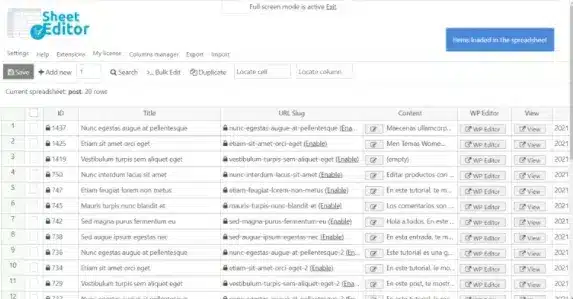
Overview of WP Sheet Editor EDD Downloads Pro
WP Sheet Editor EDD Downloads Pro is an indispensable tool designed for store owners and administrators managing digital products with Easy Digital Downloads (EDD). This powerful plugin transforms the way you handle your EDD downloads, offering a robust spreadsheet interface that simplifies bulk editing, advanced searching, and quick management of all your digital products. If you’re looking to save significant time and streamline your workflow, WP Sheet Editor EDD Downloads Pro is the ultimate solution for efficient store administration.
Key Features of WP Sheet Editor EDD Downloads Pro
- Intuitive Spreadsheet Interface: Manage all your EDD downloads, including their details, files, and meta fields, through a familiar and easy-to-use spreadsheet interface. This visual editor makes navigation and data entry incredibly straightforward for WP Sheet Editor EDD Downloads Pro users.
- Bulk Edit Any Field: Effortlessly update thousands of EDD downloads simultaneously. Whether it’s changing prices, updating file URLs, modifying categories, or adjusting other download properties, WP Sheet Editor EDD Downloads Pro handles it all with a few clicks.
- Advanced Search and Filtering: Pinpoint specific downloads using powerful search and filtering options. Filter by product name, category, tag, price range, author, status, or any custom field to quickly find the items you need to edit with WP Sheet Editor EDD Downloads Pro.
- Export and Import Functionality: Easily export all your EDD download data to a CSV file for offline editing or backup. Import updated CSV files back into your store, ensuring seamless data synchronization and mass updates for WP Sheet Editor EDD Downloads Pro users.
- Custom Field Support: Fully supports custom fields added by other EDD extensions or themes, allowing you to manage every aspect of your digital products from one central location. WP Sheet Editor EDD Downloads Pro ensures comprehensive control over your data.
- Image and File Management: Directly manage download images, featured images, and associated download files from the spreadsheet. Update file paths, add new files, or remove existing ones with unparalleled ease using WP Sheet Editor EDD Downloads Pro.
- Column Manager for Custom Views: Customize your spreadsheet view by adding, removing, or reordering columns to display only the information most relevant to your current task. This personalization enhances efficiency when working with WP Sheet Editor EDD Downloads Pro.
- Undo/Redo Changes: Work with confidence knowing you can undo any mistakes or revert changes, providing a safety net for all your editing operations within WP Sheet Editor EDD Downloads Pro.
Why Choose WP Sheet Editor EDD Downloads Pro?
Choosing WP Sheet Editor EDD Downloads Pro means opting for unparalleled efficiency and control over your Easy Digital Downloads store. In the fast-paced world of e-commerce, time is money, and manually editing hundreds or even thousands of digital products can be an incredibly tedious and error-prone process. This powerful plugin eliminates those frustrations by providing a centralized, intuitive spreadsheet interface where you can perform complex edits, manage variations, and update product details in mere minutes, not hours. It’s designed to drastically cut down the administrative burden, allowing you to focus more on growing your business and less on mundane data entry.
Beyond just saving time, WP Sheet Editor EDD Downloads Pro significantly enhances the accuracy and consistency of your product data. With bulk editing capabilities, you can ensure that pricing, file paths, categories, and other critical information are uniform across your entire catalog, reducing the likelihood of customer confusion or operational errors. Its advanced filtering and search functions mean you can quickly locate specific subsets of products for targeted updates, making promotional changes, seasonal adjustments, or inventory management a breeze. Investing in WP Sheet Editor EDD Downloads Pro is an investment in a more organized, efficient, and ultimately more profitable digital storefront.
Who Should Use WP Sheet Editor EDD Downloads Pro?
WP Sheet Editor EDD Downloads Pro is perfect for any individual or business running an Easy Digital Downloads store. This includes small to large online stores selling digital products like e-books, software, music, graphics, or online courses. Freelancers and agencies managing multiple client stores will find it invaluable for its speed and efficiency. Store owners with extensive product catalogs will benefit immensely from its bulk editing capabilities, while those needing precise control over product data and SEO attributes will appreciate its comprehensive editing features. Essentially, anyone who wants to optimize their EDD store management and save countless hours should consider WP Sheet Editor EDD Downloads Pro.
How to Install WP Sheet Editor EDD Downloads Pro
- Download the Plugin: After acquiring WP Sheet Editor EDD Downloads Pro, download the plugin ZIP file to your computer. Ensure you have the latest stable version for optimal performance and compatibility.
- Upload to WordPress: Log in to your WordPress admin dashboard. Navigate to ‘Plugins’ > ‘Add New’, then click the ‘Upload Plugin’ button at the top of the page.
- Choose File and Install: Click ‘Choose File’, select the WP Sheet Editor EDD Downloads Pro ZIP file you downloaded, and then click ‘Install Now’.
- Activate the Plugin: Once the installation is complete, WordPress will prompt you to activate the plugin. Click ‘Activate Plugin’ to enable WP Sheet Editor EDD Downloads Pro on your website.
- Access the Editor: After activation, you can find the new spreadsheet editor for your EDD downloads usually under ‘Sheet Editor’ in your WordPress admin menu, or directly within the Easy Digital Downloads section.
Frequently Asked Questions About WP Sheet Editor EDD Downloads Pro
Is WP Sheet Editor EDD Downloads Pro compatible with other EDD add-ons?
Yes, WP Sheet Editor EDD Downloads Pro is built to be highly compatible with a wide range of Easy Digital Downloads add-ons and extensions. It automatically detects and allows you to edit custom fields introduced by other plugins, providing a seamless and integrated management experience for your entire EDD ecosystem.
What types of download data can I edit with WP Sheet Editor EDD Downloads Pro?
With WP Sheet Editor EDD Downloads Pro, you can edit virtually every piece of data associated with your EDD downloads. This includes titles, descriptions, excerpts, prices, download files, categories, tags, featured images, download limits, purchase notes, custom meta fields, and much more. Its comprehensive support ensures you have full control over your digital products.
Is WP Sheet Editor EDD Downloads Pro easy to use for beginners?
Absolutely! WP Sheet Editor EDD Downloads Pro features an intuitive and familiar spreadsheet interface that mirrors popular tools like Excel or Google Sheets. While it’s incredibly powerful, its design prioritizes ease of use, making it accessible for both beginners and advanced users. Comprehensive documentation and helpful tooltips further assist users in navigating its features.
Get WP Sheet Editor EDD Downloads Pro Today
Revolutionize the way you manage your Easy Digital Downloads store. With WP Sheet Editor EDD Downloads Pro, you gain a powerful, time-saving tool that simplifies bulk editing, enhances data accuracy, and streamlines your entire product management workflow. Stop wrestling with individual product edits and embrace the efficiency of a centralized spreadsheet editor. Explore this and other essential WordPress Plugins available. Elevate your online store’s potential by adding WP Sheet Editor EDD Downloads Pro to your toolkit today and discover the full range of premium GPL WordPress Products to empower your website.
Related Products You May Like
Here's everything you need to know about your purchase:
- 100% original files — Every product is the genuine, virus-free file, exactly as released by the original developer.
- Instant download — Access your files immediately after purchase from your account.
- Lifetime access — Re-download your purchased files anytime. No expiry, no limits.
- Free updates — Newer version released? Just request an update from us, free for all customers.
- Dedicated support — Our team is available 24/7 for installation and file-related help.
- Easy refunds — Not satisfied? Review our Refund Policy. We offer a hassle-free 7-day guarantee.
$59.00 Original price was: $59.00.$2.00Current price is: $2.00.
Version
1.0.79
Last Updated
18/02/2026
License
GPL v2
Compatibility
WordPress 5.0+
Need latest version?
Newer version released? Request an update from us — free for all customers!
Request Update →🎁 Your Purchase Includes
Overview of WP Sheet Editor EDD Downloads Pro
WP Sheet Editor EDD Downloads Pro is an indispensable tool designed for store owners and administrators managing digital products with Easy Digital Downloads (EDD). This powerful plugin transforms the way you handle your EDD downloads, offering a robust spreadsheet interface that simplifies bulk editing, advanced searching, and quick management of all your digital products. If you’re looking to save significant time and streamline your workflow, WP Sheet Editor EDD Downloads Pro is the ultimate solution for efficient store administration.
Key Features of WP Sheet Editor EDD Downloads Pro
- Intuitive Spreadsheet Interface: Manage all your EDD downloads, including their details, files, and meta fields, through a familiar and easy-to-use spreadsheet interface. This visual editor makes navigation and data entry incredibly straightforward for WP Sheet Editor EDD Downloads Pro users.
- Bulk Edit Any Field: Effortlessly update thousands of EDD downloads simultaneously. Whether it’s changing prices, updating file URLs, modifying categories, or adjusting other download properties, WP Sheet Editor EDD Downloads Pro handles it all with a few clicks.
- Advanced Search and Filtering: Pinpoint specific downloads using powerful search and filtering options. Filter by product name, category, tag, price range, author, status, or any custom field to quickly find the items you need to edit with WP Sheet Editor EDD Downloads Pro.
- Export and Import Functionality: Easily export all your EDD download data to a CSV file for offline editing or backup. Import updated CSV files back into your store, ensuring seamless data synchronization and mass updates for WP Sheet Editor EDD Downloads Pro users.
- Custom Field Support: Fully supports custom fields added by other EDD extensions or themes, allowing you to manage every aspect of your digital products from one central location. WP Sheet Editor EDD Downloads Pro ensures comprehensive control over your data.
- Image and File Management: Directly manage download images, featured images, and associated download files from the spreadsheet. Update file paths, add new files, or remove existing ones with unparalleled ease using WP Sheet Editor EDD Downloads Pro.
- Column Manager for Custom Views: Customize your spreadsheet view by adding, removing, or reordering columns to display only the information most relevant to your current task. This personalization enhances efficiency when working with WP Sheet Editor EDD Downloads Pro.
- Undo/Redo Changes: Work with confidence knowing you can undo any mistakes or revert changes, providing a safety net for all your editing operations within WP Sheet Editor EDD Downloads Pro.
Why Choose WP Sheet Editor EDD Downloads Pro?
Choosing WP Sheet Editor EDD Downloads Pro means opting for unparalleled efficiency and control over your Easy Digital Downloads store. In the fast-paced world of e-commerce, time is money, and manually editing hundreds or even thousands of digital products can be an incredibly tedious and error-prone process. This powerful plugin eliminates those frustrations by providing a centralized, intuitive spreadsheet interface where you can perform complex edits, manage variations, and update product details in mere minutes, not hours. It’s designed to drastically cut down the administrative burden, allowing you to focus more on growing your business and less on mundane data entry.
Beyond just saving time, WP Sheet Editor EDD Downloads Pro significantly enhances the accuracy and consistency of your product data. With bulk editing capabilities, you can ensure that pricing, file paths, categories, and other critical information are uniform across your entire catalog, reducing the likelihood of customer confusion or operational errors. Its advanced filtering and search functions mean you can quickly locate specific subsets of products for targeted updates, making promotional changes, seasonal adjustments, or inventory management a breeze. Investing in WP Sheet Editor EDD Downloads Pro is an investment in a more organized, efficient, and ultimately more profitable digital storefront.
Who Should Use WP Sheet Editor EDD Downloads Pro?
WP Sheet Editor EDD Downloads Pro is perfect for any individual or business running an Easy Digital Downloads store. This includes small to large online stores selling digital products like e-books, software, music, graphics, or online courses. Freelancers and agencies managing multiple client stores will find it invaluable for its speed and efficiency. Store owners with extensive product catalogs will benefit immensely from its bulk editing capabilities, while those needing precise control over product data and SEO attributes will appreciate its comprehensive editing features. Essentially, anyone who wants to optimize their EDD store management and save countless hours should consider WP Sheet Editor EDD Downloads Pro.
How to Install WP Sheet Editor EDD Downloads Pro
- Download the Plugin: After acquiring WP Sheet Editor EDD Downloads Pro, download the plugin ZIP file to your computer. Ensure you have the latest stable version for optimal performance and compatibility.
- Upload to WordPress: Log in to your WordPress admin dashboard. Navigate to ‘Plugins’ > ‘Add New’, then click the ‘Upload Plugin’ button at the top of the page.
- Choose File and Install: Click ‘Choose File’, select the WP Sheet Editor EDD Downloads Pro ZIP file you downloaded, and then click ‘Install Now’.
- Activate the Plugin: Once the installation is complete, WordPress will prompt you to activate the plugin. Click ‘Activate Plugin’ to enable WP Sheet Editor EDD Downloads Pro on your website.
- Access the Editor: After activation, you can find the new spreadsheet editor for your EDD downloads usually under ‘Sheet Editor’ in your WordPress admin menu, or directly within the Easy Digital Downloads section.
Frequently Asked Questions About WP Sheet Editor EDD Downloads Pro
Is WP Sheet Editor EDD Downloads Pro compatible with other EDD add-ons?
Yes, WP Sheet Editor EDD Downloads Pro is built to be highly compatible with a wide range of Easy Digital Downloads add-ons and extensions. It automatically detects and allows you to edit custom fields introduced by other plugins, providing a seamless and integrated management experience for your entire EDD ecosystem.
What types of download data can I edit with WP Sheet Editor EDD Downloads Pro?
With WP Sheet Editor EDD Downloads Pro, you can edit virtually every piece of data associated with your EDD downloads. This includes titles, descriptions, excerpts, prices, download files, categories, tags, featured images, download limits, purchase notes, custom meta fields, and much more. Its comprehensive support ensures you have full control over your digital products.
Is WP Sheet Editor EDD Downloads Pro easy to use for beginners?
Absolutely! WP Sheet Editor EDD Downloads Pro features an intuitive and familiar spreadsheet interface that mirrors popular tools like Excel or Google Sheets. While it’s incredibly powerful, its design prioritizes ease of use, making it accessible for both beginners and advanced users. Comprehensive documentation and helpful tooltips further assist users in navigating its features.
Get WP Sheet Editor EDD Downloads Pro Today
Revolutionize the way you manage your Easy Digital Downloads store. With WP Sheet Editor EDD Downloads Pro, you gain a powerful, time-saving tool that simplifies bulk editing, enhances data accuracy, and streamlines your entire product management workflow. Stop wrestling with individual product edits and embrace the efficiency of a centralized spreadsheet editor. Explore this and other essential WordPress Plugins available. Elevate your online store’s potential by adding WP Sheet Editor EDD Downloads Pro to your toolkit today and discover the full range of premium GPL WordPress Products to empower your website.
Related Products You May Like
Reviews
There are no reviews yet.
Here's everything you need to know about your purchase:
- 100% original files — Every product is the genuine, virus-free file, exactly as released by the original developer.
- Instant download — Access your files immediately after purchase from your account.
- Lifetime access — Re-download your purchased files anytime. No expiry, no limits.
- Free updates — Newer version released? Just request an update from us, free for all customers.
- Dedicated support — Our team is available 24/7 for installation and file-related help.
- Easy refunds — Not satisfied? Review our Refund Policy. We offer a hassle-free 7-day guarantee.
Reviews
There are no reviews yet.