

WP Frontend Admin Premium 1.22.5
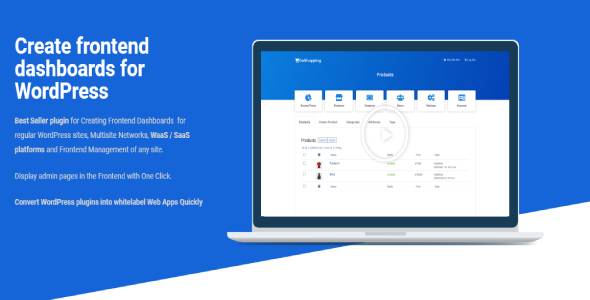
Overview of WP Frontend Admin
Transform the way you and your clients interact with WordPress using WP Frontend Admin. This powerful plugin empowers you to create custom, intuitive frontend dashboards and simplify the WordPress backend, making it accessible and user-friendly for non-technical users. Whether you’re a developer, an agency, or a site owner, WP Frontend Admin is your ultimate tool for delivering a tailored and streamlined administrative experience.
Key Features of WP Frontend Admin
- Frontend Dashboard Builder: Easily design and implement custom frontend dashboards, allowing users to manage content, settings, and profiles without ever seeing the traditional WordPress backend.
- Backend Simplification: Drastically reduce the complexity of the WordPress admin area by hiding unnecessary menus, meta boxes, and options, presenting a clean interface tailored to specific user roles.
- User Role-Based Access: Control precisely what each user role can see and do within the frontend and simplified backend, ensuring a secure and customized experience for every user.
- White Labeling Capabilities: Brand the entire administrative interface with your own logos, colors, and custom login pages, providing a professional and consistent experience for your clients.
- Frontend Content Editing: Allow users to create and edit posts, pages, and custom post types directly from the frontend, simplifying content management and reducing the learning curve.
- WooCommerce Integration: Seamlessly integrate with WooCommerce, enabling customers and vendors to manage products, orders, and shop settings from a user-friendly frontend interface.
- Custom Login/Registration Forms: Create beautiful, branded login and registration forms that integrate perfectly with your site’s design, enhancing user onboarding.
- Menu Editor and Visibility Control: Customize the navigation menus in both the frontend dashboard and simplified backend, hiding or showing specific items based on user roles.
Why Choose WP Frontend Admin?
Choosing WP Frontend Admin means investing in efficiency, professionalism, and an unparalleled user experience. For agencies and developers, it translates into significant time savings on client onboarding and support. Instead of spending hours explaining the intricacies of the WordPress backend, you can provide a ready-to-use, simplified interface that your clients will intuitively understand. This not only boosts client satisfaction but also frees up your resources to focus on more complex development tasks. With WP Frontend Admin, you’re not just providing a website; you’re delivering a bespoke content management system tailored precisely to their needs.
Beyond client work, WP Frontend Admin is invaluable for any site owner looking to empower their team or users. Imagine a membership site where members can update their profiles, manage subscriptions, or submit content through a branded, easy-to-navigate frontend dashboard. Or an e-commerce store where vendors can manage their products and orders without ever touching the WordPress admin. This level of control and simplification reduces potential errors, minimizes support requests, and fosters a more independent and productive user base. The ability to white-label the entire experience further enhances your brand’s professionalism, making your platform feel truly custom-built.
Furthermore, WP Frontend Admin is designed with flexibility in mind. Its robust features allow for deep customization without requiring extensive coding knowledge. You can pick and choose which elements to display or hide, ensuring that the interface is always relevant and clutter-free for each specific user. This adaptability makes WP Frontend Admin a versatile solution for a wide range of applications, from basic client sites to complex multi-vendor marketplaces and educational platforms. It truly puts you in control of the user’s administrative journey.
Who Should Use WP Frontend Admin?
WP Frontend Admin is an essential tool for:
- WordPress Developers & Agencies: To streamline client work, reduce support overhead, and deliver highly customized, branded client portals.
- Membership Site Owners: To provide members with an intuitive frontend dashboard for managing profiles, subscriptions, and content.
- eCommerce Store Owners (WooCommerce): To offer vendors or customers a simplified interface for managing products, orders, and account details.
- LMS Platform Creators: To give students and instructors a tailored frontend experience for courses, lessons, and progress tracking.
- Website Owners with Non-Technical Staff: To simplify content management and site updates for staff members who don’t need full backend access.
- Anyone Building Custom Applications on WordPress: To create unique, user-specific interfaces for various functionalities without exposing the standard WordPress admin.
How to Install WP Frontend Admin
- First, download the WP Frontend Admin plugin file from your GPLUniverse account after purchase.
- Log in to your WordPress administration dashboard.
- Navigate to the ‘Plugins’ menu and click on ‘Add New’.
- Click the ‘Upload Plugin’ button at the top of the page.
- Choose the downloaded
.zipfile for WP Frontend Admin from your computer and click ‘Install Now’. - Once the installation is complete, click ‘Activate Plugin’ to enable WP Frontend Admin on your website.
Frequently Asked Questions About WP Frontend Admin
Is WP Frontend Admin compatible with all WordPress themes and plugins?
WP Frontend Admin is designed to be highly compatible with most standard WordPress themes and plugins. While it works out-of-the-box with many setups, due to the vast ecosystem of WordPress, specific theme or plugin customizations might occasionally require minor adjustments. We recommend testing WP Frontend Admin in a staging environment first to ensure seamless integration with your unique site configuration.
Can I completely white-label the entire admin experience with WP Frontend Admin?
Yes, one of the core strengths of WP Frontend Admin is its comprehensive white-labeling capabilities. You can customize login pages, replace WordPress logos with your own branding, change colors, and even remove all traces of WordPress branding from the frontend dashboard and simplified backend areas. This allows you to deliver a fully branded, professional experience to your clients or users.
How does WP Frontend Admin benefit my clients or users?
WP Frontend Admin significantly benefits your clients and users by providing them with a streamlined, intuitive, and task-specific interface. Instead of navigating a complex WordPress backend, they get a clean, customized dashboard tailored to their exact needs. This reduces confusion, minimizes the learning curve, prevents accidental errors, and ultimately empowers them to manage their content and settings with confidence and ease.
Get WP Frontend Admin Today
Elevate your WordPress projects and user experience with WP Frontend Admin. Stop struggling with complex backend interfaces and start delivering intuitive, branded solutions that impress. Unlock the full potential of your WordPress site by simplifying administration for everyone. Browse our extensive collection of WordPress Plugins and other high-quality GPL WordPress Products at GPLUniverse. Purchase WP Frontend Admin now and revolutionize your WordPress workflow.
Related Products You May Like
Here's everything you need to know about your purchase:
- 100% original files — Every product is the genuine, virus-free file, exactly as released by the original developer.
- Instant download — Access your files immediately after purchase from your account.
- Lifetime access — Re-download your purchased files anytime. No expiry, no limits.
- Free updates — Newer version released? Just request an update from us, free for all customers.
- Dedicated support — Our team is available 24/7 for installation and file-related help.
- Easy refunds — Not satisfied? Review our Refund Policy. We offer a hassle-free 7-day guarantee.
$100.00 Original price was: $100.00.$2.00Current price is: $2.00.
Version
1.22.5
Last Updated
26/02/2025
License
GPL v2
Compatibility
WordPress 5.0+
Need latest version?
Newer version released? Request an update from us — free for all customers!
Request Update →🎁 Your Purchase Includes
Overview of WP Frontend Admin
Transform the way you and your clients interact with WordPress using WP Frontend Admin. This powerful plugin empowers you to create custom, intuitive frontend dashboards and simplify the WordPress backend, making it accessible and user-friendly for non-technical users. Whether you’re a developer, an agency, or a site owner, WP Frontend Admin is your ultimate tool for delivering a tailored and streamlined administrative experience.
Key Features of WP Frontend Admin
- Frontend Dashboard Builder: Easily design and implement custom frontend dashboards, allowing users to manage content, settings, and profiles without ever seeing the traditional WordPress backend.
- Backend Simplification: Drastically reduce the complexity of the WordPress admin area by hiding unnecessary menus, meta boxes, and options, presenting a clean interface tailored to specific user roles.
- User Role-Based Access: Control precisely what each user role can see and do within the frontend and simplified backend, ensuring a secure and customized experience for every user.
- White Labeling Capabilities: Brand the entire administrative interface with your own logos, colors, and custom login pages, providing a professional and consistent experience for your clients.
- Frontend Content Editing: Allow users to create and edit posts, pages, and custom post types directly from the frontend, simplifying content management and reducing the learning curve.
- WooCommerce Integration: Seamlessly integrate with WooCommerce, enabling customers and vendors to manage products, orders, and shop settings from a user-friendly frontend interface.
- Custom Login/Registration Forms: Create beautiful, branded login and registration forms that integrate perfectly with your site’s design, enhancing user onboarding.
- Menu Editor and Visibility Control: Customize the navigation menus in both the frontend dashboard and simplified backend, hiding or showing specific items based on user roles.
Why Choose WP Frontend Admin?
Choosing WP Frontend Admin means investing in efficiency, professionalism, and an unparalleled user experience. For agencies and developers, it translates into significant time savings on client onboarding and support. Instead of spending hours explaining the intricacies of the WordPress backend, you can provide a ready-to-use, simplified interface that your clients will intuitively understand. This not only boosts client satisfaction but also frees up your resources to focus on more complex development tasks. With WP Frontend Admin, you’re not just providing a website; you’re delivering a bespoke content management system tailored precisely to their needs.
Beyond client work, WP Frontend Admin is invaluable for any site owner looking to empower their team or users. Imagine a membership site where members can update their profiles, manage subscriptions, or submit content through a branded, easy-to-navigate frontend dashboard. Or an e-commerce store where vendors can manage their products and orders without ever touching the WordPress admin. This level of control and simplification reduces potential errors, minimizes support requests, and fosters a more independent and productive user base. The ability to white-label the entire experience further enhances your brand’s professionalism, making your platform feel truly custom-built.
Furthermore, WP Frontend Admin is designed with flexibility in mind. Its robust features allow for deep customization without requiring extensive coding knowledge. You can pick and choose which elements to display or hide, ensuring that the interface is always relevant and clutter-free for each specific user. This adaptability makes WP Frontend Admin a versatile solution for a wide range of applications, from basic client sites to complex multi-vendor marketplaces and educational platforms. It truly puts you in control of the user’s administrative journey.
Who Should Use WP Frontend Admin?
WP Frontend Admin is an essential tool for:
- WordPress Developers & Agencies: To streamline client work, reduce support overhead, and deliver highly customized, branded client portals.
- Membership Site Owners: To provide members with an intuitive frontend dashboard for managing profiles, subscriptions, and content.
- eCommerce Store Owners (WooCommerce): To offer vendors or customers a simplified interface for managing products, orders, and account details.
- LMS Platform Creators: To give students and instructors a tailored frontend experience for courses, lessons, and progress tracking.
- Website Owners with Non-Technical Staff: To simplify content management and site updates for staff members who don’t need full backend access.
- Anyone Building Custom Applications on WordPress: To create unique, user-specific interfaces for various functionalities without exposing the standard WordPress admin.
How to Install WP Frontend Admin
- First, download the WP Frontend Admin plugin file from your GPLUniverse account after purchase.
- Log in to your WordPress administration dashboard.
- Navigate to the ‘Plugins’ menu and click on ‘Add New’.
- Click the ‘Upload Plugin’ button at the top of the page.
- Choose the downloaded
.zipfile for WP Frontend Admin from your computer and click ‘Install Now’. - Once the installation is complete, click ‘Activate Plugin’ to enable WP Frontend Admin on your website.
Frequently Asked Questions About WP Frontend Admin
Is WP Frontend Admin compatible with all WordPress themes and plugins?
WP Frontend Admin is designed to be highly compatible with most standard WordPress themes and plugins. While it works out-of-the-box with many setups, due to the vast ecosystem of WordPress, specific theme or plugin customizations might occasionally require minor adjustments. We recommend testing WP Frontend Admin in a staging environment first to ensure seamless integration with your unique site configuration.
Can I completely white-label the entire admin experience with WP Frontend Admin?
Yes, one of the core strengths of WP Frontend Admin is its comprehensive white-labeling capabilities. You can customize login pages, replace WordPress logos with your own branding, change colors, and even remove all traces of WordPress branding from the frontend dashboard and simplified backend areas. This allows you to deliver a fully branded, professional experience to your clients or users.
How does WP Frontend Admin benefit my clients or users?
WP Frontend Admin significantly benefits your clients and users by providing them with a streamlined, intuitive, and task-specific interface. Instead of navigating a complex WordPress backend, they get a clean, customized dashboard tailored to their exact needs. This reduces confusion, minimizes the learning curve, prevents accidental errors, and ultimately empowers them to manage their content and settings with confidence and ease.
Get WP Frontend Admin Today
Elevate your WordPress projects and user experience with WP Frontend Admin. Stop struggling with complex backend interfaces and start delivering intuitive, branded solutions that impress. Unlock the full potential of your WordPress site by simplifying administration for everyone. Browse our extensive collection of WordPress Plugins and other high-quality GPL WordPress Products at GPLUniverse. Purchase WP Frontend Admin now and revolutionize your WordPress workflow.
Related Products You May Like
Reviews
There are no reviews yet.
Here's everything you need to know about your purchase:
- 100% original files — Every product is the genuine, virus-free file, exactly as released by the original developer.
- Instant download — Access your files immediately after purchase from your account.
- Lifetime access — Re-download your purchased files anytime. No expiry, no limits.
- Free updates — Newer version released? Just request an update from us, free for all customers.
- Dedicated support — Our team is available 24/7 for installation and file-related help.
- Easy refunds — Not satisfied? Review our Refund Policy. We offer a hassle-free 7-day guarantee.
Reviews
There are no reviews yet.