

WP Cron Cleaner Pro 1.0.3
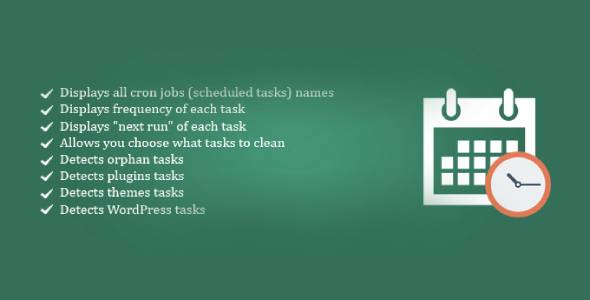
Overview of WP Cron Cleaner Pro
Efficiently manage and optimize your WordPress site’s scheduled tasks with WP Cron Cleaner Pro. This essential plugin provides unparalleled control over your WordPress cron jobs, helping you identify, clean, and streamline operations that impact site performance. Designed for WordPress administrators, developers, and site owners who demand robust control and a smooth-running website, WP Cron Cleaner Pro is the ultimate solution for cron management.
Key Features of WP Cron Cleaner Pro
- Comprehensive Cron Job Listing: Gain a clear, real-time overview of all scheduled cron events on your WordPress site, including their hooks, arguments, next run times, and recurrence.
- Effortless Cron Job Deletion: Easily remove unnecessary, orphaned, or problematic cron jobs with a single click, preventing them from consuming resources and slowing down your site.
- Manual Cron Job Execution: Test and trigger specific cron events manually to debug issues or ensure critical tasks run precisely when needed, offering invaluable flexibility.
- Detailed Event Information: Access in-depth details for each cron event, including the plugin or theme responsible for its creation, aiding in troubleshooting and optimization.
- Search and Filter Functionality: Quickly locate specific cron jobs using powerful search and filter options, making it simple to manage even a large number of scheduled tasks.
- Performance Monitoring: Understand how your cron jobs are affecting your site’s performance by identifying long-running or frequently triggered events that might need attention.
- User-Friendly Interface: Navigate and manage your cron jobs with an intuitive and well-designed interface that makes complex tasks simple for users of all technical levels.
- Scheduled Task Creation (Pro Feature): Beyond cleaning, WP Cron Cleaner Pro allows you to create custom cron jobs directly from the dashboard, giving you complete control over your site’s automation.
Why Choose WP Cron Cleaner Pro?
Choosing WP Cron Cleaner Pro means opting for a faster, more stable, and meticulously managed WordPress website. WordPress cron, while vital for background tasks like scheduled posts, updates, and backups, can sometimes become bloated or misconfigured, leading to performance bottlenecks and unexpected behavior. This powerful plugin empowers you to take charge, transforming potential liabilities into assets by ensuring every scheduled task runs efficiently and only when necessary. It’s not just about cleaning; it’s about optimizing your site’s hidden processes for peak performance and reliability.
With WP Cron Cleaner Pro, you eliminate guesswork and gain transparency into one of WordPress’s most critical, yet often overlooked, systems. Imagine identifying and removing a rogue cron job that was silently draining your server resources, or manually triggering a crucial backup task without needing to delve into complex code. This level of control translates directly into a smoother user experience for your visitors, improved SEO through faster page loads, and peace of mind for you as a site administrator. Invest in WP Cron Cleaner Pro to unlock your site’s full potential and maintain a clean, high-performing WordPress environment.
Who Should Use WP Cron Cleaner Pro?
WP Cron Cleaner Pro is indispensable for anyone running a WordPress website, particularly those experiencing performance issues, unexplained resource usage, or simply seeking better control over their site’s backend operations. It’s perfect for WordPress developers who need to debug cron-related problems, site administrators who manage multiple plugins and themes, and e-commerce store owners who rely on timely scheduled tasks. If you want to ensure your site’s automated processes are running optimally and efficiently, WP Cron Cleaner Pro is for you.
How to Install WP Cron Cleaner Pro
- Download the Plugin: After purchasing WP Cron Cleaner Pro from our store, download the plugin’s ZIP file to your computer. Ensure you download the correct version.
- Upload via WordPress Dashboard: Log in to your WordPress admin area. Navigate to ‘Plugins’ > ‘Add New’ and then click the ‘Upload Plugin’ button at the top of the page.
- Choose and Install: Click ‘Choose File’, select the WP Cron Cleaner Pro ZIP file you downloaded, and then click ‘Install Now’. WordPress will upload and unpack the plugin.
- Activate the Plugin: Once the installation is complete, click the ‘Activate Plugin’ button. WP Cron Cleaner Pro will now be active on your site, and you’ll find its settings under the ‘Tools’ or ‘Settings’ menu.
- Configure and Optimize: Navigate to the WP Cron Cleaner Pro settings page in your WordPress dashboard. Begin reviewing your cron jobs, deleting unnecessary ones, and optimizing your scheduled tasks for improved site performance.
Frequently Asked Questions About WP Cron Cleaner Pro
What exactly is WordPress Cron?
WordPress Cron (WP-Cron) is WordPress’s way of handling scheduled tasks, such as publishing scheduled posts, checking for updates, sending email notifications, or performing database maintenance. Unlike a system cron job, WP-Cron is triggered by page loads, meaning it runs when someone visits your site, making WP Cron Cleaner Pro crucial for managing these often-invisible background processes.
Can WP Cron Cleaner Pro really improve my site’s performance?
Absolutely. By allowing you to identify and remove redundant, orphaned, or resource-intensive cron jobs, WP Cron Cleaner Pro directly contributes to a lighter server load and faster page generation. Unmanaged cron tasks can silently consume CPU and memory, leading to slower site performance and even timeouts. Cleaning them up with WP Cron Cleaner Pro frees up resources, resulting in a noticeable speed improvement for your website.
Is WP Cron Cleaner Pro compatible with all WordPress themes and plugins?
WP Cron Cleaner Pro is designed to be highly compatible with standard WordPress installations, themes, and plugins. It interacts directly with the core WordPress cron system, ensuring broad compatibility. While specific conflicts are rare, if you encounter any issues, our support team is ready to assist. It’s always a good practice to back up your site before installing any new plugin.
Get WP Cron Cleaner Pro Today
Ready to take full control of your WordPress cron jobs and unlock superior site performance? Don’t let hidden background tasks slow down your website. Acquire WP Cron Cleaner Pro today and experience the difference a well-managed cron system makes. Explore our extensive collection of WordPress Plugins and other premium GPL WordPress Products to further enhance your site’s capabilities. Optimize your WordPress site with confidence!
Related Products You May Like
Here's everything you need to know about your purchase:
- 100% original files — Every product is the genuine, virus-free file, exactly as released by the original developer.
- Instant download — Access your files immediately after purchase from your account.
- Lifetime access — Re-download your purchased files anytime. No expiry, no limits.
- Free updates — Newer version released? Just request an update from us, free for all customers.
- Dedicated support — Our team is available 24/7 for installation and file-related help.
- Easy refunds — Not satisfied? Review our Refund Policy. We offer a hassle-free 7-day guarantee.
$100.00 Original price was: $100.00.$2.00Current price is: $2.00.
Version
1.0.3
Last Updated
10/02/2026
License
GPL v2
Compatibility
WordPress 5.0+
Need latest version?
Newer version released? Request an update from us — free for all customers!
Request Update →🎁 Your Purchase Includes
Overview of WP Cron Cleaner Pro
Efficiently manage and optimize your WordPress site’s scheduled tasks with WP Cron Cleaner Pro. This essential plugin provides unparalleled control over your WordPress cron jobs, helping you identify, clean, and streamline operations that impact site performance. Designed for WordPress administrators, developers, and site owners who demand robust control and a smooth-running website, WP Cron Cleaner Pro is the ultimate solution for cron management.
Key Features of WP Cron Cleaner Pro
- Comprehensive Cron Job Listing: Gain a clear, real-time overview of all scheduled cron events on your WordPress site, including their hooks, arguments, next run times, and recurrence.
- Effortless Cron Job Deletion: Easily remove unnecessary, orphaned, or problematic cron jobs with a single click, preventing them from consuming resources and slowing down your site.
- Manual Cron Job Execution: Test and trigger specific cron events manually to debug issues or ensure critical tasks run precisely when needed, offering invaluable flexibility.
- Detailed Event Information: Access in-depth details for each cron event, including the plugin or theme responsible for its creation, aiding in troubleshooting and optimization.
- Search and Filter Functionality: Quickly locate specific cron jobs using powerful search and filter options, making it simple to manage even a large number of scheduled tasks.
- Performance Monitoring: Understand how your cron jobs are affecting your site’s performance by identifying long-running or frequently triggered events that might need attention.
- User-Friendly Interface: Navigate and manage your cron jobs with an intuitive and well-designed interface that makes complex tasks simple for users of all technical levels.
- Scheduled Task Creation (Pro Feature): Beyond cleaning, WP Cron Cleaner Pro allows you to create custom cron jobs directly from the dashboard, giving you complete control over your site’s automation.
Why Choose WP Cron Cleaner Pro?
Choosing WP Cron Cleaner Pro means opting for a faster, more stable, and meticulously managed WordPress website. WordPress cron, while vital for background tasks like scheduled posts, updates, and backups, can sometimes become bloated or misconfigured, leading to performance bottlenecks and unexpected behavior. This powerful plugin empowers you to take charge, transforming potential liabilities into assets by ensuring every scheduled task runs efficiently and only when necessary. It’s not just about cleaning; it’s about optimizing your site’s hidden processes for peak performance and reliability.
With WP Cron Cleaner Pro, you eliminate guesswork and gain transparency into one of WordPress’s most critical, yet often overlooked, systems. Imagine identifying and removing a rogue cron job that was silently draining your server resources, or manually triggering a crucial backup task without needing to delve into complex code. This level of control translates directly into a smoother user experience for your visitors, improved SEO through faster page loads, and peace of mind for you as a site administrator. Invest in WP Cron Cleaner Pro to unlock your site’s full potential and maintain a clean, high-performing WordPress environment.
Who Should Use WP Cron Cleaner Pro?
WP Cron Cleaner Pro is indispensable for anyone running a WordPress website, particularly those experiencing performance issues, unexplained resource usage, or simply seeking better control over their site’s backend operations. It’s perfect for WordPress developers who need to debug cron-related problems, site administrators who manage multiple plugins and themes, and e-commerce store owners who rely on timely scheduled tasks. If you want to ensure your site’s automated processes are running optimally and efficiently, WP Cron Cleaner Pro is for you.
How to Install WP Cron Cleaner Pro
- Download the Plugin: After purchasing WP Cron Cleaner Pro from our store, download the plugin’s ZIP file to your computer. Ensure you download the correct version.
- Upload via WordPress Dashboard: Log in to your WordPress admin area. Navigate to ‘Plugins’ > ‘Add New’ and then click the ‘Upload Plugin’ button at the top of the page.
- Choose and Install: Click ‘Choose File’, select the WP Cron Cleaner Pro ZIP file you downloaded, and then click ‘Install Now’. WordPress will upload and unpack the plugin.
- Activate the Plugin: Once the installation is complete, click the ‘Activate Plugin’ button. WP Cron Cleaner Pro will now be active on your site, and you’ll find its settings under the ‘Tools’ or ‘Settings’ menu.
- Configure and Optimize: Navigate to the WP Cron Cleaner Pro settings page in your WordPress dashboard. Begin reviewing your cron jobs, deleting unnecessary ones, and optimizing your scheduled tasks for improved site performance.
Frequently Asked Questions About WP Cron Cleaner Pro
What exactly is WordPress Cron?
WordPress Cron (WP-Cron) is WordPress’s way of handling scheduled tasks, such as publishing scheduled posts, checking for updates, sending email notifications, or performing database maintenance. Unlike a system cron job, WP-Cron is triggered by page loads, meaning it runs when someone visits your site, making WP Cron Cleaner Pro crucial for managing these often-invisible background processes.
Can WP Cron Cleaner Pro really improve my site’s performance?
Absolutely. By allowing you to identify and remove redundant, orphaned, or resource-intensive cron jobs, WP Cron Cleaner Pro directly contributes to a lighter server load and faster page generation. Unmanaged cron tasks can silently consume CPU and memory, leading to slower site performance and even timeouts. Cleaning them up with WP Cron Cleaner Pro frees up resources, resulting in a noticeable speed improvement for your website.
Is WP Cron Cleaner Pro compatible with all WordPress themes and plugins?
WP Cron Cleaner Pro is designed to be highly compatible with standard WordPress installations, themes, and plugins. It interacts directly with the core WordPress cron system, ensuring broad compatibility. While specific conflicts are rare, if you encounter any issues, our support team is ready to assist. It’s always a good practice to back up your site before installing any new plugin.
Get WP Cron Cleaner Pro Today
Ready to take full control of your WordPress cron jobs and unlock superior site performance? Don’t let hidden background tasks slow down your website. Acquire WP Cron Cleaner Pro today and experience the difference a well-managed cron system makes. Explore our extensive collection of WordPress Plugins and other premium GPL WordPress Products to further enhance your site’s capabilities. Optimize your WordPress site with confidence!
Related Products You May Like
Reviews
There are no reviews yet.
Here's everything you need to know about your purchase:
- 100% original files — Every product is the genuine, virus-free file, exactly as released by the original developer.
- Instant download — Access your files immediately after purchase from your account.
- Lifetime access — Re-download your purchased files anytime. No expiry, no limits.
- Free updates — Newer version released? Just request an update from us, free for all customers.
- Dedicated support — Our team is available 24/7 for installation and file-related help.
- Easy refunds — Not satisfied? Review our Refund Policy. We offer a hassle-free 7-day guarantee.
Reviews
There are no reviews yet.