

WooCommerce PDF Invoices 5.1.1
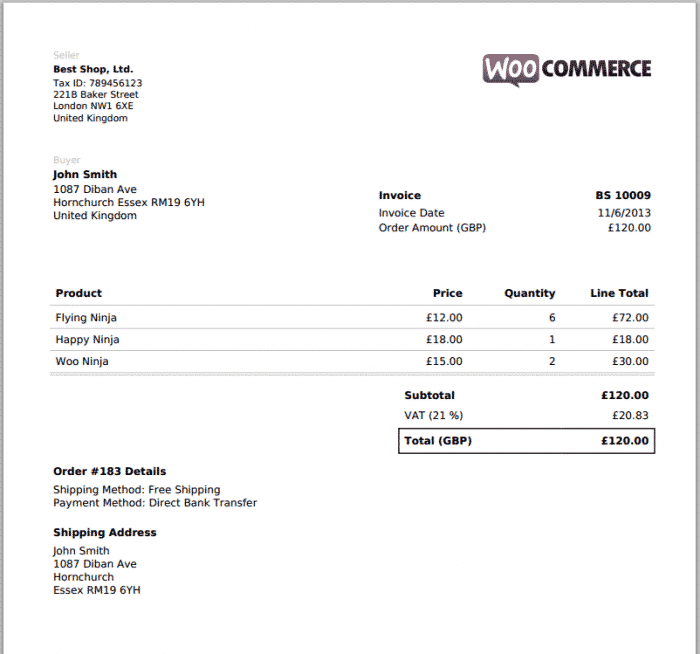
Overview of WooCommerce PDF Invoices
Streamline your e-commerce operations with WooCommerce PDF Invoices, the essential plugin designed to automate and professionalize your store’s documentation. This powerful tool empowers WooCommerce store owners to effortlessly generate, customize, and attach PDF invoices, packing slips, and shipping labels to customer order emails. Perfect for any business looking to enhance customer experience, improve order fulfillment efficiency, and maintain a polished brand image, WooCommerce PDF Invoices takes the hassle out of managing your critical sales documents.
Key Features of WooCommerce PDF Invoices
- Automated PDF Generation: Automatically create professional PDF invoices, packing slips, and shipping labels upon order completion, reducing manual workload and ensuring consistency for every transaction.
- Customizable Templates: Gain full control over the design and branding of your documents. Utilize intuitive settings to add your company logo, custom footer text, and personalize colors to match your brand identity.
- Flexible Document Types: Generate a variety of essential documents including invoices, packing slips, shipping labels, and even pro forma invoices, catering to diverse business needs and international shipping requirements.
- Email Attachment Integration: Seamlessly attach generated PDF documents to specific WooCommerce order emails, ensuring customers receive their invoices promptly and conveniently directly in their inbox.
- Bulk Document Creation: Save valuable time by generating multiple PDF invoices or packing slips in bulk directly from your WooCommerce order list, ideal for processing large volumes of orders efficiently.
- Sequential Invoice Numbering: Maintain accurate financial records with customizable sequential invoice numbering, ensuring every invoice is uniquely identified and easy to track for accounting purposes.
- Multi-Language Support: Cater to a global customer base with built-in multi-language support, allowing your invoices and documents to be presented in the customer’s preferred language.
- Easy-to-Use Interface: Enjoy a user-friendly interface that makes configuring settings, designing templates, and managing your PDF documents straightforward, even for those without technical expertise.
Why Choose WooCommerce PDF Invoices?
Choosing WooCommerce PDF Invoices is a strategic decision for any online store aiming for operational excellence and enhanced customer satisfaction. In today’s competitive e-commerce landscape, professional documentation is not just a nicety; it’s a necessity. This plugin ensures that every customer interaction, from order confirmation to delivery, is backed by clear, branded, and easily accessible paperwork. It eliminates the common pitfalls of manual document creation, such as errors, inconsistencies, and time consumption, allowing you to focus on growing your business rather than administrative tasks.
Beyond automation, WooCommerce PDF Invoices offers unparalleled customization. Your invoices are more than just a receipt; they are an extension of your brand. With the ability to incorporate your logo, brand colors, and custom notes, you transform a standard document into a powerful branding tool. This attention to detail fosters trust and professionalism, significantly improving the overall customer experience. By providing clear, detailed, and easily downloadable PDF invoices, you empower your customers and reduce the likelihood of support inquiries regarding their purchases.
Furthermore, the robust features of WooCommerce PDF Invoices contribute directly to better financial management and compliance. Sequential invoice numbering simplifies accounting and tax preparation, while the ability to generate various document types ensures you meet all necessary legal and logistical requirements. Whether you’re a small startup or a large enterprise, this plugin scales with your needs, making it an indispensable asset for maintaining organized records and a highly efficient order fulfillment process. Invest in WooCommerce PDF Invoices to elevate your store’s professionalism and operational efficiency.
Who Should Use WooCommerce PDF Invoices?
WooCommerce PDF Invoices is ideal for all WooCommerce store owners, small to large, who need to automate and professionalize their order documentation. This includes online retailers, dropshippers, service providers, and anyone selling physical or digital products through WooCommerce who requires professional invoices, packing slips, or shipping labels for their customers and internal records.
How to Install WooCommerce PDF Invoices
- Download the Plugin: After acquiring WooCommerce PDF Invoices, download the plugin .zip file from your account dashboard.
- Upload to WordPress: Log in to your WordPress admin panel. Navigate to ‘Plugins’ > ‘Add New’ and click the ‘Upload Plugin’ button at the top.
- Choose File and Install: Click ‘Choose File’, select the .zip file you downloaded, and then click ‘Install Now’.
- Activate the Plugin: Once the installation is complete, click ‘Activate Plugin’ to enable WooCommerce PDF Invoices on your website.
- Configure Settings: Go to ‘WooCommerce’ > ‘PDF Invoices’ in your WordPress dashboard to access the plugin settings. From here, you can customize templates, enable document types, and configure email attachments to suit your store’s needs.
Frequently Asked Questions About WooCommerce PDF Invoices
Can I customize the design of the PDF invoices?
Yes, WooCommerce PDF Invoices offers extensive customization options. You can easily add your company logo, adjust colors, modify font sizes, include custom footer text, and even add a personalized thank-you message to ensure your invoices align perfectly with your brand identity.
Does WooCommerce PDF Invoices support multiple languages?
Absolutely. WooCommerce PDF Invoices is designed with global businesses in mind and supports multiple languages. This allows you to generate invoices and other documents in the customer’s preferred language, enhancing their experience and clarity.
Can I generate invoices for past orders?
Yes, you can. WooCommerce PDF Invoices allows you to generate invoices for existing orders retrospectively. You can do this individually from an order’s detail page or in bulk from the WooCommerce orders list, making it easy to catch up on documentation.
Get WooCommerce PDF Invoices Today
Elevate your e-commerce store’s professionalism and efficiency with WooCommerce PDF Invoices. Automate your document creation, customize your invoices to reflect your brand, and provide your customers with a seamless experience from purchase to delivery. Explore this essential addition and many other premium WordPress Plugins available. Enhance your entire website with top-tier GPL WordPress Products and empower your business for success.
Related Products You May Like
Here's everything you need to know about your purchase:
- 100% original files — Every product is the genuine, virus-free file, exactly as released by the original developer.
- Instant download — Access your files immediately after purchase from your account.
- Lifetime access — Re-download your purchased files anytime. No expiry, no limits.
- Free updates — Newer version released? Just request an update from us, free for all customers.
- Dedicated support — Our team is available 24/7 for installation and file-related help.
- Easy refunds — Not satisfied? Review our Refund Policy. We offer a hassle-free 7-day guarantee.
$59.00 Original price was: $59.00.$2.00Current price is: $2.00.
Version
5.1.1
Last Updated
25/2/2026
License
GPL v2
Compatibility
WordPress 5.0+
Need latest version?
Newer version released? Request an update from us — free for all customers!
Request Update →🎁 Your Purchase Includes
Overview of WooCommerce PDF Invoices
Streamline your e-commerce operations with WooCommerce PDF Invoices, the essential plugin designed to automate and professionalize your store’s documentation. This powerful tool empowers WooCommerce store owners to effortlessly generate, customize, and attach PDF invoices, packing slips, and shipping labels to customer order emails. Perfect for any business looking to enhance customer experience, improve order fulfillment efficiency, and maintain a polished brand image, WooCommerce PDF Invoices takes the hassle out of managing your critical sales documents.
Key Features of WooCommerce PDF Invoices
- Automated PDF Generation: Automatically create professional PDF invoices, packing slips, and shipping labels upon order completion, reducing manual workload and ensuring consistency for every transaction.
- Customizable Templates: Gain full control over the design and branding of your documents. Utilize intuitive settings to add your company logo, custom footer text, and personalize colors to match your brand identity.
- Flexible Document Types: Generate a variety of essential documents including invoices, packing slips, shipping labels, and even pro forma invoices, catering to diverse business needs and international shipping requirements.
- Email Attachment Integration: Seamlessly attach generated PDF documents to specific WooCommerce order emails, ensuring customers receive their invoices promptly and conveniently directly in their inbox.
- Bulk Document Creation: Save valuable time by generating multiple PDF invoices or packing slips in bulk directly from your WooCommerce order list, ideal for processing large volumes of orders efficiently.
- Sequential Invoice Numbering: Maintain accurate financial records with customizable sequential invoice numbering, ensuring every invoice is uniquely identified and easy to track for accounting purposes.
- Multi-Language Support: Cater to a global customer base with built-in multi-language support, allowing your invoices and documents to be presented in the customer’s preferred language.
- Easy-to-Use Interface: Enjoy a user-friendly interface that makes configuring settings, designing templates, and managing your PDF documents straightforward, even for those without technical expertise.
Why Choose WooCommerce PDF Invoices?
Choosing WooCommerce PDF Invoices is a strategic decision for any online store aiming for operational excellence and enhanced customer satisfaction. In today’s competitive e-commerce landscape, professional documentation is not just a nicety; it’s a necessity. This plugin ensures that every customer interaction, from order confirmation to delivery, is backed by clear, branded, and easily accessible paperwork. It eliminates the common pitfalls of manual document creation, such as errors, inconsistencies, and time consumption, allowing you to focus on growing your business rather than administrative tasks.
Beyond automation, WooCommerce PDF Invoices offers unparalleled customization. Your invoices are more than just a receipt; they are an extension of your brand. With the ability to incorporate your logo, brand colors, and custom notes, you transform a standard document into a powerful branding tool. This attention to detail fosters trust and professionalism, significantly improving the overall customer experience. By providing clear, detailed, and easily downloadable PDF invoices, you empower your customers and reduce the likelihood of support inquiries regarding their purchases.
Furthermore, the robust features of WooCommerce PDF Invoices contribute directly to better financial management and compliance. Sequential invoice numbering simplifies accounting and tax preparation, while the ability to generate various document types ensures you meet all necessary legal and logistical requirements. Whether you’re a small startup or a large enterprise, this plugin scales with your needs, making it an indispensable asset for maintaining organized records and a highly efficient order fulfillment process. Invest in WooCommerce PDF Invoices to elevate your store’s professionalism and operational efficiency.
Who Should Use WooCommerce PDF Invoices?
WooCommerce PDF Invoices is ideal for all WooCommerce store owners, small to large, who need to automate and professionalize their order documentation. This includes online retailers, dropshippers, service providers, and anyone selling physical or digital products through WooCommerce who requires professional invoices, packing slips, or shipping labels for their customers and internal records.
How to Install WooCommerce PDF Invoices
- Download the Plugin: After acquiring WooCommerce PDF Invoices, download the plugin .zip file from your account dashboard.
- Upload to WordPress: Log in to your WordPress admin panel. Navigate to ‘Plugins’ > ‘Add New’ and click the ‘Upload Plugin’ button at the top.
- Choose File and Install: Click ‘Choose File’, select the .zip file you downloaded, and then click ‘Install Now’.
- Activate the Plugin: Once the installation is complete, click ‘Activate Plugin’ to enable WooCommerce PDF Invoices on your website.
- Configure Settings: Go to ‘WooCommerce’ > ‘PDF Invoices’ in your WordPress dashboard to access the plugin settings. From here, you can customize templates, enable document types, and configure email attachments to suit your store’s needs.
Frequently Asked Questions About WooCommerce PDF Invoices
Can I customize the design of the PDF invoices?
Yes, WooCommerce PDF Invoices offers extensive customization options. You can easily add your company logo, adjust colors, modify font sizes, include custom footer text, and even add a personalized thank-you message to ensure your invoices align perfectly with your brand identity.
Does WooCommerce PDF Invoices support multiple languages?
Absolutely. WooCommerce PDF Invoices is designed with global businesses in mind and supports multiple languages. This allows you to generate invoices and other documents in the customer’s preferred language, enhancing their experience and clarity.
Can I generate invoices for past orders?
Yes, you can. WooCommerce PDF Invoices allows you to generate invoices for existing orders retrospectively. You can do this individually from an order’s detail page or in bulk from the WooCommerce orders list, making it easy to catch up on documentation.
Get WooCommerce PDF Invoices Today
Elevate your e-commerce store’s professionalism and efficiency with WooCommerce PDF Invoices. Automate your document creation, customize your invoices to reflect your brand, and provide your customers with a seamless experience from purchase to delivery. Explore this essential addition and many other premium WordPress Plugins available. Enhance your entire website with top-tier GPL WordPress Products and empower your business for success.
Related Products You May Like
Reviews
There are no reviews yet.
Here's everything you need to know about your purchase:
- 100% original files — Every product is the genuine, virus-free file, exactly as released by the original developer.
- Instant download — Access your files immediately after purchase from your account.
- Lifetime access — Re-download your purchased files anytime. No expiry, no limits.
- Free updates — Newer version released? Just request an update from us, free for all customers.
- Dedicated support — Our team is available 24/7 for installation and file-related help.
- Easy refunds — Not satisfied? Review our Refund Policy. We offer a hassle-free 7-day guarantee.
Reviews
There are no reviews yet.