

WooCommerce Order Status Manager 1.15.7
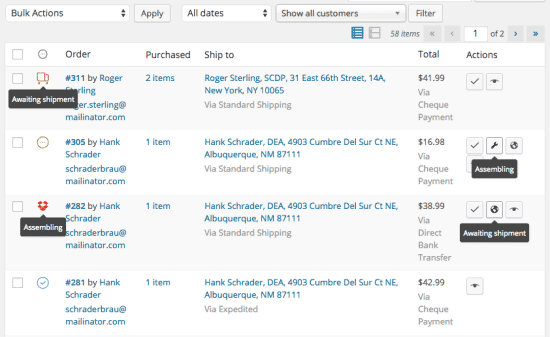
Overview of WooCommerce Order Status Manager
Efficiently managing your online store’s order lifecycle is crucial for customer satisfaction and operational smoothness. The WooCommerce Order Status Manager is a powerful plugin designed to give you complete control over your order statuses, allowing for custom creation, editing, and automation. This essential tool empowers WooCommerce store owners to streamline their workflow, enhance customer communication, and adapt their order processing to perfectly match their unique business operations.
Key Features of WooCommerce Order Status Manager
- Create Unlimited Custom Order Statuses: Go beyond WooCommerce’s default statuses. With WooCommerce Order Status Manager, you can define any number of new order statuses, such as “Processing Payment,” “Awaiting Stock,” “Shipped,” “Completed – Review Requested,” or “Refund Initiated,” to accurately reflect every stage of your order fulfillment process.
- Edit and Customize Existing Statuses: Modify the core WooCommerce statuses to better suit your needs. Change their names, colors, and icons, or even make them non-editable for certain user roles, all managed seamlessly by WooCommerce Order Status Manager.
- Intuitive Drag-and-Drop Reordering: Easily organize your custom and default statuses into a logical flow using a simple drag-and-drop interface. This visual arrangement helps you and your team quickly understand the progression of orders.
- Assign Custom Icons and Colors: Enhance visual clarity and quick identification in your order list by assigning unique icons and distinct colors to each order status. This feature of WooCommerce Order Status Manager makes managing orders at a glance incredibly efficient.
- Automate Status Changes: Set up rules to automatically change order statuses based on specific actions or conditions. For example, automatically mark an order as “Shipped” once a tracking number is added, or “Completed” after a set number of days post-shipment, significantly reducing manual effort.
- Email Notifications for Custom Statuses: Configure custom email templates to be sent automatically to customers when an order status changes. Keep your customers informed every step of the way, improving transparency and trust with the help of WooCommerce Order Status Manager.
- Control Status Visibility and Access: Define which user roles can see or interact with specific order statuses. This is perfect for larger teams where different departments handle various stages of order processing.
- Integrates with WooCommerce Reports: Your custom statuses are fully integrated into WooCommerce’s reporting system, providing more granular data and insights into your order fulfillment performance.
Why Choose WooCommerce Order Status Manager?
Choosing WooCommerce Order Status Manager means investing in a more organized, efficient, and customer-friendly e-commerce operation. This powerful plugin transforms the way you handle orders, moving beyond the limitations of default statuses to provide a truly tailored experience. It empowers you to create a transparent and professional workflow that not only satisfies your team but also delights your customers. Imagine reducing the number of customer inquiries about order progress because they are consistently updated through automated emails tailored to each new status – that’s the peace of mind WooCommerce Order Status Manager delivers.
The flexibility offered by WooCommerce Order Status Manager allows businesses of all sizes to adapt their order management to their specific products, services, and shipping methods. Whether you’re selling digital downloads, physical goods, or offering custom services, you can design a status system that makes sense for you. This level of customization leads to fewer errors, faster processing times, and a significant boost in operational efficiency, freeing up valuable time that can be reinvested into growing your business.
Furthermore, by providing clear and consistent updates to your customers through custom statuses and automated notifications, WooCommerce Order Status Manager significantly enhances the post-purchase experience. Happy customers are repeat customers, and a smooth, transparent order journey builds trust and loyalty. It’s not just about managing orders; it’s about building stronger customer relationships and fostering a professional brand image that stands out in the competitive e-commerce landscape.
Who Should Use WooCommerce Order Status Manager?
WooCommerce Order Status Manager is an indispensable tool for any WooCommerce store owner looking to gain finer control over their order processing. It’s ideal for businesses with complex fulfillment workflows, those needing to differentiate between various stages of order preparation (e.g., “Awaiting Design Proof,” “In Production,” “Ready for Pickup”), or anyone who wants to provide more detailed and accurate status updates to their customers. Whether you’re a small startup aiming for professionalism or a large enterprise needing robust workflow automation, WooCommerce Order Status Manager scales to meet your demands, ensuring your order management is always precise and efficient.
How to Install WooCommerce Order Status Manager
- Download the Plugin: After acquiring WooCommerce Order Status Manager, download the plugin’s .zip file to your computer. Ensure you have the correct and latest version for optimal performance.
- Upload to WordPress: Log in to your WordPress admin dashboard. Navigate to “Plugins” > “Add New” and then click the “Upload Plugin” button at the top of the page.
- Choose File and Install: Click “Choose File,” select the WooCommerce Order Status Manager .zip file you downloaded, and then click “Install Now.” WordPress will upload and unpack the plugin.
- Activate the Plugin: Once the installation is complete, you’ll see a success message. Click the “Activate Plugin” link to enable WooCommerce Order Status Manager on your site.
- Configure Settings: After activation, you can find the settings for WooCommerce Order Status Manager usually under “WooCommerce” > “Settings” or a dedicated menu item. Start creating your custom statuses and automating your workflow!
Frequently Asked Questions About WooCommerce Order Status Manager
Can I create an unlimited number of custom statuses with WooCommerce Order Status Manager?
Yes, absolutely! WooCommerce Order Status Manager is designed to be highly flexible, allowing you to create an unlimited number of custom order statuses. This means you can define as many stages as necessary to perfectly represent your unique order fulfillment process, from initial payment processing to final delivery and beyond.
Does WooCommerce Order Status Manager allow me to send custom emails for each new status?
Indeed. One of the core functionalities of WooCommerce Order Status Manager is its ability to integrate with WooCommerce email notifications. You can configure specific email templates to be sent automatically to your customers whenever an order transitions to a new custom status, ensuring they are always informed and engaged throughout their purchase journey.
Is WooCommerce Order Status Manager compatible with other WooCommerce extensions?
WooCommerce Order Status Manager is built following WordPress and WooCommerce best practices, making it highly compatible with most well-coded WooCommerce extensions. While we always recommend testing in a staging environment, its design ensures it generally coexists smoothly with other plugins, enhancing your store’s overall functionality without conflicts.
Get WooCommerce Order Status Manager Today
Elevate your e-commerce operations and provide an unparalleled customer experience by integrating the powerful WooCommerce Order Status Manager into your store. Stop struggling with generic order statuses and start building a truly efficient, transparent, and professional workflow that reflects your brand’s commitment to excellence. Explore this and many other premium WordPress Plugins to enhance your site’s capabilities. Don’t miss out on optimizing your store with our wide range of GPL WordPress Products. Transform your order management now!
Related Products You May Like
Here's everything you need to know about your purchase:
- 100% original files — Every product is the genuine, virus-free file, exactly as released by the original developer.
- Instant download — Access your files immediately after purchase from your account.
- Lifetime access — Re-download your purchased files anytime. No expiry, no limits.
- Free updates — Newer version released? Just request an update from us, free for all customers.
- Dedicated support — Our team is available 24/7 for installation and file-related help.
- Easy refunds — Not satisfied? Review our Refund Policy. We offer a hassle-free 7-day guarantee.
$59.00 Original price was: $59.00.$2.00Current price is: $2.00.
Version
1.15.7
Last Updated
03/04/2026
License
GPL v2
Compatibility
WordPress 5.0+
Need latest version?
Newer version released? Request an update from us — free for all customers!
Request Update →🎁 Your Purchase Includes
Overview of WooCommerce Order Status Manager
Efficiently managing your online store’s order lifecycle is crucial for customer satisfaction and operational smoothness. The WooCommerce Order Status Manager is a powerful plugin designed to give you complete control over your order statuses, allowing for custom creation, editing, and automation. This essential tool empowers WooCommerce store owners to streamline their workflow, enhance customer communication, and adapt their order processing to perfectly match their unique business operations.
Key Features of WooCommerce Order Status Manager
- Create Unlimited Custom Order Statuses: Go beyond WooCommerce’s default statuses. With WooCommerce Order Status Manager, you can define any number of new order statuses, such as “Processing Payment,” “Awaiting Stock,” “Shipped,” “Completed – Review Requested,” or “Refund Initiated,” to accurately reflect every stage of your order fulfillment process.
- Edit and Customize Existing Statuses: Modify the core WooCommerce statuses to better suit your needs. Change their names, colors, and icons, or even make them non-editable for certain user roles, all managed seamlessly by WooCommerce Order Status Manager.
- Intuitive Drag-and-Drop Reordering: Easily organize your custom and default statuses into a logical flow using a simple drag-and-drop interface. This visual arrangement helps you and your team quickly understand the progression of orders.
- Assign Custom Icons and Colors: Enhance visual clarity and quick identification in your order list by assigning unique icons and distinct colors to each order status. This feature of WooCommerce Order Status Manager makes managing orders at a glance incredibly efficient.
- Automate Status Changes: Set up rules to automatically change order statuses based on specific actions or conditions. For example, automatically mark an order as “Shipped” once a tracking number is added, or “Completed” after a set number of days post-shipment, significantly reducing manual effort.
- Email Notifications for Custom Statuses: Configure custom email templates to be sent automatically to customers when an order status changes. Keep your customers informed every step of the way, improving transparency and trust with the help of WooCommerce Order Status Manager.
- Control Status Visibility and Access: Define which user roles can see or interact with specific order statuses. This is perfect for larger teams where different departments handle various stages of order processing.
- Integrates with WooCommerce Reports: Your custom statuses are fully integrated into WooCommerce’s reporting system, providing more granular data and insights into your order fulfillment performance.
Why Choose WooCommerce Order Status Manager?
Choosing WooCommerce Order Status Manager means investing in a more organized, efficient, and customer-friendly e-commerce operation. This powerful plugin transforms the way you handle orders, moving beyond the limitations of default statuses to provide a truly tailored experience. It empowers you to create a transparent and professional workflow that not only satisfies your team but also delights your customers. Imagine reducing the number of customer inquiries about order progress because they are consistently updated through automated emails tailored to each new status – that’s the peace of mind WooCommerce Order Status Manager delivers.
The flexibility offered by WooCommerce Order Status Manager allows businesses of all sizes to adapt their order management to their specific products, services, and shipping methods. Whether you’re selling digital downloads, physical goods, or offering custom services, you can design a status system that makes sense for you. This level of customization leads to fewer errors, faster processing times, and a significant boost in operational efficiency, freeing up valuable time that can be reinvested into growing your business.
Furthermore, by providing clear and consistent updates to your customers through custom statuses and automated notifications, WooCommerce Order Status Manager significantly enhances the post-purchase experience. Happy customers are repeat customers, and a smooth, transparent order journey builds trust and loyalty. It’s not just about managing orders; it’s about building stronger customer relationships and fostering a professional brand image that stands out in the competitive e-commerce landscape.
Who Should Use WooCommerce Order Status Manager?
WooCommerce Order Status Manager is an indispensable tool for any WooCommerce store owner looking to gain finer control over their order processing. It’s ideal for businesses with complex fulfillment workflows, those needing to differentiate between various stages of order preparation (e.g., “Awaiting Design Proof,” “In Production,” “Ready for Pickup”), or anyone who wants to provide more detailed and accurate status updates to their customers. Whether you’re a small startup aiming for professionalism or a large enterprise needing robust workflow automation, WooCommerce Order Status Manager scales to meet your demands, ensuring your order management is always precise and efficient.
How to Install WooCommerce Order Status Manager
- Download the Plugin: After acquiring WooCommerce Order Status Manager, download the plugin’s .zip file to your computer. Ensure you have the correct and latest version for optimal performance.
- Upload to WordPress: Log in to your WordPress admin dashboard. Navigate to “Plugins” > “Add New” and then click the “Upload Plugin” button at the top of the page.
- Choose File and Install: Click “Choose File,” select the WooCommerce Order Status Manager .zip file you downloaded, and then click “Install Now.” WordPress will upload and unpack the plugin.
- Activate the Plugin: Once the installation is complete, you’ll see a success message. Click the “Activate Plugin” link to enable WooCommerce Order Status Manager on your site.
- Configure Settings: After activation, you can find the settings for WooCommerce Order Status Manager usually under “WooCommerce” > “Settings” or a dedicated menu item. Start creating your custom statuses and automating your workflow!
Frequently Asked Questions About WooCommerce Order Status Manager
Can I create an unlimited number of custom statuses with WooCommerce Order Status Manager?
Yes, absolutely! WooCommerce Order Status Manager is designed to be highly flexible, allowing you to create an unlimited number of custom order statuses. This means you can define as many stages as necessary to perfectly represent your unique order fulfillment process, from initial payment processing to final delivery and beyond.
Does WooCommerce Order Status Manager allow me to send custom emails for each new status?
Indeed. One of the core functionalities of WooCommerce Order Status Manager is its ability to integrate with WooCommerce email notifications. You can configure specific email templates to be sent automatically to your customers whenever an order transitions to a new custom status, ensuring they are always informed and engaged throughout their purchase journey.
Is WooCommerce Order Status Manager compatible with other WooCommerce extensions?
WooCommerce Order Status Manager is built following WordPress and WooCommerce best practices, making it highly compatible with most well-coded WooCommerce extensions. While we always recommend testing in a staging environment, its design ensures it generally coexists smoothly with other plugins, enhancing your store’s overall functionality without conflicts.
Get WooCommerce Order Status Manager Today
Elevate your e-commerce operations and provide an unparalleled customer experience by integrating the powerful WooCommerce Order Status Manager into your store. Stop struggling with generic order statuses and start building a truly efficient, transparent, and professional workflow that reflects your brand’s commitment to excellence. Explore this and many other premium WordPress Plugins to enhance your site’s capabilities. Don’t miss out on optimizing your store with our wide range of GPL WordPress Products. Transform your order management now!
Related Products You May Like
Reviews
There are no reviews yet.
Here's everything you need to know about your purchase:
- 100% original files — Every product is the genuine, virus-free file, exactly as released by the original developer.
- Instant download — Access your files immediately after purchase from your account.
- Lifetime access — Re-download your purchased files anytime. No expiry, no limits.
- Free updates — Newer version released? Just request an update from us, free for all customers.
- Dedicated support — Our team is available 24/7 for installation and file-related help.
- Easy refunds — Not satisfied? Review our Refund Policy. We offer a hassle-free 7-day guarantee.
Reviews
There are no reviews yet.