

WooCommerce Order Barcodes 1.9.9
Overview of WooCommerce Order Barcodes
Streamline your order fulfillment process and enhance customer experience with WooCommerce Order Barcodes. This powerful extension is designed for any WooCommerce store owner looking to add scannable barcodes to their order emails, packing slips, and even directly on the order details page. It simplifies order management, making it quicker and more accurate for both store staff and customers to track and verify purchases.
Key Features of WooCommerce Order Barcodes
- Automatic Barcode Generation: WooCommerce Order Barcodes automatically generates unique barcodes for every new order placed in your store, ensuring no two orders share the same identifier.
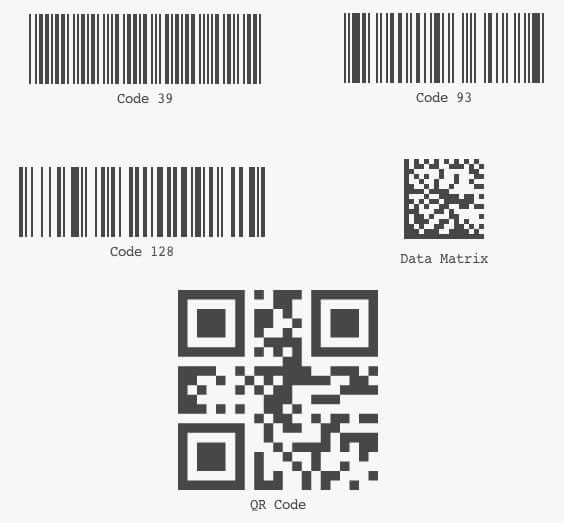
- Multiple Barcode Types: Supports various barcode symbologies including Code 39, Code 128, EAN-13, QR Code, and more, allowing you to choose the format best suited for your business needs.
- Customizable Barcode Placement: Easily integrate barcodes into customer order emails, printable packing slips, and invoices, providing clear visual identifiers for every purchase.
- Order Tracking and Verification: Utilize WooCommerce Order Barcodes to quickly scan and verify order details, status, and contents, significantly reducing manual errors during picking, packing, and shipping.
- Seamless WooCommerce Integration: Designed to work flawlessly within your existing WooCommerce setup, adding powerful barcode functionality without requiring complex configurations.
- Admin Order Page Display: Barcodes are prominently displayed on the WooCommerce admin order details page, providing quick access for staff to view and manage order information directly.
- Email Template Integration: Offers easy integration into standard WooCommerce email templates, ensuring customers receive their unique barcode directly in their order confirmation.
- Developer Friendly: Built with extensibility in mind, WooCommerce Order Barcodes provides hooks and filters for developers to further customize its functionality to specific store requirements.
Why Choose WooCommerce Order Barcodes?
Choosing WooCommerce Order Barcodes means investing in efficiency and accuracy for your online store. In today’s fast-paced e-commerce environment, minimizing errors and speeding up fulfillment are crucial for customer satisfaction and operational success. By automating the generation and integration of unique barcodes into your order process, you empower your team to handle orders with greater speed and precision. Imagine a world where verifying an order simply involves a quick scan, eliminating the need for manual data entry and reducing the likelihood of shipping the wrong item or to the wrong address.
WooCommerce Order Barcodes isn’t just about speed; it’s about creating a professional and reliable experience for your customers. When they receive clear, scannable barcodes on their order documents, it instills confidence in your brand’s professionalism and attention to detail. This robust tool helps you maintain a high standard of service, from the moment an order is placed to its final delivery. It’s an essential addition for growing businesses, high-volume stores, or any merchant looking to optimize their backend operations and elevate their customer service.
Beyond the immediate operational benefits, implementing WooCommerce Order Barcodes provides a scalable solution for future growth. As your order volume increases, the automated barcode system will continue to perform reliably, preventing bottlenecks and ensuring your fulfillment process remains smooth and efficient. It’s a foundational tool for any serious WooCommerce store aiming for peak performance.
Who Should Use WooCommerce Order Barcodes?
WooCommerce Order Barcodes is ideal for any e-commerce store utilizing WooCommerce that processes a moderate to high volume of orders. It’s particularly beneficial for businesses looking to professionalize their order fulfillment, reduce manual errors, and speed up their picking, packing, and shipping operations. Warehouses, drop-shippers, and stores with multiple staff members handling orders will find immense value in its ability to streamline workflows and improve accuracy. If you print packing slips, send confirmation emails, or simply want a more robust order management system, WooCommerce Order Barcodes is for you.
How to Install WooCommerce Order Barcodes
- Download the Plugin: After purchasing WooCommerce Order Barcodes, download the plugin zip file from your account on our website.
- Upload to WordPress: Log in to your WordPress admin dashboard. Navigate to ‘Plugins’ > ‘Add New’ > ‘Upload Plugin’. Choose the downloaded zip file and click ‘Install Now’.
- Activate the Plugin: Once the installation is complete, click ‘Activate Plugin’. WooCommerce Order Barcodes will now be active on your site.
- Configure Settings: Go to ‘WooCommerce’ > ‘Settings’ > ‘Order Barcodes’ tab. Here you can configure barcode types, placement options, and other preferences to suit your store’s needs.
- Test Functionality: Place a test order on your site to ensure that WooCommerce Order Barcodes is generating and displaying barcodes correctly in order emails and on the admin order page.
Frequently Asked Questions About WooCommerce Order Barcodes
What barcode types does WooCommerce Order Barcodes support?
WooCommerce Order Barcodes supports a wide range of popular barcode symbologies, including Code 39, Code 128, EAN-13, and QR Code. This flexibility allows you to choose the best format for your specific needs, whether it’s for product tracking, inventory management, or customer verification.
Can I display WooCommerce Order Barcodes on custom invoice templates?
Yes, WooCommerce Order Barcodes is designed for easy integration. While it works out-of-the-box with standard WooCommerce emails and packing slips, it also provides developer-friendly hooks and filters that allow you to integrate barcodes into custom invoice or packing slip templates. You may need some custom code or a compatible third-party plugin for advanced template customization.
Does WooCommerce Order Barcodes help with inventory management?
While WooCommerce Order Barcodes primarily focuses on order identification and fulfillment, the unique barcodes generated can indirectly aid inventory management. By quickly scanning barcodes during the picking and packing process, you can ensure the correct items are dispatched, reducing discrepancies that might affect inventory counts. It provides a clear identifier for each order, which can be cross-referenced with your inventory system.
Get WooCommerce Order Barcodes Today
Elevate your WooCommerce store’s operational efficiency and customer satisfaction by integrating the powerful capabilities of WooCommerce Order Barcodes. This essential tool will transform your order management, making it faster, more accurate, and remarkably professional. Don’t let manual errors slow down your business. Invest in precision and speed today. Browse our extensive range of WordPress Plugins and other premium GPL WordPress Products to find everything you need to build and grow a successful online store.
Related Products You May Like
Here's everything you need to know about your purchase:
- 100% original files — Every product is the genuine, virus-free file, exactly as released by the original developer.
- Instant download — Access your files immediately after purchase from your account.
- Lifetime access — Re-download your purchased files anytime. No expiry, no limits.
- Free updates — Newer version released? Just request an update from us, free for all customers.
- Dedicated support — Our team is available 24/7 for installation and file-related help.
- Easy refunds — Not satisfied? Review our Refund Policy. We offer a hassle-free 7-day guarantee.
$59.00 Original price was: $59.00.$2.00Current price is: $2.00.
Version
1.9.9
Last Updated
03/04/2026
License
GPL v2
Compatibility
WordPress 5.0+
Need latest version?
Newer version released? Request an update from us — free for all customers!
Request Update →🎁 Your Purchase Includes
Overview of WooCommerce Order Barcodes
Streamline your order fulfillment process and enhance customer experience with WooCommerce Order Barcodes. This powerful extension is designed for any WooCommerce store owner looking to add scannable barcodes to their order emails, packing slips, and even directly on the order details page. It simplifies order management, making it quicker and more accurate for both store staff and customers to track and verify purchases.
Key Features of WooCommerce Order Barcodes
- Automatic Barcode Generation: WooCommerce Order Barcodes automatically generates unique barcodes for every new order placed in your store, ensuring no two orders share the same identifier.
- Multiple Barcode Types: Supports various barcode symbologies including Code 39, Code 128, EAN-13, QR Code, and more, allowing you to choose the format best suited for your business needs.
- Customizable Barcode Placement: Easily integrate barcodes into customer order emails, printable packing slips, and invoices, providing clear visual identifiers for every purchase.
- Order Tracking and Verification: Utilize WooCommerce Order Barcodes to quickly scan and verify order details, status, and contents, significantly reducing manual errors during picking, packing, and shipping.
- Seamless WooCommerce Integration: Designed to work flawlessly within your existing WooCommerce setup, adding powerful barcode functionality without requiring complex configurations.
- Admin Order Page Display: Barcodes are prominently displayed on the WooCommerce admin order details page, providing quick access for staff to view and manage order information directly.
- Email Template Integration: Offers easy integration into standard WooCommerce email templates, ensuring customers receive their unique barcode directly in their order confirmation.
- Developer Friendly: Built with extensibility in mind, WooCommerce Order Barcodes provides hooks and filters for developers to further customize its functionality to specific store requirements.
Why Choose WooCommerce Order Barcodes?
Choosing WooCommerce Order Barcodes means investing in efficiency and accuracy for your online store. In today’s fast-paced e-commerce environment, minimizing errors and speeding up fulfillment are crucial for customer satisfaction and operational success. By automating the generation and integration of unique barcodes into your order process, you empower your team to handle orders with greater speed and precision. Imagine a world where verifying an order simply involves a quick scan, eliminating the need for manual data entry and reducing the likelihood of shipping the wrong item or to the wrong address.
WooCommerce Order Barcodes isn’t just about speed; it’s about creating a professional and reliable experience for your customers. When they receive clear, scannable barcodes on their order documents, it instills confidence in your brand’s professionalism and attention to detail. This robust tool helps you maintain a high standard of service, from the moment an order is placed to its final delivery. It’s an essential addition for growing businesses, high-volume stores, or any merchant looking to optimize their backend operations and elevate their customer service.
Beyond the immediate operational benefits, implementing WooCommerce Order Barcodes provides a scalable solution for future growth. As your order volume increases, the automated barcode system will continue to perform reliably, preventing bottlenecks and ensuring your fulfillment process remains smooth and efficient. It’s a foundational tool for any serious WooCommerce store aiming for peak performance.
Who Should Use WooCommerce Order Barcodes?
WooCommerce Order Barcodes is ideal for any e-commerce store utilizing WooCommerce that processes a moderate to high volume of orders. It’s particularly beneficial for businesses looking to professionalize their order fulfillment, reduce manual errors, and speed up their picking, packing, and shipping operations. Warehouses, drop-shippers, and stores with multiple staff members handling orders will find immense value in its ability to streamline workflows and improve accuracy. If you print packing slips, send confirmation emails, or simply want a more robust order management system, WooCommerce Order Barcodes is for you.
How to Install WooCommerce Order Barcodes
- Download the Plugin: After purchasing WooCommerce Order Barcodes, download the plugin zip file from your account on our website.
- Upload to WordPress: Log in to your WordPress admin dashboard. Navigate to ‘Plugins’ > ‘Add New’ > ‘Upload Plugin’. Choose the downloaded zip file and click ‘Install Now’.
- Activate the Plugin: Once the installation is complete, click ‘Activate Plugin’. WooCommerce Order Barcodes will now be active on your site.
- Configure Settings: Go to ‘WooCommerce’ > ‘Settings’ > ‘Order Barcodes’ tab. Here you can configure barcode types, placement options, and other preferences to suit your store’s needs.
- Test Functionality: Place a test order on your site to ensure that WooCommerce Order Barcodes is generating and displaying barcodes correctly in order emails and on the admin order page.
Frequently Asked Questions About WooCommerce Order Barcodes
What barcode types does WooCommerce Order Barcodes support?
WooCommerce Order Barcodes supports a wide range of popular barcode symbologies, including Code 39, Code 128, EAN-13, and QR Code. This flexibility allows you to choose the best format for your specific needs, whether it’s for product tracking, inventory management, or customer verification.
Can I display WooCommerce Order Barcodes on custom invoice templates?
Yes, WooCommerce Order Barcodes is designed for easy integration. While it works out-of-the-box with standard WooCommerce emails and packing slips, it also provides developer-friendly hooks and filters that allow you to integrate barcodes into custom invoice or packing slip templates. You may need some custom code or a compatible third-party plugin for advanced template customization.
Does WooCommerce Order Barcodes help with inventory management?
While WooCommerce Order Barcodes primarily focuses on order identification and fulfillment, the unique barcodes generated can indirectly aid inventory management. By quickly scanning barcodes during the picking and packing process, you can ensure the correct items are dispatched, reducing discrepancies that might affect inventory counts. It provides a clear identifier for each order, which can be cross-referenced with your inventory system.
Get WooCommerce Order Barcodes Today
Elevate your WooCommerce store’s operational efficiency and customer satisfaction by integrating the powerful capabilities of WooCommerce Order Barcodes. This essential tool will transform your order management, making it faster, more accurate, and remarkably professional. Don’t let manual errors slow down your business. Invest in precision and speed today. Browse our extensive range of WordPress Plugins and other premium GPL WordPress Products to find everything you need to build and grow a successful online store.
Related Products You May Like
Reviews
There are no reviews yet.
Here's everything you need to know about your purchase:
- 100% original files — Every product is the genuine, virus-free file, exactly as released by the original developer.
- Instant download — Access your files immediately after purchase from your account.
- Lifetime access — Re-download your purchased files anytime. No expiry, no limits.
- Free updates — Newer version released? Just request an update from us, free for all customers.
- Dedicated support — Our team is available 24/7 for installation and file-related help.
- Easy refunds — Not satisfied? Review our Refund Policy. We offer a hassle-free 7-day guarantee.
Reviews
There are no reviews yet.