

WooCommerce Notification 1.7.0 – Boost Your Sales – Live Feed Sales – Recent Sales Popup – Upsells
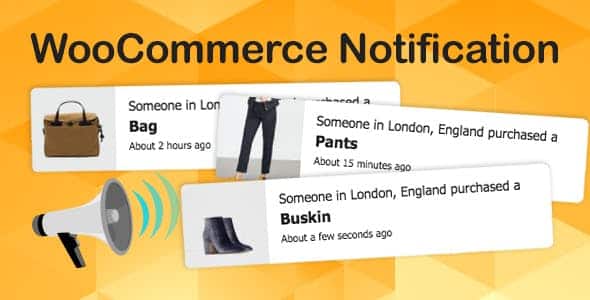
Overview of WooCommerce Notification
WooCommerce Notification is a powerful and essential plugin designed to significantly boost your sales by leveraging the power of social proof. This innovative tool creates a live feed of recent sales and displays a recent sales popup, showcasing customer activity on your WooCommerce store. It’s the perfect solution for any online business aiming to build trust, create urgency, and increase conversion rates by showing real-time customer engagement.
Key Features of WooCommerce Notification
- Real-time Sales Notifications: Display recent purchases to visitors as they browse your site, creating dynamic social proof that encourages others to buy. WooCommerce Notification ensures your store always looks active and trustworthy.
- Customizable Popup Design: Tailor the appearance of your sales popups to perfectly match your brand’s aesthetic. Control colors, fonts, positions, and animations to create a seamless user experience with WooCommerce Notification.
- Flexible Display Rules: Set specific pages or products where notifications should appear or be hidden. You can also control the timing, duration, and frequency of popups to optimize visitor engagement without being intrusive.
- Upsell and Cross-sell Opportunities: Beyond just showing recent sales, WooCommerce Notification can be configured to highlight related products or popular items, subtly guiding customers towards additional purchases and increasing average order value.
- Mobile Responsive Design: Ensure your sales notifications look great and function flawlessly across all devices, from desktops to smartphones, providing an optimal viewing experience for every customer.
- Advanced Reporting and Analytics: Gain insights into the performance of your notifications. Track impressions, clicks, and conversions to understand what’s working best and refine your strategy with WooCommerce Notification.
- Multiple Notification Types: Choose between displaying actual recent sales, popular product views, or even custom messages to create a sense of urgency and highlight promotions.
- Easy Integration with WooCommerce: Seamlessly integrates with your existing WooCommerce store, requiring no coding knowledge. Get up and running quickly with WooCommerce Notification to start seeing results.
Why Choose WooCommerce Notification?
In today’s competitive e-commerce landscape, building trust and creating a sense of urgency are paramount to converting visitors into loyal customers. WooCommerce Notification excels in both these areas by providing authentic social proof. When potential buyers see that other people are actively purchasing from your store, it instantly builds confidence and reduces buyer hesitation. This psychological trigger is incredibly effective at moving customers through the sales funnel, turning browsers into buyers.
Furthermore, WooCommerce Notification is more than just a sales ticker; it’s a strategic marketing tool designed for maximum impact. Its highly customizable nature means you can maintain your brand’s integrity while implementing powerful conversion tactics. From controlling the exact message and appearance of popups to setting advanced display rules, you have complete control over how and when your social proof is presented. This level of flexibility ensures that WooCommerce Notification enhances your customer’s shopping experience rather than detracting from it, leading to higher engagement and, ultimately, a significant boost in your store’s revenue. Invest in WooCommerce Notification to transform your store’s performance.
Who Should Use WooCommerce Notification?
WooCommerce Notification is ideal for any WooCommerce store owner looking to enhance their online presence, build customer trust, and significantly increase conversion rates. It’s particularly beneficial for new stores aiming to quickly establish credibility, as well as established businesses seeking to optimize their sales funnel and leverage social proof more effectively. Dropshippers, boutique stores, digital product sellers, and large e-commerce operations can all benefit from the dynamic urgency and authenticity that WooCommerce Notification provides.
How to Install WooCommerce Notification
- Download the Plugin: After acquiring WooCommerce Notification, download the plugin file (usually a .zip archive) to your computer.
- Upload to WordPress: Log in to your WordPress admin dashboard. Navigate to ‘Plugins’ > ‘Add New’. Click on the ‘Upload Plugin’ button at the top of the page.
- Choose File and Install: Click ‘Choose File’, locate the WooCommerce Notification .zip file you downloaded, and click ‘Install Now’.
- Activate the Plugin: Once the installation is complete, click the ‘Activate Plugin’ link. This will enable WooCommerce Notification on your website.
- Configure Settings: After activation, you’ll typically find a new menu item in your WordPress dashboard (e.g., ‘WooCommerce Notification’ or under ‘WooCommerce’). Click on it to access the settings panel and begin customizing your sales notifications.
Frequently Asked Questions About WooCommerce Notification
Is WooCommerce Notification mobile-friendly?
Yes, absolutely! WooCommerce Notification is built with responsiveness in mind. All notification popups and displays are designed to adapt seamlessly to various screen sizes, ensuring an optimal and unobtrusive experience for your customers whether they are browsing on a desktop, tablet, or smartphone.
Can I customize the appearance of the notifications?
Yes, customization is a core feature of WooCommerce Notification. You have extensive control over the design elements, including colors, fonts, position on the screen, animation effects, and even the text content within the notifications. This allows you to perfectly match the look and feel of your brand.
Does WooCommerce Notification affect my website’s loading speed?
WooCommerce Notification is optimized for performance. It’s designed to be lightweight and efficient, minimizing any potential impact on your website’s loading speed. The plugin loads asynchronously, ensuring that your site’s core content loads quickly while the notifications are displayed smoothly without hindering user experience.
Get WooCommerce Notification Today
Ready to transform your WooCommerce store into a conversion powerhouse? WooCommerce Notification is the ultimate tool for leveraging social proof, building customer confidence, and driving more sales. Don’t let potential customers leave without experiencing the dynamic, trustworthy environment that real-time notifications create. Enhance your marketing strategy and see a tangible increase in your conversion rates. Explore this and other essential WordPress Plugins, and discover the full range of premium GPL WordPress Products available to elevate your online business today!
Related Products You May Like
Here's everything you need to know about your purchase:
- 100% original files — Every product is the genuine, virus-free file, exactly as released by the original developer.
- Instant download — Access your files immediately after purchase from your account.
- Lifetime access — Re-download your purchased files anytime. No expiry, no limits.
- Free updates — Newer version released? Just request an update from us, free for all customers.
- Dedicated support — Our team is available 24/7 for installation and file-related help.
- Easy refunds — Not satisfied? Review our Refund Policy. We offer a hassle-free 7-day guarantee.
$100.00 Original price was: $100.00.$2.00Current price is: $2.00.
Version
1.7.0
Last Updated
03/03/2026
License
GPL v2
Compatibility
WordPress 5.0+
Need latest version?
Newer version released? Request an update from us — free for all customers!
Request Update →🎁 Your Purchase Includes
Overview of WooCommerce Notification
WooCommerce Notification is a powerful and essential plugin designed to significantly boost your sales by leveraging the power of social proof. This innovative tool creates a live feed of recent sales and displays a recent sales popup, showcasing customer activity on your WooCommerce store. It’s the perfect solution for any online business aiming to build trust, create urgency, and increase conversion rates by showing real-time customer engagement.
Key Features of WooCommerce Notification
- Real-time Sales Notifications: Display recent purchases to visitors as they browse your site, creating dynamic social proof that encourages others to buy. WooCommerce Notification ensures your store always looks active and trustworthy.
- Customizable Popup Design: Tailor the appearance of your sales popups to perfectly match your brand’s aesthetic. Control colors, fonts, positions, and animations to create a seamless user experience with WooCommerce Notification.
- Flexible Display Rules: Set specific pages or products where notifications should appear or be hidden. You can also control the timing, duration, and frequency of popups to optimize visitor engagement without being intrusive.
- Upsell and Cross-sell Opportunities: Beyond just showing recent sales, WooCommerce Notification can be configured to highlight related products or popular items, subtly guiding customers towards additional purchases and increasing average order value.
- Mobile Responsive Design: Ensure your sales notifications look great and function flawlessly across all devices, from desktops to smartphones, providing an optimal viewing experience for every customer.
- Advanced Reporting and Analytics: Gain insights into the performance of your notifications. Track impressions, clicks, and conversions to understand what’s working best and refine your strategy with WooCommerce Notification.
- Multiple Notification Types: Choose between displaying actual recent sales, popular product views, or even custom messages to create a sense of urgency and highlight promotions.
- Easy Integration with WooCommerce: Seamlessly integrates with your existing WooCommerce store, requiring no coding knowledge. Get up and running quickly with WooCommerce Notification to start seeing results.
Why Choose WooCommerce Notification?
In today’s competitive e-commerce landscape, building trust and creating a sense of urgency are paramount to converting visitors into loyal customers. WooCommerce Notification excels in both these areas by providing authentic social proof. When potential buyers see that other people are actively purchasing from your store, it instantly builds confidence and reduces buyer hesitation. This psychological trigger is incredibly effective at moving customers through the sales funnel, turning browsers into buyers.
Furthermore, WooCommerce Notification is more than just a sales ticker; it’s a strategic marketing tool designed for maximum impact. Its highly customizable nature means you can maintain your brand’s integrity while implementing powerful conversion tactics. From controlling the exact message and appearance of popups to setting advanced display rules, you have complete control over how and when your social proof is presented. This level of flexibility ensures that WooCommerce Notification enhances your customer’s shopping experience rather than detracting from it, leading to higher engagement and, ultimately, a significant boost in your store’s revenue. Invest in WooCommerce Notification to transform your store’s performance.
Who Should Use WooCommerce Notification?
WooCommerce Notification is ideal for any WooCommerce store owner looking to enhance their online presence, build customer trust, and significantly increase conversion rates. It’s particularly beneficial for new stores aiming to quickly establish credibility, as well as established businesses seeking to optimize their sales funnel and leverage social proof more effectively. Dropshippers, boutique stores, digital product sellers, and large e-commerce operations can all benefit from the dynamic urgency and authenticity that WooCommerce Notification provides.
How to Install WooCommerce Notification
- Download the Plugin: After acquiring WooCommerce Notification, download the plugin file (usually a .zip archive) to your computer.
- Upload to WordPress: Log in to your WordPress admin dashboard. Navigate to ‘Plugins’ > ‘Add New’. Click on the ‘Upload Plugin’ button at the top of the page.
- Choose File and Install: Click ‘Choose File’, locate the WooCommerce Notification .zip file you downloaded, and click ‘Install Now’.
- Activate the Plugin: Once the installation is complete, click the ‘Activate Plugin’ link. This will enable WooCommerce Notification on your website.
- Configure Settings: After activation, you’ll typically find a new menu item in your WordPress dashboard (e.g., ‘WooCommerce Notification’ or under ‘WooCommerce’). Click on it to access the settings panel and begin customizing your sales notifications.
Frequently Asked Questions About WooCommerce Notification
Is WooCommerce Notification mobile-friendly?
Yes, absolutely! WooCommerce Notification is built with responsiveness in mind. All notification popups and displays are designed to adapt seamlessly to various screen sizes, ensuring an optimal and unobtrusive experience for your customers whether they are browsing on a desktop, tablet, or smartphone.
Can I customize the appearance of the notifications?
Yes, customization is a core feature of WooCommerce Notification. You have extensive control over the design elements, including colors, fonts, position on the screen, animation effects, and even the text content within the notifications. This allows you to perfectly match the look and feel of your brand.
Does WooCommerce Notification affect my website’s loading speed?
WooCommerce Notification is optimized for performance. It’s designed to be lightweight and efficient, minimizing any potential impact on your website’s loading speed. The plugin loads asynchronously, ensuring that your site’s core content loads quickly while the notifications are displayed smoothly without hindering user experience.
Get WooCommerce Notification Today
Ready to transform your WooCommerce store into a conversion powerhouse? WooCommerce Notification is the ultimate tool for leveraging social proof, building customer confidence, and driving more sales. Don’t let potential customers leave without experiencing the dynamic, trustworthy environment that real-time notifications create. Enhance your marketing strategy and see a tangible increase in your conversion rates. Explore this and other essential WordPress Plugins, and discover the full range of premium GPL WordPress Products available to elevate your online business today!
Related Products You May Like
Reviews
There are no reviews yet.
Here's everything you need to know about your purchase:
- 100% original files — Every product is the genuine, virus-free file, exactly as released by the original developer.
- Instant download — Access your files immediately after purchase from your account.
- Lifetime access — Re-download your purchased files anytime. No expiry, no limits.
- Free updates — Newer version released? Just request an update from us, free for all customers.
- Dedicated support — Our team is available 24/7 for installation and file-related help.
- Easy refunds — Not satisfied? Review our Refund Policy. We offer a hassle-free 7-day guarantee.
Reviews
There are no reviews yet.