

WooCommerce Give Products 1.3.0
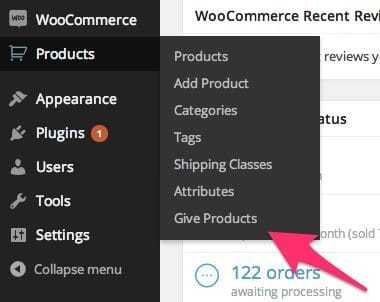
Overview of WooCommerce Give Products
Transform your WooCommerce store into a dynamic marketing powerhouse with WooCommerce Give Products. This powerful plugin empowers store owners to effortlessly implement product giveaways, special promotions, and bonus offers, enhancing customer engagement and driving sales. Whether you want to offer a complimentary gift with purchase, a freebie for a minimum spend, or a bonus item for specific product acquisitions, WooCommerce Give Products streamlines the entire process, making it intuitive and highly effective for any e-commerce business looking to add value and incentivize purchases.
Key Features of WooCommerce Give Products
- Conditional Product Giveaways: Easily set up rules to give away products based on various conditions, such as cart total, specific products in the cart, customer roles, or even the number of items purchased. This flexibility allows for highly targeted and effective promotions.
- Automatic Product Addition: When conditions are met, WooCommerce Give Products automatically adds the designated gift product(s) to the customer’s cart, ensuring a seamless and effortless experience for your shoppers without requiring manual input.
- Support for All Product Types: Give away any type of WooCommerce product – simple products, variable products, digital downloads, or even external/affiliate products. This comprehensive support ensures your promotional strategies are never limited.
- Configurable Gift Visibility: Control whether the gift product is displayed as a regular item in the cart, or as a special promotional item, providing transparency and clarity to your customers about their bonus.
- Multiple Gift Options: Offer customers a choice of gifts from a predefined selection, adding another layer of personalization and perceived value to your promotions.
- Expiry Dates for Offers: Set specific start and end dates for your giveaway campaigns, creating urgency and allowing for seasonal or time-limited promotions without constant manual management.
- Stackable Giveaways: Configure multiple giveaway rules that can run concurrently, allowing customers to receive multiple bonus products if they meet the criteria for several promotions.
- Detailed Reporting: Track the performance of your giveaway campaigns with insights into how many gift products have been distributed, helping you measure success and refine future strategies.
Why Choose WooCommerce Give Products?
Choosing WooCommerce Give Products means investing in a robust solution that significantly boosts your store’s marketing capabilities. It’s more than just giving away items; it’s about strategically enhancing your customer’s shopping experience, fostering loyalty, and ultimately increasing your average order value. By integrating this plugin, you create compelling reasons for customers to purchase more, return frequently, and spread positive word-of-mouth about your brand. The ease of setting up complex promotional rules eliminates the need for manual coupon codes or complicated backend adjustments, saving you valuable time and effort.
The versatility of WooCommerce Give Products allows you to implement a wide array of marketing tactics. From “buy one get one free” scenarios to loyalty rewards for repeat customers, or even introductory offers for new sign-ups, the possibilities are endless. This plugin serves as a powerful tool for clearing old inventory, promoting new arrivals, or simply delighting your customers with unexpected bonuses. It integrates seamlessly with your existing WooCommerce setup, ensuring a smooth operation and a consistent user experience on both the frontend and backend, solidifying its place as an indispensable asset for any serious e-commerce venture.
Who Should Use WooCommerce Give Products?
If you’re an online store owner looking to boost sales, improve customer retention, and run effective marketing campaigns without complexity, then WooCommerce Give Products is for you. It’s ideal for e-commerce businesses of all sizes – from small boutiques to large retailers – that want to offer incentives, run seasonal promotions, or simply add value to their customer’s purchases. Marketers, dropshippers, and digital product sellers will find immense value in its ability to automate giveaways, turning casual browsers into loyal customers and maximizing conversion rates through strategic gifting.
How to Install WooCommerce Give Products
Installing WooCommerce Give Products is a straightforward process, similar to any other WordPress plugin. Follow these steps to get your giveaway campaigns up and running:
- Download the Plugin: After acquiring WooCommerce Give Products, download the plugin file (usually a .zip archive) to your computer.
- Upload to WordPress: Log in to your WordPress admin dashboard. Navigate to ‘Plugins’ > ‘Add New’. Click on the ‘Upload Plugin’ button at the top of the page.
- Choose File and Install: Click ‘Choose File’, select the WooCommerce Give Products .zip file you downloaded, and then click ‘Install Now’.
- Activate the Plugin: Once the installation is complete, click the ‘Activate Plugin’ button.
- Configure Settings: After activation, you will find new settings or a dedicated menu item for WooCommerce Give Products within your WooCommerce or WordPress dashboard, where you can start configuring your giveaway rules and promotions.
Frequently Asked Questions About WooCommerce Give Products
How does WooCommerce Give Products handle different product types for giveaways?
WooCommerce Give Products is designed to be highly versatile. It supports all standard WooCommerce product types, including simple products, variable products (allowing you to specify a particular variation as a gift), grouped products, and even digital/downloadable products. This ensures you can offer virtually any item from your catalog as a gift or bonus.
Can I set specific conditions for when a product is given away?
Absolutely! One of the core strengths of WooCommerce Give Products is its robust conditional logic. You can set rules based on various factors such as the total value of the customer’s cart, specific products being present in the cart, the quantity of items purchased, or even the customer’s user role. This allows for highly targeted and effective promotional campaigns.
Is WooCommerce Give Products compatible with other WooCommerce extensions?
WooCommerce Give Products is built to adhere to WooCommerce and WordPress best practices, making it generally compatible with most well-coded WooCommerce extensions and themes. While specific conflicts can occasionally arise with any combination of plugins, it’s designed for broad compatibility within the WooCommerce ecosystem. For specific concerns, always consult the plugin documentation or support resources.
Get WooCommerce Give Products Today
Elevate your e-commerce strategy and delight your customers with powerful, automated product giveaways. WooCommerce Give Products offers an unparalleled way to drive engagement, increase conversions, and build lasting customer loyalty. Don’t miss out on the opportunity to transform your promotions into a seamless, highly effective part of your sales funnel. Explore this and many other essential WordPress Plugins available. Embrace the power of WooCommerce Give Products and unlock new revenue streams for your store. Browse our extensive collection of GPL WordPress Products and take your online business to the next level today.
Related Products You May Like
Here's everything you need to know about your purchase:
- 100% original files — Every product is the genuine, virus-free file, exactly as released by the original developer.
- Instant download — Access your files immediately after purchase from your account.
- Lifetime access — Re-download your purchased files anytime. No expiry, no limits.
- Free updates — Newer version released? Just request an update from us, free for all customers.
- Dedicated support — Our team is available 24/7 for installation and file-related help.
- Easy refunds — Not satisfied? Review our Refund Policy. We offer a hassle-free 7-day guarantee.
$59.00 Original price was: $59.00.$2.00Current price is: $2.00.
Version
1.3.0
Last Updated
03/04/2026
License
GPL v2
Compatibility
WordPress 5.0+
Need latest version?
Newer version released? Request an update from us — free for all customers!
Request Update →🎁 Your Purchase Includes
Overview of WooCommerce Give Products
Transform your WooCommerce store into a dynamic marketing powerhouse with WooCommerce Give Products. This powerful plugin empowers store owners to effortlessly implement product giveaways, special promotions, and bonus offers, enhancing customer engagement and driving sales. Whether you want to offer a complimentary gift with purchase, a freebie for a minimum spend, or a bonus item for specific product acquisitions, WooCommerce Give Products streamlines the entire process, making it intuitive and highly effective for any e-commerce business looking to add value and incentivize purchases.
Key Features of WooCommerce Give Products
- Conditional Product Giveaways: Easily set up rules to give away products based on various conditions, such as cart total, specific products in the cart, customer roles, or even the number of items purchased. This flexibility allows for highly targeted and effective promotions.
- Automatic Product Addition: When conditions are met, WooCommerce Give Products automatically adds the designated gift product(s) to the customer’s cart, ensuring a seamless and effortless experience for your shoppers without requiring manual input.
- Support for All Product Types: Give away any type of WooCommerce product – simple products, variable products, digital downloads, or even external/affiliate products. This comprehensive support ensures your promotional strategies are never limited.
- Configurable Gift Visibility: Control whether the gift product is displayed as a regular item in the cart, or as a special promotional item, providing transparency and clarity to your customers about their bonus.
- Multiple Gift Options: Offer customers a choice of gifts from a predefined selection, adding another layer of personalization and perceived value to your promotions.
- Expiry Dates for Offers: Set specific start and end dates for your giveaway campaigns, creating urgency and allowing for seasonal or time-limited promotions without constant manual management.
- Stackable Giveaways: Configure multiple giveaway rules that can run concurrently, allowing customers to receive multiple bonus products if they meet the criteria for several promotions.
- Detailed Reporting: Track the performance of your giveaway campaigns with insights into how many gift products have been distributed, helping you measure success and refine future strategies.
Why Choose WooCommerce Give Products?
Choosing WooCommerce Give Products means investing in a robust solution that significantly boosts your store’s marketing capabilities. It’s more than just giving away items; it’s about strategically enhancing your customer’s shopping experience, fostering loyalty, and ultimately increasing your average order value. By integrating this plugin, you create compelling reasons for customers to purchase more, return frequently, and spread positive word-of-mouth about your brand. The ease of setting up complex promotional rules eliminates the need for manual coupon codes or complicated backend adjustments, saving you valuable time and effort.
The versatility of WooCommerce Give Products allows you to implement a wide array of marketing tactics. From “buy one get one free” scenarios to loyalty rewards for repeat customers, or even introductory offers for new sign-ups, the possibilities are endless. This plugin serves as a powerful tool for clearing old inventory, promoting new arrivals, or simply delighting your customers with unexpected bonuses. It integrates seamlessly with your existing WooCommerce setup, ensuring a smooth operation and a consistent user experience on both the frontend and backend, solidifying its place as an indispensable asset for any serious e-commerce venture.
Who Should Use WooCommerce Give Products?
If you’re an online store owner looking to boost sales, improve customer retention, and run effective marketing campaigns without complexity, then WooCommerce Give Products is for you. It’s ideal for e-commerce businesses of all sizes – from small boutiques to large retailers – that want to offer incentives, run seasonal promotions, or simply add value to their customer’s purchases. Marketers, dropshippers, and digital product sellers will find immense value in its ability to automate giveaways, turning casual browsers into loyal customers and maximizing conversion rates through strategic gifting.
How to Install WooCommerce Give Products
Installing WooCommerce Give Products is a straightforward process, similar to any other WordPress plugin. Follow these steps to get your giveaway campaigns up and running:
- Download the Plugin: After acquiring WooCommerce Give Products, download the plugin file (usually a .zip archive) to your computer.
- Upload to WordPress: Log in to your WordPress admin dashboard. Navigate to ‘Plugins’ > ‘Add New’. Click on the ‘Upload Plugin’ button at the top of the page.
- Choose File and Install: Click ‘Choose File’, select the WooCommerce Give Products .zip file you downloaded, and then click ‘Install Now’.
- Activate the Plugin: Once the installation is complete, click the ‘Activate Plugin’ button.
- Configure Settings: After activation, you will find new settings or a dedicated menu item for WooCommerce Give Products within your WooCommerce or WordPress dashboard, where you can start configuring your giveaway rules and promotions.
Frequently Asked Questions About WooCommerce Give Products
How does WooCommerce Give Products handle different product types for giveaways?
WooCommerce Give Products is designed to be highly versatile. It supports all standard WooCommerce product types, including simple products, variable products (allowing you to specify a particular variation as a gift), grouped products, and even digital/downloadable products. This ensures you can offer virtually any item from your catalog as a gift or bonus.
Can I set specific conditions for when a product is given away?
Absolutely! One of the core strengths of WooCommerce Give Products is its robust conditional logic. You can set rules based on various factors such as the total value of the customer’s cart, specific products being present in the cart, the quantity of items purchased, or even the customer’s user role. This allows for highly targeted and effective promotional campaigns.
Is WooCommerce Give Products compatible with other WooCommerce extensions?
WooCommerce Give Products is built to adhere to WooCommerce and WordPress best practices, making it generally compatible with most well-coded WooCommerce extensions and themes. While specific conflicts can occasionally arise with any combination of plugins, it’s designed for broad compatibility within the WooCommerce ecosystem. For specific concerns, always consult the plugin documentation or support resources.
Get WooCommerce Give Products Today
Elevate your e-commerce strategy and delight your customers with powerful, automated product giveaways. WooCommerce Give Products offers an unparalleled way to drive engagement, increase conversions, and build lasting customer loyalty. Don’t miss out on the opportunity to transform your promotions into a seamless, highly effective part of your sales funnel. Explore this and many other essential WordPress Plugins available. Embrace the power of WooCommerce Give Products and unlock new revenue streams for your store. Browse our extensive collection of GPL WordPress Products and take your online business to the next level today.
Related Products You May Like
Reviews
There are no reviews yet.
Here's everything you need to know about your purchase:
- 100% original files — Every product is the genuine, virus-free file, exactly as released by the original developer.
- Instant download — Access your files immediately after purchase from your account.
- Lifetime access — Re-download your purchased files anytime. No expiry, no limits.
- Free updates — Newer version released? Just request an update from us, free for all customers.
- Dedicated support — Our team is available 24/7 for installation and file-related help.
- Easy refunds — Not satisfied? Review our Refund Policy. We offer a hassle-free 7-day guarantee.
Reviews
There are no reviews yet.