

Woocommerce Facebook Tab 1.2.0
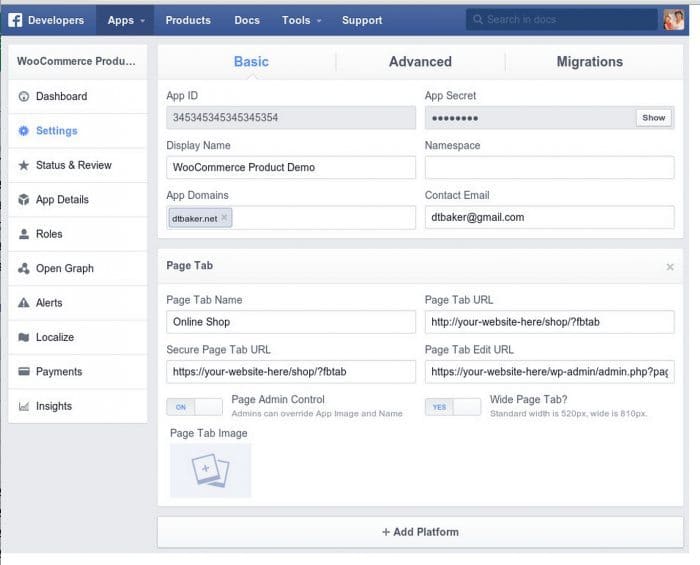
Overview of Woocommerce Facebook Tab
Transform your WooCommerce store’s social presence with Woocommerce Facebook Tab, the essential plugin for any online business looking to expand its reach. This powerful tool seamlessly integrates your entire product catalog directly onto a dedicated tab on your Facebook Business Page, allowing your customers to browse and discover your products without ever leaving the social media platform. Woocommerce Facebook Tab is designed for e-commerce entrepreneurs, marketers, and store owners who understand the immense potential of Facebook as a sales channel and want to make their products easily accessible to a massive, engaged audience.
Key Features of Woocommerce Facebook Tab
- Effortless Facebook Integration: Woocommerce Facebook Tab provides a straightforward way to display your WooCommerce store directly on your Facebook Business Page. Connect your shop to millions of potential customers with just a few clicks.
- Customizable Tab Name: Personalize the name of your shop’s tab on Facebook to align perfectly with your brand identity, making it intuitive and inviting for visitors to click and explore.
- Direct Product Display: Showcase your entire WooCommerce product inventory, including images, descriptions, and prices, directly within the Facebook interface. Customers can view products as if they were on your own website.
- Enhanced User Experience: Keep your audience engaged on Facebook while they browse your products. This smooth, integrated experience reduces friction and encourages longer browsing sessions, potentially leading to higher conversions.
- Mobile Responsive Design: Woocommerce Facebook Tab ensures that your store tab looks flawless and functions perfectly across all devices, from desktops to tablets and smartphones, providing an optimal shopping experience for every user.
- Search Engine Friendly: While primarily a social tool, having your products visible and linked from a major platform like Facebook can indirectly contribute to your overall online visibility and brand recognition.
- Simple Setup & Configuration: Designed with user-friendliness in mind, Woocommerce Facebook Tab offers an intuitive setup process, allowing you to get your shop live on Facebook quickly and without complex technical knowledge.
- Real-time Product Sync: Any changes or additions you make to your products in WooCommerce are automatically reflected on your Facebook Shop tab, ensuring your customers always see the most up-to-date inventory.
Why Choose Woocommerce Facebook Tab?
In today’s digital landscape, social media is more than just a place for connection; it’s a bustling marketplace. Choosing Woocommerce Facebook Tab means strategically positioning your products where your audience already spends a significant amount of their time. This plugin isn’t just about presence; it’s about making your e-commerce store an integral part of the social shopping experience. By allowing users to browse your products directly on Facebook, you eliminate extra steps, reduce bounce rates, and create a more convenient path to purchase.
Woocommerce Facebook Tab empowers you to transform passive social media engagement into active sales opportunities. It acts as a powerful bridge between your WordPress-powered WooCommerce store and the vast Facebook ecosystem, dramatically increasing your product’s exposure. Imagine your latest collection or special offers being just a click away for your Facebook followers. This direct integration not only streamlines the customer journey but also reinforces your brand’s professionalism and commitment to accessibility, making Woocommerce Facebook Tab an invaluable asset for any growing online business.
Who Should Use Woocommerce Facebook Tab?
Woocommerce Facebook Tab is an indispensable tool for a wide range of users. Small business owners looking to expand their online footprint and reach a younger, more socially active demographic will find it incredibly beneficial. Established e-commerce stores seeking to diversify their sales channels and leverage Facebook’s immense user base for direct sales and brand building should also consider Woocommerce Facebook Tab a priority. Furthermore, marketers and agencies managing multiple client stores can use Woocommerce Facebook Tab to offer enhanced social commerce solutions. Essentially, anyone running a WooCommerce store who wants to seamlessly integrate their product offerings into a Facebook Business Page to drive traffic, increase visibility, and boost sales will greatly benefit from Woocommerce Facebook Tab.
How to Install Woocommerce Facebook Tab
- Download Woocommerce Facebook Tab: Obtain the plugin file from your trusted source for GPL WordPress products.
- Upload to WordPress: Log in to your WordPress admin dashboard. Navigate to ‘Plugins’ > ‘Add New’ > ‘Upload Plugin’. Choose the Woocommerce Facebook Tab .zip file you downloaded and click ‘Install Now’.
- Activate the Plugin: Once the upload is complete, WordPress will prompt you to activate the plugin. Click ‘Activate Plugin’ to enable Woocommerce Facebook Tab on your site.
- Configure Settings: After activation, a new menu item or settings area related to Woocommerce Facebook Tab will appear, usually under ‘WooCommerce’ or ‘Settings’. Click on it to access the configuration options.
- Connect to Facebook: Follow the on-screen instructions within the Woocommerce Facebook Tab settings to authorize the connection with your Facebook Business Page. You will likely need to log into your Facebook account and grant the necessary permissions for the plugin to display your shop.
Frequently Asked Questions About Woocommerce Facebook Tab
Does Woocommerce Facebook Tab require a Facebook Business Page?
Yes, Woocommerce Facebook Tab is specifically designed to integrate with a Facebook Business Page. It cannot be used with personal profiles. A dedicated business page provides the necessary infrastructure for displaying a shop tab and managing your business presence effectively on the platform.
Is Woocommerce Facebook Tab mobile-friendly and responsive?
Absolutely. Woocommerce Facebook Tab is built with responsiveness in mind. This ensures that your integrated shop tab displays perfectly and provides an optimal browsing experience for customers visiting your Facebook Page from any device, whether it’s a desktop computer, tablet, or smartphone.
Can I customize the appearance of the Woocommerce Facebook Tab?
While the core display is dictated by Facebook’s platform, Woocommerce Facebook Tab typically offers options to customize the name of your shop tab and some basic display settings. This allows you to maintain brand consistency and make your shop inviting to visitors.
Get Woocommerce Facebook Tab Today
Don’t miss out on the incredible opportunity to connect your WooCommerce store directly with the vast audience on Facebook. Woocommerce Facebook Tab is your gateway to expanded visibility, increased engagement, and higher sales. Elevate your social commerce strategy and make it easier than ever for customers to discover and purchase your products. Explore Woocommerce Facebook Tab and other essential WordPress Plugins to optimize your online store. Browse our extensive collection of premium GPL WordPress Products and empower your e-commerce business today.
Related Products You May Like
Here's everything you need to know about your purchase:
- 100% original files — Every product is the genuine, virus-free file, exactly as released by the original developer.
- Instant download — Access your files immediately after purchase from your account.
- Lifetime access — Re-download your purchased files anytime. No expiry, no limits.
- Free updates — Newer version released? Just request an update from us, free for all customers.
- Dedicated support — Our team is available 24/7 for installation and file-related help.
- Easy refunds — Not satisfied? Review our Refund Policy. We offer a hassle-free 7-day guarantee.
$59.00 Original price was: $59.00.$3.00Current price is: $3.00.
Version
1.2.0
Last Updated
18/02/2026
License
GPL v2
Compatibility
WordPress 5.0+
Need latest version?
Newer version released? Request an update from us — free for all customers!
Request Update →🎁 Your Purchase Includes
Overview of Woocommerce Facebook Tab
Transform your WooCommerce store’s social presence with Woocommerce Facebook Tab, the essential plugin for any online business looking to expand its reach. This powerful tool seamlessly integrates your entire product catalog directly onto a dedicated tab on your Facebook Business Page, allowing your customers to browse and discover your products without ever leaving the social media platform. Woocommerce Facebook Tab is designed for e-commerce entrepreneurs, marketers, and store owners who understand the immense potential of Facebook as a sales channel and want to make their products easily accessible to a massive, engaged audience.
Key Features of Woocommerce Facebook Tab
- Effortless Facebook Integration: Woocommerce Facebook Tab provides a straightforward way to display your WooCommerce store directly on your Facebook Business Page. Connect your shop to millions of potential customers with just a few clicks.
- Customizable Tab Name: Personalize the name of your shop’s tab on Facebook to align perfectly with your brand identity, making it intuitive and inviting for visitors to click and explore.
- Direct Product Display: Showcase your entire WooCommerce product inventory, including images, descriptions, and prices, directly within the Facebook interface. Customers can view products as if they were on your own website.
- Enhanced User Experience: Keep your audience engaged on Facebook while they browse your products. This smooth, integrated experience reduces friction and encourages longer browsing sessions, potentially leading to higher conversions.
- Mobile Responsive Design: Woocommerce Facebook Tab ensures that your store tab looks flawless and functions perfectly across all devices, from desktops to tablets and smartphones, providing an optimal shopping experience for every user.
- Search Engine Friendly: While primarily a social tool, having your products visible and linked from a major platform like Facebook can indirectly contribute to your overall online visibility and brand recognition.
- Simple Setup & Configuration: Designed with user-friendliness in mind, Woocommerce Facebook Tab offers an intuitive setup process, allowing you to get your shop live on Facebook quickly and without complex technical knowledge.
- Real-time Product Sync: Any changes or additions you make to your products in WooCommerce are automatically reflected on your Facebook Shop tab, ensuring your customers always see the most up-to-date inventory.
Why Choose Woocommerce Facebook Tab?
In today’s digital landscape, social media is more than just a place for connection; it’s a bustling marketplace. Choosing Woocommerce Facebook Tab means strategically positioning your products where your audience already spends a significant amount of their time. This plugin isn’t just about presence; it’s about making your e-commerce store an integral part of the social shopping experience. By allowing users to browse your products directly on Facebook, you eliminate extra steps, reduce bounce rates, and create a more convenient path to purchase.
Woocommerce Facebook Tab empowers you to transform passive social media engagement into active sales opportunities. It acts as a powerful bridge between your WordPress-powered WooCommerce store and the vast Facebook ecosystem, dramatically increasing your product’s exposure. Imagine your latest collection or special offers being just a click away for your Facebook followers. This direct integration not only streamlines the customer journey but also reinforces your brand’s professionalism and commitment to accessibility, making Woocommerce Facebook Tab an invaluable asset for any growing online business.
Who Should Use Woocommerce Facebook Tab?
Woocommerce Facebook Tab is an indispensable tool for a wide range of users. Small business owners looking to expand their online footprint and reach a younger, more socially active demographic will find it incredibly beneficial. Established e-commerce stores seeking to diversify their sales channels and leverage Facebook’s immense user base for direct sales and brand building should also consider Woocommerce Facebook Tab a priority. Furthermore, marketers and agencies managing multiple client stores can use Woocommerce Facebook Tab to offer enhanced social commerce solutions. Essentially, anyone running a WooCommerce store who wants to seamlessly integrate their product offerings into a Facebook Business Page to drive traffic, increase visibility, and boost sales will greatly benefit from Woocommerce Facebook Tab.
How to Install Woocommerce Facebook Tab
- Download Woocommerce Facebook Tab: Obtain the plugin file from your trusted source for GPL WordPress products.
- Upload to WordPress: Log in to your WordPress admin dashboard. Navigate to ‘Plugins’ > ‘Add New’ > ‘Upload Plugin’. Choose the Woocommerce Facebook Tab .zip file you downloaded and click ‘Install Now’.
- Activate the Plugin: Once the upload is complete, WordPress will prompt you to activate the plugin. Click ‘Activate Plugin’ to enable Woocommerce Facebook Tab on your site.
- Configure Settings: After activation, a new menu item or settings area related to Woocommerce Facebook Tab will appear, usually under ‘WooCommerce’ or ‘Settings’. Click on it to access the configuration options.
- Connect to Facebook: Follow the on-screen instructions within the Woocommerce Facebook Tab settings to authorize the connection with your Facebook Business Page. You will likely need to log into your Facebook account and grant the necessary permissions for the plugin to display your shop.
Frequently Asked Questions About Woocommerce Facebook Tab
Does Woocommerce Facebook Tab require a Facebook Business Page?
Yes, Woocommerce Facebook Tab is specifically designed to integrate with a Facebook Business Page. It cannot be used with personal profiles. A dedicated business page provides the necessary infrastructure for displaying a shop tab and managing your business presence effectively on the platform.
Is Woocommerce Facebook Tab mobile-friendly and responsive?
Absolutely. Woocommerce Facebook Tab is built with responsiveness in mind. This ensures that your integrated shop tab displays perfectly and provides an optimal browsing experience for customers visiting your Facebook Page from any device, whether it’s a desktop computer, tablet, or smartphone.
Can I customize the appearance of the Woocommerce Facebook Tab?
While the core display is dictated by Facebook’s platform, Woocommerce Facebook Tab typically offers options to customize the name of your shop tab and some basic display settings. This allows you to maintain brand consistency and make your shop inviting to visitors.
Get Woocommerce Facebook Tab Today
Don’t miss out on the incredible opportunity to connect your WooCommerce store directly with the vast audience on Facebook. Woocommerce Facebook Tab is your gateway to expanded visibility, increased engagement, and higher sales. Elevate your social commerce strategy and make it easier than ever for customers to discover and purchase your products. Explore Woocommerce Facebook Tab and other essential WordPress Plugins to optimize your online store. Browse our extensive collection of premium GPL WordPress Products and empower your e-commerce business today.
Related Products You May Like
Reviews
There are no reviews yet.
Here's everything you need to know about your purchase:
- 100% original files — Every product is the genuine, virus-free file, exactly as released by the original developer.
- Instant download — Access your files immediately after purchase from your account.
- Lifetime access — Re-download your purchased files anytime. No expiry, no limits.
- Free updates — Newer version released? Just request an update from us, free for all customers.
- Dedicated support — Our team is available 24/7 for installation and file-related help.
- Easy refunds — Not satisfied? Review our Refund Policy. We offer a hassle-free 7-day guarantee.
Reviews
There are no reviews yet.