

WooCommerce Delivery Slots – Iconic 2.12.0
Overview of WooCommerce Delivery Slots
Streamline your e-commerce operations and empower your customers with precise delivery choices using WooCommerce Delivery Slots. This powerful plugin is specifically designed for online stores that require sophisticated management of their delivery schedules, allowing customers to select their preferred date and time slots directly during checkout. Ideal for businesses ranging from food delivery services and florists to furniture stores and local retailers, WooCommerce Delivery Slots transforms the customer experience by providing transparency and control over when their orders arrive.
Key Features of WooCommerce Delivery Slots
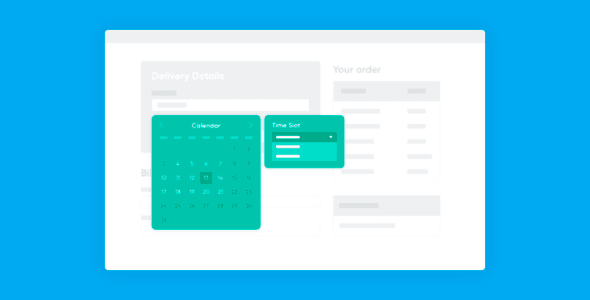
- Flexible Delivery Date & Time Selection: Allow your customers to choose their desired delivery date and a specific time slot from a user-friendly calendar interface at checkout, enhancing convenience and reducing cart abandonment.
- Configurable Blackout Dates: Easily mark specific days, holidays, or periods as unavailable for delivery, ensuring you never over-commit during peak times or when your business is closed.
- Minimum & Maximum Delivery Days: Set boundaries for how far in advance or how quickly an order can be delivered, providing essential lead time for preparation and preventing last-minute rushes.
- Daily Slot Quantity Management: Define the number of available delivery slots for each day and time period, preventing overbooking and allowing you to manage your delivery capacity efficiently.
- Cost Per Slot Option: Implement additional charges for specific delivery slots, such as premium same-day or expedited delivery options, creating new revenue streams and offering greater flexibility to customers.
- Time Zone Support: Ensure accuracy and avoid confusion by displaying delivery slots in your customer’s local time zone, regardless of your store’s server location.
- Order Editing Integration: Seamlessly integrate with WooCommerce order editing, allowing store managers to adjust delivery slots even after an order has been placed, providing flexibility for both the customer and the business.
- Intuitive Backend Configuration: Manage all settings for WooCommerce Delivery Slots from a clear and organized admin panel, making it simple to set up, modify, and monitor your delivery options.
Why Choose WooCommerce Delivery Slots?
In today’s competitive online marketplace, customer satisfaction hinges significantly on the delivery experience. By integrating WooCommerce Delivery Slots, you’re not just adding a feature; you’re investing in a superior customer journey. This plugin empowers your customers by giving them control over their delivery schedule, a crucial factor that can significantly reduce customer service inquiries related to delivery times and missed deliveries. When customers can choose a slot that perfectly fits their schedule, they feel valued and are more likely to complete their purchase, leading to higher conversion rates and repeat business.
Beyond the enhanced customer experience, WooCommerce Delivery Slots offers substantial operational benefits for your business. It provides you with the tools to manage your logistics more effectively. By setting specific capacities for delivery slots, you can prevent your team from being overwhelmed, ensuring that every order can be fulfilled and delivered on time. This level of control allows for better resource allocation, whether it’s optimizing driver routes, managing inventory, or scheduling staff. The ability to define blackout dates and lead times means you can plan around holidays, staff shortages, or busy periods with ease, maintaining a high standard of service year-round.
Choosing WooCommerce Delivery Slots also projects a professional image for your store. It demonstrates that you prioritize customer convenience and operational efficiency, building trust and credibility with your audience. For any business that relies on timely and organized product delivery, this plugin is an indispensable asset. It helps you meet customer expectations, optimize your workflow, and ultimately contribute to the sustained growth and success of your online store.
Who Should Use WooCommerce Delivery Slots?
WooCommerce Delivery Slots is an essential tool for any online store or service that delivers physical products and needs to offer customers precise control over their delivery schedule. This includes, but is not limited to, local grocery stores and food delivery services, florists, bakeries, gift shops, furniture retailers, appliance stores, and businesses offering installation services. If your business model benefits from scheduled appointments or deliveries, WooCommerce Delivery Slots is designed for you.
How to Install WooCommerce Delivery Slots
- Download the Plugin: After acquiring WooCommerce Delivery Slots, download the plugin .zip file to your computer. Ensure it is the complete plugin file and not an extracted folder.
- Upload to WordPress: Log in to your WordPress admin dashboard. Navigate to ‘Plugins’ > ‘Add New’. Click on the ‘Upload Plugin’ button at the top of the page.
- Choose File and Install: Click ‘Choose File’, select the WooCommerce Delivery Slots .zip file you downloaded, and then click ‘Install Now’.
- Activate the Plugin: Once the installation is complete, WordPress will prompt you to activate the plugin. Click ‘Activate Plugin’.
- Configure Settings: After activation, go to ‘WooCommerce’ > ‘Settings’ > ‘Delivery Slots’ to configure your delivery dates, time slots, blackout periods, and other preferences to suit your business needs.
Frequently Asked Questions About WooCommerce Delivery Slots
Can I set different delivery slots for different products or shipping zones?
Yes, WooCommerce Delivery Slots offers robust configuration options. You can define delivery slots and their availability based on different shipping zones, allowing you to tailor delivery options specifically for local, regional, or national customers. While direct per-product slot assignment is not a primary feature, you can manage availability and costs globally or by shipping zone, impacting which slots appear for orders based on the customer’s address.
How does WooCommerce Delivery Slots handle holidays and non-delivery days?
The plugin includes a comprehensive feature to manage blackout dates. You can easily mark specific dates, such as public holidays, company closures, or any other non-delivery days, as unavailable in the delivery calendar. This ensures that customers cannot select these dates for delivery, providing clear communication and preventing operational issues.
Is WooCommerce Delivery Slots compatible with other WooCommerce extensions?
WooCommerce Delivery Slots is developed with standard WooCommerce practices in mind, aiming for broad compatibility. It generally works well with most well-coded WooCommerce themes and extensions. However, due to the vast number of plugins available, it’s always recommended to test compatibility in a staging environment, especially with other plugins that heavily modify the checkout or shipping processes.
Get WooCommerce Delivery Slots Today
Revolutionize your delivery process and delight your customers with the precision and flexibility offered by WooCommerce Delivery Slots. This essential plugin is a game-changer for any e-commerce store looking to enhance customer satisfaction, streamline logistics, and boost efficiency. Explore this and many other premium WordPress Plugins and GPL WordPress Products available to elevate your online business. Take control of your deliveries and offer an unparalleled shopping experience by integrating WooCommerce Delivery Slots into your store today.
Related Products You May Like
Here's everything you need to know about your purchase:
- 100% original files — Every product is the genuine, virus-free file, exactly as released by the original developer.
- Instant download — Access your files immediately after purchase from your account.
- Lifetime access — Re-download your purchased files anytime. No expiry, no limits.
- Free updates — Newer version released? Just request an update from us, free for all customers.
- Dedicated support — Our team is available 24/7 for installation and file-related help.
- Easy refunds — Not satisfied? Review our Refund Policy. We offer a hassle-free 7-day guarantee.
$100.00 Original price was: $100.00.$2.00Current price is: $2.00.
Version
2.12.0
Last Updated
01/05/2026
License
GPL v2
Compatibility
WordPress 5.0+
Need latest version?
Newer version released? Request an update from us — free for all customers!
Request Update →🎁 Your Purchase Includes
Overview of WooCommerce Delivery Slots
Streamline your e-commerce operations and empower your customers with precise delivery choices using WooCommerce Delivery Slots. This powerful plugin is specifically designed for online stores that require sophisticated management of their delivery schedules, allowing customers to select their preferred date and time slots directly during checkout. Ideal for businesses ranging from food delivery services and florists to furniture stores and local retailers, WooCommerce Delivery Slots transforms the customer experience by providing transparency and control over when their orders arrive.
Key Features of WooCommerce Delivery Slots
- Flexible Delivery Date & Time Selection: Allow your customers to choose their desired delivery date and a specific time slot from a user-friendly calendar interface at checkout, enhancing convenience and reducing cart abandonment.
- Configurable Blackout Dates: Easily mark specific days, holidays, or periods as unavailable for delivery, ensuring you never over-commit during peak times or when your business is closed.
- Minimum & Maximum Delivery Days: Set boundaries for how far in advance or how quickly an order can be delivered, providing essential lead time for preparation and preventing last-minute rushes.
- Daily Slot Quantity Management: Define the number of available delivery slots for each day and time period, preventing overbooking and allowing you to manage your delivery capacity efficiently.
- Cost Per Slot Option: Implement additional charges for specific delivery slots, such as premium same-day or expedited delivery options, creating new revenue streams and offering greater flexibility to customers.
- Time Zone Support: Ensure accuracy and avoid confusion by displaying delivery slots in your customer’s local time zone, regardless of your store’s server location.
- Order Editing Integration: Seamlessly integrate with WooCommerce order editing, allowing store managers to adjust delivery slots even after an order has been placed, providing flexibility for both the customer and the business.
- Intuitive Backend Configuration: Manage all settings for WooCommerce Delivery Slots from a clear and organized admin panel, making it simple to set up, modify, and monitor your delivery options.
Why Choose WooCommerce Delivery Slots?
In today’s competitive online marketplace, customer satisfaction hinges significantly on the delivery experience. By integrating WooCommerce Delivery Slots, you’re not just adding a feature; you’re investing in a superior customer journey. This plugin empowers your customers by giving them control over their delivery schedule, a crucial factor that can significantly reduce customer service inquiries related to delivery times and missed deliveries. When customers can choose a slot that perfectly fits their schedule, they feel valued and are more likely to complete their purchase, leading to higher conversion rates and repeat business.
Beyond the enhanced customer experience, WooCommerce Delivery Slots offers substantial operational benefits for your business. It provides you with the tools to manage your logistics more effectively. By setting specific capacities for delivery slots, you can prevent your team from being overwhelmed, ensuring that every order can be fulfilled and delivered on time. This level of control allows for better resource allocation, whether it’s optimizing driver routes, managing inventory, or scheduling staff. The ability to define blackout dates and lead times means you can plan around holidays, staff shortages, or busy periods with ease, maintaining a high standard of service year-round.
Choosing WooCommerce Delivery Slots also projects a professional image for your store. It demonstrates that you prioritize customer convenience and operational efficiency, building trust and credibility with your audience. For any business that relies on timely and organized product delivery, this plugin is an indispensable asset. It helps you meet customer expectations, optimize your workflow, and ultimately contribute to the sustained growth and success of your online store.
Who Should Use WooCommerce Delivery Slots?
WooCommerce Delivery Slots is an essential tool for any online store or service that delivers physical products and needs to offer customers precise control over their delivery schedule. This includes, but is not limited to, local grocery stores and food delivery services, florists, bakeries, gift shops, furniture retailers, appliance stores, and businesses offering installation services. If your business model benefits from scheduled appointments or deliveries, WooCommerce Delivery Slots is designed for you.
How to Install WooCommerce Delivery Slots
- Download the Plugin: After acquiring WooCommerce Delivery Slots, download the plugin .zip file to your computer. Ensure it is the complete plugin file and not an extracted folder.
- Upload to WordPress: Log in to your WordPress admin dashboard. Navigate to ‘Plugins’ > ‘Add New’. Click on the ‘Upload Plugin’ button at the top of the page.
- Choose File and Install: Click ‘Choose File’, select the WooCommerce Delivery Slots .zip file you downloaded, and then click ‘Install Now’.
- Activate the Plugin: Once the installation is complete, WordPress will prompt you to activate the plugin. Click ‘Activate Plugin’.
- Configure Settings: After activation, go to ‘WooCommerce’ > ‘Settings’ > ‘Delivery Slots’ to configure your delivery dates, time slots, blackout periods, and other preferences to suit your business needs.
Frequently Asked Questions About WooCommerce Delivery Slots
Can I set different delivery slots for different products or shipping zones?
Yes, WooCommerce Delivery Slots offers robust configuration options. You can define delivery slots and their availability based on different shipping zones, allowing you to tailor delivery options specifically for local, regional, or national customers. While direct per-product slot assignment is not a primary feature, you can manage availability and costs globally or by shipping zone, impacting which slots appear for orders based on the customer’s address.
How does WooCommerce Delivery Slots handle holidays and non-delivery days?
The plugin includes a comprehensive feature to manage blackout dates. You can easily mark specific dates, such as public holidays, company closures, or any other non-delivery days, as unavailable in the delivery calendar. This ensures that customers cannot select these dates for delivery, providing clear communication and preventing operational issues.
Is WooCommerce Delivery Slots compatible with other WooCommerce extensions?
WooCommerce Delivery Slots is developed with standard WooCommerce practices in mind, aiming for broad compatibility. It generally works well with most well-coded WooCommerce themes and extensions. However, due to the vast number of plugins available, it’s always recommended to test compatibility in a staging environment, especially with other plugins that heavily modify the checkout or shipping processes.
Get WooCommerce Delivery Slots Today
Revolutionize your delivery process and delight your customers with the precision and flexibility offered by WooCommerce Delivery Slots. This essential plugin is a game-changer for any e-commerce store looking to enhance customer satisfaction, streamline logistics, and boost efficiency. Explore this and many other premium WordPress Plugins and GPL WordPress Products available to elevate your online business. Take control of your deliveries and offer an unparalleled shopping experience by integrating WooCommerce Delivery Slots into your store today.
Related Products You May Like
Reviews
There are no reviews yet.
Here's everything you need to know about your purchase:
- 100% original files — Every product is the genuine, virus-free file, exactly as released by the original developer.
- Instant download — Access your files immediately after purchase from your account.
- Lifetime access — Re-download your purchased files anytime. No expiry, no limits.
- Free updates — Newer version released? Just request an update from us, free for all customers.
- Dedicated support — Our team is available 24/7 for installation and file-related help.
- Easy refunds — Not satisfied? Review our Refund Policy. We offer a hassle-free 7-day guarantee.
Reviews
There are no reviews yet.