

WooCommerce Customer Order Coupons CSV Import Suite 3.12.5
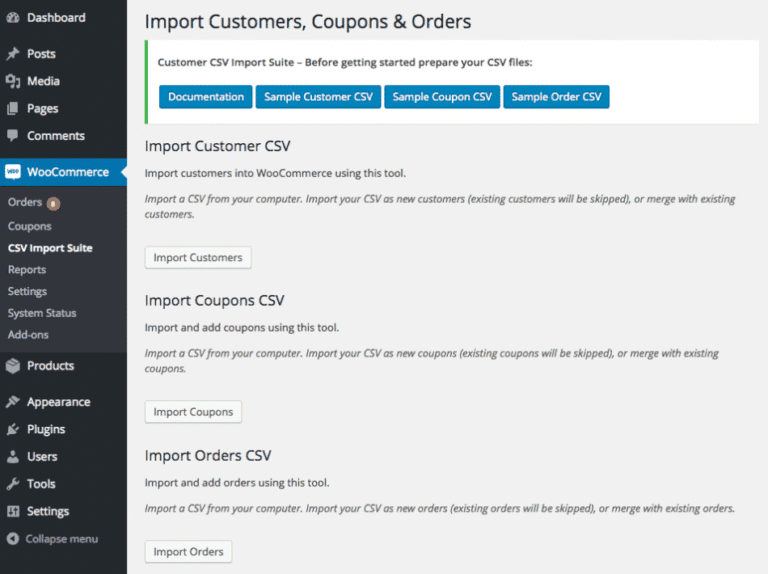
Overview of WooCommerce Customer Order Coupon CSV Import Suite
The **WooCommerce Customer Order Coupon CSV Import Suite** is an essential tool designed for WooCommerce store owners who need to efficiently manage and import customer-specific coupons in bulk. This powerful plugin streamlines the process of adding or updating thousands of coupons directly linked to customer orders or specific users, all through a simple CSV file upload. Ideal for businesses running complex marketing campaigns, migrating data, or needing precise control over their coupon distribution, the **WooCommerce Customer Order Coupon CSV Import Suite** eliminates manual entry and significantly boosts operational efficiency.
Key Features of WooCommerce Customer Order Coupon CSV Import Suite
- Effortless Bulk Coupon Import: Easily import a large volume of coupons and associate them with specific customer orders or email addresses using a well-structured CSV file, saving countless hours of manual data entry.
- Flexible CSV Field Mapping: Gain complete control over your import process with intuitive field mapping. Match columns from your CSV file to the corresponding WooCommerce coupon fields, ensuring accurate data transfer for every coupon attribute.
- Support for All Standard Coupon Types: Import various coupon types including percentage discounts, fixed cart discounts, and fixed product discounts, allowing for diverse promotional strategies to be implemented with ease.
- Comprehensive Coupon Data Handling: The **WooCommerce Customer Order Coupon CSV Import Suite** supports importing all standard WooCommerce coupon data, such as usage limits, expiry dates, minimum/maximum spend, individual use only, free shipping eligibility, and product/category restrictions.
- Customer-Specific Coupon Assignment: Directly link coupons to individual customers via their email address or user ID, ensuring targeted promotions and personalized offers are accurately distributed.
- Order-Specific Coupon Integration: Assign coupons directly to specific WooCommerce orders, perfect for loyalty programs, post-purchase incentives, or resolving customer service issues with bespoke discounts.
- Error Logging and Reporting: The plugin provides detailed logs of the import process, highlighting any errors or skipped rows, so you can quickly identify and rectify issues to ensure a clean and successful import every time.
- User-Friendly Interface: Despite its powerful capabilities, the **WooCommerce Customer Order Coupon CSV Import Suite** boasts an intuitive and easy-to-navigate interface, making the complex task of bulk coupon management accessible to all skill levels.
Why Choose WooCommerce Customer Order Coupon CSV Import Suite?
In the fast-paced world of e-commerce, efficiency and precision are paramount. The **WooCommerce Customer Order Coupon CSV Import Suite** stands out as an indispensable tool for any WooCommerce store looking to optimize its coupon management strategy. Imagine launching a large-scale marketing campaign requiring thousands of unique, customer-specific coupons, or migrating an existing store with a rich history of customer orders and associated discounts. Without a solution like this, you’d be facing days, if not weeks, of tedious manual data entry, prone to human error and significant time consumption. This suite transforms that challenge into a simple, streamlined upload process, allowing you to focus on growing your business rather than wrestling with spreadsheets.
Choosing the **WooCommerce Customer Order Coupon CSV Import Suite** means investing in accuracy, speed, and scalability. It empowers you to execute sophisticated promotional strategies, reward loyal customers with personalized discounts linked to their purchase history, or swiftly recover from potential issues by issuing targeted coupons. The ability to bulk import and link coupons directly to customer orders or specific users is a game-changer for customer retention, loyalty programs, and overall marketing agility. This plugin ensures that your coupon data is always up-to-date, correctly assigned, and ready to enhance your customers’ shopping experience, ultimately driving conversions and fostering long-term customer relationships.
Who Should Use WooCommerce Customer Order Coupon CSV Import Suite?
The **WooCommerce Customer Order Coupon CSV Import Suite** is perfectly suited for a wide range of users and businesses. E-commerce managers and store owners will find it invaluable for streamlining their daily operations and executing marketing campaigns. Marketing teams can leverage it to deploy highly targeted and personalized coupon strategies. Developers and agencies involved in migrating existing e-commerce stores to WooCommerce will appreciate its ability to import historical coupon data accurately. Furthermore, any business experiencing significant growth, managing a large customer base, or frequently running promotions that require individualized coupon distribution will benefit immensely from the efficiency and precision offered by the **WooCommerce Customer Order Coupon CSV Import Suite**.
How to Install WooCommerce Customer Order Coupon CSV Import Suite
- Download the Plugin: After acquiring the **WooCommerce Customer Order Coupon CSV Import Suite**, download the plugin file (usually a .zip archive) to your computer.
- Upload via WordPress Dashboard: Log in to your WordPress admin panel. Navigate to ‘Plugins’ > ‘Add New’. Click the ‘Upload Plugin’ button at the top of the page.
- Choose and Install: Click ‘Choose File’, select the .zip file for the **WooCommerce Customer Order Coupon CSV Import Suite** you just downloaded, and then click ‘Install Now’.
- Activate the Plugin: Once the installation is complete, WordPress will prompt you to activate the plugin. Click ‘Activate Plugin’.
- Configure Settings: After activation, you will find new options related to the **WooCommerce Customer Order Coupon CSV Import Suite** within your WooCommerce settings or a dedicated plugin menu, ready for you to configure and start importing your coupons.
Frequently Asked Questions About WooCommerce Customer Order Coupon CSV Import Suite
What kind of CSV file structure does WooCommerce Customer Order Coupon CSV Import Suite support?
The **WooCommerce Customer Order Coupon CSV Import Suite** is designed to be flexible. It typically supports standard CSV formats where each row represents a unique coupon and columns represent various coupon attributes (e.g., coupon code, discount type, amount, expiry date, usage limit, customer email, order ID). The plugin includes an intuitive mapping interface that allows you to match your CSV column headers to the plugin’s required fields, making it adaptable to various export formats.
Can I update existing coupons using the WooCommerce Customer Order Coupon CSV Import Suite?
Yes, the **WooCommerce Customer Order Coupon CSV Import Suite** supports updating existing coupons. By including the unique coupon code or ID in your CSV file, the plugin can identify and modify the details of an already existing coupon rather than creating a duplicate. This functionality is incredibly useful for adjusting expiry dates, usage limits, or other parameters for ongoing promotions without manual intervention.
What happens if there are errors in my CSV file during the import process?
The **WooCommerce Customer Order Coupon CSV Import Suite** is built with robust error handling. If the plugin encounters errors in your CSV file, such as malformed data, missing required fields, or invalid coupon types, it will typically log these errors. A detailed report or log file will be generated, indicating which rows or coupons failed to import and why, allowing you to easily identify and correct the issues in your CSV before attempting another import.
Get WooCommerce Customer Order Coupon CSV Import Suite Today
Elevate your WooCommerce store’s coupon management to a professional level with the **WooCommerce Customer Order Coupon CSV Import Suite**. Stop wasting time on manual data entry and embrace the power of bulk import for customer-specific and order-linked coupons. This robust plugin is your key to efficient marketing campaigns, seamless data migration, and unparalleled control over your promotional strategies. Explore this and many other premium WordPress Plugins available at GPLUniverse. Don’t miss out on optimizing your e-commerce operations – enhance your store today with our top-tier GPL WordPress Products.
Related Products You May Like
Here's everything you need to know about your purchase:
- 100% original files — Every product is the genuine, virus-free file, exactly as released by the original developer.
- Instant download — Access your files immediately after purchase from your account.
- Lifetime access — Re-download your purchased files anytime. No expiry, no limits.
- Free updates — Newer version released? Just request an update from us, free for all customers.
- Dedicated support — Our team is available 24/7 for installation and file-related help.
- Easy refunds — Not satisfied? Review our Refund Policy. We offer a hassle-free 7-day guarantee.
$59.00 Original price was: $59.00.$2.00Current price is: $2.00.
Version
3.12.5
Last Updated
25/2/2026
License
GPL v2
Compatibility
WordPress 5.0+
Need latest version?
Newer version released? Request an update from us — free for all customers!
Request Update →🎁 Your Purchase Includes
Overview of WooCommerce Customer Order Coupon CSV Import Suite
The **WooCommerce Customer Order Coupon CSV Import Suite** is an essential tool designed for WooCommerce store owners who need to efficiently manage and import customer-specific coupons in bulk. This powerful plugin streamlines the process of adding or updating thousands of coupons directly linked to customer orders or specific users, all through a simple CSV file upload. Ideal for businesses running complex marketing campaigns, migrating data, or needing precise control over their coupon distribution, the **WooCommerce Customer Order Coupon CSV Import Suite** eliminates manual entry and significantly boosts operational efficiency.
Key Features of WooCommerce Customer Order Coupon CSV Import Suite
- Effortless Bulk Coupon Import: Easily import a large volume of coupons and associate them with specific customer orders or email addresses using a well-structured CSV file, saving countless hours of manual data entry.
- Flexible CSV Field Mapping: Gain complete control over your import process with intuitive field mapping. Match columns from your CSV file to the corresponding WooCommerce coupon fields, ensuring accurate data transfer for every coupon attribute.
- Support for All Standard Coupon Types: Import various coupon types including percentage discounts, fixed cart discounts, and fixed product discounts, allowing for diverse promotional strategies to be implemented with ease.
- Comprehensive Coupon Data Handling: The **WooCommerce Customer Order Coupon CSV Import Suite** supports importing all standard WooCommerce coupon data, such as usage limits, expiry dates, minimum/maximum spend, individual use only, free shipping eligibility, and product/category restrictions.
- Customer-Specific Coupon Assignment: Directly link coupons to individual customers via their email address or user ID, ensuring targeted promotions and personalized offers are accurately distributed.
- Order-Specific Coupon Integration: Assign coupons directly to specific WooCommerce orders, perfect for loyalty programs, post-purchase incentives, or resolving customer service issues with bespoke discounts.
- Error Logging and Reporting: The plugin provides detailed logs of the import process, highlighting any errors or skipped rows, so you can quickly identify and rectify issues to ensure a clean and successful import every time.
- User-Friendly Interface: Despite its powerful capabilities, the **WooCommerce Customer Order Coupon CSV Import Suite** boasts an intuitive and easy-to-navigate interface, making the complex task of bulk coupon management accessible to all skill levels.
Why Choose WooCommerce Customer Order Coupon CSV Import Suite?
In the fast-paced world of e-commerce, efficiency and precision are paramount. The **WooCommerce Customer Order Coupon CSV Import Suite** stands out as an indispensable tool for any WooCommerce store looking to optimize its coupon management strategy. Imagine launching a large-scale marketing campaign requiring thousands of unique, customer-specific coupons, or migrating an existing store with a rich history of customer orders and associated discounts. Without a solution like this, you’d be facing days, if not weeks, of tedious manual data entry, prone to human error and significant time consumption. This suite transforms that challenge into a simple, streamlined upload process, allowing you to focus on growing your business rather than wrestling with spreadsheets.
Choosing the **WooCommerce Customer Order Coupon CSV Import Suite** means investing in accuracy, speed, and scalability. It empowers you to execute sophisticated promotional strategies, reward loyal customers with personalized discounts linked to their purchase history, or swiftly recover from potential issues by issuing targeted coupons. The ability to bulk import and link coupons directly to customer orders or specific users is a game-changer for customer retention, loyalty programs, and overall marketing agility. This plugin ensures that your coupon data is always up-to-date, correctly assigned, and ready to enhance your customers’ shopping experience, ultimately driving conversions and fostering long-term customer relationships.
Who Should Use WooCommerce Customer Order Coupon CSV Import Suite?
The **WooCommerce Customer Order Coupon CSV Import Suite** is perfectly suited for a wide range of users and businesses. E-commerce managers and store owners will find it invaluable for streamlining their daily operations and executing marketing campaigns. Marketing teams can leverage it to deploy highly targeted and personalized coupon strategies. Developers and agencies involved in migrating existing e-commerce stores to WooCommerce will appreciate its ability to import historical coupon data accurately. Furthermore, any business experiencing significant growth, managing a large customer base, or frequently running promotions that require individualized coupon distribution will benefit immensely from the efficiency and precision offered by the **WooCommerce Customer Order Coupon CSV Import Suite**.
How to Install WooCommerce Customer Order Coupon CSV Import Suite
- Download the Plugin: After acquiring the **WooCommerce Customer Order Coupon CSV Import Suite**, download the plugin file (usually a .zip archive) to your computer.
- Upload via WordPress Dashboard: Log in to your WordPress admin panel. Navigate to ‘Plugins’ > ‘Add New’. Click the ‘Upload Plugin’ button at the top of the page.
- Choose and Install: Click ‘Choose File’, select the .zip file for the **WooCommerce Customer Order Coupon CSV Import Suite** you just downloaded, and then click ‘Install Now’.
- Activate the Plugin: Once the installation is complete, WordPress will prompt you to activate the plugin. Click ‘Activate Plugin’.
- Configure Settings: After activation, you will find new options related to the **WooCommerce Customer Order Coupon CSV Import Suite** within your WooCommerce settings or a dedicated plugin menu, ready for you to configure and start importing your coupons.
Frequently Asked Questions About WooCommerce Customer Order Coupon CSV Import Suite
What kind of CSV file structure does WooCommerce Customer Order Coupon CSV Import Suite support?
The **WooCommerce Customer Order Coupon CSV Import Suite** is designed to be flexible. It typically supports standard CSV formats where each row represents a unique coupon and columns represent various coupon attributes (e.g., coupon code, discount type, amount, expiry date, usage limit, customer email, order ID). The plugin includes an intuitive mapping interface that allows you to match your CSV column headers to the plugin’s required fields, making it adaptable to various export formats.
Can I update existing coupons using the WooCommerce Customer Order Coupon CSV Import Suite?
Yes, the **WooCommerce Customer Order Coupon CSV Import Suite** supports updating existing coupons. By including the unique coupon code or ID in your CSV file, the plugin can identify and modify the details of an already existing coupon rather than creating a duplicate. This functionality is incredibly useful for adjusting expiry dates, usage limits, or other parameters for ongoing promotions without manual intervention.
What happens if there are errors in my CSV file during the import process?
The **WooCommerce Customer Order Coupon CSV Import Suite** is built with robust error handling. If the plugin encounters errors in your CSV file, such as malformed data, missing required fields, or invalid coupon types, it will typically log these errors. A detailed report or log file will be generated, indicating which rows or coupons failed to import and why, allowing you to easily identify and correct the issues in your CSV before attempting another import.
Get WooCommerce Customer Order Coupon CSV Import Suite Today
Elevate your WooCommerce store’s coupon management to a professional level with the **WooCommerce Customer Order Coupon CSV Import Suite**. Stop wasting time on manual data entry and embrace the power of bulk import for customer-specific and order-linked coupons. This robust plugin is your key to efficient marketing campaigns, seamless data migration, and unparalleled control over your promotional strategies. Explore this and many other premium WordPress Plugins available at GPLUniverse. Don’t miss out on optimizing your e-commerce operations – enhance your store today with our top-tier GPL WordPress Products.
Related Products You May Like
Reviews
There are no reviews yet.
Here's everything you need to know about your purchase:
- 100% original files — Every product is the genuine, virus-free file, exactly as released by the original developer.
- Instant download — Access your files immediately after purchase from your account.
- Lifetime access — Re-download your purchased files anytime. No expiry, no limits.
- Free updates — Newer version released? Just request an update from us, free for all customers.
- Dedicated support — Our team is available 24/7 for installation and file-related help.
- Easy refunds — Not satisfied? Review our Refund Policy. We offer a hassle-free 7-day guarantee.
Reviews
There are no reviews yet.