

Tin Canny LearnDash Reporting 5.1.1
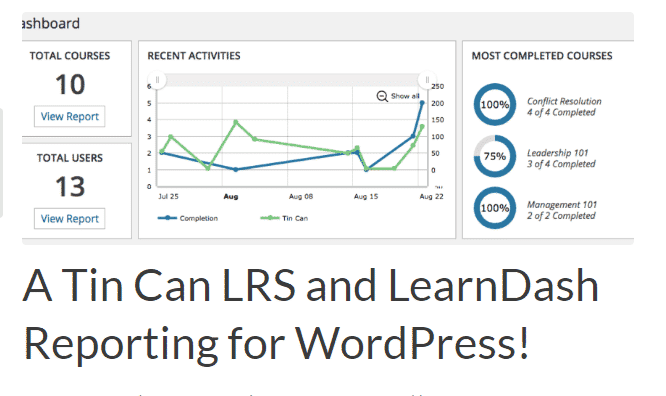
Overview of Tin Canny LearnDash Reporting
Unlock the true potential of your LearnDash courses with Tin Canny LearnDash Reporting. This powerful plugin is designed to provide comprehensive, in-depth insights into your learners’ progress, performance, and engagement within the LearnDash LMS. Perfect for educators, corporate trainers, and anyone managing online courses, Tin Canny LearnDash Reporting transforms raw data into actionable intelligence, helping you optimize your educational content and improve learner outcomes.
Key Features of Tin Canny LearnDash Reporting
- Advanced Reporting Dashboards: Gain access to intuitive and visually rich dashboards that present key metrics at a glance, making it easy to monitor overall course performance and individual learner progress with Tin Canny LearnDash Reporting.
- SCORM and xAPI Support: Seamlessly track and report on content created with popular authoring tools like Articulate Storyline, Adobe Captivate, and H5P, ensuring all your interactive learning experiences are fully monitored by Tin Canny LearnDash Reporting.
- Detailed Group Reporting: Manage and analyze the performance of entire groups or cohorts with specialized reports, allowing administrators to understand team progress, identify struggling groups, and compare outcomes effectively.
- Individual User Progress Tracking: Dive deep into each learner’s journey, viewing their course completion status, quiz scores, time spent on lessons, and specific interactions, all consolidated by Tin Canny LearnDash Reporting.
- Comprehensive Quiz and Assignment Reporting: Get granular data on quiz attempts, correct/incorrect answers, average scores, and assignment submissions, providing valuable feedback for refining your assessments.
- Customizable Reports and Filters: Tailor your reports to display precisely the data you need. Utilize robust filtering options by course, lesson, user, group, and date range to extract specific insights.
- Interactive Visualizations: Data is presented through engaging charts, graphs, and tables, making complex information digestible and highlighting trends and patterns in learner behavior.
- Exportable Data: Easily export your reports in various formats (e.g., CSV) for further analysis, archiving, or sharing with stakeholders, ensuring flexibility in how you manage your data.
Why Choose Tin Canny LearnDash Reporting?
Choosing Tin Canny LearnDash Reporting means empowering your LearnDash platform with unparalleled analytical capabilities. In today’s data-driven world, understanding how learners interact with your content is crucial for continuous improvement. This plugin goes beyond basic LearnDash reporting, offering a sophisticated suite of tools that provide deep insights into every aspect of your online courses. From tracking SCORM content interactions to generating detailed reports for specific user groups, Tin Canny LearnDash Reporting ensures you have all the information necessary to make informed decisions about your educational strategies.
The value of Tin Canny LearnDash Reporting extends to optimizing learner engagement and retention. By identifying areas where learners struggle or disengage, you can proactively adjust your course material, provide targeted support, and enhance the overall learning experience. Its user-friendly interface means you don’t need to be a data scientist to interpret the reports; the clear visualizations and organized data make analysis straightforward for administrators and instructors alike. This efficiency saves valuable time, allowing you to focus more on content creation and learner support rather than manual data compilation.
Furthermore, for organizations and educational institutions, Tin Canny LearnDash Reporting is indispensable for compliance, auditing, and demonstrating the effectiveness of training programs. The ability to generate comprehensive, exportable reports provides verifiable proof of completion and performance, which is vital for certifications and regulatory requirements. Invest in Tin Canny LearnDash Reporting to elevate your LearnDash platform from a simple course delivery system to a powerful, insight-generating educational engine.
Who Should Use Tin Canny LearnDash Reporting?
Tin Canny LearnDash Reporting is an essential tool for a wide range of LearnDash users, including:
- Online Course Creators: To understand how learners interact with their content and identify areas for improvement.
- Educational Institutions: For tracking student progress, managing cohorts, and reporting on academic performance.
- Corporate Trainers: To monitor employee training completion, evaluate knowledge retention, and demonstrate ROI on learning initiatives.
- eLearning Professionals: Anyone seeking deeper analytics and more robust reporting capabilities than what LearnDash offers out-of-the-box.
- Membership Site Owners: To track engagement with premium course content and identify high-value members.
How to Install Tin Canny LearnDash Reporting
- Download the Plugin: After acquiring Tin Canny LearnDash Reporting, download the plugin zip file to your computer.
- Upload to WordPress: Log in to your WordPress admin dashboard. Navigate to “Plugins” > “Add New” and click the “Upload Plugin” button at the top of the page.
- Choose File: Click “Choose File” and select the Tin Canny LearnDash Reporting zip file you downloaded in step 1. Then, click “Install Now”.
- Activate Plugin: Once the plugin has been successfully uploaded and installed, click the “Activate Plugin” button.
- Configure Settings: After activation, navigate to the new “Tin Canny Reporting” menu item (or similar) in your WordPress dashboard to configure its settings, connect to LearnDash, and begin generating reports.
Frequently Asked Questions About Tin Canny LearnDash Reporting
What kind of data does Tin Canny LearnDash Reporting provide?
Tin Canny LearnDash Reporting provides an extensive range of data, including individual learner progress, course and lesson completion rates, detailed quiz scores and attempts, time spent on content, SCORM and xAPI interaction data, and overall group performance. It aggregates this data into easily digestible reports and visualizations, offering a holistic view of your e-learning environment.
Is Tin Canny LearnDash Reporting compatible with other LearnDash add-ons?
While Tin Canny LearnDash Reporting is specifically designed to enhance LearnDash’s core functionality, it is generally built to integrate smoothly within the LearnDash ecosystem. For specific compatibility with third-party LearnDash add-ons, it’s always recommended to consult the plugin’s documentation or test in a staging environment to ensure seamless operation.
Can I export the reports generated by Tin Canny LearnDash Reporting?
Yes, one of the key features of Tin Canny LearnDash Reporting is its ability to export data. You can typically export reports in formats like CSV, allowing you to further analyze the data using external tools, create custom presentations, or maintain offline records for compliance and auditing purposes.
Get Tin Canny LearnDash Reporting Today
Elevate your LearnDash experience and gain unprecedented insights into your online courses with Tin Canny LearnDash Reporting. Stop guessing and start making data-driven decisions that enhance learner success and optimize your educational content. Explore this essential tool and many other powerful WordPress Plugins available. Visit our main shop to discover a vast array of GPL WordPress Products designed to boost your website’s functionality and performance.
Related Products You May Like
Here's everything you need to know about your purchase:
- 100% original files — Every product is the genuine, virus-free file, exactly as released by the original developer.
- Instant download — Access your files immediately after purchase from your account.
- Lifetime access — Re-download your purchased files anytime. No expiry, no limits.
- Free updates — Newer version released? Just request an update from us, free for all customers.
- Dedicated support — Our team is available 24/7 for installation and file-related help.
- Easy refunds — Not satisfied? Review our Refund Policy. We offer a hassle-free 7-day guarantee.
$59.00 Original price was: $59.00.$2.00Current price is: $2.00.
Version
5.1.1
Last Updated
25/2/2026
License
GPL v2
Compatibility
WordPress 5.0+
Need latest version?
Newer version released? Request an update from us — free for all customers!
Request Update →🎁 Your Purchase Includes
Overview of Tin Canny LearnDash Reporting
Unlock the true potential of your LearnDash courses with Tin Canny LearnDash Reporting. This powerful plugin is designed to provide comprehensive, in-depth insights into your learners’ progress, performance, and engagement within the LearnDash LMS. Perfect for educators, corporate trainers, and anyone managing online courses, Tin Canny LearnDash Reporting transforms raw data into actionable intelligence, helping you optimize your educational content and improve learner outcomes.
Key Features of Tin Canny LearnDash Reporting
- Advanced Reporting Dashboards: Gain access to intuitive and visually rich dashboards that present key metrics at a glance, making it easy to monitor overall course performance and individual learner progress with Tin Canny LearnDash Reporting.
- SCORM and xAPI Support: Seamlessly track and report on content created with popular authoring tools like Articulate Storyline, Adobe Captivate, and H5P, ensuring all your interactive learning experiences are fully monitored by Tin Canny LearnDash Reporting.
- Detailed Group Reporting: Manage and analyze the performance of entire groups or cohorts with specialized reports, allowing administrators to understand team progress, identify struggling groups, and compare outcomes effectively.
- Individual User Progress Tracking: Dive deep into each learner’s journey, viewing their course completion status, quiz scores, time spent on lessons, and specific interactions, all consolidated by Tin Canny LearnDash Reporting.
- Comprehensive Quiz and Assignment Reporting: Get granular data on quiz attempts, correct/incorrect answers, average scores, and assignment submissions, providing valuable feedback for refining your assessments.
- Customizable Reports and Filters: Tailor your reports to display precisely the data you need. Utilize robust filtering options by course, lesson, user, group, and date range to extract specific insights.
- Interactive Visualizations: Data is presented through engaging charts, graphs, and tables, making complex information digestible and highlighting trends and patterns in learner behavior.
- Exportable Data: Easily export your reports in various formats (e.g., CSV) for further analysis, archiving, or sharing with stakeholders, ensuring flexibility in how you manage your data.
Why Choose Tin Canny LearnDash Reporting?
Choosing Tin Canny LearnDash Reporting means empowering your LearnDash platform with unparalleled analytical capabilities. In today’s data-driven world, understanding how learners interact with your content is crucial for continuous improvement. This plugin goes beyond basic LearnDash reporting, offering a sophisticated suite of tools that provide deep insights into every aspect of your online courses. From tracking SCORM content interactions to generating detailed reports for specific user groups, Tin Canny LearnDash Reporting ensures you have all the information necessary to make informed decisions about your educational strategies.
The value of Tin Canny LearnDash Reporting extends to optimizing learner engagement and retention. By identifying areas where learners struggle or disengage, you can proactively adjust your course material, provide targeted support, and enhance the overall learning experience. Its user-friendly interface means you don’t need to be a data scientist to interpret the reports; the clear visualizations and organized data make analysis straightforward for administrators and instructors alike. This efficiency saves valuable time, allowing you to focus more on content creation and learner support rather than manual data compilation.
Furthermore, for organizations and educational institutions, Tin Canny LearnDash Reporting is indispensable for compliance, auditing, and demonstrating the effectiveness of training programs. The ability to generate comprehensive, exportable reports provides verifiable proof of completion and performance, which is vital for certifications and regulatory requirements. Invest in Tin Canny LearnDash Reporting to elevate your LearnDash platform from a simple course delivery system to a powerful, insight-generating educational engine.
Who Should Use Tin Canny LearnDash Reporting?
Tin Canny LearnDash Reporting is an essential tool for a wide range of LearnDash users, including:
- Online Course Creators: To understand how learners interact with their content and identify areas for improvement.
- Educational Institutions: For tracking student progress, managing cohorts, and reporting on academic performance.
- Corporate Trainers: To monitor employee training completion, evaluate knowledge retention, and demonstrate ROI on learning initiatives.
- eLearning Professionals: Anyone seeking deeper analytics and more robust reporting capabilities than what LearnDash offers out-of-the-box.
- Membership Site Owners: To track engagement with premium course content and identify high-value members.
How to Install Tin Canny LearnDash Reporting
- Download the Plugin: After acquiring Tin Canny LearnDash Reporting, download the plugin zip file to your computer.
- Upload to WordPress: Log in to your WordPress admin dashboard. Navigate to “Plugins” > “Add New” and click the “Upload Plugin” button at the top of the page.
- Choose File: Click “Choose File” and select the Tin Canny LearnDash Reporting zip file you downloaded in step 1. Then, click “Install Now”.
- Activate Plugin: Once the plugin has been successfully uploaded and installed, click the “Activate Plugin” button.
- Configure Settings: After activation, navigate to the new “Tin Canny Reporting” menu item (or similar) in your WordPress dashboard to configure its settings, connect to LearnDash, and begin generating reports.
Frequently Asked Questions About Tin Canny LearnDash Reporting
What kind of data does Tin Canny LearnDash Reporting provide?
Tin Canny LearnDash Reporting provides an extensive range of data, including individual learner progress, course and lesson completion rates, detailed quiz scores and attempts, time spent on content, SCORM and xAPI interaction data, and overall group performance. It aggregates this data into easily digestible reports and visualizations, offering a holistic view of your e-learning environment.
Is Tin Canny LearnDash Reporting compatible with other LearnDash add-ons?
While Tin Canny LearnDash Reporting is specifically designed to enhance LearnDash’s core functionality, it is generally built to integrate smoothly within the LearnDash ecosystem. For specific compatibility with third-party LearnDash add-ons, it’s always recommended to consult the plugin’s documentation or test in a staging environment to ensure seamless operation.
Can I export the reports generated by Tin Canny LearnDash Reporting?
Yes, one of the key features of Tin Canny LearnDash Reporting is its ability to export data. You can typically export reports in formats like CSV, allowing you to further analyze the data using external tools, create custom presentations, or maintain offline records for compliance and auditing purposes.
Get Tin Canny LearnDash Reporting Today
Elevate your LearnDash experience and gain unprecedented insights into your online courses with Tin Canny LearnDash Reporting. Stop guessing and start making data-driven decisions that enhance learner success and optimize your educational content. Explore this essential tool and many other powerful WordPress Plugins available. Visit our main shop to discover a vast array of GPL WordPress Products designed to boost your website’s functionality and performance.
Related Products You May Like
Reviews
There are no reviews yet.
Here's everything you need to know about your purchase:
- 100% original files — Every product is the genuine, virus-free file, exactly as released by the original developer.
- Instant download — Access your files immediately after purchase from your account.
- Lifetime access — Re-download your purchased files anytime. No expiry, no limits.
- Free updates — Newer version released? Just request an update from us, free for all customers.
- Dedicated support — Our team is available 24/7 for installation and file-related help.
- Easy refunds — Not satisfied? Review our Refund Policy. We offer a hassle-free 7-day guarantee.
Reviews
There are no reviews yet.