

TfCounter 1.0.2 – Counter Widget For Elementor
Overview of TfCounter
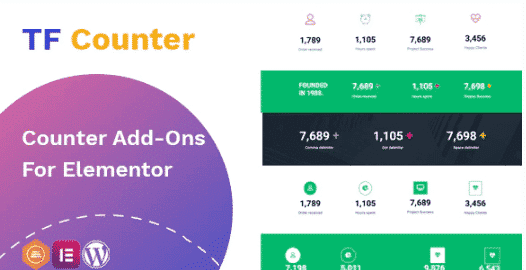
TfCounter is an essential Elementor widget designed to showcase dynamic numerical data on your WordPress website with stunning visual appeal. This powerful tool is perfect for businesses, agencies, and individuals looking to highlight achievements, statistics, or progress in an engaging and professional manner. With TfCounter, you can effortlessly add animated counters that capture attention and build credibility, transforming raw numbers into compelling stories.
Key Features of TfCounter
- Animated Counter Effects: Engage your visitors with smooth, eye-catching animation effects as your numbers count up to their final values, creating a dynamic user experience.
- Fully Customizable Design: Take complete control over the appearance of your counters. Adjust colors, typography, font sizes, backgrounds, and borders to perfectly match your brand’s aesthetic.
- Prefix and Suffix Options: Easily add text before or after your numbers, such as currency symbols, percentages, or descriptive words, to provide context and clarity.
- Decimal Point Support: Display precise figures with support for decimal points, making TfCounter suitable for a wide range of data, from financial metrics to scientific measurements.
- Start and End Values: Define the starting and ending numbers for each counter, giving you flexibility to animate from zero or any other specific value.
- Animation Duration Control: Set the speed at which your counters animate, allowing you to create anything from quick bursts of information to gradual, unfolding statistics.
- Elementor Integration: Seamlessly integrate TfCounter into any page or post built with Elementor, leveraging its intuitive drag-and-drop interface for quick setup.
- Responsive Design: Ensure your impressive counters look flawless on any device, from desktops to tablets and smartphones, providing a consistent user experience across all screen sizes.
Why Choose TfCounter?
Choosing TfCounter for your WordPress website means opting for a blend of robust functionality and unparalleled ease of use. In today’s data-driven world, presenting your achievements and statistics in an engaging format is crucial for building trust and impressing visitors. TfCounter empowers you to do just that, transforming static numbers into dynamic visual elements that immediately draw the eye and convey professionalism. It’s more than just a counter; it’s a storytelling tool that helps you highlight milestones, showcase growth, or demonstrate impact without requiring any coding knowledge.
The flexibility and customization options within TfCounter are truly exceptional. Whether you need to display client numbers, project completions, sales figures, or social media followers, TfCounter provides the tools to present this information exactly how you envision it. Its deep integration with Elementor means you can leverage all the power of your favorite page builder while adding sophisticated counter animations in minutes. The responsive design ensures that your hard work looks fantastic on every device, enhancing user experience and reinforcing your brand’s commitment to quality. When you choose TfCounter, you’re investing in a widget that not only looks great but also effectively communicates your success.
Furthermore, as part of our premium GPL collection, TfCounter offers you the freedom and flexibility that comes with open-source licensing. This means you get a high-quality, reliable product that can be used across multiple projects without restrictive licenses, providing incredible value. Enhance your website’s visual appeal and data presentation capabilities with TfCounter, a smart choice for any WordPress professional aiming for excellence.
Who Should Use TfCounter?
TfCounter is ideal for a broad range of WordPress users and professionals, including:
- Business Owners: To display key performance indicators (KPIs), customer counts, or product sales.
- Agencies and Freelancers: To showcase portfolio statistics, client satisfaction rates, or project completion numbers for potential clients.
- Bloggers and Content Creators: To highlight subscriber counts, article views, or social media engagement.
- E-commerce Stores: To feature product sales, satisfied customers, or items in stock.
- Non-profit Organizations: To illustrate fundraising goals, beneficiaries helped, or volunteer hours.
- Educators and Online Course Providers: To show student enrollment, course completions, or success rates.
How to Install TfCounter
- Download TfCounter: After purchasing, download the TfCounter plugin zip file from your account on our website.
- Upload to WordPress: Log in to your WordPress dashboard, navigate to “Plugins” > “Add New,” and then click “Upload Plugin.” Choose the downloaded TfCounter zip file and click “Install Now.”
- Activate the Plugin: Once the installation is complete, click “Activate Plugin.” TfCounter is now ready to be used with Elementor.
- Edit with Elementor: Go to any page or post you wish to edit with Elementor. Search for the “TfCounter” widget in the Elementor editor sidebar.
- Drag and Customize: Drag the TfCounter widget onto your page, and then use the intuitive Elementor controls to set your desired numbers, animation, and styling options.
Frequently Asked Questions About TfCounter
Is TfCounter compatible with all WordPress themes?
Yes, TfCounter is designed to be compatible with any WordPress theme, as long as Elementor is installed and active. It leverages Elementor’s framework, ensuring seamless integration and consistent performance regardless of your theme.
Can I use multiple TfCounter widgets on a single page?
Absolutely! You can add as many TfCounter widgets as you need on a single page or across different pages of your website. Each instance of TfCounter can be independently customized with its own values and styling.
Does TfCounter affect website performance?
TfCounter is developed with performance in mind. While any animated element adds a minimal load, TfCounter is optimized to be lightweight and efficient, ensuring it doesn’t significantly impact your website’s loading speed or overall performance. We always recommend optimizing other site assets for best results.
Get TfCounter Today
Ready to transform your website’s numerical data into engaging, animated statistics? TfCounter offers an intuitive and powerful solution to enhance your Elementor-powered pages. Elevate your site’s professionalism and capture visitor attention by showcasing your achievements with dynamic counters. Explore TfCounter and other premium WordPress Plugins available in our collection. Don’t miss out on the opportunity to enhance your online presence with the best GPL WordPress Products. Purchase TfCounter today and start building more impactful web experiences!
Related Products You May Like
Here's everything you need to know about your purchase:
- 100% original files — Every product is the genuine, virus-free file, exactly as released by the original developer.
- Instant download — Access your files immediately after purchase from your account.
- Lifetime access — Re-download your purchased files anytime. No expiry, no limits.
- Free updates — Newer version released? Just request an update from us, free for all customers.
- Dedicated support — Our team is available 24/7 for installation and file-related help.
- Easy refunds — Not satisfied? Review our Refund Policy. We offer a hassle-free 7-day guarantee.
$59.00 Original price was: $59.00.$2.00Current price is: $2.00.
Version
1.0.2
Last Updated
21/05/2023
License
GPL v2
Compatibility
WordPress 5.0+
Need latest version?
Newer version released? Request an update from us — free for all customers!
Request Update →🎁 Your Purchase Includes
Overview of TfCounter
TfCounter is an essential Elementor widget designed to showcase dynamic numerical data on your WordPress website with stunning visual appeal. This powerful tool is perfect for businesses, agencies, and individuals looking to highlight achievements, statistics, or progress in an engaging and professional manner. With TfCounter, you can effortlessly add animated counters that capture attention and build credibility, transforming raw numbers into compelling stories.
Key Features of TfCounter
- Animated Counter Effects: Engage your visitors with smooth, eye-catching animation effects as your numbers count up to their final values, creating a dynamic user experience.
- Fully Customizable Design: Take complete control over the appearance of your counters. Adjust colors, typography, font sizes, backgrounds, and borders to perfectly match your brand’s aesthetic.
- Prefix and Suffix Options: Easily add text before or after your numbers, such as currency symbols, percentages, or descriptive words, to provide context and clarity.
- Decimal Point Support: Display precise figures with support for decimal points, making TfCounter suitable for a wide range of data, from financial metrics to scientific measurements.
- Start and End Values: Define the starting and ending numbers for each counter, giving you flexibility to animate from zero or any other specific value.
- Animation Duration Control: Set the speed at which your counters animate, allowing you to create anything from quick bursts of information to gradual, unfolding statistics.
- Elementor Integration: Seamlessly integrate TfCounter into any page or post built with Elementor, leveraging its intuitive drag-and-drop interface for quick setup.
- Responsive Design: Ensure your impressive counters look flawless on any device, from desktops to tablets and smartphones, providing a consistent user experience across all screen sizes.
Why Choose TfCounter?
Choosing TfCounter for your WordPress website means opting for a blend of robust functionality and unparalleled ease of use. In today’s data-driven world, presenting your achievements and statistics in an engaging format is crucial for building trust and impressing visitors. TfCounter empowers you to do just that, transforming static numbers into dynamic visual elements that immediately draw the eye and convey professionalism. It’s more than just a counter; it’s a storytelling tool that helps you highlight milestones, showcase growth, or demonstrate impact without requiring any coding knowledge.
The flexibility and customization options within TfCounter are truly exceptional. Whether you need to display client numbers, project completions, sales figures, or social media followers, TfCounter provides the tools to present this information exactly how you envision it. Its deep integration with Elementor means you can leverage all the power of your favorite page builder while adding sophisticated counter animations in minutes. The responsive design ensures that your hard work looks fantastic on every device, enhancing user experience and reinforcing your brand’s commitment to quality. When you choose TfCounter, you’re investing in a widget that not only looks great but also effectively communicates your success.
Furthermore, as part of our premium GPL collection, TfCounter offers you the freedom and flexibility that comes with open-source licensing. This means you get a high-quality, reliable product that can be used across multiple projects without restrictive licenses, providing incredible value. Enhance your website’s visual appeal and data presentation capabilities with TfCounter, a smart choice for any WordPress professional aiming for excellence.
Who Should Use TfCounter?
TfCounter is ideal for a broad range of WordPress users and professionals, including:
- Business Owners: To display key performance indicators (KPIs), customer counts, or product sales.
- Agencies and Freelancers: To showcase portfolio statistics, client satisfaction rates, or project completion numbers for potential clients.
- Bloggers and Content Creators: To highlight subscriber counts, article views, or social media engagement.
- E-commerce Stores: To feature product sales, satisfied customers, or items in stock.
- Non-profit Organizations: To illustrate fundraising goals, beneficiaries helped, or volunteer hours.
- Educators and Online Course Providers: To show student enrollment, course completions, or success rates.
How to Install TfCounter
- Download TfCounter: After purchasing, download the TfCounter plugin zip file from your account on our website.
- Upload to WordPress: Log in to your WordPress dashboard, navigate to “Plugins” > “Add New,” and then click “Upload Plugin.” Choose the downloaded TfCounter zip file and click “Install Now.”
- Activate the Plugin: Once the installation is complete, click “Activate Plugin.” TfCounter is now ready to be used with Elementor.
- Edit with Elementor: Go to any page or post you wish to edit with Elementor. Search for the “TfCounter” widget in the Elementor editor sidebar.
- Drag and Customize: Drag the TfCounter widget onto your page, and then use the intuitive Elementor controls to set your desired numbers, animation, and styling options.
Frequently Asked Questions About TfCounter
Is TfCounter compatible with all WordPress themes?
Yes, TfCounter is designed to be compatible with any WordPress theme, as long as Elementor is installed and active. It leverages Elementor’s framework, ensuring seamless integration and consistent performance regardless of your theme.
Can I use multiple TfCounter widgets on a single page?
Absolutely! You can add as many TfCounter widgets as you need on a single page or across different pages of your website. Each instance of TfCounter can be independently customized with its own values and styling.
Does TfCounter affect website performance?
TfCounter is developed with performance in mind. While any animated element adds a minimal load, TfCounter is optimized to be lightweight and efficient, ensuring it doesn’t significantly impact your website’s loading speed or overall performance. We always recommend optimizing other site assets for best results.
Get TfCounter Today
Ready to transform your website’s numerical data into engaging, animated statistics? TfCounter offers an intuitive and powerful solution to enhance your Elementor-powered pages. Elevate your site’s professionalism and capture visitor attention by showcasing your achievements with dynamic counters. Explore TfCounter and other premium WordPress Plugins available in our collection. Don’t miss out on the opportunity to enhance your online presence with the best GPL WordPress Products. Purchase TfCounter today and start building more impactful web experiences!
Related Products You May Like
Reviews
There are no reviews yet.
Here's everything you need to know about your purchase:
- 100% original files — Every product is the genuine, virus-free file, exactly as released by the original developer.
- Instant download — Access your files immediately after purchase from your account.
- Lifetime access — Re-download your purchased files anytime. No expiry, no limits.
- Free updates — Newer version released? Just request an update from us, free for all customers.
- Dedicated support — Our team is available 24/7 for installation and file-related help.
- Easy refunds — Not satisfied? Review our Refund Policy. We offer a hassle-free 7-day guarantee.
Reviews
There are no reviews yet.