

Smart Manager For WooCommerce 8.85.0
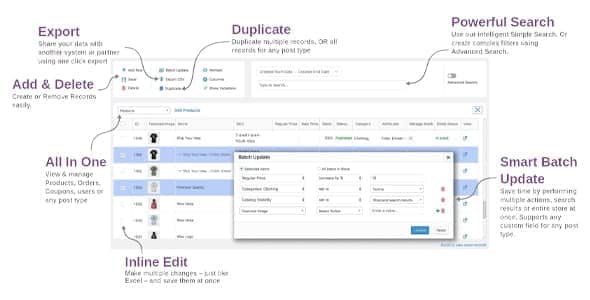
Overview of Smart Manager
Unlock unparalleled control and efficiency over your WooCommerce store with Smart Manager. This powerful plugin is an essential tool for any online business owner looking to streamline their daily operations, manage products, orders, customers, and coupons with speed and precision. Whether you’re a small startup or a large enterprise, Smart Manager empowers you to handle bulk edits, quick searches, and comprehensive data management directly from your WordPress dashboard, transforming tedious tasks into swift actions.
Key Features of Smart Manager
- Intuitive Dashboard Interface: Navigate and manage all your WooCommerce data – products, orders, customers, coupons, and more – from a single, user-friendly dashboard. Smart Manager makes complex data accessible and manageable.
- Real-time Data Editing: Perform quick, inline edits on individual items without reloading the page. Update product stock, order statuses, customer details, or coupon validity with ease, ensuring your store data is always current.
- Powerful Bulk Editing Capabilities: Save countless hours by making changes to hundreds or thousands of items simultaneously. Modify prices, categories, attributes, order statuses, and more in bulk, all thanks to Smart Manager‘s robust features.
- Advanced Search and Filter Options: Locate specific products, orders, or customers instantly with highly customizable search and filter criteria. Drill down into your data using multiple conditions to find exactly what you need.
- Export and Import Functionality: Effortlessly export any filtered data to a CSV file for analysis or record-keeping. Similarly, import new data or update existing records in bulk, making inventory updates or customer migrations simple with Smart Manager.
- Customizable Views and Columns: Personalize your management dashboard by choosing which columns to display and arranging them to suit your workflow. Focus on the information most critical to your operations.
- Duplicate Products and Posts: Quickly clone existing products, posts, or pages to create new entries with similar attributes, significantly speeding up content creation and product listing processes.
- Manage All Post Types: Beyond WooCommerce specific data, Smart Manager extends its capabilities to manage all WordPress post types, including posts, pages, and custom post types, offering a truly centralized administration experience.
Why Choose Smart Manager?
Choosing Smart Manager for your WooCommerce store is a strategic decision that pays dividends in efficiency, accuracy, and time savings. In the fast-paced world of e-commerce, every minute counts, and this plugin is engineered to reclaim those minutes from repetitive, manual tasks. Its intuitive design means you spend less time learning the tool and more time actually managing your business. From updating hundreds of product prices in a single click to changing the status of multiple orders instantly, Smart Manager transforms what used to be hours of work into mere moments.
Beyond the sheer speed it offers, Smart Manager significantly reduces the potential for human error. By allowing bulk operations and providing clear, organized data views, it ensures consistency across your store. This leads to better customer satisfaction, fewer operational glitches, and a more professional online presence. Store owners can focus on growth strategies, marketing, and customer engagement, rather than getting bogged down in administrative minutiae. The comprehensive suite of tools packed into Smart Manager makes it an indispensable asset for proactive management.
Ultimately, Smart Manager isn’t just a plugin; it’s an investment in the operational health and scalability of your WooCommerce store. It simplifies complex data management, provides powerful real-time editing, and offers unparalleled flexibility in handling your store’s core assets. For anyone serious about optimizing their e-commerce workflow and maintaining a highly efficient online business, the choice is clear: Smart Manager provides the robust, reliable solution you need.
Who Should Use Smart Manager?
Smart Manager is ideal for a wide range of WooCommerce users. Store owners who manage extensive product catalogs will find its bulk editing features invaluable. E-commerce managers needing to quickly process orders, update customer information, or adjust coupon campaigns will benefit from its real-time capabilities. Developers and site administrators can leverage Smart Manager to efficiently manage custom post types and data, ensuring a smooth backend operation. Essentially, anyone looking to save time, reduce manual effort, and gain greater control over their WooCommerce data will find Smart Manager to be an indispensable tool.
How to Install Smart Manager
- Download the Plugin: After acquiring Smart Manager, download the plugin file (a .zip archive) to your computer from your account dashboard.
- Upload to WordPress: Log in to your WordPress admin panel. Navigate to ‘Plugins’ > ‘Add New’ and then click the ‘Upload Plugin’ button at the top of the page.
- Choose File and Install: Click ‘Choose File’, select the Smart Manager .zip file you downloaded, and then click ‘Install Now’.
- Activate the Plugin: Once the installation is complete, click the ‘Activate Plugin’ button.
- Access Smart Manager: You can now access Smart Manager from your WordPress dashboard, typically found under the ‘WooCommerce’ menu or a dedicated ‘Smart Manager’ menu item, ready to optimize your store management.
Frequently Asked Questions About Smart Manager
Can Smart Manager handle custom fields and attributes?
Yes, Smart Manager is designed to provide comprehensive control, including the ability to manage and bulk edit custom fields and attributes for products, orders, and other post types. This flexibility ensures that your unique store configurations are fully supported.
Is Smart Manager compatible with other WooCommerce extensions?
Smart Manager is built to be highly compatible with the standard WooCommerce ecosystem. While it generally works well with most extensions, specific integrations might require testing. Its core functionality focuses on direct database interactions, which are typically robust across various setups.
Can I revert changes made with Smart Manager?
While Smart Manager itself doesn’t have an undo button for bulk operations, it’s always recommended to perform a database backup before making significant bulk changes. For individual edits, you can simply re-edit the item. Planning your changes carefully is key when using any powerful management tool like Smart Manager.
Get Smart Manager Today
Don’t let manual data entry and inefficient processes hold your WooCommerce store back. Embrace the power and precision of Smart Manager to transform your daily operations, boost productivity, and gain unprecedented control over your e-commerce business. Experience the difference that intelligent management can make. Explore our range of WordPress Plugins and other premium GPL WordPress Products to further enhance your site. Get Smart Manager now and start managing your store smarter, not harder!
Related Products You May Like
Here's everything you need to know about your purchase:
- 100% original files — Every product is the genuine, virus-free file, exactly as released by the original developer.
- Instant download — Access your files immediately after purchase from your account.
- Lifetime access — Re-download your purchased files anytime. No expiry, no limits.
- Free updates — Newer version released? Just request an update from us, free for all customers.
- Dedicated support — Our team is available 24/7 for installation and file-related help.
- Easy refunds — Not satisfied? Review our Refund Policy. We offer a hassle-free 7-day guarantee.
$100.00 Original price was: $100.00.$2.00Current price is: $2.00.
Version
8.85.0
Last Updated
03/03/2026
License
GPL v2
Compatibility
WordPress 5.0+
Need latest version?
Newer version released? Request an update from us — free for all customers!
Request Update →🎁 Your Purchase Includes
Overview of Smart Manager
Unlock unparalleled control and efficiency over your WooCommerce store with Smart Manager. This powerful plugin is an essential tool for any online business owner looking to streamline their daily operations, manage products, orders, customers, and coupons with speed and precision. Whether you’re a small startup or a large enterprise, Smart Manager empowers you to handle bulk edits, quick searches, and comprehensive data management directly from your WordPress dashboard, transforming tedious tasks into swift actions.
Key Features of Smart Manager
- Intuitive Dashboard Interface: Navigate and manage all your WooCommerce data – products, orders, customers, coupons, and more – from a single, user-friendly dashboard. Smart Manager makes complex data accessible and manageable.
- Real-time Data Editing: Perform quick, inline edits on individual items without reloading the page. Update product stock, order statuses, customer details, or coupon validity with ease, ensuring your store data is always current.
- Powerful Bulk Editing Capabilities: Save countless hours by making changes to hundreds or thousands of items simultaneously. Modify prices, categories, attributes, order statuses, and more in bulk, all thanks to Smart Manager‘s robust features.
- Advanced Search and Filter Options: Locate specific products, orders, or customers instantly with highly customizable search and filter criteria. Drill down into your data using multiple conditions to find exactly what you need.
- Export and Import Functionality: Effortlessly export any filtered data to a CSV file for analysis or record-keeping. Similarly, import new data or update existing records in bulk, making inventory updates or customer migrations simple with Smart Manager.
- Customizable Views and Columns: Personalize your management dashboard by choosing which columns to display and arranging them to suit your workflow. Focus on the information most critical to your operations.
- Duplicate Products and Posts: Quickly clone existing products, posts, or pages to create new entries with similar attributes, significantly speeding up content creation and product listing processes.
- Manage All Post Types: Beyond WooCommerce specific data, Smart Manager extends its capabilities to manage all WordPress post types, including posts, pages, and custom post types, offering a truly centralized administration experience.
Why Choose Smart Manager?
Choosing Smart Manager for your WooCommerce store is a strategic decision that pays dividends in efficiency, accuracy, and time savings. In the fast-paced world of e-commerce, every minute counts, and this plugin is engineered to reclaim those minutes from repetitive, manual tasks. Its intuitive design means you spend less time learning the tool and more time actually managing your business. From updating hundreds of product prices in a single click to changing the status of multiple orders instantly, Smart Manager transforms what used to be hours of work into mere moments.
Beyond the sheer speed it offers, Smart Manager significantly reduces the potential for human error. By allowing bulk operations and providing clear, organized data views, it ensures consistency across your store. This leads to better customer satisfaction, fewer operational glitches, and a more professional online presence. Store owners can focus on growth strategies, marketing, and customer engagement, rather than getting bogged down in administrative minutiae. The comprehensive suite of tools packed into Smart Manager makes it an indispensable asset for proactive management.
Ultimately, Smart Manager isn’t just a plugin; it’s an investment in the operational health and scalability of your WooCommerce store. It simplifies complex data management, provides powerful real-time editing, and offers unparalleled flexibility in handling your store’s core assets. For anyone serious about optimizing their e-commerce workflow and maintaining a highly efficient online business, the choice is clear: Smart Manager provides the robust, reliable solution you need.
Who Should Use Smart Manager?
Smart Manager is ideal for a wide range of WooCommerce users. Store owners who manage extensive product catalogs will find its bulk editing features invaluable. E-commerce managers needing to quickly process orders, update customer information, or adjust coupon campaigns will benefit from its real-time capabilities. Developers and site administrators can leverage Smart Manager to efficiently manage custom post types and data, ensuring a smooth backend operation. Essentially, anyone looking to save time, reduce manual effort, and gain greater control over their WooCommerce data will find Smart Manager to be an indispensable tool.
How to Install Smart Manager
- Download the Plugin: After acquiring Smart Manager, download the plugin file (a .zip archive) to your computer from your account dashboard.
- Upload to WordPress: Log in to your WordPress admin panel. Navigate to ‘Plugins’ > ‘Add New’ and then click the ‘Upload Plugin’ button at the top of the page.
- Choose File and Install: Click ‘Choose File’, select the Smart Manager .zip file you downloaded, and then click ‘Install Now’.
- Activate the Plugin: Once the installation is complete, click the ‘Activate Plugin’ button.
- Access Smart Manager: You can now access Smart Manager from your WordPress dashboard, typically found under the ‘WooCommerce’ menu or a dedicated ‘Smart Manager’ menu item, ready to optimize your store management.
Frequently Asked Questions About Smart Manager
Can Smart Manager handle custom fields and attributes?
Yes, Smart Manager is designed to provide comprehensive control, including the ability to manage and bulk edit custom fields and attributes for products, orders, and other post types. This flexibility ensures that your unique store configurations are fully supported.
Is Smart Manager compatible with other WooCommerce extensions?
Smart Manager is built to be highly compatible with the standard WooCommerce ecosystem. While it generally works well with most extensions, specific integrations might require testing. Its core functionality focuses on direct database interactions, which are typically robust across various setups.
Can I revert changes made with Smart Manager?
While Smart Manager itself doesn’t have an undo button for bulk operations, it’s always recommended to perform a database backup before making significant bulk changes. For individual edits, you can simply re-edit the item. Planning your changes carefully is key when using any powerful management tool like Smart Manager.
Get Smart Manager Today
Don’t let manual data entry and inefficient processes hold your WooCommerce store back. Embrace the power and precision of Smart Manager to transform your daily operations, boost productivity, and gain unprecedented control over your e-commerce business. Experience the difference that intelligent management can make. Explore our range of WordPress Plugins and other premium GPL WordPress Products to further enhance your site. Get Smart Manager now and start managing your store smarter, not harder!
Related Products You May Like
Reviews
There are no reviews yet.
Here's everything you need to know about your purchase:
- 100% original files — Every product is the genuine, virus-free file, exactly as released by the original developer.
- Instant download — Access your files immediately after purchase from your account.
- Lifetime access — Re-download your purchased files anytime. No expiry, no limits.
- Free updates — Newer version released? Just request an update from us, free for all customers.
- Dedicated support — Our team is available 24/7 for installation and file-related help.
- Easy refunds — Not satisfied? Review our Refund Policy. We offer a hassle-free 7-day guarantee.
Reviews
There are no reviews yet.