

Qloud 3.3.1 – Cloud Computing, Apps & Server WordPress Theme
Overview of Qloud
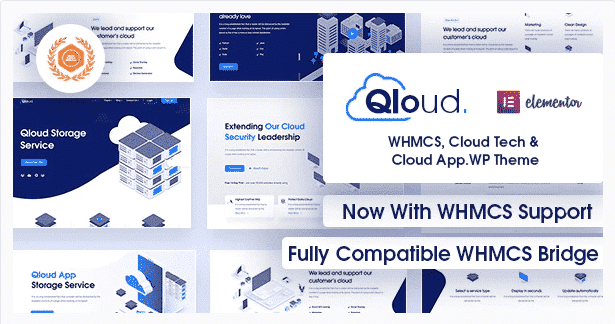
Welcome to the ultimate solution for establishing a powerful online presence for your cloud computing, apps, or server-related business. **Qloud** is a meticulously designed WordPress theme crafted specifically for companies operating in the tech and digital infrastructure sectors. It provides a robust, modern, and highly customizable platform to showcase your services, attract clients, and build a credible brand in the competitive digital landscape.
Key Features of Qloud
- Modern & Responsive Design: Qloud boasts a sleek, contemporary design that is fully responsive, ensuring your website looks impeccable and functions flawlessly on any device, from desktops to smartphones.
- Elementor Page Builder Integration: Build and customize your pages with unparalleled ease using the intuitive drag-and-drop functionality of the Elementor page builder. Qloud offers extensive compatibility and custom widgets for Elementor, empowering non-coders to create stunning layouts.
- One-Click Demo Import: Get your site up and running in minutes with the one-click demo import feature. Qloud provides pre-built demos tailored for various cloud services, allowing you to quickly launch your site and then customize it to your exact needs.
- Advanced Theme Options: Take full control of your website’s appearance and functionality with a comprehensive set of theme options. Adjust colors, fonts, layouts, headers, footers, and more without touching a single line of code.
- Dedicated Service Pages: Showcase your cloud computing services, app offerings, or server solutions with specialized, pre-designed pages. Qloud helps you present your information clearly and attractively, highlighting your unique value proposition.
- SEO Optimized: Built with best SEO practices in mind, Qloud helps your website rank higher in search engine results. Its clean code and fast loading times contribute to improved visibility and organic traffic.
- Cross-Browser Compatibility: Qloud is rigorously tested to ensure flawless performance across all major web browsers, including Chrome, Firefox, Safari, and Edge, guaranteeing a consistent user experience for all your visitors.
- Professional Support & Documentation: While our GPL products are provided for your convenience, the original authors of Qloud offer dedicated support and comprehensive documentation, ensuring you have the resources to maximize your theme’s potential.
Why Choose Qloud?
Choosing Qloud means investing in a future-proof website solution that understands the unique demands of the cloud computing and tech industry. This theme isn’t just about aesthetics; it’s engineered for performance, user experience, and conversion. Its deep integration with Elementor empowers you to craft a site that perfectly reflects your brand’s innovation and reliability, without needing extensive technical knowledge or hiring a developer.
Qloud provides a robust foundation for businesses looking to make a significant impact online. From its lightning-fast loading speeds, crucial for retaining visitors, to its comprehensive set of customization options, every aspect of Qloud is designed to elevate your digital presence. The professional layouts for services, teams, and contact pages ensure that all essential information is presented in a clear, engaging, and professional manner, building trust and credibility with your potential clients.
Beyond its technical prowess, Qloud offers incredible value by saving you time and resources. Instead of building a website from scratch or struggling with generic themes, Qloud delivers a specialized, ready-to-use template that speaks directly to your target audience. It’s the smart choice for businesses that demand excellence and efficiency in their online ventures, ensuring your website is not just a digital brochure, but a powerful growth engine.
Who Should Use Qloud?
Qloud is ideal for a wide range of professionals and businesses in the tech sector. This includes cloud computing service providers, SaaS companies, server hosting providers, app development agencies, data centers, IT consulting firms, and technology startups looking to establish a professional and authoritative online presence. If your business revolves around digital infrastructure, software as a service, or technical solutions, Qloud is tailored to meet your specific needs.
How to Install Qloud
- Download Qloud: After purchasing, download the Qloud theme files from your account dashboard on our site.
- Upload Theme to WordPress: Log in to your WordPress admin panel. Navigate to Appearance > Themes > Add New > Upload Theme, then select the downloaded Qloud .zip file and click “Install Now”.
- Activate Qloud: Once the theme is installed, click on the “Activate” link to make Qloud your active theme.
- Install Required Plugins: Qloud will prompt you to install recommended plugins (like Elementor). Install and activate them for full functionality.
- Import Demo Content (Optional): For a quick start, go to Appearance > Import Demo Data (or similar, depending on the theme’s importer) and import the demo content. This will set up your site like the live demo, which you can then customize.
Frequently Asked Questions About Qloud
Is Qloud compatible with popular WordPress plugins?
Yes, Qloud is designed with broad compatibility in mind. It works seamlessly with essential plugins like Elementor for page building, Contact Form 7 for forms, and popular SEO plugins, ensuring you can extend its functionality as needed for your cloud computing business.
Can I customize the colors and fonts in Qloud?
Absolutely! Qloud comes with extensive theme options that allow you to easily customize virtually every aspect of your site’s design, including colors, typography, layouts, header styles, and more, all without any coding knowledge.
Does Qloud support a blog section for tech articles?
Yes, Qloud includes beautifully designed blog layouts, perfect for sharing industry news, technical articles, company updates, and thought leadership content. Engaging with your audience through a blog is a great way to establish authority in the cloud computing space.
Get Qloud Today
Elevate your cloud computing, apps, or server business with a website that truly represents your brand’s innovation and professionalism. Qloud offers an unmatched blend of design, functionality, and ease of use, making it the perfect choice for your next digital project. Explore our vast collection of WordPress Themes and other premium GPL WordPress Products to find everything you need to build an exceptional online presence. Invest in Qloud today and build a website that drives success!
Related Products You May Like
Here's everything you need to know about your purchase:
- 100% original files — Every product is the genuine, virus-free file, exactly as released by the original developer.
- Instant download — Access your files immediately after purchase from your account.
- Lifetime access — Re-download your purchased files anytime. No expiry, no limits.
- Free updates — Newer version released? Just request an update from us, free for all customers.
- Dedicated support — Our team is available 24/7 for installation and file-related help.
- Easy refunds — Not satisfied? Review our Refund Policy. We offer a hassle-free 7-day guarantee.
$100.00 Original price was: $100.00.$2.00Current price is: $2.00.
Version
3.3.1
Last Updated
14/04/2026
License
GPL v2
Compatibility
WordPress 5.0+
Need latest version?
Newer version released? Request an update from us — free for all customers!
Request Update →🎁 Your Purchase Includes
Overview of Qloud
Welcome to the ultimate solution for establishing a powerful online presence for your cloud computing, apps, or server-related business. **Qloud** is a meticulously designed WordPress theme crafted specifically for companies operating in the tech and digital infrastructure sectors. It provides a robust, modern, and highly customizable platform to showcase your services, attract clients, and build a credible brand in the competitive digital landscape.
Key Features of Qloud
- Modern & Responsive Design: Qloud boasts a sleek, contemporary design that is fully responsive, ensuring your website looks impeccable and functions flawlessly on any device, from desktops to smartphones.
- Elementor Page Builder Integration: Build and customize your pages with unparalleled ease using the intuitive drag-and-drop functionality of the Elementor page builder. Qloud offers extensive compatibility and custom widgets for Elementor, empowering non-coders to create stunning layouts.
- One-Click Demo Import: Get your site up and running in minutes with the one-click demo import feature. Qloud provides pre-built demos tailored for various cloud services, allowing you to quickly launch your site and then customize it to your exact needs.
- Advanced Theme Options: Take full control of your website’s appearance and functionality with a comprehensive set of theme options. Adjust colors, fonts, layouts, headers, footers, and more without touching a single line of code.
- Dedicated Service Pages: Showcase your cloud computing services, app offerings, or server solutions with specialized, pre-designed pages. Qloud helps you present your information clearly and attractively, highlighting your unique value proposition.
- SEO Optimized: Built with best SEO practices in mind, Qloud helps your website rank higher in search engine results. Its clean code and fast loading times contribute to improved visibility and organic traffic.
- Cross-Browser Compatibility: Qloud is rigorously tested to ensure flawless performance across all major web browsers, including Chrome, Firefox, Safari, and Edge, guaranteeing a consistent user experience for all your visitors.
- Professional Support & Documentation: While our GPL products are provided for your convenience, the original authors of Qloud offer dedicated support and comprehensive documentation, ensuring you have the resources to maximize your theme’s potential.
Why Choose Qloud?
Choosing Qloud means investing in a future-proof website solution that understands the unique demands of the cloud computing and tech industry. This theme isn’t just about aesthetics; it’s engineered for performance, user experience, and conversion. Its deep integration with Elementor empowers you to craft a site that perfectly reflects your brand’s innovation and reliability, without needing extensive technical knowledge or hiring a developer.
Qloud provides a robust foundation for businesses looking to make a significant impact online. From its lightning-fast loading speeds, crucial for retaining visitors, to its comprehensive set of customization options, every aspect of Qloud is designed to elevate your digital presence. The professional layouts for services, teams, and contact pages ensure that all essential information is presented in a clear, engaging, and professional manner, building trust and credibility with your potential clients.
Beyond its technical prowess, Qloud offers incredible value by saving you time and resources. Instead of building a website from scratch or struggling with generic themes, Qloud delivers a specialized, ready-to-use template that speaks directly to your target audience. It’s the smart choice for businesses that demand excellence and efficiency in their online ventures, ensuring your website is not just a digital brochure, but a powerful growth engine.
Who Should Use Qloud?
Qloud is ideal for a wide range of professionals and businesses in the tech sector. This includes cloud computing service providers, SaaS companies, server hosting providers, app development agencies, data centers, IT consulting firms, and technology startups looking to establish a professional and authoritative online presence. If your business revolves around digital infrastructure, software as a service, or technical solutions, Qloud is tailored to meet your specific needs.
How to Install Qloud
- Download Qloud: After purchasing, download the Qloud theme files from your account dashboard on our site.
- Upload Theme to WordPress: Log in to your WordPress admin panel. Navigate to Appearance > Themes > Add New > Upload Theme, then select the downloaded Qloud .zip file and click “Install Now”.
- Activate Qloud: Once the theme is installed, click on the “Activate” link to make Qloud your active theme.
- Install Required Plugins: Qloud will prompt you to install recommended plugins (like Elementor). Install and activate them for full functionality.
- Import Demo Content (Optional): For a quick start, go to Appearance > Import Demo Data (or similar, depending on the theme’s importer) and import the demo content. This will set up your site like the live demo, which you can then customize.
Frequently Asked Questions About Qloud
Is Qloud compatible with popular WordPress plugins?
Yes, Qloud is designed with broad compatibility in mind. It works seamlessly with essential plugins like Elementor for page building, Contact Form 7 for forms, and popular SEO plugins, ensuring you can extend its functionality as needed for your cloud computing business.
Can I customize the colors and fonts in Qloud?
Absolutely! Qloud comes with extensive theme options that allow you to easily customize virtually every aspect of your site’s design, including colors, typography, layouts, header styles, and more, all without any coding knowledge.
Does Qloud support a blog section for tech articles?
Yes, Qloud includes beautifully designed blog layouts, perfect for sharing industry news, technical articles, company updates, and thought leadership content. Engaging with your audience through a blog is a great way to establish authority in the cloud computing space.
Get Qloud Today
Elevate your cloud computing, apps, or server business with a website that truly represents your brand’s innovation and professionalism. Qloud offers an unmatched blend of design, functionality, and ease of use, making it the perfect choice for your next digital project. Explore our vast collection of WordPress Themes and other premium GPL WordPress Products to find everything you need to build an exceptional online presence. Invest in Qloud today and build a website that drives success!
Related Products You May Like
Reviews
There are no reviews yet.
Here's everything you need to know about your purchase:
- 100% original files — Every product is the genuine, virus-free file, exactly as released by the original developer.
- Instant download — Access your files immediately after purchase from your account.
- Lifetime access — Re-download your purchased files anytime. No expiry, no limits.
- Free updates — Newer version released? Just request an update from us, free for all customers.
- Dedicated support — Our team is available 24/7 for installation and file-related help.
- Easy refunds — Not satisfied? Review our Refund Policy. We offer a hassle-free 7-day guarantee.
Reviews
There are no reviews yet.