

Prolancer 1.4.6 – Freelance Marketplace WordPress theme
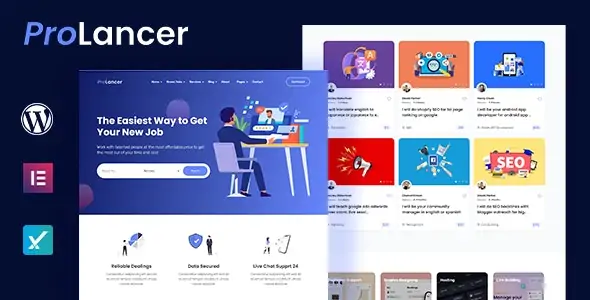
Overview of Prolancer
Prolancer is a robust and intuitive WordPress theme designed to power your very own freelance marketplace. It’s the perfect solution for entrepreneurs, agencies, and businesses looking to create a dynamic platform where clients can post projects and freelancers can offer their services, fostering a vibrant ecosystem for remote work.
Key Features of Prolancer
- Comprehensive Project Posting: Clients can easily post detailed project descriptions, set budgets, and define deadlines. Prolancer streamlines the process, ensuring all necessary information is captured for freelancers to bid effectively.
- Advanced Freelancer Profiles: Freelancers can create rich, professional profiles showcasing their skills, portfolios, experience, and rates. This helps clients make informed decisions and connects talent with the right opportunities.
- Secure Bidding System: Prolancer includes a sophisticated bidding mechanism allowing freelancers to submit proposals for projects. Clients can review bids, compare offers, and select the best fit for their needs.
- Integrated Messaging & Communication: Facilitate seamless communication between clients and freelancers directly within the platform. Prolancer ensures all project-related discussions are centralized and easy to track.
- Escrow & Payment Management: Implement a secure escrow system to hold funds until project completion and client satisfaction. Prolancer supports various payment gateways, ensuring smooth and reliable transactions.
- Review and Rating System: Build trust and accountability with an integrated review and rating system. Clients can rate freelancers, and vice versa, providing valuable feedback for future users of your Prolancer marketplace.
- Customizable Dashboards: Both clients and freelancers get personalized dashboards to manage projects, bids, messages, and profiles efficiently. The intuitive design of Prolancer makes navigation a breeze for all users.
- Monetization Options: Prolancer offers various ways to monetize your platform, such as commission fees on projects, featured listings, or premium membership packages, providing flexibility for your business model.
Why Choose Prolancer?
Choosing Prolancer means investing in a powerful, ready-to-launch solution for your freelance marketplace. This theme eliminates the complexity of building such a platform from scratch, offering a comprehensive suite of tools and features right out of the box. Prolancer is meticulously designed to be user-friendly for both site administrators and end-users, ensuring a smooth experience for everyone involved. Its intuitive interface and robust backend capabilities empower you to manage your marketplace with ease, focusing on growth rather than technical headaches.
The flexibility and scalability of Prolancer are unparalleled. Whether you’re starting a niche marketplace for a specific industry or aiming for a broad platform connecting diverse talents, Prolancer can adapt to your vision. It’s built with modern web standards, ensuring responsiveness across all devices and optimal performance. With Prolancer, you’re not just getting a theme; you’re getting a complete ecosystem that fosters collaboration, trust, and successful project outcomes. The continuous development ensures that Prolancer remains a cutting-edge solution in the ever-evolving freelance economy.
Who Should Use Prolancer?
Prolancer is ideal for entrepreneurs, startups, and established businesses looking to enter the booming freelance economy. It’s perfect for individuals who want to create their own Upwork or Fiverr-style platform, connecting service providers with clients. Digital agencies, HR firms, and educational institutions can also leverage Prolancer to build specialized talent pools or internal project management systems. Anyone with a vision for a thriving online marketplace will find Prolancer to be an invaluable tool.
How to Install Prolancer
- Download Prolancer: After purchasing, download the Prolancer theme package from your account area.
- Upload the Theme: Log in to your WordPress dashboard, navigate to Appearance > Themes > Add New > Upload Theme. Select the downloaded Prolancer .zip file and click ‘Install Now’.
- Activate Prolancer: Once installed, click the ‘Activate’ link to enable Prolancer as your active theme.
- Install Required Plugins: Prolancer will likely recommend or require several plugins for full functionality. Install and activate these plugins as prompted.
- Import Demo Content (Optional): To get started quickly, consider importing the demo content provided with Prolancer. This will set up your site with pre-designed pages and settings, which you can then customize.
Frequently Asked Questions About Prolancer
Is Prolancer compatible with other WordPress plugins?
Yes, Prolancer is developed with WordPress best practices in mind, ensuring broad compatibility with a wide range of popular WordPress plugins. While we cannot guarantee compatibility with every single plugin, it generally works well with essential plugins for SEO, security, caching, and more. If you encounter any specific compatibility issues, our support team can assist.
Can I customize the design and layout of Prolancer?
Absolutely! Prolancer is highly customizable. It typically integrates with popular page builders or provides extensive theme options within the WordPress Customizer, allowing you to modify colors, fonts, layouts, and other design elements to match your brand. You have significant control over the look and feel of your Prolancer marketplace.
Does Prolancer support multiple languages and currencies?
Prolancer is designed to be translation-ready, meaning it’s compatible with plugins like WPML or Polylang, allowing you to create a multilingual marketplace. For currency, Prolancer integrates with payment gateways that support various currencies, and you can usually set your preferred base currency for transactions within the theme’s settings or through a dedicated currency plugin.
Get Prolancer Today
Transform your vision into a thriving online freelance marketplace with Prolancer. This comprehensive theme provides all the tools you need to connect clients with talented freelancers, manage projects, and facilitate secure transactions. Don’t miss the opportunity to build your next successful venture. Explore Prolancer and other premium WordPress Themes and GPL WordPress Products available in our store today!
Related Products You May Like
Here's everything you need to know about your purchase:
- 100% original files — Every product is the genuine, virus-free file, exactly as released by the original developer.
- Instant download — Access your files immediately after purchase from your account.
- Lifetime access — Re-download your purchased files anytime. No expiry, no limits.
- Free updates — Newer version released? Just request an update from us, free for all customers.
- Dedicated support — Our team is available 24/7 for installation and file-related help.
- Easy refunds — Not satisfied? Review our Refund Policy. We offer a hassle-free 7-day guarantee.
$100.00 Original price was: $100.00.$2.00Current price is: $2.00.
Version
1.4.6
Last Updated
04/08/2025
License
GPL v2
Compatibility
WordPress 5.0+
Need latest version?
Newer version released? Request an update from us — free for all customers!
Request Update →🎁 Your Purchase Includes
Overview of Prolancer
Prolancer is a robust and intuitive WordPress theme designed to power your very own freelance marketplace. It’s the perfect solution for entrepreneurs, agencies, and businesses looking to create a dynamic platform where clients can post projects and freelancers can offer their services, fostering a vibrant ecosystem for remote work.
Key Features of Prolancer
- Comprehensive Project Posting: Clients can easily post detailed project descriptions, set budgets, and define deadlines. Prolancer streamlines the process, ensuring all necessary information is captured for freelancers to bid effectively.
- Advanced Freelancer Profiles: Freelancers can create rich, professional profiles showcasing their skills, portfolios, experience, and rates. This helps clients make informed decisions and connects talent with the right opportunities.
- Secure Bidding System: Prolancer includes a sophisticated bidding mechanism allowing freelancers to submit proposals for projects. Clients can review bids, compare offers, and select the best fit for their needs.
- Integrated Messaging & Communication: Facilitate seamless communication between clients and freelancers directly within the platform. Prolancer ensures all project-related discussions are centralized and easy to track.
- Escrow & Payment Management: Implement a secure escrow system to hold funds until project completion and client satisfaction. Prolancer supports various payment gateways, ensuring smooth and reliable transactions.
- Review and Rating System: Build trust and accountability with an integrated review and rating system. Clients can rate freelancers, and vice versa, providing valuable feedback for future users of your Prolancer marketplace.
- Customizable Dashboards: Both clients and freelancers get personalized dashboards to manage projects, bids, messages, and profiles efficiently. The intuitive design of Prolancer makes navigation a breeze for all users.
- Monetization Options: Prolancer offers various ways to monetize your platform, such as commission fees on projects, featured listings, or premium membership packages, providing flexibility for your business model.
Why Choose Prolancer?
Choosing Prolancer means investing in a powerful, ready-to-launch solution for your freelance marketplace. This theme eliminates the complexity of building such a platform from scratch, offering a comprehensive suite of tools and features right out of the box. Prolancer is meticulously designed to be user-friendly for both site administrators and end-users, ensuring a smooth experience for everyone involved. Its intuitive interface and robust backend capabilities empower you to manage your marketplace with ease, focusing on growth rather than technical headaches.
The flexibility and scalability of Prolancer are unparalleled. Whether you’re starting a niche marketplace for a specific industry or aiming for a broad platform connecting diverse talents, Prolancer can adapt to your vision. It’s built with modern web standards, ensuring responsiveness across all devices and optimal performance. With Prolancer, you’re not just getting a theme; you’re getting a complete ecosystem that fosters collaboration, trust, and successful project outcomes. The continuous development ensures that Prolancer remains a cutting-edge solution in the ever-evolving freelance economy.
Who Should Use Prolancer?
Prolancer is ideal for entrepreneurs, startups, and established businesses looking to enter the booming freelance economy. It’s perfect for individuals who want to create their own Upwork or Fiverr-style platform, connecting service providers with clients. Digital agencies, HR firms, and educational institutions can also leverage Prolancer to build specialized talent pools or internal project management systems. Anyone with a vision for a thriving online marketplace will find Prolancer to be an invaluable tool.
How to Install Prolancer
- Download Prolancer: After purchasing, download the Prolancer theme package from your account area.
- Upload the Theme: Log in to your WordPress dashboard, navigate to Appearance > Themes > Add New > Upload Theme. Select the downloaded Prolancer .zip file and click ‘Install Now’.
- Activate Prolancer: Once installed, click the ‘Activate’ link to enable Prolancer as your active theme.
- Install Required Plugins: Prolancer will likely recommend or require several plugins for full functionality. Install and activate these plugins as prompted.
- Import Demo Content (Optional): To get started quickly, consider importing the demo content provided with Prolancer. This will set up your site with pre-designed pages and settings, which you can then customize.
Frequently Asked Questions About Prolancer
Is Prolancer compatible with other WordPress plugins?
Yes, Prolancer is developed with WordPress best practices in mind, ensuring broad compatibility with a wide range of popular WordPress plugins. While we cannot guarantee compatibility with every single plugin, it generally works well with essential plugins for SEO, security, caching, and more. If you encounter any specific compatibility issues, our support team can assist.
Can I customize the design and layout of Prolancer?
Absolutely! Prolancer is highly customizable. It typically integrates with popular page builders or provides extensive theme options within the WordPress Customizer, allowing you to modify colors, fonts, layouts, and other design elements to match your brand. You have significant control over the look and feel of your Prolancer marketplace.
Does Prolancer support multiple languages and currencies?
Prolancer is designed to be translation-ready, meaning it’s compatible with plugins like WPML or Polylang, allowing you to create a multilingual marketplace. For currency, Prolancer integrates with payment gateways that support various currencies, and you can usually set your preferred base currency for transactions within the theme’s settings or through a dedicated currency plugin.
Get Prolancer Today
Transform your vision into a thriving online freelance marketplace with Prolancer. This comprehensive theme provides all the tools you need to connect clients with talented freelancers, manage projects, and facilitate secure transactions. Don’t miss the opportunity to build your next successful venture. Explore Prolancer and other premium WordPress Themes and GPL WordPress Products available in our store today!
Related Products You May Like
Reviews
There are no reviews yet.
Here's everything you need to know about your purchase:
- 100% original files — Every product is the genuine, virus-free file, exactly as released by the original developer.
- Instant download — Access your files immediately after purchase from your account.
- Lifetime access — Re-download your purchased files anytime. No expiry, no limits.
- Free updates — Newer version released? Just request an update from us, free for all customers.
- Dedicated support — Our team is available 24/7 for installation and file-related help.
- Easy refunds — Not satisfied? Review our Refund Policy. We offer a hassle-free 7-day guarantee.
Reviews
There are no reviews yet.