

MinervaKB Knowledge Base for WordPress with Analytics 2.0.9
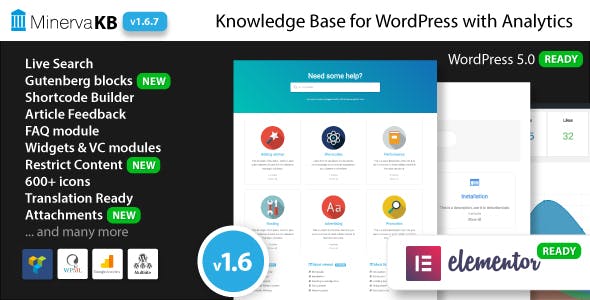
Overview of MinervaKB Knowledge Base for WordPress
Elevate your customer support and reduce inquiries with MinervaKB Knowledge Base for WordPress. This powerful plugin transforms your website into an efficient, self-service information hub, providing instant answers to your users’ most common questions. Designed for businesses, support teams, and online communities, MinervaKB Knowledge Base for WordPress helps you organize documentation, FAQs, and tutorials into an easily navigable and searchable resource.
Key Features of MinervaKB Knowledge Base for WordPress
- Intuitive Content Creation: Effortlessly create, edit, and manage your knowledge base articles using a familiar WordPress interface. MinervaKB Knowledge Base for WordPress integrates seamlessly with the Block Editor, making content creation a breeze.
- Advanced Search & Filtering: Empower your users to find answers quickly with a robust, AJAX-powered search engine. Articles can be filtered by categories, tags, and even custom fields, ensuring relevant results every time.
- Comprehensive Analytics & Insights: Gain valuable insights into user behavior with built-in analytics. Track popular articles, search queries, and articles that users found unhelpful, allowing you to continuously improve your content and support strategy.
- Feedback & Rating System: Allow users to rate articles and provide feedback, directly informing you about content effectiveness. This invaluable input helps refine your knowledge base and enhance user satisfaction.
- Seamless Integration & Customization: MinervaKB Knowledge Base for WordPress is designed to work flawlessly with any WordPress theme. Customize its appearance to match your brand with extensive styling options, shortcodes, and widget support.
- Related Articles & Table of Contents: Automatically suggest related articles to users, guiding them to further helpful content. The dynamic table of contents for long articles improves readability and navigation, making MinervaKB Knowledge Base for WordPress highly user-friendly.
- Restrict Content Access: Control who can view specific articles or entire sections of your knowledge base. Ideal for creating private documentation for registered users, staff, or premium customers.
- Gutenberg & Elementor Support: Leverage the power of modern WordPress builders. MinervaKB Knowledge Base for WordPress offers dedicated blocks for Gutenberg and widgets for Elementor, simplifying the integration of knowledge base elements into any page.
Why Choose MinervaKB Knowledge Base for WordPress?
Choosing MinervaKB Knowledge Base for WordPress means investing in a smarter, more efficient customer support system. In today’s fast-paced digital world, users expect instant solutions. A well-structured knowledge base not only meets this expectation but significantly reduces the burden on your support team, allowing them to focus on more complex issues. MinervaKB provides a professional, user-friendly platform that enhances your website’s value and improves the overall customer experience.
This powerful plugin goes beyond simple FAQs, offering advanced features like detailed analytics and user feedback mechanisms that empower you to continually optimize your support content. By understanding what your users are searching for and what they find helpful, you can proactively address pain points and build a more robust, self-sufficient support ecosystem. MinervaKB Knowledge Base for WordPress is a strategic asset for any business aiming to scale its support operations without escalating costs.
Moreover, its seamless integration with WordPress and extensive customization options ensure that your knowledge base looks and feels like an integral part of your brand. With MinervaKB Knowledge Base for WordPress, you’re not just adding a feature; you’re creating a valuable resource that fosters customer loyalty and satisfaction.
Who Should Use MinervaKB Knowledge Base for WordPress?
MinervaKB Knowledge Base for WordPress is ideal for a wide range of users, including e-commerce stores looking to provide detailed product information and FAQs, software companies needing to document features and troubleshoot common issues, service providers offering how-to guides, and any organization aiming to build a comprehensive self-service portal for their customers or internal teams. It’s perfect for those who want to reduce support tickets, improve customer satisfaction, and empower users to find answers independently.
How to Install MinervaKB Knowledge Base for WordPress
- Download the Plugin: After acquiring MinervaKB Knowledge Base for WordPress, download the plugin zip file to your computer.
- Upload to WordPress: Log in to your WordPress dashboard. Navigate to ‘Plugins’ > ‘Add New’ and click the ‘Upload Plugin’ button at the top. Choose the downloaded zip file and click ‘Install Now’.
- Activate the Plugin: Once the installation is complete, click ‘Activate Plugin’. You will then see MinervaKB Knowledge Base for WordPress listed among your active plugins.
- Initial Setup: A new ‘MinervaKB’ menu item will appear in your WordPress admin sidebar. Click on it to access the setup wizard and configure your knowledge base settings, categories, and initial articles.
- Start Creating Content: Begin populating your knowledge base by adding new articles under the ‘MinervaKB’ menu. Organize them into categories for easy navigation and searchability.
Frequently Asked Questions About MinervaKB Knowledge Base for WordPress
Does MinervaKB Knowledge Base for WordPress work with any WordPress theme?
Yes, MinervaKB Knowledge Base for WordPress is designed to be highly compatible with virtually any well-coded WordPress theme. It includes extensive customization options to ensure it seamlessly integrates with your site’s design and branding.
Can I restrict access to certain articles or categories?
Absolutely. MinervaKB Knowledge Base for WordPress offers robust content restriction features, allowing you to control visibility for specific articles, categories, or even the entire knowledge base. You can set content to be accessible only to logged-in users, specific user roles, or through other custom conditions.
What kind of analytics does MinervaKB Knowledge Base for WordPress provide?
The plugin includes powerful built-in analytics that track article views, user ratings, search queries, and feedback. This data helps you understand what content is most popular, what users are looking for, and where your knowledge base might need improvement.
Get MinervaKB Knowledge Base for WordPress Today
Enhance your customer support and streamline information delivery with MinervaKB Knowledge Base for WordPress. Provide your users with the answers they need, when they need them, and build a more efficient, user-centric website. Explore MinervaKB and other premium WordPress Plugins available at our store, or browse our full range of GPL WordPress Products to empower your online presence today.
Related Products You May Like
Here's everything you need to know about your purchase:
- 100% original files — Every product is the genuine, virus-free file, exactly as released by the original developer.
- Instant download — Access your files immediately after purchase from your account.
- Lifetime access — Re-download your purchased files anytime. No expiry, no limits.
- Free updates — Newer version released? Just request an update from us, free for all customers.
- Dedicated support — Our team is available 24/7 for installation and file-related help.
- Easy refunds — Not satisfied? Review our Refund Policy. We offer a hassle-free 7-day guarantee.
$100.00 Original price was: $100.00.$2.00Current price is: $2.00.
Version
2.0.9
Last Updated
13/01/2025
License
GPL v2
Compatibility
WordPress 5.0+
Need latest version?
Newer version released? Request an update from us — free for all customers!
Request Update →🎁 Your Purchase Includes
Overview of MinervaKB Knowledge Base for WordPress
Elevate your customer support and reduce inquiries with MinervaKB Knowledge Base for WordPress. This powerful plugin transforms your website into an efficient, self-service information hub, providing instant answers to your users’ most common questions. Designed for businesses, support teams, and online communities, MinervaKB Knowledge Base for WordPress helps you organize documentation, FAQs, and tutorials into an easily navigable and searchable resource.
Key Features of MinervaKB Knowledge Base for WordPress
- Intuitive Content Creation: Effortlessly create, edit, and manage your knowledge base articles using a familiar WordPress interface. MinervaKB Knowledge Base for WordPress integrates seamlessly with the Block Editor, making content creation a breeze.
- Advanced Search & Filtering: Empower your users to find answers quickly with a robust, AJAX-powered search engine. Articles can be filtered by categories, tags, and even custom fields, ensuring relevant results every time.
- Comprehensive Analytics & Insights: Gain valuable insights into user behavior with built-in analytics. Track popular articles, search queries, and articles that users found unhelpful, allowing you to continuously improve your content and support strategy.
- Feedback & Rating System: Allow users to rate articles and provide feedback, directly informing you about content effectiveness. This invaluable input helps refine your knowledge base and enhance user satisfaction.
- Seamless Integration & Customization: MinervaKB Knowledge Base for WordPress is designed to work flawlessly with any WordPress theme. Customize its appearance to match your brand with extensive styling options, shortcodes, and widget support.
- Related Articles & Table of Contents: Automatically suggest related articles to users, guiding them to further helpful content. The dynamic table of contents for long articles improves readability and navigation, making MinervaKB Knowledge Base for WordPress highly user-friendly.
- Restrict Content Access: Control who can view specific articles or entire sections of your knowledge base. Ideal for creating private documentation for registered users, staff, or premium customers.
- Gutenberg & Elementor Support: Leverage the power of modern WordPress builders. MinervaKB Knowledge Base for WordPress offers dedicated blocks for Gutenberg and widgets for Elementor, simplifying the integration of knowledge base elements into any page.
Why Choose MinervaKB Knowledge Base for WordPress?
Choosing MinervaKB Knowledge Base for WordPress means investing in a smarter, more efficient customer support system. In today’s fast-paced digital world, users expect instant solutions. A well-structured knowledge base not only meets this expectation but significantly reduces the burden on your support team, allowing them to focus on more complex issues. MinervaKB provides a professional, user-friendly platform that enhances your website’s value and improves the overall customer experience.
This powerful plugin goes beyond simple FAQs, offering advanced features like detailed analytics and user feedback mechanisms that empower you to continually optimize your support content. By understanding what your users are searching for and what they find helpful, you can proactively address pain points and build a more robust, self-sufficient support ecosystem. MinervaKB Knowledge Base for WordPress is a strategic asset for any business aiming to scale its support operations without escalating costs.
Moreover, its seamless integration with WordPress and extensive customization options ensure that your knowledge base looks and feels like an integral part of your brand. With MinervaKB Knowledge Base for WordPress, you’re not just adding a feature; you’re creating a valuable resource that fosters customer loyalty and satisfaction.
Who Should Use MinervaKB Knowledge Base for WordPress?
MinervaKB Knowledge Base for WordPress is ideal for a wide range of users, including e-commerce stores looking to provide detailed product information and FAQs, software companies needing to document features and troubleshoot common issues, service providers offering how-to guides, and any organization aiming to build a comprehensive self-service portal for their customers or internal teams. It’s perfect for those who want to reduce support tickets, improve customer satisfaction, and empower users to find answers independently.
How to Install MinervaKB Knowledge Base for WordPress
- Download the Plugin: After acquiring MinervaKB Knowledge Base for WordPress, download the plugin zip file to your computer.
- Upload to WordPress: Log in to your WordPress dashboard. Navigate to ‘Plugins’ > ‘Add New’ and click the ‘Upload Plugin’ button at the top. Choose the downloaded zip file and click ‘Install Now’.
- Activate the Plugin: Once the installation is complete, click ‘Activate Plugin’. You will then see MinervaKB Knowledge Base for WordPress listed among your active plugins.
- Initial Setup: A new ‘MinervaKB’ menu item will appear in your WordPress admin sidebar. Click on it to access the setup wizard and configure your knowledge base settings, categories, and initial articles.
- Start Creating Content: Begin populating your knowledge base by adding new articles under the ‘MinervaKB’ menu. Organize them into categories for easy navigation and searchability.
Frequently Asked Questions About MinervaKB Knowledge Base for WordPress
Does MinervaKB Knowledge Base for WordPress work with any WordPress theme?
Yes, MinervaKB Knowledge Base for WordPress is designed to be highly compatible with virtually any well-coded WordPress theme. It includes extensive customization options to ensure it seamlessly integrates with your site’s design and branding.
Can I restrict access to certain articles or categories?
Absolutely. MinervaKB Knowledge Base for WordPress offers robust content restriction features, allowing you to control visibility for specific articles, categories, or even the entire knowledge base. You can set content to be accessible only to logged-in users, specific user roles, or through other custom conditions.
What kind of analytics does MinervaKB Knowledge Base for WordPress provide?
The plugin includes powerful built-in analytics that track article views, user ratings, search queries, and feedback. This data helps you understand what content is most popular, what users are looking for, and where your knowledge base might need improvement.
Get MinervaKB Knowledge Base for WordPress Today
Enhance your customer support and streamline information delivery with MinervaKB Knowledge Base for WordPress. Provide your users with the answers they need, when they need them, and build a more efficient, user-centric website. Explore MinervaKB and other premium WordPress Plugins available at our store, or browse our full range of GPL WordPress Products to empower your online presence today.
Related Products You May Like
Reviews
There are no reviews yet.
Here's everything you need to know about your purchase:
- 100% original files — Every product is the genuine, virus-free file, exactly as released by the original developer.
- Instant download — Access your files immediately after purchase from your account.
- Lifetime access — Re-download your purchased files anytime. No expiry, no limits.
- Free updates — Newer version released? Just request an update from us, free for all customers.
- Dedicated support — Our team is available 24/7 for installation and file-related help.
- Easy refunds — Not satisfied? Review our Refund Policy. We offer a hassle-free 7-day guarantee.
Reviews
There are no reviews yet.