

MediCenter 16.1 – Health Medical Clinic WordPress Theme
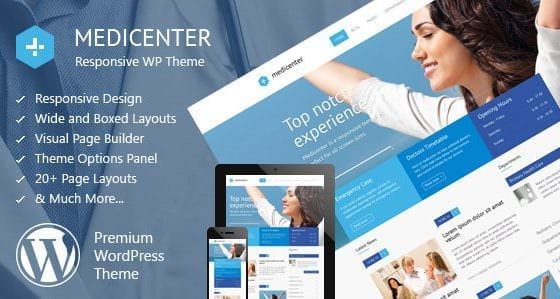
Overview of MediCenter
Welcome to MediCenter, the premier Health Medical Clinic WordPress Theme designed specifically for doctors, hospitals, clinics, and medical practices. This robust and intuitive theme provides a professional and trustworthy online presence, ensuring your patients can easily find information, book appointments, and understand your services. MediCenter is meticulously crafted to meet the unique needs of the healthcare industry, offering a seamless experience for both administrators and visitors.
Key Features of MediCenter
- Professional Design & Layouts: MediCenter boasts a clean, modern, and highly professional design that instills confidence and trust. It comes with various pre-built layouts and demos tailored for different medical specialities, allowing you to launch your site quickly and efficiently.
- Appointment Booking System: Streamline your patient scheduling with MediCenter’s integrated and easy-to-use appointment booking system. Patients can request appointments directly from your website, reducing administrative load and improving accessibility.
- Responsive & Retina Ready: Ensure your website looks stunning and functions flawlessly on any device, from desktops to smartphones and tablets. MediCenter is fully responsive and retina-ready, providing a crisp and engaging user experience across all screen sizes.
- Doctor & Department Profiles: Showcase your medical team and their expertise with dedicated profiles. MediCenter allows you to create detailed pages for doctors, including their specializations, qualifications, and contact information, building transparency and patient trust.
- Service & Treatment Pages: Clearly outline the services and treatments your clinic offers. With MediCenter, you can create informative and engaging pages for each service, complete with descriptions, images, and relevant FAQs.
- Customizable Visual Composer: Take full control of your website’s design with the included Visual Composer (WPBakery Page Builder). Drag and drop elements to create custom layouts without any coding knowledge, making site customization with MediCenter incredibly easy.
- SEO Optimized: Built with best SEO practices in mind, MediCenter helps your clinic rank higher in search engine results. This means more visibility for potential patients searching for medical services in your area.
- Multilingual Ready (WPML Compatible): Expand your reach to a diverse patient base. MediCenter is fully compatible with WPML, allowing you to translate your website into multiple languages and serve a broader community.
Why Choose MediCenter?
Choosing MediCenter means investing in a digital solution that truly understands the intricacies of the healthcare sector. Its purpose-built features, such as the intuitive appointment booking system and comprehensive doctor profiles, are not just add-ons but core functionalities designed to enhance patient engagement and operational efficiency. The theme’s clean, professional aesthetic immediately conveys trustworthiness and expertise, critical factors for any medical practice looking to attract and retain patients online. MediCenter simplifies the complex task of managing a medical website, allowing you to focus more on patient care and less on web development.
Beyond its specialized features, MediCenter offers unparalleled flexibility and ease of use. The integration with Visual Composer empowers even those without technical skills to create and customize stunning pages, ensuring your website reflects the unique brand and services of your clinic. Regular updates and dedicated support mean your website remains secure, up-to-date, and compatible with the latest WordPress versions, providing long-term value. With MediCenter, you’re not just getting a theme; you’re getting a complete digital platform engineered for medical success.
Furthermore, MediCenter’s robust SEO optimization ensures that your clinic isn’t just online, but discoverable. In today’s competitive landscape, being found by prospective patients is paramount. The theme’s responsive design guarantees a superior user experience across all devices, a crucial element for modern web browsing and search engine rankings. Opting for MediCenter is a strategic decision for any healthcare provider aiming for a strong, professional, and effective online presence.
Who Should Use MediCenter?
MediCenter is ideal for a wide range of medical professionals and healthcare institutions. This includes individual doctors, general practitioners, dentists, physiotherapists, psychologists, surgeons, pediatricians, hospitals, specialized clinics, medical research centers, and even health coaches or wellness practitioners looking for a professional and feature-rich WordPress solution.
How to Install MediCenter
- Download the Theme Package: After purchasing, download the MediCenter theme package from your account. This package typically includes the main theme file (installable .zip), documentation, and any bundled plugins.
- Log In to WordPress Dashboard: Access your WordPress admin area by navigating to `yourwebsite.com/wp-admin` and entering your credentials.
- Upload the Theme: Go to `Appearance > Themes` and click on the “Add New” button at the top. Then, click “Upload Theme,” choose the `medicenter.zip` file (or similar, ensure it’s the installable theme file, not the full download package), and click “Install Now.”
- Activate MediCenter: Once the theme is successfully installed, click the “Activate” link. You will then be prompted to install any required or recommended plugins that come with MediCenter. Install and activate all necessary plugins for full functionality.
- Import Demo Content (Optional but Recommended): For the quickest setup, navigate to the theme options or an import section (often found under `Appearance > Import Demo Data` or similar) and import the demo content. This will replicate the demo site, which you can then customize with your own information.
Frequently Asked Questions About MediCenter
Is MediCenter compatible with the latest WordPress version?
Yes, MediCenter is regularly updated to ensure full compatibility with the latest versions of WordPress. We strive to provide a seamless and stable experience for all users.
Can I customize the colors and fonts of MediCenter?
Absolutely! MediCenter offers extensive customization options through its theme options panel. You can easily change colors, typography, layouts, and much more to match your brand’s aesthetic without needing to write any code.
Does MediCenter support online payments for appointments?
While MediCenter includes an appointment booking system, direct online payment functionality for appointments typically requires integration with a separate WooCommerce setup or a dedicated payment gateway plugin. The theme provides the framework for bookings, and you can extend its capabilities with compatible plugins.
Get MediCenter Today
Elevate your medical practice with a professional and fully functional online presence. MediCenter provides all the tools you need to build trust, attract new patients, and manage your clinic efficiently online. Explore the power of a purpose-built theme designed for the healthcare industry. Dive into our collection of WordPress Themes and discover how MediCenter can transform your digital strategy. For a complete range of digital solutions, browse all our GPL WordPress Products and empower your website today.
Related Products You May Like
Here's everything you need to know about your purchase:
- 100% original files — Every product is the genuine, virus-free file, exactly as released by the original developer.
- Instant download — Access your files immediately after purchase from your account.
- Lifetime access — Re-download your purchased files anytime. No expiry, no limits.
- Free updates — Newer version released? Just request an update from us, free for all customers.
- Dedicated support — Our team is available 24/7 for installation and file-related help.
- Easy refunds — Not satisfied? Review our Refund Policy. We offer a hassle-free 7-day guarantee.
$59.00 Original price was: $59.00.$2.00Current price is: $2.00.
Version
16.1
Last Updated
25/2/2026
License
GPL v2
Compatibility
WordPress 5.0+
Need latest version?
Newer version released? Request an update from us — free for all customers!
Request Update →🎁 Your Purchase Includes
Overview of MediCenter
Welcome to MediCenter, the premier Health Medical Clinic WordPress Theme designed specifically for doctors, hospitals, clinics, and medical practices. This robust and intuitive theme provides a professional and trustworthy online presence, ensuring your patients can easily find information, book appointments, and understand your services. MediCenter is meticulously crafted to meet the unique needs of the healthcare industry, offering a seamless experience for both administrators and visitors.
Key Features of MediCenter
- Professional Design & Layouts: MediCenter boasts a clean, modern, and highly professional design that instills confidence and trust. It comes with various pre-built layouts and demos tailored for different medical specialities, allowing you to launch your site quickly and efficiently.
- Appointment Booking System: Streamline your patient scheduling with MediCenter’s integrated and easy-to-use appointment booking system. Patients can request appointments directly from your website, reducing administrative load and improving accessibility.
- Responsive & Retina Ready: Ensure your website looks stunning and functions flawlessly on any device, from desktops to smartphones and tablets. MediCenter is fully responsive and retina-ready, providing a crisp and engaging user experience across all screen sizes.
- Doctor & Department Profiles: Showcase your medical team and their expertise with dedicated profiles. MediCenter allows you to create detailed pages for doctors, including their specializations, qualifications, and contact information, building transparency and patient trust.
- Service & Treatment Pages: Clearly outline the services and treatments your clinic offers. With MediCenter, you can create informative and engaging pages for each service, complete with descriptions, images, and relevant FAQs.
- Customizable Visual Composer: Take full control of your website’s design with the included Visual Composer (WPBakery Page Builder). Drag and drop elements to create custom layouts without any coding knowledge, making site customization with MediCenter incredibly easy.
- SEO Optimized: Built with best SEO practices in mind, MediCenter helps your clinic rank higher in search engine results. This means more visibility for potential patients searching for medical services in your area.
- Multilingual Ready (WPML Compatible): Expand your reach to a diverse patient base. MediCenter is fully compatible with WPML, allowing you to translate your website into multiple languages and serve a broader community.
Why Choose MediCenter?
Choosing MediCenter means investing in a digital solution that truly understands the intricacies of the healthcare sector. Its purpose-built features, such as the intuitive appointment booking system and comprehensive doctor profiles, are not just add-ons but core functionalities designed to enhance patient engagement and operational efficiency. The theme’s clean, professional aesthetic immediately conveys trustworthiness and expertise, critical factors for any medical practice looking to attract and retain patients online. MediCenter simplifies the complex task of managing a medical website, allowing you to focus more on patient care and less on web development.
Beyond its specialized features, MediCenter offers unparalleled flexibility and ease of use. The integration with Visual Composer empowers even those without technical skills to create and customize stunning pages, ensuring your website reflects the unique brand and services of your clinic. Regular updates and dedicated support mean your website remains secure, up-to-date, and compatible with the latest WordPress versions, providing long-term value. With MediCenter, you’re not just getting a theme; you’re getting a complete digital platform engineered for medical success.
Furthermore, MediCenter’s robust SEO optimization ensures that your clinic isn’t just online, but discoverable. In today’s competitive landscape, being found by prospective patients is paramount. The theme’s responsive design guarantees a superior user experience across all devices, a crucial element for modern web browsing and search engine rankings. Opting for MediCenter is a strategic decision for any healthcare provider aiming for a strong, professional, and effective online presence.
Who Should Use MediCenter?
MediCenter is ideal for a wide range of medical professionals and healthcare institutions. This includes individual doctors, general practitioners, dentists, physiotherapists, psychologists, surgeons, pediatricians, hospitals, specialized clinics, medical research centers, and even health coaches or wellness practitioners looking for a professional and feature-rich WordPress solution.
How to Install MediCenter
- Download the Theme Package: After purchasing, download the MediCenter theme package from your account. This package typically includes the main theme file (installable .zip), documentation, and any bundled plugins.
- Log In to WordPress Dashboard: Access your WordPress admin area by navigating to `yourwebsite.com/wp-admin` and entering your credentials.
- Upload the Theme: Go to `Appearance > Themes` and click on the “Add New” button at the top. Then, click “Upload Theme,” choose the `medicenter.zip` file (or similar, ensure it’s the installable theme file, not the full download package), and click “Install Now.”
- Activate MediCenter: Once the theme is successfully installed, click the “Activate” link. You will then be prompted to install any required or recommended plugins that come with MediCenter. Install and activate all necessary plugins for full functionality.
- Import Demo Content (Optional but Recommended): For the quickest setup, navigate to the theme options or an import section (often found under `Appearance > Import Demo Data` or similar) and import the demo content. This will replicate the demo site, which you can then customize with your own information.
Frequently Asked Questions About MediCenter
Is MediCenter compatible with the latest WordPress version?
Yes, MediCenter is regularly updated to ensure full compatibility with the latest versions of WordPress. We strive to provide a seamless and stable experience for all users.
Can I customize the colors and fonts of MediCenter?
Absolutely! MediCenter offers extensive customization options through its theme options panel. You can easily change colors, typography, layouts, and much more to match your brand’s aesthetic without needing to write any code.
Does MediCenter support online payments for appointments?
While MediCenter includes an appointment booking system, direct online payment functionality for appointments typically requires integration with a separate WooCommerce setup or a dedicated payment gateway plugin. The theme provides the framework for bookings, and you can extend its capabilities with compatible plugins.
Get MediCenter Today
Elevate your medical practice with a professional and fully functional online presence. MediCenter provides all the tools you need to build trust, attract new patients, and manage your clinic efficiently online. Explore the power of a purpose-built theme designed for the healthcare industry. Dive into our collection of WordPress Themes and discover how MediCenter can transform your digital strategy. For a complete range of digital solutions, browse all our GPL WordPress Products and empower your website today.
Related Products You May Like
Reviews
There are no reviews yet.
Here's everything you need to know about your purchase:
- 100% original files — Every product is the genuine, virus-free file, exactly as released by the original developer.
- Instant download — Access your files immediately after purchase from your account.
- Lifetime access — Re-download your purchased files anytime. No expiry, no limits.
- Free updates — Newer version released? Just request an update from us, free for all customers.
- Dedicated support — Our team is available 24/7 for installation and file-related help.
- Easy refunds — Not satisfied? Review our Refund Policy. We offer a hassle-free 7-day guarantee.
Reviews
There are no reviews yet.