

Maxima 1.2.4 – Minimal Blog & Magazine WordPress Theme
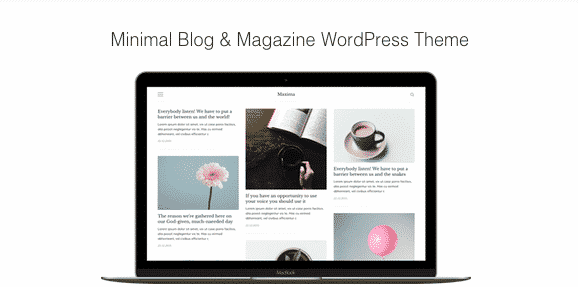
Overview of Maxima
Discover Maxima, a meticulously crafted WordPress theme designed for bloggers, writers, and online magazines seeking a clean, elegant, and highly functional platform. This minimal blog and magazine theme empowers creators to showcase their content with sophistication, offering a distraction-free reading experience that keeps visitors engaged. Maxima is perfect for anyone looking to build a professional online presence with a focus on beautiful typography and intuitive design.
Key Features of Maxima
- Responsive & Retina Ready: Maxima ensures your content looks stunning on any device, from desktops to smartphones, with perfect pixel clarity and adaptability.
- Multiple Blog Layouts: Choose from various blog layouts, including classic, grid, list, and masonry, to best present your articles and captivate your audience with Maxima’s flexible design.
- Powerful Theme Options: Customize every aspect of your website with Maxima’s intuitive theme options panel, allowing for easy adjustments without touching a single line of code.
- SEO Optimized: Built with best SEO practices in mind, Maxima helps your content rank higher in search engines, driving more organic traffic to your blog or magazine.
- Custom Widgets: Enhance your site’s functionality with a collection of custom widgets tailored for Maxima, including author profiles, popular posts, social media links, and more.
- Gutenberg Ready: Maxima is fully compatible with the WordPress block editor (Gutenberg), providing a seamless content creation experience with versatile block options.
- Translation Ready: Reach a global audience with Maxima’s translation-ready design, making it easy to localize your website into any language using popular plugins.
- Fast Loading Speed: Optimized for performance, Maxima ensures quick loading times, improving user experience and contributing positively to your site’s SEO.
Why Choose Maxima?
Choosing Maxima means investing in a theme that truly understands the needs of modern content creators. Its minimalist aesthetic isn’t just about looks; it’s about providing a clear, focused environment where your stories and articles can shine without unnecessary clutter. Maxima strips away the distractions, allowing your readers to immerse themselves in your content, leading to longer visit durations and a more memorable user experience. This thoughtful design philosophy makes Maxima an ideal choice for serious bloggers and online publishers who value readability and elegance above all else.
Beyond its beautiful design, Maxima is engineered for performance and ease of use. You don’t need to be a coding expert to build a professional website with Maxima. The intuitive theme options panel puts you in control, allowing you to personalize colors, fonts, layouts, and more with simple clicks. Furthermore, Maxima’s robust, clean code ensures your site remains fast and secure, which is crucial for both user satisfaction and search engine rankings. With Maxima, you get a reliable, scalable foundation for your online presence, ready to grow with your content.
The commitment to ongoing development and compatibility is another compelling reason to choose Maxima. It’s built to work seamlessly with the latest versions of WordPress and popular plugins, ensuring your website remains future-proof. Whether you’re starting a personal blog, an online journal, or a niche magazine, Maxima provides the tools and flexibility to bring your vision to life. Experience the difference a truly minimal and powerful theme can make for your digital storytelling.
Who Should Use Maxima?
Maxima is the perfect solution for individual bloggers, freelance writers, journalists, online magazines, and content creators who prioritize clean design and exceptional readability. It’s ideal for those who want their words and images to be the main focus, without heavy visual elements competing for attention. If you write about fashion, lifestyle, travel, food, technology, personal development, or any topic that benefits from a sophisticated and uncluttered presentation, Maxima is tailored for you.
How to Install Maxima
- Download Maxima: After purchasing Maxima from our store, download the theme package (a .zip file) to your computer. Do not unzip the file.
- Upload Theme: Log in to your WordPress dashboard. Navigate to ‘Appearance’ > ‘Themes’ > ‘Add New’ > ‘Upload Theme’. Click ‘Choose File’ and select the Maxima .zip file you downloaded.
- Install & Activate: Click ‘Install Now’. Once the installation is complete, click ‘Activate’ to make Maxima your active theme.
- Install Required Plugins: Maxima may recommend or require certain plugins for full functionality. Follow the prompts in your dashboard to install and activate these plugins.
- Import Demo Content (Optional): To get started quickly, Maxima often includes demo content. Check the theme documentation or theme options panel for instructions on how to import it, providing a ready-made structure you can customize.
Frequently Asked Questions About Maxima
Is Maxima compatible with popular page builders like Elementor or Beaver Builder?
While Maxima is primarily designed for the native WordPress block editor (Gutenberg) to maintain its minimalist aesthetic and performance, it is generally compatible with popular page builders. You can use them to design specific pages or sections, but for optimal performance and to preserve the clean look of Maxima, we recommend leveraging its built-in features and Gutenberg blocks for blog posts and standard content.
Can I customize the colors and fonts in Maxima?
Absolutely! Maxima comes with a comprehensive set of theme options accessible through the WordPress Customizer. This allows you to easily change primary and secondary colors, typography settings (fonts, sizes, line heights), background images, and more, all with a live preview, ensuring your Maxima site perfectly matches your brand identity.
Does Maxima support different post formats?
Yes, Maxima fully supports various WordPress post formats, including Standard, Image, Gallery, Video, Audio, and Quote. This flexibility allows you to present your diverse content types in an engaging and appropriate manner, enhancing the overall appeal of your blog or magazine powered by Maxima.
Get Maxima Today
Elevate your online presence with Maxima, the ultimate minimal blog and magazine WordPress theme. Its blend of elegant design, robust features, and user-friendly customization makes it the perfect choice for anyone serious about content creation. Don’t settle for less; give your readers the exceptional experience they deserve. Explore Maxima and other premium WordPress Themes available at our store, and empower your website with the best GPL WordPress Products. Start building your beautiful, high-performing blog or magazine with Maxima today!
Related Products You May Like
Here's everything you need to know about your purchase:
- 100% original files — Every product is the genuine, virus-free file, exactly as released by the original developer.
- Instant download — Access your files immediately after purchase from your account.
- Lifetime access — Re-download your purchased files anytime. No expiry, no limits.
- Free updates — Newer version released? Just request an update from us, free for all customers.
- Dedicated support — Our team is available 24/7 for installation and file-related help.
- Easy refunds — Not satisfied? Review our Refund Policy. We offer a hassle-free 7-day guarantee.
$59.00 Original price was: $59.00.$2.00Current price is: $2.00.
Version
Latest
Last Updated
21/06/2026
License
GPL v2
Compatibility
WordPress 5.0+
Need latest version?
Newer version released? Request an update from us — free for all customers!
Request Update →🎁 Your Purchase Includes
Overview of Maxima
Discover Maxima, a meticulously crafted WordPress theme designed for bloggers, writers, and online magazines seeking a clean, elegant, and highly functional platform. This minimal blog and magazine theme empowers creators to showcase their content with sophistication, offering a distraction-free reading experience that keeps visitors engaged. Maxima is perfect for anyone looking to build a professional online presence with a focus on beautiful typography and intuitive design.
Key Features of Maxima
- Responsive & Retina Ready: Maxima ensures your content looks stunning on any device, from desktops to smartphones, with perfect pixel clarity and adaptability.
- Multiple Blog Layouts: Choose from various blog layouts, including classic, grid, list, and masonry, to best present your articles and captivate your audience with Maxima’s flexible design.
- Powerful Theme Options: Customize every aspect of your website with Maxima’s intuitive theme options panel, allowing for easy adjustments without touching a single line of code.
- SEO Optimized: Built with best SEO practices in mind, Maxima helps your content rank higher in search engines, driving more organic traffic to your blog or magazine.
- Custom Widgets: Enhance your site’s functionality with a collection of custom widgets tailored for Maxima, including author profiles, popular posts, social media links, and more.
- Gutenberg Ready: Maxima is fully compatible with the WordPress block editor (Gutenberg), providing a seamless content creation experience with versatile block options.
- Translation Ready: Reach a global audience with Maxima’s translation-ready design, making it easy to localize your website into any language using popular plugins.
- Fast Loading Speed: Optimized for performance, Maxima ensures quick loading times, improving user experience and contributing positively to your site’s SEO.
Why Choose Maxima?
Choosing Maxima means investing in a theme that truly understands the needs of modern content creators. Its minimalist aesthetic isn’t just about looks; it’s about providing a clear, focused environment where your stories and articles can shine without unnecessary clutter. Maxima strips away the distractions, allowing your readers to immerse themselves in your content, leading to longer visit durations and a more memorable user experience. This thoughtful design philosophy makes Maxima an ideal choice for serious bloggers and online publishers who value readability and elegance above all else.
Beyond its beautiful design, Maxima is engineered for performance and ease of use. You don’t need to be a coding expert to build a professional website with Maxima. The intuitive theme options panel puts you in control, allowing you to personalize colors, fonts, layouts, and more with simple clicks. Furthermore, Maxima’s robust, clean code ensures your site remains fast and secure, which is crucial for both user satisfaction and search engine rankings. With Maxima, you get a reliable, scalable foundation for your online presence, ready to grow with your content.
The commitment to ongoing development and compatibility is another compelling reason to choose Maxima. It’s built to work seamlessly with the latest versions of WordPress and popular plugins, ensuring your website remains future-proof. Whether you’re starting a personal blog, an online journal, or a niche magazine, Maxima provides the tools and flexibility to bring your vision to life. Experience the difference a truly minimal and powerful theme can make for your digital storytelling.
Who Should Use Maxima?
Maxima is the perfect solution for individual bloggers, freelance writers, journalists, online magazines, and content creators who prioritize clean design and exceptional readability. It’s ideal for those who want their words and images to be the main focus, without heavy visual elements competing for attention. If you write about fashion, lifestyle, travel, food, technology, personal development, or any topic that benefits from a sophisticated and uncluttered presentation, Maxima is tailored for you.
How to Install Maxima
- Download Maxima: After purchasing Maxima from our store, download the theme package (a .zip file) to your computer. Do not unzip the file.
- Upload Theme: Log in to your WordPress dashboard. Navigate to ‘Appearance’ > ‘Themes’ > ‘Add New’ > ‘Upload Theme’. Click ‘Choose File’ and select the Maxima .zip file you downloaded.
- Install & Activate: Click ‘Install Now’. Once the installation is complete, click ‘Activate’ to make Maxima your active theme.
- Install Required Plugins: Maxima may recommend or require certain plugins for full functionality. Follow the prompts in your dashboard to install and activate these plugins.
- Import Demo Content (Optional): To get started quickly, Maxima often includes demo content. Check the theme documentation or theme options panel for instructions on how to import it, providing a ready-made structure you can customize.
Frequently Asked Questions About Maxima
Is Maxima compatible with popular page builders like Elementor or Beaver Builder?
While Maxima is primarily designed for the native WordPress block editor (Gutenberg) to maintain its minimalist aesthetic and performance, it is generally compatible with popular page builders. You can use them to design specific pages or sections, but for optimal performance and to preserve the clean look of Maxima, we recommend leveraging its built-in features and Gutenberg blocks for blog posts and standard content.
Can I customize the colors and fonts in Maxima?
Absolutely! Maxima comes with a comprehensive set of theme options accessible through the WordPress Customizer. This allows you to easily change primary and secondary colors, typography settings (fonts, sizes, line heights), background images, and more, all with a live preview, ensuring your Maxima site perfectly matches your brand identity.
Does Maxima support different post formats?
Yes, Maxima fully supports various WordPress post formats, including Standard, Image, Gallery, Video, Audio, and Quote. This flexibility allows you to present your diverse content types in an engaging and appropriate manner, enhancing the overall appeal of your blog or magazine powered by Maxima.
Get Maxima Today
Elevate your online presence with Maxima, the ultimate minimal blog and magazine WordPress theme. Its blend of elegant design, robust features, and user-friendly customization makes it the perfect choice for anyone serious about content creation. Don’t settle for less; give your readers the exceptional experience they deserve. Explore Maxima and other premium WordPress Themes available at our store, and empower your website with the best GPL WordPress Products. Start building your beautiful, high-performing blog or magazine with Maxima today!
Related Products You May Like
Reviews
There are no reviews yet.
Here's everything you need to know about your purchase:
- 100% original files — Every product is the genuine, virus-free file, exactly as released by the original developer.
- Instant download — Access your files immediately after purchase from your account.
- Lifetime access — Re-download your purchased files anytime. No expiry, no limits.
- Free updates — Newer version released? Just request an update from us, free for all customers.
- Dedicated support — Our team is available 24/7 for installation and file-related help.
- Easy refunds — Not satisfied? Review our Refund Policy. We offer a hassle-free 7-day guarantee.
Reviews
There are no reviews yet.