

WP Table Manager 4.2.2
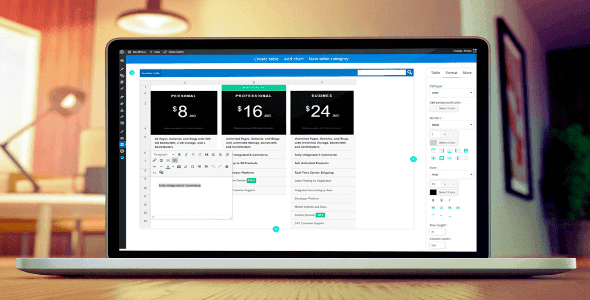
Overview of WP Table Manager
Transform the way you manage and display data on your WordPress website with WP Table Manager. This powerful plugin offers an intuitive and comprehensive solution for creating, editing, and managing tables directly within your WordPress dashboard. Whether you’re a blogger, an e-commerce store owner, or a business showcasing complex data, WP Table Manager is designed for anyone needing professional, responsive, and easy-to-update tables without touching a single line of code.
Key Features of WP Table Manager
- Intuitive Spreadsheet Interface: Manage your tables with a familiar spreadsheet-like interface, making data entry and organization incredibly straightforward and efficient. WP Table Manager minimizes the learning curve.
- Advanced Table Filtering & Sorting: Empower your users with dynamic filtering and sorting options directly on the frontend, allowing them to quickly find and organize the data that matters most to them within your tables.
- Visual Table Builder: Design stunning tables with a drag-and-drop interface, customizing colors, fonts, borders, and cell padding to perfectly match your site’s aesthetic. WP Table Manager puts design control in your hands.
- Responsive Design: Ensure your tables look flawless on any device, from desktops to tablets and smartphones, with built-in responsive capabilities that adapt content gracefully. This is a core strength of WP Table Manager.
- Excel, CSV, & Google Sheets Import/Export: Seamlessly import data from existing Excel, CSV, or Google Sheets files, and export your WordPress tables back to these formats for easy data migration and backup.
- Cell Merging & Resizing: Gain granular control over your table structure by easily merging cells, resizing columns and rows, and creating complex layouts to present your data effectively.
- Charts Generation: Go beyond simple tables by transforming your data into engaging and informative charts (pie, bar, line, etc.) directly within the plugin, adding a powerful visual dimension.
- Gutenberg & Classic Editor Integration: Insert and manage your tables effortlessly regardless of whether you’re using the modern Gutenberg block editor or the classic WordPress editor. WP Table Manager supports both.
Why Choose WP Table Manager?
Choosing WP Table Manager means opting for unparalleled flexibility and ease of use when it comes to displaying tabular data on your WordPress site. Unlike other solutions that might require shortcode memorization or complex coding, WP Table Manager provides a visual, intuitive interface that makes table creation and management a breeze. Its robust feature set, from advanced filtering to responsive design and chart generation, ensures that your data is not only presented beautifully but is also highly functional and accessible to your audience. This plugin significantly reduces the time and effort required to maintain data-rich pages, allowing you to focus on your content and audience engagement.
Furthermore, the power of WP Table Manager extends to its integration capabilities. Whether you need to pull data from external sources like Google Sheets or manage large datasets from Excel, the import/export functionality streamlines your workflow. The ability to generate dynamic charts directly from your table data adds immense value, helping you visualize trends and insights without needing additional plugins. With WP Table Manager, you’re not just getting a table builder; you’re investing in a comprehensive data management tool that enhances user experience and elevates the professionalism of your website.
Who Should Use WP Table Manager?
WP Table Manager is ideal for a diverse range of WordPress users. Bloggers and content creators can use it to display product comparisons, statistics, or event schedules. E-commerce store owners will find it invaluable for creating detailed product specification tables or pricing lists. Businesses and agencies can leverage it for presenting financial reports, team directories, service comparisons, or any other structured data. Essentially, anyone who needs to present information clearly, professionally, and interactively in a table format on their WordPress site will benefit immensely from WP Table Manager.
How to Install WP Table Manager
- Download the Plugin: After acquiring WP Table Manager, download the plugin .zip file to your computer.
- Upload to WordPress: Log in to your WordPress admin dashboard. Navigate to ‘Plugins’ > ‘Add New’ > ‘Upload Plugin’. Click ‘Choose File’ and select the WP Table Manager .zip file, then click ‘Install Now’.
- Activate the Plugin: Once the installation is complete, click the ‘Activate Plugin’ button.
- Configure Settings: Go to the new ‘WP Table Manager’ menu item in your WordPress dashboard to access the settings and start creating your first table.
- Create Your First Table: Begin building your tables using the intuitive interface, customizing them to suit your content needs.
Frequently Asked Questions About WP Table Manager
Can WP Table Manager handle very large datasets?
Yes, WP Table Manager is designed to efficiently manage and display large datasets. Its optimized architecture ensures good performance even with extensive tables, and features like filtering and sorting help users navigate through the data without performance bottlenecks.
Is WP Table Manager compatible with all WordPress themes?
WP Table Manager is built with WordPress best practices in mind and is designed to be compatible with most well-coded WordPress themes. Its styling options allow you to customize the table appearance to seamlessly integrate with your theme’s design.
Does WP Table Manager support custom CSS for advanced styling?
Absolutely. While WP Table Manager offers extensive visual customization options, it also provides fields for adding custom CSS. This allows users with coding knowledge to apply highly specific styling rules and further personalize their tables beyond the built-in options.
Get WP Table Manager Today
Elevate your website’s data presentation with WP Table Manager and provide your visitors with a superior experience. This powerful tool is a must-have for anyone serious about professional and interactive data display on WordPress. Explore this and many other premium WordPress Plugins available at GPLUniverse. Don’t miss out on enhancing your site’s functionality and aesthetics with our wide range of GPL WordPress Products.
Related Products You May Like
Here's everything you need to know about your purchase:
- 100% original files — Every product is the genuine, virus-free file, exactly as released by the original developer.
- Instant download — Access your files immediately after purchase from your account.
- Lifetime access — Re-download your purchased files anytime. No expiry, no limits.
- Free updates — Newer version released? Just request an update from us, free for all customers.
- Dedicated support — Our team is available 24/7 for installation and file-related help.
- Easy refunds — Not satisfied? Review our Refund Policy. We offer a hassle-free 7-day guarantee.
$100.00 Original price was: $100.00.$2.00Current price is: $2.00.
Version
4.2.2
Last Updated
29/04/2026
License
GPL v2
Compatibility
WordPress 5.0+
Need latest version?
Newer version released? Request an update from us — free for all customers!
Request Update →🎁 Your Purchase Includes
Overview of WP Table Manager
Transform the way you manage and display data on your WordPress website with WP Table Manager. This powerful plugin offers an intuitive and comprehensive solution for creating, editing, and managing tables directly within your WordPress dashboard. Whether you’re a blogger, an e-commerce store owner, or a business showcasing complex data, WP Table Manager is designed for anyone needing professional, responsive, and easy-to-update tables without touching a single line of code.
Key Features of WP Table Manager
- Intuitive Spreadsheet Interface: Manage your tables with a familiar spreadsheet-like interface, making data entry and organization incredibly straightforward and efficient. WP Table Manager minimizes the learning curve.
- Advanced Table Filtering & Sorting: Empower your users with dynamic filtering and sorting options directly on the frontend, allowing them to quickly find and organize the data that matters most to them within your tables.
- Visual Table Builder: Design stunning tables with a drag-and-drop interface, customizing colors, fonts, borders, and cell padding to perfectly match your site’s aesthetic. WP Table Manager puts design control in your hands.
- Responsive Design: Ensure your tables look flawless on any device, from desktops to tablets and smartphones, with built-in responsive capabilities that adapt content gracefully. This is a core strength of WP Table Manager.
- Excel, CSV, & Google Sheets Import/Export: Seamlessly import data from existing Excel, CSV, or Google Sheets files, and export your WordPress tables back to these formats for easy data migration and backup.
- Cell Merging & Resizing: Gain granular control over your table structure by easily merging cells, resizing columns and rows, and creating complex layouts to present your data effectively.
- Charts Generation: Go beyond simple tables by transforming your data into engaging and informative charts (pie, bar, line, etc.) directly within the plugin, adding a powerful visual dimension.
- Gutenberg & Classic Editor Integration: Insert and manage your tables effortlessly regardless of whether you’re using the modern Gutenberg block editor or the classic WordPress editor. WP Table Manager supports both.
Why Choose WP Table Manager?
Choosing WP Table Manager means opting for unparalleled flexibility and ease of use when it comes to displaying tabular data on your WordPress site. Unlike other solutions that might require shortcode memorization or complex coding, WP Table Manager provides a visual, intuitive interface that makes table creation and management a breeze. Its robust feature set, from advanced filtering to responsive design and chart generation, ensures that your data is not only presented beautifully but is also highly functional and accessible to your audience. This plugin significantly reduces the time and effort required to maintain data-rich pages, allowing you to focus on your content and audience engagement.
Furthermore, the power of WP Table Manager extends to its integration capabilities. Whether you need to pull data from external sources like Google Sheets or manage large datasets from Excel, the import/export functionality streamlines your workflow. The ability to generate dynamic charts directly from your table data adds immense value, helping you visualize trends and insights without needing additional plugins. With WP Table Manager, you’re not just getting a table builder; you’re investing in a comprehensive data management tool that enhances user experience and elevates the professionalism of your website.
Who Should Use WP Table Manager?
WP Table Manager is ideal for a diverse range of WordPress users. Bloggers and content creators can use it to display product comparisons, statistics, or event schedules. E-commerce store owners will find it invaluable for creating detailed product specification tables or pricing lists. Businesses and agencies can leverage it for presenting financial reports, team directories, service comparisons, or any other structured data. Essentially, anyone who needs to present information clearly, professionally, and interactively in a table format on their WordPress site will benefit immensely from WP Table Manager.
How to Install WP Table Manager
- Download the Plugin: After acquiring WP Table Manager, download the plugin .zip file to your computer.
- Upload to WordPress: Log in to your WordPress admin dashboard. Navigate to ‘Plugins’ > ‘Add New’ > ‘Upload Plugin’. Click ‘Choose File’ and select the WP Table Manager .zip file, then click ‘Install Now’.
- Activate the Plugin: Once the installation is complete, click the ‘Activate Plugin’ button.
- Configure Settings: Go to the new ‘WP Table Manager’ menu item in your WordPress dashboard to access the settings and start creating your first table.
- Create Your First Table: Begin building your tables using the intuitive interface, customizing them to suit your content needs.
Frequently Asked Questions About WP Table Manager
Can WP Table Manager handle very large datasets?
Yes, WP Table Manager is designed to efficiently manage and display large datasets. Its optimized architecture ensures good performance even with extensive tables, and features like filtering and sorting help users navigate through the data without performance bottlenecks.
Is WP Table Manager compatible with all WordPress themes?
WP Table Manager is built with WordPress best practices in mind and is designed to be compatible with most well-coded WordPress themes. Its styling options allow you to customize the table appearance to seamlessly integrate with your theme’s design.
Does WP Table Manager support custom CSS for advanced styling?
Absolutely. While WP Table Manager offers extensive visual customization options, it also provides fields for adding custom CSS. This allows users with coding knowledge to apply highly specific styling rules and further personalize their tables beyond the built-in options.
Get WP Table Manager Today
Elevate your website’s data presentation with WP Table Manager and provide your visitors with a superior experience. This powerful tool is a must-have for anyone serious about professional and interactive data display on WordPress. Explore this and many other premium WordPress Plugins available at GPLUniverse. Don’t miss out on enhancing your site’s functionality and aesthetics with our wide range of GPL WordPress Products.
Related Products You May Like
Reviews
There are no reviews yet.
Here's everything you need to know about your purchase:
- 100% original files — Every product is the genuine, virus-free file, exactly as released by the original developer.
- Instant download — Access your files immediately after purchase from your account.
- Lifetime access — Re-download your purchased files anytime. No expiry, no limits.
- Free updates — Newer version released? Just request an update from us, free for all customers.
- Dedicated support — Our team is available 24/7 for installation and file-related help.
- Easy refunds — Not satisfied? Review our Refund Policy. We offer a hassle-free 7-day guarantee.
Reviews
There are no reviews yet.