

iHelper – Drupal Knowledge & Helpdesk Theme Latest
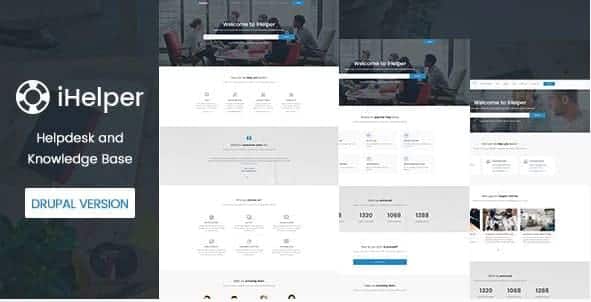
Overview of iHelper Drupal Knowledge & Helpdesk Theme
The iHelper Drupal Knowledge & Helpdesk Theme is an essential solution for businesses and organizations aiming to establish a robust, user-friendly knowledge base and support system. This powerful theme transforms your Drupal site into a comprehensive resource hub, enabling you to efficiently organize articles, FAQs, and support documentation. Designed for clarity and ease of use, the iHelper Drupal Knowledge & Helpdesk Theme empowers your customers to find answers quickly, reducing support inquiries and improving overall satisfaction.
Key Features of iHelper Drupal Knowledge & Helpdesk Theme
- Intuitive Knowledge Base Structure: Easily categorize and organize your articles, FAQs, and guides into a logical, searchable hierarchy. The iHelper Drupal Knowledge & Helpdesk Theme ensures your content is always accessible and easy to navigate for your users.
- Responsive Design: Provide an optimal viewing and interaction experience across a wide range of devices, from desktops to mobile phones. The iHelper Drupal Knowledge & Helpdesk Theme is fully responsive, ensuring your support content looks great everywhere.
- Powerful Search Functionality: Integrate an advanced search bar that allows users to quickly find relevant information within your knowledge base. This core feature of the iHelper Drupal Knowledge & Helpdesk Theme significantly enhances user experience.
- Integrated Helpdesk Capabilities: Beyond just a knowledge base, this theme offers foundational helpdesk features to manage support tickets or guide users to submit inquiries, streamlining your customer service operations.
- Customizable Layouts & Branding: Tailor the look and feel of your knowledge base to match your brand identity with flexible customization options. The iHelper Drupal Knowledge & Helpdesk Theme lets you maintain a consistent brand presence.
- User Feedback & Rating System: Allow users to rate articles or provide feedback, helping you identify areas for improvement and ensure your content remains relevant and helpful. This interactive element is crucial for the iHelper Drupal Knowledge & Helpdesk Theme.
- SEO Optimized: Built with search engine optimization best practices in mind, helping your knowledge base articles rank higher in search results and attract more organic traffic to your valuable content.
- Multi-Language Support (RTL Ready): Cater to a global audience with support for multiple languages and Right-to-Left (RTL) text, making the iHelper Drupal Knowledge & Helpdesk Theme a versatile choice for international businesses.
Why Choose iHelper Drupal Knowledge & Helpdesk Theme?
Choosing the iHelper Drupal Knowledge & Helpdesk Theme means investing in a solution that significantly enhances your customer support efficiency and user satisfaction. In today’s fast-paced digital world, users expect immediate access to information. This theme provides exactly that, allowing your customers to self-serve by finding answers to their questions around the clock, without needing to contact your support team directly. This not only empowers your users but also frees up your support agents to focus on more complex issues, leading to a more productive and cost-effective support operation.
The value of the iHelper Drupal Knowledge & Helpdesk Theme extends beyond just answering questions. It’s about building trust and demonstrating your commitment to customer success. A well-organized, easily searchable knowledge base powered by this theme reflects professionalism and a user-centric approach. By consistently providing high-quality, accessible information, you can reduce frustration, improve user retention, and foster a stronger relationship with your audience. The intuitive design and powerful features of the iHelper Drupal Knowledge & Helpdesk Theme make it an indispensable tool for any organization looking to elevate its online support presence.
Furthermore, the flexibility and customization options mean that the iHelper Drupal Knowledge & Helpdesk Theme can seamlessly integrate with your existing brand and workflow. You’re not just getting a theme; you’re getting a comprehensive platform that grows with your business. Its SEO-friendly structure ensures your valuable content gets discovered, driving more traffic to your site and positioning your brand as an authority in your niche. Make the smart choice for superior online support with the iHelper Drupal Knowledge & Helpdesk Theme.
Who Should Use iHelper Drupal Knowledge & Helpdesk Theme?
The iHelper Drupal Knowledge & Helpdesk Theme is ideal for a wide range of entities. SaaS companies, software developers, product manufacturers, and service providers will find it invaluable for documenting their offerings and providing technical support. E-commerce businesses can use it to create comprehensive FAQ sections and guides for their products. Educational institutions, non-profits, and community organizations can leverage it to share information, resources, and policy documents effectively. Essentially, any organization that regularly needs to provide information and support to its users or customers will benefit immensely from implementing the iHelper Drupal Knowledge & Helpdesk Theme.
How to Install iHelper Drupal Knowledge & Helpdesk Theme
- Download the Theme Package: First, obtain the iHelper Drupal Knowledge & Helpdesk Theme package from your purchase source. Ensure you have the latest stable version.
- Upload to Your Drupal Installation: Access your Drupal site’s backend. Navigate to ‘Appearance’ and then click on ‘Install new theme’. Upload the theme’s .zip file directly or upload the unzipped theme folder via FTP to your Drupal installation’s `themes` directory (e.g., `sites/all/themes/`).
- Enable the Theme: After uploading, return to the ‘Appearance’ page in your Drupal admin panel. Locate the iHelper Drupal Knowledge & Helpdesk Theme in the list of available themes and click the ‘Install and set as default’ link to activate it.
- Configure Theme Settings: Once enabled, click on ‘Settings’ next to the iHelper Drupal Knowledge & Helpdesk Theme to customize its various options. This is where you can adjust layouts, colors, typography, and other features to match your brand.
- Populate Your Knowledge Base: Begin adding your articles, FAQs, and support content. Utilize Drupal’s content types and views to structure your knowledge base effectively, making full use of the features provided by the iHelper Drupal Knowledge & Helpdesk Theme.
Frequently Asked Questions About iHelper Drupal Knowledge & Helpdesk Theme
Is the iHelper Drupal Knowledge & Helpdesk Theme responsive across all devices?
Yes, absolutely. The iHelper Drupal Knowledge & Helpdesk Theme is designed with full responsiveness in mind, ensuring that your knowledge base and helpdesk content adapts seamlessly to any screen size, whether it’s a desktop computer, tablet, or smartphone. Your users will have an optimal viewing and interaction experience regardless of their device.
Can I customize the branding and appearance of the iHelper Drupal Knowledge & Helpdesk Theme?
Yes, extensive customization options are a core feature of the iHelper Drupal Knowledge & Helpdesk Theme. You can easily modify colors, fonts, layouts, and integrate your own logo to ensure your knowledge base perfectly aligns with your brand’s aesthetic and identity. This allows for a consistent user experience across all your digital touchpoints.
Does the iHelper Drupal Knowledge & Helpdesk Theme support different content types for articles?
The iHelper Drupal Knowledge & Helpdesk Theme leverages Drupal’s powerful content management capabilities, allowing you to create and manage various content types for your knowledge base articles. You can define specific fields for FAQs, tutorials, documentation, and more, ensuring your content is structured and presented in the most effective way for your users.
Get iHelper Drupal Knowledge & Helpdesk Theme Today
Elevate your customer support and information delivery with the robust capabilities of the iHelper Drupal Knowledge & Helpdesk Theme. This powerful solution is ready to transform your Drupal site into an efficient, user-centric knowledge and helpdesk hub. Explore our extensive collection of WordPress Themes and other premium GPL WordPress Products to further enhance your online presence. Don’t miss out on the opportunity to provide exceptional self-service options and streamline your support operations.
Related Products You May Like
Here's everything you need to know about your purchase:
- 100% original files — Every product is the genuine, virus-free file, exactly as released by the original developer.
- Instant download — Access your files immediately after purchase from your account.
- Lifetime access — Re-download your purchased files anytime. No expiry, no limits.
- Free updates — Newer version released? Just request an update from us, free for all customers.
- Dedicated support — Our team is available 24/7 for installation and file-related help.
- Easy refunds — Not satisfied? Review our Refund Policy. We offer a hassle-free 7-day guarantee.
$59.00 Original price was: $59.00.$2.00Current price is: $2.00.
Version
Latest
Last Updated
02/06/2025
License
GPL v2
Compatibility
WordPress 5.0+
Need latest version?
Newer version released? Request an update from us — free for all customers!
Request Update →🎁 Your Purchase Includes
Overview of iHelper Drupal Knowledge & Helpdesk Theme
The iHelper Drupal Knowledge & Helpdesk Theme is an essential solution for businesses and organizations aiming to establish a robust, user-friendly knowledge base and support system. This powerful theme transforms your Drupal site into a comprehensive resource hub, enabling you to efficiently organize articles, FAQs, and support documentation. Designed for clarity and ease of use, the iHelper Drupal Knowledge & Helpdesk Theme empowers your customers to find answers quickly, reducing support inquiries and improving overall satisfaction.
Key Features of iHelper Drupal Knowledge & Helpdesk Theme
- Intuitive Knowledge Base Structure: Easily categorize and organize your articles, FAQs, and guides into a logical, searchable hierarchy. The iHelper Drupal Knowledge & Helpdesk Theme ensures your content is always accessible and easy to navigate for your users.
- Responsive Design: Provide an optimal viewing and interaction experience across a wide range of devices, from desktops to mobile phones. The iHelper Drupal Knowledge & Helpdesk Theme is fully responsive, ensuring your support content looks great everywhere.
- Powerful Search Functionality: Integrate an advanced search bar that allows users to quickly find relevant information within your knowledge base. This core feature of the iHelper Drupal Knowledge & Helpdesk Theme significantly enhances user experience.
- Integrated Helpdesk Capabilities: Beyond just a knowledge base, this theme offers foundational helpdesk features to manage support tickets or guide users to submit inquiries, streamlining your customer service operations.
- Customizable Layouts & Branding: Tailor the look and feel of your knowledge base to match your brand identity with flexible customization options. The iHelper Drupal Knowledge & Helpdesk Theme lets you maintain a consistent brand presence.
- User Feedback & Rating System: Allow users to rate articles or provide feedback, helping you identify areas for improvement and ensure your content remains relevant and helpful. This interactive element is crucial for the iHelper Drupal Knowledge & Helpdesk Theme.
- SEO Optimized: Built with search engine optimization best practices in mind, helping your knowledge base articles rank higher in search results and attract more organic traffic to your valuable content.
- Multi-Language Support (RTL Ready): Cater to a global audience with support for multiple languages and Right-to-Left (RTL) text, making the iHelper Drupal Knowledge & Helpdesk Theme a versatile choice for international businesses.
Why Choose iHelper Drupal Knowledge & Helpdesk Theme?
Choosing the iHelper Drupal Knowledge & Helpdesk Theme means investing in a solution that significantly enhances your customer support efficiency and user satisfaction. In today’s fast-paced digital world, users expect immediate access to information. This theme provides exactly that, allowing your customers to self-serve by finding answers to their questions around the clock, without needing to contact your support team directly. This not only empowers your users but also frees up your support agents to focus on more complex issues, leading to a more productive and cost-effective support operation.
The value of the iHelper Drupal Knowledge & Helpdesk Theme extends beyond just answering questions. It’s about building trust and demonstrating your commitment to customer success. A well-organized, easily searchable knowledge base powered by this theme reflects professionalism and a user-centric approach. By consistently providing high-quality, accessible information, you can reduce frustration, improve user retention, and foster a stronger relationship with your audience. The intuitive design and powerful features of the iHelper Drupal Knowledge & Helpdesk Theme make it an indispensable tool for any organization looking to elevate its online support presence.
Furthermore, the flexibility and customization options mean that the iHelper Drupal Knowledge & Helpdesk Theme can seamlessly integrate with your existing brand and workflow. You’re not just getting a theme; you’re getting a comprehensive platform that grows with your business. Its SEO-friendly structure ensures your valuable content gets discovered, driving more traffic to your site and positioning your brand as an authority in your niche. Make the smart choice for superior online support with the iHelper Drupal Knowledge & Helpdesk Theme.
Who Should Use iHelper Drupal Knowledge & Helpdesk Theme?
The iHelper Drupal Knowledge & Helpdesk Theme is ideal for a wide range of entities. SaaS companies, software developers, product manufacturers, and service providers will find it invaluable for documenting their offerings and providing technical support. E-commerce businesses can use it to create comprehensive FAQ sections and guides for their products. Educational institutions, non-profits, and community organizations can leverage it to share information, resources, and policy documents effectively. Essentially, any organization that regularly needs to provide information and support to its users or customers will benefit immensely from implementing the iHelper Drupal Knowledge & Helpdesk Theme.
How to Install iHelper Drupal Knowledge & Helpdesk Theme
- Download the Theme Package: First, obtain the iHelper Drupal Knowledge & Helpdesk Theme package from your purchase source. Ensure you have the latest stable version.
- Upload to Your Drupal Installation: Access your Drupal site’s backend. Navigate to ‘Appearance’ and then click on ‘Install new theme’. Upload the theme’s .zip file directly or upload the unzipped theme folder via FTP to your Drupal installation’s `themes` directory (e.g., `sites/all/themes/`).
- Enable the Theme: After uploading, return to the ‘Appearance’ page in your Drupal admin panel. Locate the iHelper Drupal Knowledge & Helpdesk Theme in the list of available themes and click the ‘Install and set as default’ link to activate it.
- Configure Theme Settings: Once enabled, click on ‘Settings’ next to the iHelper Drupal Knowledge & Helpdesk Theme to customize its various options. This is where you can adjust layouts, colors, typography, and other features to match your brand.
- Populate Your Knowledge Base: Begin adding your articles, FAQs, and support content. Utilize Drupal’s content types and views to structure your knowledge base effectively, making full use of the features provided by the iHelper Drupal Knowledge & Helpdesk Theme.
Frequently Asked Questions About iHelper Drupal Knowledge & Helpdesk Theme
Is the iHelper Drupal Knowledge & Helpdesk Theme responsive across all devices?
Yes, absolutely. The iHelper Drupal Knowledge & Helpdesk Theme is designed with full responsiveness in mind, ensuring that your knowledge base and helpdesk content adapts seamlessly to any screen size, whether it’s a desktop computer, tablet, or smartphone. Your users will have an optimal viewing and interaction experience regardless of their device.
Can I customize the branding and appearance of the iHelper Drupal Knowledge & Helpdesk Theme?
Yes, extensive customization options are a core feature of the iHelper Drupal Knowledge & Helpdesk Theme. You can easily modify colors, fonts, layouts, and integrate your own logo to ensure your knowledge base perfectly aligns with your brand’s aesthetic and identity. This allows for a consistent user experience across all your digital touchpoints.
Does the iHelper Drupal Knowledge & Helpdesk Theme support different content types for articles?
The iHelper Drupal Knowledge & Helpdesk Theme leverages Drupal’s powerful content management capabilities, allowing you to create and manage various content types for your knowledge base articles. You can define specific fields for FAQs, tutorials, documentation, and more, ensuring your content is structured and presented in the most effective way for your users.
Get iHelper Drupal Knowledge & Helpdesk Theme Today
Elevate your customer support and information delivery with the robust capabilities of the iHelper Drupal Knowledge & Helpdesk Theme. This powerful solution is ready to transform your Drupal site into an efficient, user-centric knowledge and helpdesk hub. Explore our extensive collection of WordPress Themes and other premium GPL WordPress Products to further enhance your online presence. Don’t miss out on the opportunity to provide exceptional self-service options and streamline your support operations.
Related Products You May Like
Reviews
There are no reviews yet.
Here's everything you need to know about your purchase:
- 100% original files — Every product is the genuine, virus-free file, exactly as released by the original developer.
- Instant download — Access your files immediately after purchase from your account.
- Lifetime access — Re-download your purchased files anytime. No expiry, no limits.
- Free updates — Newer version released? Just request an update from us, free for all customers.
- Dedicated support — Our team is available 24/7 for installation and file-related help.
- Easy refunds — Not satisfied? Review our Refund Policy. We offer a hassle-free 7-day guarantee.
Reviews
There are no reviews yet.