

Gravity Forms Image Choices 1.6.17
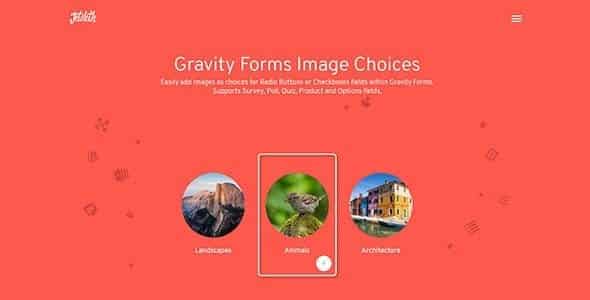
Overview of Gravity Forms Image Choices
Transform your standard Gravity Forms radio buttons and checkboxes into visually appealing image-based selections with Gravity Forms Image Choices. This powerful add-on is designed for anyone looking to enhance user experience, boost form engagement, and make their forms more intuitive and attractive. Say goodbye to plain text options and hello to dynamic, clickable images that clearly represent choices, making your forms stand out.
Key Features of Gravity Forms Image Choices
- Visual Form Enhancements: Elevate your Gravity Forms with stunning image choices instead of traditional text-only options, making forms more interactive and user-friendly.
- Easy Integration: Seamlessly integrates with existing Gravity Forms installations, allowing you to convert standard fields into image choices with minimal effort.
- Support for Radio Buttons & Checkboxes: Apply image choices to both radio button and checkbox fields, offering flexibility for single or multiple selection options.
- Customizable Image Sizes: Control the display size of your images directly within the form settings, ensuring they fit perfectly within your website’s design.
- Retina Ready Display: Images are optimized for high-resolution screens, providing crisp and clear visuals on all devices, enhancing the professional look of your forms.
- Intuitive User Experience: Improve form completion rates by offering a more engaging and understandable way for users to make selections, reducing confusion and errors.
- No Coding Required: Implement sophisticated image-based choices without writing a single line of code, making it accessible for users of all technical skill levels.
- Enhanced Form Aesthetics: Give your forms a modern, polished look that aligns with your brand’s visual identity, contributing to a more cohesive website experience.
Why Choose Gravity Forms Image Choices?
In today’s visually-driven digital landscape, engaging your audience is paramount. Standard text-based form fields can often feel monotonous and uninviting, leading to higher abandonment rates. By choosing Gravity Forms Image Choices, you’re not just adding images; you’re investing in a superior user experience. This plugin empowers you to craft forms that are not only functional but also captivating, allowing users to quickly grasp options through visual cues. Whether you’re showcasing product variations, service types, or survey responses, images communicate far more effectively and rapidly than text alone.
The value of Gravity Forms Image Choices extends beyond mere aesthetics. It significantly improves clarity, especially for complex choices or options that are better represented visually. Imagine selecting different t-shirt designs, booking specific types of rooms, or choosing subscription tiers based on clear, attractive images. This clarity reduces friction in the decision-making process, making form completion faster, more enjoyable, and ultimately, more successful. For businesses and website owners, this translates directly into higher conversion rates, better data collection, and a more professional brand image.
Who Should Use Gravity Forms Image Choices?
Gravity Forms Image Choices is an essential tool for anyone leveraging Gravity Forms who wants to enhance their user interaction. This includes e-commerce stores looking to display product options visually, educators creating interactive quizzes, event organizers offering visual seating or package selections, and marketers building engaging surveys or lead generation forms. Developers and web designers will also find it invaluable for delivering sophisticated and user-friendly forms to their clients without custom coding. If your forms collect information where visual representation can aid understanding or improve engagement, then Gravity Forms Image Choices is for you.
How to Install Gravity Forms Image Choices
- Download the Plugin: After acquiring Gravity Forms Image Choices, download the plugin zip file to your computer.
- Upload to WordPress: Log in to your WordPress admin dashboard. Navigate to ‘Plugins’ > ‘Add New’ and click the ‘Upload Plugin’ button at the top.
- Choose File & Install: Click ‘Choose File’, select the downloaded zip file for Gravity Forms Image Choices, and then click ‘Install Now’.
- Activate the Plugin: Once the installation is complete, click ‘Activate Plugin’.
- Configure Your Forms: Go to your Gravity Forms settings. When editing a radio button or checkbox field, you will now see options to enable image choices and upload your desired images for each option.
Frequently Asked Questions About Gravity Forms Image Choices
Can I use Gravity Forms Image Choices with any Gravity Forms field?
Gravity Forms Image Choices is specifically designed to work with standard radio button and checkbox fields within Gravity Forms. It transforms these traditional text-based options into visually appealing image selections, greatly enhancing user interaction for single or multiple choice questions.
Is Gravity Forms Image Choices responsive and retina-ready?
Yes, absolutely! Gravity Forms Image Choices is built with responsiveness in mind, ensuring your image choices look great and function perfectly on any device, from desktops to smartphones. Furthermore, it is optimized for retina displays, providing crisp, high-resolution images for users with high-DPI screens.
Do I need to be a developer to use Gravity Forms Image Choices?
Not at all! One of the key benefits of Gravity Forms Image Choices is its user-friendliness. It integrates seamlessly into the Gravity Forms interface, allowing you to enable and configure image choices directly from your field settings without writing any code. It’s designed for users of all technical skill levels.
Get Gravity Forms Image Choices Today
Ready to revolutionize your Gravity Forms and create a more engaging experience for your users? Don’t let your forms be a barrier to conversion. Embrace the power of visual communication and upgrade to Gravity Forms Image Choices. Explore this and many other robust WordPress Plugins available at our store, designed to elevate your website’s functionality and aesthetics. Discover the full range of premium GPL WordPress Products and unlock unparalleled potential for your online presence.
Related Products You May Like
Here's everything you need to know about your purchase:
- 100% original files — Every product is the genuine, virus-free file, exactly as released by the original developer.
- Instant download — Access your files immediately after purchase from your account.
- Lifetime access — Re-download your purchased files anytime. No expiry, no limits.
- Free updates — Newer version released? Just request an update from us, free for all customers.
- Dedicated support — Our team is available 24/7 for installation and file-related help.
- Easy refunds — Not satisfied? Review our Refund Policy. We offer a hassle-free 7-day guarantee.
$100.00 Original price was: $100.00.$2.00Current price is: $2.00.
Version
1.6.17
Last Updated
06/06/2026
License
GPL v2
Compatibility
WordPress 5.0+
Need latest version?
Newer version released? Request an update from us — free for all customers!
Request Update →🎁 Your Purchase Includes
Overview of Gravity Forms Image Choices
Transform your standard Gravity Forms radio buttons and checkboxes into visually appealing image-based selections with Gravity Forms Image Choices. This powerful add-on is designed for anyone looking to enhance user experience, boost form engagement, and make their forms more intuitive and attractive. Say goodbye to plain text options and hello to dynamic, clickable images that clearly represent choices, making your forms stand out.
Key Features of Gravity Forms Image Choices
- Visual Form Enhancements: Elevate your Gravity Forms with stunning image choices instead of traditional text-only options, making forms more interactive and user-friendly.
- Easy Integration: Seamlessly integrates with existing Gravity Forms installations, allowing you to convert standard fields into image choices with minimal effort.
- Support for Radio Buttons & Checkboxes: Apply image choices to both radio button and checkbox fields, offering flexibility for single or multiple selection options.
- Customizable Image Sizes: Control the display size of your images directly within the form settings, ensuring they fit perfectly within your website’s design.
- Retina Ready Display: Images are optimized for high-resolution screens, providing crisp and clear visuals on all devices, enhancing the professional look of your forms.
- Intuitive User Experience: Improve form completion rates by offering a more engaging and understandable way for users to make selections, reducing confusion and errors.
- No Coding Required: Implement sophisticated image-based choices without writing a single line of code, making it accessible for users of all technical skill levels.
- Enhanced Form Aesthetics: Give your forms a modern, polished look that aligns with your brand’s visual identity, contributing to a more cohesive website experience.
Why Choose Gravity Forms Image Choices?
In today’s visually-driven digital landscape, engaging your audience is paramount. Standard text-based form fields can often feel monotonous and uninviting, leading to higher abandonment rates. By choosing Gravity Forms Image Choices, you’re not just adding images; you’re investing in a superior user experience. This plugin empowers you to craft forms that are not only functional but also captivating, allowing users to quickly grasp options through visual cues. Whether you’re showcasing product variations, service types, or survey responses, images communicate far more effectively and rapidly than text alone.
The value of Gravity Forms Image Choices extends beyond mere aesthetics. It significantly improves clarity, especially for complex choices or options that are better represented visually. Imagine selecting different t-shirt designs, booking specific types of rooms, or choosing subscription tiers based on clear, attractive images. This clarity reduces friction in the decision-making process, making form completion faster, more enjoyable, and ultimately, more successful. For businesses and website owners, this translates directly into higher conversion rates, better data collection, and a more professional brand image.
Who Should Use Gravity Forms Image Choices?
Gravity Forms Image Choices is an essential tool for anyone leveraging Gravity Forms who wants to enhance their user interaction. This includes e-commerce stores looking to display product options visually, educators creating interactive quizzes, event organizers offering visual seating or package selections, and marketers building engaging surveys or lead generation forms. Developers and web designers will also find it invaluable for delivering sophisticated and user-friendly forms to their clients without custom coding. If your forms collect information where visual representation can aid understanding or improve engagement, then Gravity Forms Image Choices is for you.
How to Install Gravity Forms Image Choices
- Download the Plugin: After acquiring Gravity Forms Image Choices, download the plugin zip file to your computer.
- Upload to WordPress: Log in to your WordPress admin dashboard. Navigate to ‘Plugins’ > ‘Add New’ and click the ‘Upload Plugin’ button at the top.
- Choose File & Install: Click ‘Choose File’, select the downloaded zip file for Gravity Forms Image Choices, and then click ‘Install Now’.
- Activate the Plugin: Once the installation is complete, click ‘Activate Plugin’.
- Configure Your Forms: Go to your Gravity Forms settings. When editing a radio button or checkbox field, you will now see options to enable image choices and upload your desired images for each option.
Frequently Asked Questions About Gravity Forms Image Choices
Can I use Gravity Forms Image Choices with any Gravity Forms field?
Gravity Forms Image Choices is specifically designed to work with standard radio button and checkbox fields within Gravity Forms. It transforms these traditional text-based options into visually appealing image selections, greatly enhancing user interaction for single or multiple choice questions.
Is Gravity Forms Image Choices responsive and retina-ready?
Yes, absolutely! Gravity Forms Image Choices is built with responsiveness in mind, ensuring your image choices look great and function perfectly on any device, from desktops to smartphones. Furthermore, it is optimized for retina displays, providing crisp, high-resolution images for users with high-DPI screens.
Do I need to be a developer to use Gravity Forms Image Choices?
Not at all! One of the key benefits of Gravity Forms Image Choices is its user-friendliness. It integrates seamlessly into the Gravity Forms interface, allowing you to enable and configure image choices directly from your field settings without writing any code. It’s designed for users of all technical skill levels.
Get Gravity Forms Image Choices Today
Ready to revolutionize your Gravity Forms and create a more engaging experience for your users? Don’t let your forms be a barrier to conversion. Embrace the power of visual communication and upgrade to Gravity Forms Image Choices. Explore this and many other robust WordPress Plugins available at our store, designed to elevate your website’s functionality and aesthetics. Discover the full range of premium GPL WordPress Products and unlock unparalleled potential for your online presence.
Related Products You May Like
Reviews
There are no reviews yet.
Here's everything you need to know about your purchase:
- 100% original files — Every product is the genuine, virus-free file, exactly as released by the original developer.
- Instant download — Access your files immediately after purchase from your account.
- Lifetime access — Re-download your purchased files anytime. No expiry, no limits.
- Free updates — Newer version released? Just request an update from us, free for all customers.
- Dedicated support — Our team is available 24/7 for installation and file-related help.
- Easy refunds — Not satisfied? Review our Refund Policy. We offer a hassle-free 7-day guarantee.
Reviews
There are no reviews yet.