

FullEvents 1.3.3 – Event Plugin WordPress
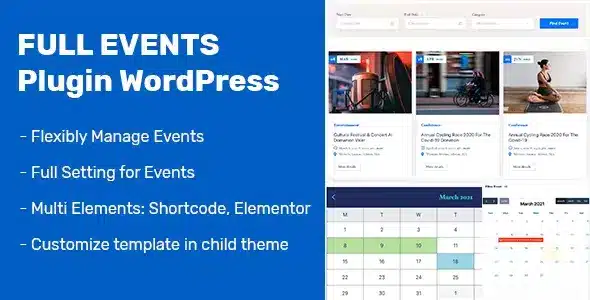
Overview of FullEvents
FullEvents is the ultimate WordPress plugin designed to help you effortlessly create, manage, and display events on your website. Whether you’re organizing conferences, workshops, concerts, or local meetups, FullEvents provides a comprehensive solution for individuals, businesses, and organizations looking to streamline their event management process and engage their audience effectively. With FullEvents, transforming your WordPress site into a dynamic event hub has never been simpler or more powerful.
Key Features of FullEvents
- Intuitive Event Creation: Easily add new events with a user-friendly interface, specifying all necessary details from date and time to venue and organizers. FullEvents makes the initial setup a breeze.
- Flexible Event Scheduling: Set up single-day, multi-day, or recurring events with advanced scheduling options. FullEvents ensures your calendar accurately reflects your event series.
- Customizable Event Pages: Create beautiful, dedicated pages for each event, complete with descriptions, images, videos, and custom fields to provide all the information attendees need.
- Multiple Display Options: Showcase your events using various layouts, including calendar views, list views, grid views, and widgets, seamlessly integrating with your theme’s design. FullEvents offers maximum versatility.
- Venue Management: Manage multiple venues, link them to specific events, and display venue details including maps and directions, enhancing the attendee experience.
- Organizer Profiles: Create and manage profiles for event organizers, allowing attendees to learn more about the people behind the events.
- Shortcode & Widget Support: Easily embed event listings and calendars anywhere on your site using simple shortcodes or drag-and-drop widgets, giving you full control over your content. FullEvents integrates smoothly.
- Responsive Design: Ensures all event listings and pages look stunning and function perfectly on any device, from desktops to smartphones, providing an optimal viewing experience for all users.
Why Choose FullEvents?
Choosing FullEvents means opting for a robust and user-friendly solution that simplifies event management on your WordPress website. This powerful plugin eliminates the complexities often associated with organizing events, allowing you to focus more on content and less on technical hurdles. FullEvents empowers you to create engaging event experiences for your audience, from the initial announcement to post-event follow-up. Its intuitive design ensures that even those with limited technical expertise can quickly set up and manage a professional event calendar, making your site a go-to resource for upcoming activities.
FullEvents not only makes your life easier but also significantly enhances the user experience for your website visitors. With its versatile display options, attendees can effortlessly browse events, find crucial details, and plan their participation. The responsive design of FullEvents ensures that your events are accessible and visually appealing on any device, broadening your reach and engagement. By providing a clear, organized, and attractive way to present your events, FullEvents helps build credibility and fosters a stronger connection with your community, encouraging greater attendance and participation.
Furthermore, FullEvents is built with flexibility in mind, offering extensive customization options to match your brand’s aesthetic. You can tailor the look and feel of your event pages and listings to seamlessly integrate with your existing WordPress theme. This commitment to adaptability, combined with its comprehensive feature set for scheduling, venue management, and organizer profiles, makes FullEvents an invaluable asset for anyone serious about professional event management on their WordPress platform. Investing in FullEvents is investing in efficiency, professionalism, and audience engagement.
Who Should Use FullEvents?
FullEvents is ideal for a wide range of users, including event organizers, educational institutions, community groups, small businesses, and large corporations. Anyone who needs to publish and manage a calendar of events on their WordPress website will find FullEvents indispensable. This includes bloggers hosting webinars, churches scheduling services, non-profits organizing fundraisers, clubs planning meetings, and venues listing performances. If you aim to professionalize your event listings, streamline attendee information, and provide an excellent user experience, FullEvents is designed for you.
How to Install FullEvents
- Download the Plugin: After purchasing FullEvents, download the plugin zip file from your account on GPLUniverse.
- Upload to WordPress: Log in to your WordPress admin dashboard. Navigate to ‘Plugins’ > ‘Add New’ and click the ‘Upload Plugin’ button. Choose the FullEvents zip file you downloaded and click ‘Install Now’.
- Activate FullEvents: Once the plugin is uploaded and installed, click the ‘Activate Plugin’ link. This will enable FullEvents on your website.
- Configure Settings: After activation, you’ll find a new ‘FullEvents’ menu item in your WordPress dashboard. Click on it to access the plugin’s settings and begin configuring your event types, display options, and other preferences.
- Start Adding Events: You are now ready to start creating and managing your events using the intuitive FullEvents interface.
Frequently Asked Questions About FullEvents
Can FullEvents handle recurring events?
Yes, FullEvents is fully equipped to handle recurring events. You can easily set up events to repeat daily, weekly, monthly, or annually, with options to specify end dates or a number of occurrences. This feature of FullEvents saves you considerable time and effort in managing ongoing series.
Is FullEvents compatible with all WordPress themes?
FullEvents is designed to be highly compatible with most well-coded WordPress themes. It uses standard WordPress practices, ensuring smooth integration. While it works out of the box with many themes, minor CSS adjustments might be needed for perfect aesthetic alignment with highly customized themes. FullEvents prioritizes flexibility.
Does FullEvents support custom fields for events?
Absolutely! FullEvents allows you to add custom fields to your events, providing you with the flexibility to include any specific information relevant to your unique event types. This powerful feature of FullEvents ensures that you can capture and display all necessary details for your attendees.
Get FullEvents Today
Ready to transform your website into an efficient event management hub? Get FullEvents today and start creating, organizing, and showcasing your events with unparalleled ease and professionalism. Enhance your audience engagement and streamline your workflow with this powerful plugin. Explore FullEvents and many other essential WordPress Plugins available. Don’t miss out on the opportunity to elevate your site with premium GPL WordPress Products. Purchase FullEvents now and unlock its full potential!
Related Products You May Like
Here's everything you need to know about your purchase:
- 100% original files — Every product is the genuine, virus-free file, exactly as released by the original developer.
- Instant download — Access your files immediately after purchase from your account.
- Lifetime access — Re-download your purchased files anytime. No expiry, no limits.
- Free updates — Newer version released? Just request an update from us, free for all customers.
- Dedicated support — Our team is available 24/7 for installation and file-related help.
- Easy refunds — Not satisfied? Review our Refund Policy. We offer a hassle-free 7-day guarantee.
$100.00 Original price was: $100.00.$2.00Current price is: $2.00.
Version
1.2.9
Last Updated
01/01/2026
License
GPL v2
Compatibility
WordPress 5.0+
Need latest version?
Newer version released? Request an update from us — free for all customers!
Request Update →🎁 Your Purchase Includes
Overview of FullEvents
FullEvents is the ultimate WordPress plugin designed to help you effortlessly create, manage, and display events on your website. Whether you’re organizing conferences, workshops, concerts, or local meetups, FullEvents provides a comprehensive solution for individuals, businesses, and organizations looking to streamline their event management process and engage their audience effectively. With FullEvents, transforming your WordPress site into a dynamic event hub has never been simpler or more powerful.
Key Features of FullEvents
- Intuitive Event Creation: Easily add new events with a user-friendly interface, specifying all necessary details from date and time to venue and organizers. FullEvents makes the initial setup a breeze.
- Flexible Event Scheduling: Set up single-day, multi-day, or recurring events with advanced scheduling options. FullEvents ensures your calendar accurately reflects your event series.
- Customizable Event Pages: Create beautiful, dedicated pages for each event, complete with descriptions, images, videos, and custom fields to provide all the information attendees need.
- Multiple Display Options: Showcase your events using various layouts, including calendar views, list views, grid views, and widgets, seamlessly integrating with your theme’s design. FullEvents offers maximum versatility.
- Venue Management: Manage multiple venues, link them to specific events, and display venue details including maps and directions, enhancing the attendee experience.
- Organizer Profiles: Create and manage profiles for event organizers, allowing attendees to learn more about the people behind the events.
- Shortcode & Widget Support: Easily embed event listings and calendars anywhere on your site using simple shortcodes or drag-and-drop widgets, giving you full control over your content. FullEvents integrates smoothly.
- Responsive Design: Ensures all event listings and pages look stunning and function perfectly on any device, from desktops to smartphones, providing an optimal viewing experience for all users.
Why Choose FullEvents?
Choosing FullEvents means opting for a robust and user-friendly solution that simplifies event management on your WordPress website. This powerful plugin eliminates the complexities often associated with organizing events, allowing you to focus more on content and less on technical hurdles. FullEvents empowers you to create engaging event experiences for your audience, from the initial announcement to post-event follow-up. Its intuitive design ensures that even those with limited technical expertise can quickly set up and manage a professional event calendar, making your site a go-to resource for upcoming activities.
FullEvents not only makes your life easier but also significantly enhances the user experience for your website visitors. With its versatile display options, attendees can effortlessly browse events, find crucial details, and plan their participation. The responsive design of FullEvents ensures that your events are accessible and visually appealing on any device, broadening your reach and engagement. By providing a clear, organized, and attractive way to present your events, FullEvents helps build credibility and fosters a stronger connection with your community, encouraging greater attendance and participation.
Furthermore, FullEvents is built with flexibility in mind, offering extensive customization options to match your brand’s aesthetic. You can tailor the look and feel of your event pages and listings to seamlessly integrate with your existing WordPress theme. This commitment to adaptability, combined with its comprehensive feature set for scheduling, venue management, and organizer profiles, makes FullEvents an invaluable asset for anyone serious about professional event management on their WordPress platform. Investing in FullEvents is investing in efficiency, professionalism, and audience engagement.
Who Should Use FullEvents?
FullEvents is ideal for a wide range of users, including event organizers, educational institutions, community groups, small businesses, and large corporations. Anyone who needs to publish and manage a calendar of events on their WordPress website will find FullEvents indispensable. This includes bloggers hosting webinars, churches scheduling services, non-profits organizing fundraisers, clubs planning meetings, and venues listing performances. If you aim to professionalize your event listings, streamline attendee information, and provide an excellent user experience, FullEvents is designed for you.
How to Install FullEvents
- Download the Plugin: After purchasing FullEvents, download the plugin zip file from your account on GPLUniverse.
- Upload to WordPress: Log in to your WordPress admin dashboard. Navigate to ‘Plugins’ > ‘Add New’ and click the ‘Upload Plugin’ button. Choose the FullEvents zip file you downloaded and click ‘Install Now’.
- Activate FullEvents: Once the plugin is uploaded and installed, click the ‘Activate Plugin’ link. This will enable FullEvents on your website.
- Configure Settings: After activation, you’ll find a new ‘FullEvents’ menu item in your WordPress dashboard. Click on it to access the plugin’s settings and begin configuring your event types, display options, and other preferences.
- Start Adding Events: You are now ready to start creating and managing your events using the intuitive FullEvents interface.
Frequently Asked Questions About FullEvents
Can FullEvents handle recurring events?
Yes, FullEvents is fully equipped to handle recurring events. You can easily set up events to repeat daily, weekly, monthly, or annually, with options to specify end dates or a number of occurrences. This feature of FullEvents saves you considerable time and effort in managing ongoing series.
Is FullEvents compatible with all WordPress themes?
FullEvents is designed to be highly compatible with most well-coded WordPress themes. It uses standard WordPress practices, ensuring smooth integration. While it works out of the box with many themes, minor CSS adjustments might be needed for perfect aesthetic alignment with highly customized themes. FullEvents prioritizes flexibility.
Does FullEvents support custom fields for events?
Absolutely! FullEvents allows you to add custom fields to your events, providing you with the flexibility to include any specific information relevant to your unique event types. This powerful feature of FullEvents ensures that you can capture and display all necessary details for your attendees.
Get FullEvents Today
Ready to transform your website into an efficient event management hub? Get FullEvents today and start creating, organizing, and showcasing your events with unparalleled ease and professionalism. Enhance your audience engagement and streamline your workflow with this powerful plugin. Explore FullEvents and many other essential WordPress Plugins available. Don’t miss out on the opportunity to elevate your site with premium GPL WordPress Products. Purchase FullEvents now and unlock its full potential!
Related Products You May Like
Reviews
There are no reviews yet.
Here's everything you need to know about your purchase:
- 100% original files — Every product is the genuine, virus-free file, exactly as released by the original developer.
- Instant download — Access your files immediately after purchase from your account.
- Lifetime access — Re-download your purchased files anytime. No expiry, no limits.
- Free updates — Newer version released? Just request an update from us, free for all customers.
- Dedicated support — Our team is available 24/7 for installation and file-related help.
- Easy refunds — Not satisfied? Review our Refund Policy. We offer a hassle-free 7-day guarantee.
Reviews
There are no reviews yet.