

Eventer 3.11.4 – WordPress Event Manager Plugin
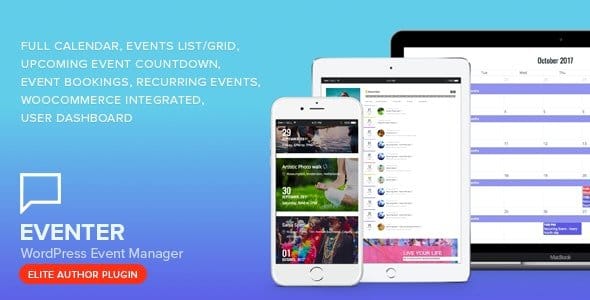
Overview of Eventer
Welcome to the ultimate solution for event management on your WordPress website. Eventer is a comprehensive and robust WordPress event manager plugin designed to simplify the creation, promotion, and management of any type of event, from workshops and conferences to concerts and festivals. Whether you’re an individual organizer, a small business, or a large enterprise, Eventer provides all the tools you need to effectively handle your event calendar, ticketing, and attendee registrations with ease and efficiency.
Key Features of Eventer
- Dynamic Event Listings: Eventer allows you to display your events in a multitude of attractive layouts, including calendars, lists, and grids. This flexibility ensures your events are presented in the most engaging way possible, capturing visitor attention instantly.
- Integrated Ticketing & Booking: Seamlessly sell tickets or manage registrations directly from your website. Eventer supports various payment gateways, making the booking process smooth for your attendees and straightforward for you to manage.
- Recurring Events Management: Effortlessly set up events that repeat on a daily, weekly, monthly, or custom schedule. This powerful feature of Eventer saves you significant time and effort when dealing with ongoing classes, meetings, or regular workshops.
- Customizable Event Pages: Create unique, dedicated pages for each event with rich content, images, videos, and all necessary details. Eventer ensures every event has its own professional presence, enhancing user experience and providing comprehensive information.
- Location & Organizer Management: Keep track of all your event locations and organizers within the plugin. Eventer lets you assign multiple organizers to an event and display location details with maps, making it easy for attendees to find their way.
- Advanced Search & Filtering: Empower your visitors to easily find events that interest them using robust search and filtering options. Attendees can filter by category, date, location, and more, making navigation through your event listings intuitive with Eventer.
- Attendee Management: Gain full control over your attendee list. Eventer provides tools to view attendee details, manage their registrations, send updates, and even export data for further analysis or CRM integration.
- Social Sharing Integration: Boost your event’s visibility with built-in social sharing options. Eventer encourages attendees to share events with their networks, expanding your reach organically and driving more interest.
Why Choose Eventer?
Choosing Eventer means opting for a powerful, flexible, and user-friendly solution that will transform how you manage events on your WordPress site. This plugin isn’t just about listing events; it’s about creating a holistic event ecosystem that engages your audience, streamlines operations, and ultimately drives success for your gatherings. With its intuitive interface, even those new to WordPress can quickly master Eventer and start creating professional event listings in no time. The comprehensive feature set ensures that whether you’re hosting a small local meetup or a large-scale international conference, Eventer has the capabilities to support your needs.
Beyond its robust feature set, Eventer is built with performance and scalability in mind. It integrates smoothly with your existing WordPress environment, ensuring compatibility and a consistent user experience. The developers behind Eventer consistently update the plugin, ensuring it remains compatible with the latest WordPress versions and incorporates new features based on user feedback and industry trends. This commitment to ongoing development means your investment in Eventer is future-proofed, providing a reliable foundation for all your event management endeavors for years to come.
Furthermore, Eventer offers unparalleled flexibility in how you present your events. With extensive customization options for layouts, colors, and content, you can ensure your event pages perfectly align with your brand’s aesthetic. This attention to detail not only enhances the visual appeal of your site but also strengthens your brand identity and improves the overall user experience. By choosing Eventer, you’re not just getting a plugin; you’re gaining a strategic partner in making your events successful and memorable.
Who Should Use Eventer?
Eventer is ideal for a wide range of users and organizations looking to manage events effectively on their WordPress website. This includes event organizers and planners, educational institutions hosting workshops or courses, non-profit organizations managing fundraising events, musicians and venues promoting concerts, fitness studios scheduling classes, community centers organizing local activities, and businesses of all sizes hosting webinars, conferences, or product launches. Essentially, anyone who needs a reliable, feature-rich, and easy-to-use system to showcase, sell, and manage events will find Eventer to be an indispensable tool.
How to Install Eventer
Installing Eventer on your WordPress site is a straightforward process. Follow these steps to get your event management system up and running:
- Download the Plugin: After purchasing Eventer from GPLUniverse, download the plugin zip file to your computer. Ensure you have the latest version for optimal performance and features.
- Upload to WordPress: Log in to your WordPress admin dashboard. Navigate to ‘Plugins’ > ‘Add New’. Click the ‘Upload Plugin’ button at the top of the page. Choose the Eventer zip file you downloaded and click ‘Install Now’.
- Activate the Plugin: Once the plugin has been successfully uploaded and installed, you will see a link to ‘Activate Plugin’. Click this link to enable Eventer on your website.
- Initial Setup & Configuration: After activation, Eventer will typically add a new menu item to your WordPress dashboard (e.g., “Events”). Click on this to access the plugin settings. Here, you can configure general options, payment gateways, display settings, and more to tailor Eventer to your specific needs.
- Start Creating Events: With Eventer installed and configured, you can now begin creating your first event. Navigate to the ‘Events’ menu in your dashboard and click ‘Add New’ to start populating your event calendar with exciting new entries.
Frequently Asked Questions About Eventer
Does Eventer support recurring events?
Yes, Eventer comes with robust support for recurring events. You can easily set up events to repeat daily, weekly, monthly, or on custom schedules, saving you time and effort for ongoing classes, meetings, or regular workshops. This feature is highly flexible and allows for detailed customization of recurrence patterns.
Can I sell tickets directly through Eventer?
Absolutely! Eventer includes integrated ticketing and booking functionalities, allowing you to sell tickets directly from your WordPress website. It supports various payment gateways, ensuring a seamless and secure transaction experience for your attendees and straightforward management for you.
Is Eventer compatible with my WordPress theme?
Eventer is designed to be highly compatible with most standard WordPress themes. While it provides its own styling, it generally adapts well to your theme’s aesthetics. In rare cases where minor styling conflicts may occur, Eventer is built with clean code, making it easy for developers to adjust if needed, ensuring a harmonious look and feel for your site.
Get Eventer Today
Ready to revolutionize your event management? Eventer offers an unparalleled combination of power, flexibility, and ease of use, making it the perfect choice for anyone looking to create, promote, and manage events on WordPress. Enhance your website’s capabilities and provide your audience with an exceptional event experience. Browse our full selection of WordPress Plugins and discover the value of GPL WordPress Products today. Don’t miss out on the opportunity to elevate your event strategy with Eventer.
Related Products You May Like
Here's everything you need to know about your purchase:
- 100% original files — Every product is the genuine, virus-free file, exactly as released by the original developer.
- Instant download — Access your files immediately after purchase from your account.
- Lifetime access — Re-download your purchased files anytime. No expiry, no limits.
- Free updates — Newer version released? Just request an update from us, free for all customers.
- Dedicated support — Our team is available 24/7 for installation and file-related help.
- Easy refunds — Not satisfied? Review our Refund Policy. We offer a hassle-free 7-day guarantee.
$100.00 Original price was: $100.00.$2.00Current price is: $2.00.
Version
3.11.4
Last Updated
03/03/2026
License
GPL v2
Compatibility
WordPress 5.0+
Need latest version?
Newer version released? Request an update from us — free for all customers!
Request Update →🎁 Your Purchase Includes
Overview of Eventer
Welcome to the ultimate solution for event management on your WordPress website. Eventer is a comprehensive and robust WordPress event manager plugin designed to simplify the creation, promotion, and management of any type of event, from workshops and conferences to concerts and festivals. Whether you’re an individual organizer, a small business, or a large enterprise, Eventer provides all the tools you need to effectively handle your event calendar, ticketing, and attendee registrations with ease and efficiency.
Key Features of Eventer
- Dynamic Event Listings: Eventer allows you to display your events in a multitude of attractive layouts, including calendars, lists, and grids. This flexibility ensures your events are presented in the most engaging way possible, capturing visitor attention instantly.
- Integrated Ticketing & Booking: Seamlessly sell tickets or manage registrations directly from your website. Eventer supports various payment gateways, making the booking process smooth for your attendees and straightforward for you to manage.
- Recurring Events Management: Effortlessly set up events that repeat on a daily, weekly, monthly, or custom schedule. This powerful feature of Eventer saves you significant time and effort when dealing with ongoing classes, meetings, or regular workshops.
- Customizable Event Pages: Create unique, dedicated pages for each event with rich content, images, videos, and all necessary details. Eventer ensures every event has its own professional presence, enhancing user experience and providing comprehensive information.
- Location & Organizer Management: Keep track of all your event locations and organizers within the plugin. Eventer lets you assign multiple organizers to an event and display location details with maps, making it easy for attendees to find their way.
- Advanced Search & Filtering: Empower your visitors to easily find events that interest them using robust search and filtering options. Attendees can filter by category, date, location, and more, making navigation through your event listings intuitive with Eventer.
- Attendee Management: Gain full control over your attendee list. Eventer provides tools to view attendee details, manage their registrations, send updates, and even export data for further analysis or CRM integration.
- Social Sharing Integration: Boost your event’s visibility with built-in social sharing options. Eventer encourages attendees to share events with their networks, expanding your reach organically and driving more interest.
Why Choose Eventer?
Choosing Eventer means opting for a powerful, flexible, and user-friendly solution that will transform how you manage events on your WordPress site. This plugin isn’t just about listing events; it’s about creating a holistic event ecosystem that engages your audience, streamlines operations, and ultimately drives success for your gatherings. With its intuitive interface, even those new to WordPress can quickly master Eventer and start creating professional event listings in no time. The comprehensive feature set ensures that whether you’re hosting a small local meetup or a large-scale international conference, Eventer has the capabilities to support your needs.
Beyond its robust feature set, Eventer is built with performance and scalability in mind. It integrates smoothly with your existing WordPress environment, ensuring compatibility and a consistent user experience. The developers behind Eventer consistently update the plugin, ensuring it remains compatible with the latest WordPress versions and incorporates new features based on user feedback and industry trends. This commitment to ongoing development means your investment in Eventer is future-proofed, providing a reliable foundation for all your event management endeavors for years to come.
Furthermore, Eventer offers unparalleled flexibility in how you present your events. With extensive customization options for layouts, colors, and content, you can ensure your event pages perfectly align with your brand’s aesthetic. This attention to detail not only enhances the visual appeal of your site but also strengthens your brand identity and improves the overall user experience. By choosing Eventer, you’re not just getting a plugin; you’re gaining a strategic partner in making your events successful and memorable.
Who Should Use Eventer?
Eventer is ideal for a wide range of users and organizations looking to manage events effectively on their WordPress website. This includes event organizers and planners, educational institutions hosting workshops or courses, non-profit organizations managing fundraising events, musicians and venues promoting concerts, fitness studios scheduling classes, community centers organizing local activities, and businesses of all sizes hosting webinars, conferences, or product launches. Essentially, anyone who needs a reliable, feature-rich, and easy-to-use system to showcase, sell, and manage events will find Eventer to be an indispensable tool.
How to Install Eventer
Installing Eventer on your WordPress site is a straightforward process. Follow these steps to get your event management system up and running:
- Download the Plugin: After purchasing Eventer from GPLUniverse, download the plugin zip file to your computer. Ensure you have the latest version for optimal performance and features.
- Upload to WordPress: Log in to your WordPress admin dashboard. Navigate to ‘Plugins’ > ‘Add New’. Click the ‘Upload Plugin’ button at the top of the page. Choose the Eventer zip file you downloaded and click ‘Install Now’.
- Activate the Plugin: Once the plugin has been successfully uploaded and installed, you will see a link to ‘Activate Plugin’. Click this link to enable Eventer on your website.
- Initial Setup & Configuration: After activation, Eventer will typically add a new menu item to your WordPress dashboard (e.g., “Events”). Click on this to access the plugin settings. Here, you can configure general options, payment gateways, display settings, and more to tailor Eventer to your specific needs.
- Start Creating Events: With Eventer installed and configured, you can now begin creating your first event. Navigate to the ‘Events’ menu in your dashboard and click ‘Add New’ to start populating your event calendar with exciting new entries.
Frequently Asked Questions About Eventer
Does Eventer support recurring events?
Yes, Eventer comes with robust support for recurring events. You can easily set up events to repeat daily, weekly, monthly, or on custom schedules, saving you time and effort for ongoing classes, meetings, or regular workshops. This feature is highly flexible and allows for detailed customization of recurrence patterns.
Can I sell tickets directly through Eventer?
Absolutely! Eventer includes integrated ticketing and booking functionalities, allowing you to sell tickets directly from your WordPress website. It supports various payment gateways, ensuring a seamless and secure transaction experience for your attendees and straightforward management for you.
Is Eventer compatible with my WordPress theme?
Eventer is designed to be highly compatible with most standard WordPress themes. While it provides its own styling, it generally adapts well to your theme’s aesthetics. In rare cases where minor styling conflicts may occur, Eventer is built with clean code, making it easy for developers to adjust if needed, ensuring a harmonious look and feel for your site.
Get Eventer Today
Ready to revolutionize your event management? Eventer offers an unparalleled combination of power, flexibility, and ease of use, making it the perfect choice for anyone looking to create, promote, and manage events on WordPress. Enhance your website’s capabilities and provide your audience with an exceptional event experience. Browse our full selection of WordPress Plugins and discover the value of GPL WordPress Products today. Don’t miss out on the opportunity to elevate your event strategy with Eventer.
Related Products You May Like
Reviews
There are no reviews yet.
Here's everything you need to know about your purchase:
- 100% original files — Every product is the genuine, virus-free file, exactly as released by the original developer.
- Instant download — Access your files immediately after purchase from your account.
- Lifetime access — Re-download your purchased files anytime. No expiry, no limits.
- Free updates — Newer version released? Just request an update from us, free for all customers.
- Dedicated support — Our team is available 24/7 for installation and file-related help.
- Easy refunds — Not satisfied? Review our Refund Policy. We offer a hassle-free 7-day guarantee.
Reviews
There are no reviews yet.