

Docy 4.4.0 – Documentation and Knowledge base WordPress Theme with Helpdesk Forum
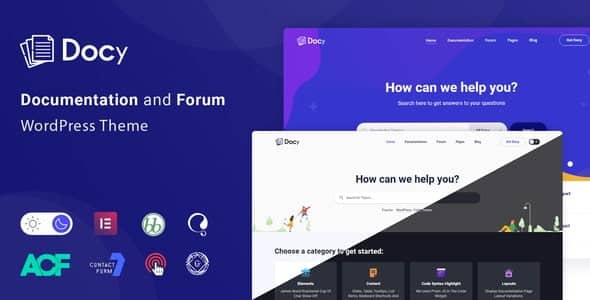
Overview of Docy
Docy is a powerful and versatile WordPress theme meticulously designed for creating comprehensive documentation, knowledge bases, and helpdesk forums. It’s the ultimate solution for businesses, developers, and organizations looking to provide exceptional self-service support and clear product information to their users. With Docy, you can effortlessly build a central hub where customers can find answers, troubleshoot issues, and engage with your support team, significantly improving user experience and reducing support load.
Key Features of Docy
- Intuitive Documentation Builder: Docy provides an easy-to-use interface for structuring and creating rich, detailed documentation. Organize your content with categories, tags, and a logical hierarchy, making it simple for users to navigate and find what they need quickly.
- Integrated Helpdesk Forum: Foster a vibrant community around your products with Docy’s built-in helpdesk forum. Users can post questions, share insights, and get support from both your team and other community members, creating a dynamic support ecosystem.
- Advanced Search Functionality: Empower your users with a robust search engine that delivers instant, relevant results. Docy’s intelligent search helps users pinpoint specific articles or forum topics, reducing frustration and saving time.
- Responsive and Retina-Ready Design: Ensure your documentation looks impeccable on any device, from desktops to smartphones. Docy is fully responsive and retina-ready, providing a seamless and visually appealing experience for all users, regardless of screen size or resolution.
- One-Click Demo Import: Get your knowledge base up and running in minutes with Docy’s convenient one-click demo import feature. Choose from stunning pre-built layouts and populate your site with dummy content, giving you a perfect starting point for customization.
- Customizable Layouts and Styles: Tailor the look and feel of your documentation site to match your brand identity perfectly. Docy offers extensive customization options for colors, fonts, layouts, and more, all manageable through the intuitive WordPress Customizer.
- Feedback and Rating System: Gather valuable insights on the helpfulness of your articles with Docy’s integrated feedback and rating system. Understand what content resonates with your users and identify areas for improvement, continuously enhancing your support resources.
- Gutenberg and Elementor Compatibility: Build and design your pages with your preferred page builder. Docy is fully compatible with both the native WordPress Gutenberg editor and the popular Elementor page builder, offering flexibility and ease of content creation.
Why Choose Docy?
Choosing Docy means investing in a superior support experience for your users and a streamlined workflow for your team. This theme isn’t just about presenting information; it’s about creating an interactive and efficient support ecosystem. With Docy, you dramatically reduce the burden on your customer support agents by enabling users to find answers independently. This self-service approach not only saves valuable time and resources but also empowers your customers, leading to higher satisfaction and loyalty. Docy’s comprehensive feature set ensures that every aspect of documentation and support is covered, from initial content creation to ongoing user engagement and feedback.
The flexibility and ease of use offered by Docy are unparalleled. Whether you’re a seasoned developer or a small business owner, Docy’s intuitive interface and robust customization options make it simple to build and maintain a professional knowledge base. The integration of a helpdesk forum directly within your documentation site creates a cohesive support environment, allowing users to transition seamlessly from reading articles to asking questions within a community setting. This integrated approach fosters a sense of community and provides multiple avenues for users to get the assistance they need, all powered by Docy.
Furthermore, Docy is built with performance and SEO in mind. Its clean code and optimized structure ensure fast loading times, which is crucial for user experience and search engine rankings. A well-structured and easily searchable knowledge base built with Docy will not only serve your existing customers but also help attract new ones by demonstrating your commitment to comprehensive support and product clarity. Elevate your online presence and support capabilities with Docy, the ultimate solution for documentation and knowledge management.
Who Should Use Docy?
Docy is ideal for a wide range of users and organizations. Software companies, SaaS providers, and web agencies can use Docy to create detailed product documentation and API guides. E-commerce stores can leverage Docy for extensive FAQs and troubleshooting guides. Educational institutions and online course creators will find Docy perfect for organizing learning materials and student support. Any business or individual that needs to provide clear, organized, and accessible information to their audience will benefit immensely from Docy.
How to Install Docy
- Download Docy: After purchasing Docy from our store, download the theme package to your computer.
- Upload the Theme: Log in to your WordPress dashboard. Navigate to Appearance > Themes > Add New > Upload Theme. Select the Docy theme .zip file from your computer and click “Install Now”.
- Activate Docy: Once the theme is uploaded and installed, click the “Activate” link to make Docy your active WordPress theme.
- Install Required Plugins: Docy will prompt you to install a set of recommended plugins. Install and activate all of these to ensure full functionality of your knowledge base and helpdesk features.
- Import Demo Content (Optional): For a quick start, navigate to Appearance > Import Demo Data and choose one of the available Docy demos to import. This will set up your site with pre-designed layouts and content, which you can then customize.
Frequently Asked Questions About Docy
Is Docy compatible with popular page builders?
Yes, Docy is fully compatible with both the native WordPress Gutenberg editor and the popular Elementor page builder. This allows you to create and customize your documentation and knowledge base pages with the tools you’re most comfortable using, offering maximum flexibility in design.
Can I customize the look and feel of Docy to match my brand?
Absolutely! Docy offers extensive customization options through the WordPress Customizer. You can easily change colors, fonts, layouts, header styles, and much more, ensuring that your documentation site perfectly aligns with your brand identity and aesthetic.
Does Docy support multilingual documentation?
While Docy itself provides the structure for your content, it is fully compatible with popular WordPress multilingual plugins like WPML and Polylang. This means you can easily set up and manage multilingual documentation, catering to a global audience with your knowledge base built with Docy.
Get Docy Today
Ready to transform your user support and content delivery? Docy offers an unparalleled solution for building robust documentation, engaging knowledge bases, and interactive helpdesk forums. Enhance your customer satisfaction, reduce support queries, and provide a seamless information experience with this feature-rich theme. Explore our extensive collection of WordPress Themes and discover other premium GPL WordPress Products to elevate your website. Don’t miss out on the opportunity to empower your users and streamline your support system with Docy.
Related Products You May Like
Here's everything you need to know about your purchase:
- 100% original files — Every product is the genuine, virus-free file, exactly as released by the original developer.
- Instant download — Access your files immediately after purchase from your account.
- Lifetime access — Re-download your purchased files anytime. No expiry, no limits.
- Free updates — Newer version released? Just request an update from us, free for all customers.
- Dedicated support — Our team is available 24/7 for installation and file-related help.
- Easy refunds — Not satisfied? Review our Refund Policy. We offer a hassle-free 7-day guarantee.
$100.00 Original price was: $100.00.$2.00Current price is: $2.00.
Version
4.4.0
Last Updated
29/4/2026
License
GPL v2
Compatibility
WordPress 5.0+
Need latest version?
Newer version released? Request an update from us — free for all customers!
Request Update →🎁 Your Purchase Includes
Overview of Docy
Docy is a powerful and versatile WordPress theme meticulously designed for creating comprehensive documentation, knowledge bases, and helpdesk forums. It’s the ultimate solution for businesses, developers, and organizations looking to provide exceptional self-service support and clear product information to their users. With Docy, you can effortlessly build a central hub where customers can find answers, troubleshoot issues, and engage with your support team, significantly improving user experience and reducing support load.
Key Features of Docy
- Intuitive Documentation Builder: Docy provides an easy-to-use interface for structuring and creating rich, detailed documentation. Organize your content with categories, tags, and a logical hierarchy, making it simple for users to navigate and find what they need quickly.
- Integrated Helpdesk Forum: Foster a vibrant community around your products with Docy’s built-in helpdesk forum. Users can post questions, share insights, and get support from both your team and other community members, creating a dynamic support ecosystem.
- Advanced Search Functionality: Empower your users with a robust search engine that delivers instant, relevant results. Docy’s intelligent search helps users pinpoint specific articles or forum topics, reducing frustration and saving time.
- Responsive and Retina-Ready Design: Ensure your documentation looks impeccable on any device, from desktops to smartphones. Docy is fully responsive and retina-ready, providing a seamless and visually appealing experience for all users, regardless of screen size or resolution.
- One-Click Demo Import: Get your knowledge base up and running in minutes with Docy’s convenient one-click demo import feature. Choose from stunning pre-built layouts and populate your site with dummy content, giving you a perfect starting point for customization.
- Customizable Layouts and Styles: Tailor the look and feel of your documentation site to match your brand identity perfectly. Docy offers extensive customization options for colors, fonts, layouts, and more, all manageable through the intuitive WordPress Customizer.
- Feedback and Rating System: Gather valuable insights on the helpfulness of your articles with Docy’s integrated feedback and rating system. Understand what content resonates with your users and identify areas for improvement, continuously enhancing your support resources.
- Gutenberg and Elementor Compatibility: Build and design your pages with your preferred page builder. Docy is fully compatible with both the native WordPress Gutenberg editor and the popular Elementor page builder, offering flexibility and ease of content creation.
Why Choose Docy?
Choosing Docy means investing in a superior support experience for your users and a streamlined workflow for your team. This theme isn’t just about presenting information; it’s about creating an interactive and efficient support ecosystem. With Docy, you dramatically reduce the burden on your customer support agents by enabling users to find answers independently. This self-service approach not only saves valuable time and resources but also empowers your customers, leading to higher satisfaction and loyalty. Docy’s comprehensive feature set ensures that every aspect of documentation and support is covered, from initial content creation to ongoing user engagement and feedback.
The flexibility and ease of use offered by Docy are unparalleled. Whether you’re a seasoned developer or a small business owner, Docy’s intuitive interface and robust customization options make it simple to build and maintain a professional knowledge base. The integration of a helpdesk forum directly within your documentation site creates a cohesive support environment, allowing users to transition seamlessly from reading articles to asking questions within a community setting. This integrated approach fosters a sense of community and provides multiple avenues for users to get the assistance they need, all powered by Docy.
Furthermore, Docy is built with performance and SEO in mind. Its clean code and optimized structure ensure fast loading times, which is crucial for user experience and search engine rankings. A well-structured and easily searchable knowledge base built with Docy will not only serve your existing customers but also help attract new ones by demonstrating your commitment to comprehensive support and product clarity. Elevate your online presence and support capabilities with Docy, the ultimate solution for documentation and knowledge management.
Who Should Use Docy?
Docy is ideal for a wide range of users and organizations. Software companies, SaaS providers, and web agencies can use Docy to create detailed product documentation and API guides. E-commerce stores can leverage Docy for extensive FAQs and troubleshooting guides. Educational institutions and online course creators will find Docy perfect for organizing learning materials and student support. Any business or individual that needs to provide clear, organized, and accessible information to their audience will benefit immensely from Docy.
How to Install Docy
- Download Docy: After purchasing Docy from our store, download the theme package to your computer.
- Upload the Theme: Log in to your WordPress dashboard. Navigate to Appearance > Themes > Add New > Upload Theme. Select the Docy theme .zip file from your computer and click “Install Now”.
- Activate Docy: Once the theme is uploaded and installed, click the “Activate” link to make Docy your active WordPress theme.
- Install Required Plugins: Docy will prompt you to install a set of recommended plugins. Install and activate all of these to ensure full functionality of your knowledge base and helpdesk features.
- Import Demo Content (Optional): For a quick start, navigate to Appearance > Import Demo Data and choose one of the available Docy demos to import. This will set up your site with pre-designed layouts and content, which you can then customize.
Frequently Asked Questions About Docy
Is Docy compatible with popular page builders?
Yes, Docy is fully compatible with both the native WordPress Gutenberg editor and the popular Elementor page builder. This allows you to create and customize your documentation and knowledge base pages with the tools you’re most comfortable using, offering maximum flexibility in design.
Can I customize the look and feel of Docy to match my brand?
Absolutely! Docy offers extensive customization options through the WordPress Customizer. You can easily change colors, fonts, layouts, header styles, and much more, ensuring that your documentation site perfectly aligns with your brand identity and aesthetic.
Does Docy support multilingual documentation?
While Docy itself provides the structure for your content, it is fully compatible with popular WordPress multilingual plugins like WPML and Polylang. This means you can easily set up and manage multilingual documentation, catering to a global audience with your knowledge base built with Docy.
Get Docy Today
Ready to transform your user support and content delivery? Docy offers an unparalleled solution for building robust documentation, engaging knowledge bases, and interactive helpdesk forums. Enhance your customer satisfaction, reduce support queries, and provide a seamless information experience with this feature-rich theme. Explore our extensive collection of WordPress Themes and discover other premium GPL WordPress Products to elevate your website. Don’t miss out on the opportunity to empower your users and streamline your support system with Docy.
Related Products You May Like
Reviews
There are no reviews yet.
Here's everything you need to know about your purchase:
- 100% original files — Every product is the genuine, virus-free file, exactly as released by the original developer.
- Instant download — Access your files immediately after purchase from your account.
- Lifetime access — Re-download your purchased files anytime. No expiry, no limits.
- Free updates — Newer version released? Just request an update from us, free for all customers.
- Dedicated support — Our team is available 24/7 for installation and file-related help.
- Easy refunds — Not satisfied? Review our Refund Policy. We offer a hassle-free 7-day guarantee.
Reviews
There are no reviews yet.