

Booked 2.4.4 – Appointment Booking for WordPress
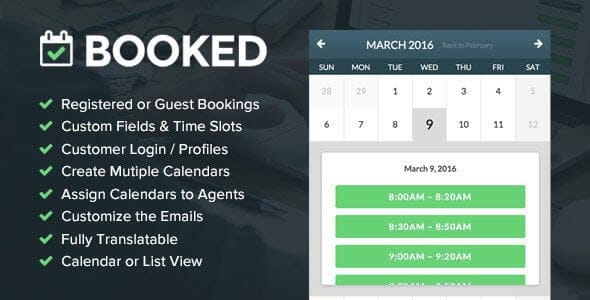
Overview of Booked
Booked is a powerful and intuitive appointment booking plugin designed specifically for WordPress websites. It empowers businesses and individuals to effortlessly manage their schedules, accept bookings, and streamline client interactions directly from their site. Whether you run a salon, a consultancy, a fitness studio, or any service-based business, Booked provides a professional and user-friendly system to handle all your appointment needs.
Key Features of Booked
- Customizable Calendars: Create unlimited calendars with unique settings, allowing you to manage different services, staff members, or locations with ease using Booked.
- Guest & Registered User Bookings: Booked supports both guest bookings for quick appointments and registered user accounts, offering clients a personalized booking experience and history.
- Frontend & Backend Management: Clients can book appointments directly from the frontend of your website, while administrators have full control to manage, approve, or deny bookings from the WordPress backend.
- Custom Fields for Forms: Tailor your booking forms with custom fields to gather specific information from clients, ensuring you have all necessary details for each appointment with Booked.
- Email Notifications: Keep both clients and staff informed with automated email notifications for new bookings, cancellations, and reminders, all handled seamlessly by Booked.
- Flexible Time Slots: Define specific time slots, block out holidays, and set custom availability for different days or staff members, giving you complete control over your schedule.
- Google Calendar Integration: Sync your Booked appointments with Google Calendar for easy personal and team schedule management, ensuring you never miss an appointment.
- Shortcode & Widget Support: Easily embed booking calendars and forms anywhere on your site using simple shortcodes or convenient widgets provided by Booked.
Why Choose Booked?
Choosing Booked means opting for efficiency, professionalism, and unparalleled convenience for both you and your clients. This robust plugin eliminates the hassle of manual scheduling, phone calls, and email tag, freeing up valuable time that can be better spent on serving your customers. With its intuitive interface, Booked makes it incredibly simple for clients to find available slots and book appointments, enhancing their overall experience with your business. The ability to customize calendars, forms, and email notifications ensures that the booking system perfectly aligns with your brand and specific operational needs.
Booked is not just an appointment tool; it’s a strategic asset for growth. By providing a seamless online booking experience, you reduce barriers for potential clients and increase conversion rates. The comprehensive backend management allows you to oversee your entire schedule at a glance, assign appointments to different staff members, and gain insights into your business’s busiest periods. Furthermore, features like Google Calendar integration and automated reminders help minimize no-shows, protecting your valuable time and revenue. Invest in Booked and transform your scheduling process into a smooth, automated, and highly effective operation.
Who Should Use Booked?
Booked is ideal for a wide range of service-based businesses and professionals looking to streamline their appointment management. This includes salons and spas, fitness trainers and gyms, consultants and coaches, healthcare providers (e.g., therapists, chiropractors), educational institutions offering tutoring or counseling, photographers, repair services, and even small businesses requiring client meetings. Any entity that relies on scheduled appointments with clients will find Booked to be an invaluable tool for improving organization and customer satisfaction.
How to Install Booked
- Download the Plugin: After purchasing Booked from our store, download the plugin zip file to your computer.
- Upload to WordPress: Log in to your WordPress admin dashboard. Navigate to ‘Plugins’ > ‘Add New’, then click the ‘Upload Plugin’ button at the top.
- Choose File & Install: Click ‘Choose File’, select the Booked zip file you downloaded, and then click ‘Install Now’.
- Activate the Plugin: Once the installation is complete, click the ‘Activate Plugin’ button. Booked will now be active on your website.
- Configure Booked Settings: Go to the new ‘Appointments’ menu item in your WordPress dashboard to configure your calendars, time slots, and other settings to get Booked ready for use.
Frequently Asked Questions About Booked
Is Booked compatible with all WordPress themes?
Booked is designed to be highly compatible with most well-coded WordPress themes. It adheres to standard WordPress practices, minimizing conflicts. In the rare event of a styling conflict, minor CSS adjustments can usually resolve the issue, allowing Booked to integrate flawlessly.
Can I create different types of appointments with Booked?
Yes, Booked allows you to create multiple calendars, each of which can represent a different service, staff member, or location. This flexibility means you can easily manage various appointment types and their specific availabilities using Booked.
Does Booked support multiple staff members?
Absolutely! Booked is built to handle multiple staff members, each with their own customizable calendar and availability. You can assign appointments to specific staff members and allow clients to choose who they want to book with.
Get Booked Today
Ready to revolutionize your appointment scheduling? Get Booked today and provide your clients with a seamless, professional booking experience while simplifying your administrative tasks. This powerful plugin is available as part of our extensive collection of WordPress Plugins. Browse our full range of GPL WordPress Products to find more essential tools for your website. Streamline your operations and enhance client satisfaction with Booked.
Related Products You May Like
Here's everything you need to know about your purchase:
- 100% original files — Every product is the genuine, virus-free file, exactly as released by the original developer.
- Instant download — Access your files immediately after purchase from your account.
- Lifetime access — Re-download your purchased files anytime. No expiry, no limits.
- Free updates — Newer version released? Just request an update from us, free for all customers.
- Dedicated support — Our team is available 24/7 for installation and file-related help.
- Easy refunds — Not satisfied? Review our Refund Policy. We offer a hassle-free 7-day guarantee.
$100.00 Original price was: $100.00.$2.00Current price is: $2.00.
Version
2.4.4
Last Updated
21/05/2026
License
GPL v2
Compatibility
WordPress 5.0+
Need latest version?
Newer version released? Request an update from us — free for all customers!
Request Update →🎁 Your Purchase Includes
Overview of Booked
Booked is a powerful and intuitive appointment booking plugin designed specifically for WordPress websites. It empowers businesses and individuals to effortlessly manage their schedules, accept bookings, and streamline client interactions directly from their site. Whether you run a salon, a consultancy, a fitness studio, or any service-based business, Booked provides a professional and user-friendly system to handle all your appointment needs.
Key Features of Booked
- Customizable Calendars: Create unlimited calendars with unique settings, allowing you to manage different services, staff members, or locations with ease using Booked.
- Guest & Registered User Bookings: Booked supports both guest bookings for quick appointments and registered user accounts, offering clients a personalized booking experience and history.
- Frontend & Backend Management: Clients can book appointments directly from the frontend of your website, while administrators have full control to manage, approve, or deny bookings from the WordPress backend.
- Custom Fields for Forms: Tailor your booking forms with custom fields to gather specific information from clients, ensuring you have all necessary details for each appointment with Booked.
- Email Notifications: Keep both clients and staff informed with automated email notifications for new bookings, cancellations, and reminders, all handled seamlessly by Booked.
- Flexible Time Slots: Define specific time slots, block out holidays, and set custom availability for different days or staff members, giving you complete control over your schedule.
- Google Calendar Integration: Sync your Booked appointments with Google Calendar for easy personal and team schedule management, ensuring you never miss an appointment.
- Shortcode & Widget Support: Easily embed booking calendars and forms anywhere on your site using simple shortcodes or convenient widgets provided by Booked.
Why Choose Booked?
Choosing Booked means opting for efficiency, professionalism, and unparalleled convenience for both you and your clients. This robust plugin eliminates the hassle of manual scheduling, phone calls, and email tag, freeing up valuable time that can be better spent on serving your customers. With its intuitive interface, Booked makes it incredibly simple for clients to find available slots and book appointments, enhancing their overall experience with your business. The ability to customize calendars, forms, and email notifications ensures that the booking system perfectly aligns with your brand and specific operational needs.
Booked is not just an appointment tool; it’s a strategic asset for growth. By providing a seamless online booking experience, you reduce barriers for potential clients and increase conversion rates. The comprehensive backend management allows you to oversee your entire schedule at a glance, assign appointments to different staff members, and gain insights into your business’s busiest periods. Furthermore, features like Google Calendar integration and automated reminders help minimize no-shows, protecting your valuable time and revenue. Invest in Booked and transform your scheduling process into a smooth, automated, and highly effective operation.
Who Should Use Booked?
Booked is ideal for a wide range of service-based businesses and professionals looking to streamline their appointment management. This includes salons and spas, fitness trainers and gyms, consultants and coaches, healthcare providers (e.g., therapists, chiropractors), educational institutions offering tutoring or counseling, photographers, repair services, and even small businesses requiring client meetings. Any entity that relies on scheduled appointments with clients will find Booked to be an invaluable tool for improving organization and customer satisfaction.
How to Install Booked
- Download the Plugin: After purchasing Booked from our store, download the plugin zip file to your computer.
- Upload to WordPress: Log in to your WordPress admin dashboard. Navigate to ‘Plugins’ > ‘Add New’, then click the ‘Upload Plugin’ button at the top.
- Choose File & Install: Click ‘Choose File’, select the Booked zip file you downloaded, and then click ‘Install Now’.
- Activate the Plugin: Once the installation is complete, click the ‘Activate Plugin’ button. Booked will now be active on your website.
- Configure Booked Settings: Go to the new ‘Appointments’ menu item in your WordPress dashboard to configure your calendars, time slots, and other settings to get Booked ready for use.
Frequently Asked Questions About Booked
Is Booked compatible with all WordPress themes?
Booked is designed to be highly compatible with most well-coded WordPress themes. It adheres to standard WordPress practices, minimizing conflicts. In the rare event of a styling conflict, minor CSS adjustments can usually resolve the issue, allowing Booked to integrate flawlessly.
Can I create different types of appointments with Booked?
Yes, Booked allows you to create multiple calendars, each of which can represent a different service, staff member, or location. This flexibility means you can easily manage various appointment types and their specific availabilities using Booked.
Does Booked support multiple staff members?
Absolutely! Booked is built to handle multiple staff members, each with their own customizable calendar and availability. You can assign appointments to specific staff members and allow clients to choose who they want to book with.
Get Booked Today
Ready to revolutionize your appointment scheduling? Get Booked today and provide your clients with a seamless, professional booking experience while simplifying your administrative tasks. This powerful plugin is available as part of our extensive collection of WordPress Plugins. Browse our full range of GPL WordPress Products to find more essential tools for your website. Streamline your operations and enhance client satisfaction with Booked.
Related Products You May Like
Reviews
There are no reviews yet.
Here's everything you need to know about your purchase:
- 100% original files — Every product is the genuine, virus-free file, exactly as released by the original developer.
- Instant download — Access your files immediately after purchase from your account.
- Lifetime access — Re-download your purchased files anytime. No expiry, no limits.
- Free updates — Newer version released? Just request an update from us, free for all customers.
- Dedicated support — Our team is available 24/7 for installation and file-related help.
- Easy refunds — Not satisfied? Review our Refund Policy. We offer a hassle-free 7-day guarantee.
Reviews
There are no reviews yet.