

Upskill 1.0.14 – Online Course Elementor Pro Template Kit
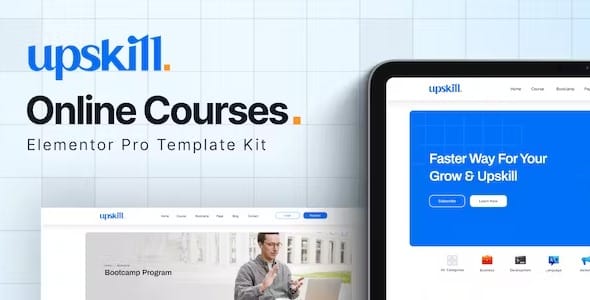
Overview of Upskill
Welcome to the ultimate solution for building a powerful online learning platform: Upskill. This exceptional Elementor Pro Template Kit is meticulously designed for educators, trainers, coaches, and anyone looking to launch or enhance their online course presence. Upskill provides a professional, modern, and fully customizable framework, enabling you to create stunning course websites with ease, without writing a single line of code. With Upskill, transforming your expertise into a thriving online educational business is simpler than ever.
Key Features of Upskill
- Modern & Intuitive Design: Upskill boasts a sleek, contemporary aesthetic that immediately captures attention and provides an engaging user experience, making your educational content stand out.
- Fully Responsive Across Devices: Every page and element within Upskill is optimized for perfect display on desktops, tablets, and mobile phones, ensuring accessibility for all your students, wherever they are.
- Seamless Elementor Pro Integration: Built exclusively for Elementor Pro, Upskill leverages its advanced features for unparalleled drag-and-drop customization, global styling, and dynamic content capabilities.
- Dedicated Course & Lesson Pages: Comes with pre-designed layouts specifically tailored for individual course descriptions, lesson content, and curriculum overviews, streamlining your content presentation.
- Engaging Instructor Profiles: Showcase your team’s expertise with beautifully crafted instructor profile pages, helping to build trust and credibility with potential students.
- Effortless Customization: Easily modify colors, fonts, layouts, and imagery to match your brand’s unique identity directly within the intuitive Elementor interface, giving you full creative control over Upskill.
- Optimized for Performance: Upskill is built with clean code and best practices in mind, ensuring fast loading times and a smooth browsing experience for your users.
- Comprehensive Global Styles: Manage your entire site’s typography, colors, and button styles from one central location, making consistent branding across your Upskill website straightforward and efficient.
Why Choose Upskill?
Choosing Upskill means investing in efficiency, professionalism, and scalability for your online education venture. In today’s competitive digital landscape, a professional and user-friendly website is paramount for attracting and retaining students. Upskill eliminates the need for expensive custom development or complex coding, allowing you to launch a high-quality platform rapidly. Its intuitive design ensures that your students enjoy a seamless learning journey, from browsing courses to enrolling and accessing content, which is crucial for engagement and conversion.
Upskill empowers you to focus on what you do best – creating valuable educational content – while it handles the technical heavy lifting of your website’s design. The robust integration with Elementor Pro provides a flexible foundation, allowing you to adapt and grow your site as your course offerings expand. Whether you’re a solo tutor, a small academy, or a large e-learning institution, Upskill provides the tools you need to build a compelling online presence that resonates with your target audience and establishes your authority in your niche.
Furthermore, by opting for Upskill, you’re choosing a solution that is not only visually stunning but also highly functional. The thoughtful layout and user experience design of Upskill are engineered to guide visitors effortlessly through your course catalog, highlight key features, and encourage enrollments. This template kit is more than just a collection of pages; it’s a strategic asset designed to elevate your brand, streamline your operations, and ultimately drive the success of your online learning business. Get Upskill today and transform your educational vision into a digital reality.
Who Should Use Upskill?
Upskill is the perfect choice for a wide array of individuals and organizations within the online education sector. This includes independent online course creators, professional coaches, personal trainers offering digital programs, language schools, music teachers, coding bootcamps, academic institutions launching online degrees, and anyone looking to monetize their knowledge through digital courses. If you have valuable skills or information to share and want to present it professionally online without the hassle of custom web development, Upskill is designed for you.
How to Install Upskill
- Install & Activate Elementor Pro: Ensure you have both the free Elementor plugin and Elementor Pro activated on your WordPress website, as Upskill requires Elementor Pro for full functionality.
- Install the Envato Elements Plugin: Navigate to Plugins > Add New in your WordPress dashboard, search for “Envato Elements,” install, and activate it.
- Import the Template Kit: Go to Elements > Installed Kits and click the “Upload Template Kit Zip File” button. Select the downloaded Upskill kit file and follow the prompts to import.
- Import Global Styles: It’s recommended to import the Global Kit Styles first. This will apply the default fonts, colors, and site settings of Upskill to your website.
- Import Individual Templates: Browse the available templates within the Elements panel and import the pages you wish to use (e.g., Home, About, Courses). You can then customize them using Elementor Pro to create your unique online learning platform with Upskill.
Frequently Asked Questions About Upskill
Is Upskill compatible with any WordPress theme?
Upskill is designed to be highly compatible with most WordPress themes, especially those built to work well with Elementor. For the best results and full design flexibility, we recommend using a minimalist or “Hello Elementor” theme, which allows Elementor Pro to control the entire site design effectively. This ensures that Upskill’s beautiful layouts and styles are fully expressed without theme conflicts.
Do I need Elementor Pro to use Upskill?
Yes, Upskill is an Elementor Pro Template Kit, meaning it leverages many of Elementor Pro’s advanced features and widgets. Therefore, you must have an active license and installation of Elementor Pro on your WordPress site to fully utilize and customize Upskill to its maximum potential.
Can I customize the colors and fonts in Upskill?
Absolutely! One of the core benefits of Upskill is its complete customizability. You can easily change all colors, fonts, typography, and other styling elements directly through Elementor’s Global Styles and individual page settings. This allows you to effortlessly match Upskill to your specific brand identity and aesthetic preferences.
Get Upskill Today
Ready to launch your professional online course website? Upskill provides the perfect foundation, combining stunning design with powerful functionality. Don’t miss out on the opportunity to create an engaging and effective learning platform that attracts students and showcases your expertise. Explore Upskill and countless other premium WordPress Themes and GPL WordPress Products available at GPL Universe. Elevate your online education business with Upskill today!
Related Products You May Like
Here's everything you need to know about your purchase:
- 100% original files — Every product is the genuine, virus-free file, exactly as released by the original developer.
- Instant download — Access your files immediately after purchase from your account.
- Lifetime access — Re-download your purchased files anytime. No expiry, no limits.
- Free updates — Newer version released? Just request an update from us, free for all customers.
- Dedicated support — Our team is available 24/7 for installation and file-related help.
- Easy refunds — Not satisfied? Review our Refund Policy. We offer a hassle-free 7-day guarantee.
$49.00 Original price was: $49.00.$2.00Current price is: $2.00.
Version
1.0
Last Updated
06/06/2026
License
GPL v2
Compatibility
WordPress 5.0+
Need latest version?
Newer version released? Request an update from us — free for all customers!
Request Update →🎁 Your Purchase Includes
Overview of Upskill
Welcome to the ultimate solution for building a powerful online learning platform: Upskill. This exceptional Elementor Pro Template Kit is meticulously designed for educators, trainers, coaches, and anyone looking to launch or enhance their online course presence. Upskill provides a professional, modern, and fully customizable framework, enabling you to create stunning course websites with ease, without writing a single line of code. With Upskill, transforming your expertise into a thriving online educational business is simpler than ever.
Key Features of Upskill
- Modern & Intuitive Design: Upskill boasts a sleek, contemporary aesthetic that immediately captures attention and provides an engaging user experience, making your educational content stand out.
- Fully Responsive Across Devices: Every page and element within Upskill is optimized for perfect display on desktops, tablets, and mobile phones, ensuring accessibility for all your students, wherever they are.
- Seamless Elementor Pro Integration: Built exclusively for Elementor Pro, Upskill leverages its advanced features for unparalleled drag-and-drop customization, global styling, and dynamic content capabilities.
- Dedicated Course & Lesson Pages: Comes with pre-designed layouts specifically tailored for individual course descriptions, lesson content, and curriculum overviews, streamlining your content presentation.
- Engaging Instructor Profiles: Showcase your team’s expertise with beautifully crafted instructor profile pages, helping to build trust and credibility with potential students.
- Effortless Customization: Easily modify colors, fonts, layouts, and imagery to match your brand’s unique identity directly within the intuitive Elementor interface, giving you full creative control over Upskill.
- Optimized for Performance: Upskill is built with clean code and best practices in mind, ensuring fast loading times and a smooth browsing experience for your users.
- Comprehensive Global Styles: Manage your entire site’s typography, colors, and button styles from one central location, making consistent branding across your Upskill website straightforward and efficient.
Why Choose Upskill?
Choosing Upskill means investing in efficiency, professionalism, and scalability for your online education venture. In today’s competitive digital landscape, a professional and user-friendly website is paramount for attracting and retaining students. Upskill eliminates the need for expensive custom development or complex coding, allowing you to launch a high-quality platform rapidly. Its intuitive design ensures that your students enjoy a seamless learning journey, from browsing courses to enrolling and accessing content, which is crucial for engagement and conversion.
Upskill empowers you to focus on what you do best – creating valuable educational content – while it handles the technical heavy lifting of your website’s design. The robust integration with Elementor Pro provides a flexible foundation, allowing you to adapt and grow your site as your course offerings expand. Whether you’re a solo tutor, a small academy, or a large e-learning institution, Upskill provides the tools you need to build a compelling online presence that resonates with your target audience and establishes your authority in your niche.
Furthermore, by opting for Upskill, you’re choosing a solution that is not only visually stunning but also highly functional. The thoughtful layout and user experience design of Upskill are engineered to guide visitors effortlessly through your course catalog, highlight key features, and encourage enrollments. This template kit is more than just a collection of pages; it’s a strategic asset designed to elevate your brand, streamline your operations, and ultimately drive the success of your online learning business. Get Upskill today and transform your educational vision into a digital reality.
Who Should Use Upskill?
Upskill is the perfect choice for a wide array of individuals and organizations within the online education sector. This includes independent online course creators, professional coaches, personal trainers offering digital programs, language schools, music teachers, coding bootcamps, academic institutions launching online degrees, and anyone looking to monetize their knowledge through digital courses. If you have valuable skills or information to share and want to present it professionally online without the hassle of custom web development, Upskill is designed for you.
How to Install Upskill
- Install & Activate Elementor Pro: Ensure you have both the free Elementor plugin and Elementor Pro activated on your WordPress website, as Upskill requires Elementor Pro for full functionality.
- Install the Envato Elements Plugin: Navigate to Plugins > Add New in your WordPress dashboard, search for “Envato Elements,” install, and activate it.
- Import the Template Kit: Go to Elements > Installed Kits and click the “Upload Template Kit Zip File” button. Select the downloaded Upskill kit file and follow the prompts to import.
- Import Global Styles: It’s recommended to import the Global Kit Styles first. This will apply the default fonts, colors, and site settings of Upskill to your website.
- Import Individual Templates: Browse the available templates within the Elements panel and import the pages you wish to use (e.g., Home, About, Courses). You can then customize them using Elementor Pro to create your unique online learning platform with Upskill.
Frequently Asked Questions About Upskill
Is Upskill compatible with any WordPress theme?
Upskill is designed to be highly compatible with most WordPress themes, especially those built to work well with Elementor. For the best results and full design flexibility, we recommend using a minimalist or “Hello Elementor” theme, which allows Elementor Pro to control the entire site design effectively. This ensures that Upskill’s beautiful layouts and styles are fully expressed without theme conflicts.
Do I need Elementor Pro to use Upskill?
Yes, Upskill is an Elementor Pro Template Kit, meaning it leverages many of Elementor Pro’s advanced features and widgets. Therefore, you must have an active license and installation of Elementor Pro on your WordPress site to fully utilize and customize Upskill to its maximum potential.
Can I customize the colors and fonts in Upskill?
Absolutely! One of the core benefits of Upskill is its complete customizability. You can easily change all colors, fonts, typography, and other styling elements directly through Elementor’s Global Styles and individual page settings. This allows you to effortlessly match Upskill to your specific brand identity and aesthetic preferences.
Get Upskill Today
Ready to launch your professional online course website? Upskill provides the perfect foundation, combining stunning design with powerful functionality. Don’t miss out on the opportunity to create an engaging and effective learning platform that attracts students and showcases your expertise. Explore Upskill and countless other premium WordPress Themes and GPL WordPress Products available at GPL Universe. Elevate your online education business with Upskill today!
Related Products You May Like
Here's everything you need to know about your purchase:
- 100% original files — Every product is the genuine, virus-free file, exactly as released by the original developer.
- Instant download — Access your files immediately after purchase from your account.
- Lifetime access — Re-download your purchased files anytime. No expiry, no limits.
- Free updates — Newer version released? Just request an update from us, free for all customers.
- Dedicated support — Our team is available 24/7 for installation and file-related help.
- Easy refunds — Not satisfied? Review our Refund Policy. We offer a hassle-free 7-day guarantee.