

Space 2.5.37 – Responsive Premium Moodle Theme
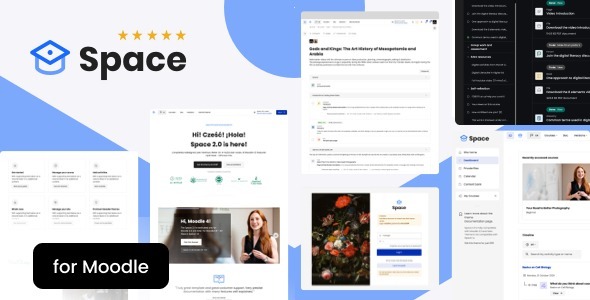
Overview of Space
Elevate your Moodle learning platform with Space, a premium responsive theme designed to transform the educational experience. Space offers a modern, intuitive, and highly customizable interface, making it the perfect choice for educators, institutions, and online course creators who demand excellence. This theme is crafted to provide an engaging and seamless user journey across all devices, ensuring that your learners have the best possible access to their courses, anytime, anywhere.
Key Features of Space
- Fully Responsive Design: Space adapts flawlessly to any screen size, from desktops to tablets and smartphones, ensuring an optimal viewing and interaction experience for all Moodle users.
- Extensive Customization Options: Tailor the look and feel of your Moodle site with a wide array of customization settings. Space allows you to easily adjust colors, fonts, layouts, and more to match your brand identity.
- Modern & Clean Aesthetics: With its contemporary design, Space provides a professional and inviting atmosphere, enhancing the perceived value of your educational content and institution.
- Intuitive Navigation: Space is built with user experience in mind, offering clear and straightforward navigation that helps learners and instructors quickly find what they need without hassle.
- Optimized for Performance: Engineered for speed and efficiency, Space ensures a smooth and responsive browsing experience, reducing load times and improving overall user satisfaction.
- Dedicated Course Layouts: Space includes specialized layouts for courses, making content presentation engaging and easy to follow, which can significantly boost learner retention and engagement.
- Drag-and-Drop Page Builder Integration: While a Moodle theme, Space often leverages Moodle’s own customization capabilities and can be enhanced with compatible plugins for even greater design flexibility.
- Cross-Browser Compatibility: Space performs consistently across all major web browsers, guaranteeing a uniform experience for your diverse user base.
Why Choose Space?
Choosing Space for your Moodle platform means investing in an unparalleled learning environment. This premium theme is not just about aesthetics; it’s about functionality, usability, and creating a truly immersive educational experience. Space empowers you to present your courses with clarity and style, making complex topics more approachable and engaging for your students. Its responsive nature ensures that learning is never interrupted, whether students are on a desktop at home or a mobile device on the go. The robust customization options mean your Moodle site will always reflect your unique brand and educational philosophy, setting you apart from the competition.
Beyond its visual appeal, Space is engineered for performance and ease of management. Its clean code base contributes to faster loading times, which is crucial for retaining learner attention and improving SEO. Educators and administrators will appreciate the intuitive backend options that make managing the theme straightforward, even for those with limited technical expertise. By opting for Space, you are providing your community with a stable, attractive, and highly functional platform that supports diverse learning styles and educational objectives. It’s a complete solution designed to elevate your online presence and foster a more effective learning ecosystem.
Who Should Use Space?
Space is an ideal solution for a broad spectrum of Moodle users. Educational institutions, from K-12 schools to universities and colleges, will find Space perfect for delivering a modern and accessible online curriculum. Individual educators, tutors, and course creators looking to host professional and engaging online courses will benefit immensely from its premium features and ease of customization. Corporate training departments can leverage Space to create a polished and effective platform for employee development and compliance training. Essentially, anyone utilizing Moodle who desires a responsive, visually appealing, and feature-rich theme to enhance their learning environment will find Space to be an invaluable asset.
How to Install Space
- Download Space: Obtain the Space theme package from your purchase source. Ensure it’s a .zip file containing the theme files.
- Access Moodle Administration: Log in to your Moodle site as an administrator.
- Navigate to Theme Installer: Go to ‘Site administration’ > ‘Plugins’ > ‘Install plugins’.
- Upload Theme File: Drag and drop the Space .zip file into the designated area or click ‘Choose a file’ to upload it. Click ‘Install plugin from the ZIP file’.
- Activate and Configure Space: After installation, navigate to ‘Site administration’ > ‘Appearance’ > ‘Themes’ > ‘Theme selector’ and choose Space as your default theme. Then, go to ‘Theme settings’ (or Space theme settings) to customize its various options to suit your needs.
Frequently Asked Questions About Space
Is Space compatible with the latest Moodle versions?
Yes, Space is regularly updated to ensure compatibility with the most recent stable versions of Moodle, providing you with a seamless experience and access to the latest Moodle features.
Can I customize the colors and fonts in Space?
Absolutely! Space offers extensive customization options directly within the Moodle theme settings. You can easily adjust colors, typography, layout elements, and much more to match your brand or personal preferences without any coding knowledge.
Does Space support right-to-left (RTL) languages?
Space is designed with global accessibility in mind and typically includes robust support for RTL languages, ensuring that your content is displayed correctly for all users, regardless of their language direction.
Get Space Today
Transform your Moodle platform into a dynamic and engaging learning hub with Space. This premium, responsive theme offers the perfect blend of aesthetic appeal, robust functionality, and user-friendliness, making it an essential upgrade for any educational institution or individual educator. Enhance your online presence, improve learner engagement, and provide an exceptional educational experience. Explore our comprehensive selection of WordPress Themes and other premium GPL WordPress Products to find everything you need to build and optimize your digital platforms. Invest in Space today and unlock the full potential of your Moodle site.
Related Products You May Like
Here's everything you need to know about your purchase:
- 100% original files — Every product is the genuine, virus-free file, exactly as released by the original developer.
- Instant download — Access your files immediately after purchase from your account.
- Lifetime access — Re-download your purchased files anytime. No expiry, no limits.
- Free updates — Newer version released? Just request an update from us, free for all customers.
- Dedicated support — Our team is available 24/7 for installation and file-related help.
- Easy refunds — Not satisfied? Review our Refund Policy. We offer a hassle-free 7-day guarantee.
$49.00 Original price was: $49.00.$1.99Current price is: $1.99.
Version
1.0
Last Updated
06/06/2026
License
GPL v2
Compatibility
WordPress 5.0+
Need latest version?
Newer version released? Request an update from us — free for all customers!
Request Update →🎁 Your Purchase Includes
Overview of Space
Elevate your Moodle learning platform with Space, a premium responsive theme designed to transform the educational experience. Space offers a modern, intuitive, and highly customizable interface, making it the perfect choice for educators, institutions, and online course creators who demand excellence. This theme is crafted to provide an engaging and seamless user journey across all devices, ensuring that your learners have the best possible access to their courses, anytime, anywhere.
Key Features of Space
- Fully Responsive Design: Space adapts flawlessly to any screen size, from desktops to tablets and smartphones, ensuring an optimal viewing and interaction experience for all Moodle users.
- Extensive Customization Options: Tailor the look and feel of your Moodle site with a wide array of customization settings. Space allows you to easily adjust colors, fonts, layouts, and more to match your brand identity.
- Modern & Clean Aesthetics: With its contemporary design, Space provides a professional and inviting atmosphere, enhancing the perceived value of your educational content and institution.
- Intuitive Navigation: Space is built with user experience in mind, offering clear and straightforward navigation that helps learners and instructors quickly find what they need without hassle.
- Optimized for Performance: Engineered for speed and efficiency, Space ensures a smooth and responsive browsing experience, reducing load times and improving overall user satisfaction.
- Dedicated Course Layouts: Space includes specialized layouts for courses, making content presentation engaging and easy to follow, which can significantly boost learner retention and engagement.
- Drag-and-Drop Page Builder Integration: While a Moodle theme, Space often leverages Moodle’s own customization capabilities and can be enhanced with compatible plugins for even greater design flexibility.
- Cross-Browser Compatibility: Space performs consistently across all major web browsers, guaranteeing a uniform experience for your diverse user base.
Why Choose Space?
Choosing Space for your Moodle platform means investing in an unparalleled learning environment. This premium theme is not just about aesthetics; it’s about functionality, usability, and creating a truly immersive educational experience. Space empowers you to present your courses with clarity and style, making complex topics more approachable and engaging for your students. Its responsive nature ensures that learning is never interrupted, whether students are on a desktop at home or a mobile device on the go. The robust customization options mean your Moodle site will always reflect your unique brand and educational philosophy, setting you apart from the competition.
Beyond its visual appeal, Space is engineered for performance and ease of management. Its clean code base contributes to faster loading times, which is crucial for retaining learner attention and improving SEO. Educators and administrators will appreciate the intuitive backend options that make managing the theme straightforward, even for those with limited technical expertise. By opting for Space, you are providing your community with a stable, attractive, and highly functional platform that supports diverse learning styles and educational objectives. It’s a complete solution designed to elevate your online presence and foster a more effective learning ecosystem.
Who Should Use Space?
Space is an ideal solution for a broad spectrum of Moodle users. Educational institutions, from K-12 schools to universities and colleges, will find Space perfect for delivering a modern and accessible online curriculum. Individual educators, tutors, and course creators looking to host professional and engaging online courses will benefit immensely from its premium features and ease of customization. Corporate training departments can leverage Space to create a polished and effective platform for employee development and compliance training. Essentially, anyone utilizing Moodle who desires a responsive, visually appealing, and feature-rich theme to enhance their learning environment will find Space to be an invaluable asset.
How to Install Space
- Download Space: Obtain the Space theme package from your purchase source. Ensure it’s a .zip file containing the theme files.
- Access Moodle Administration: Log in to your Moodle site as an administrator.
- Navigate to Theme Installer: Go to ‘Site administration’ > ‘Plugins’ > ‘Install plugins’.
- Upload Theme File: Drag and drop the Space .zip file into the designated area or click ‘Choose a file’ to upload it. Click ‘Install plugin from the ZIP file’.
- Activate and Configure Space: After installation, navigate to ‘Site administration’ > ‘Appearance’ > ‘Themes’ > ‘Theme selector’ and choose Space as your default theme. Then, go to ‘Theme settings’ (or Space theme settings) to customize its various options to suit your needs.
Frequently Asked Questions About Space
Is Space compatible with the latest Moodle versions?
Yes, Space is regularly updated to ensure compatibility with the most recent stable versions of Moodle, providing you with a seamless experience and access to the latest Moodle features.
Can I customize the colors and fonts in Space?
Absolutely! Space offers extensive customization options directly within the Moodle theme settings. You can easily adjust colors, typography, layout elements, and much more to match your brand or personal preferences without any coding knowledge.
Does Space support right-to-left (RTL) languages?
Space is designed with global accessibility in mind and typically includes robust support for RTL languages, ensuring that your content is displayed correctly for all users, regardless of their language direction.
Get Space Today
Transform your Moodle platform into a dynamic and engaging learning hub with Space. This premium, responsive theme offers the perfect blend of aesthetic appeal, robust functionality, and user-friendliness, making it an essential upgrade for any educational institution or individual educator. Enhance your online presence, improve learner engagement, and provide an exceptional educational experience. Explore our comprehensive selection of WordPress Themes and other premium GPL WordPress Products to find everything you need to build and optimize your digital platforms. Invest in Space today and unlock the full potential of your Moodle site.
Related Products You May Like
Here's everything you need to know about your purchase:
- 100% original files — Every product is the genuine, virus-free file, exactly as released by the original developer.
- Instant download — Access your files immediately after purchase from your account.
- Lifetime access — Re-download your purchased files anytime. No expiry, no limits.
- Free updates — Newer version released? Just request an update from us, free for all customers.
- Dedicated support — Our team is available 24/7 for installation and file-related help.
- Easy refunds — Not satisfied? Review our Refund Policy. We offer a hassle-free 7-day guarantee.