

DashLite 3.3.1 – Bootstrap Responsive Admin Dashboard Template
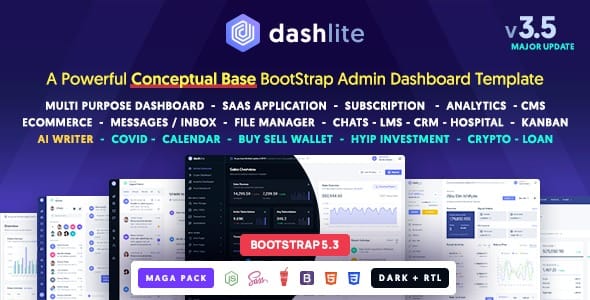
Overview of DashLite
DashLite is a cutting-edge Bootstrap 5 responsive admin dashboard template designed to provide a robust and modern foundation for your web applications. Whether you’re building a CRM, an analytics dashboard, an e-commerce backend, or a sophisticated SaaS platform, DashLite offers a comprehensive solution to kickstart your project with a clean, intuitive, and highly functional user interface.
Key Features of DashLite
- Built with Bootstrap 5: Leverages the latest version of the world’s most popular front-end framework, ensuring modern standards, excellent responsiveness, and easy customization for DashLite.
- Fully Responsive Design: DashLite is meticulously crafted to look stunning and perform flawlessly across all devices, from large desktop monitors to tablets and smartphones, providing an optimal user experience everywhere.
- Modern & Clean UI: Features an elegant, minimalist design language that enhances usability and focuses on content, making your dashboard powered by DashLite both aesthetically pleasing and highly efficient.
- Extensive UI Components: Comes packed with a rich library of UI elements including cards, buttons, forms, tables, charts, notifications, and more, allowing you to build complex interfaces with ease using DashLite.
- Multiple Layout Options: Offers various layout configurations, including different sidebar styles, header options, and content arrangements, giving you the flexibility to tailor DashLite to your specific needs.
- Dark & Light Modes: Provides built-in support for both dark and light themes, allowing users to switch between modes based on their preference, enhancing accessibility and reducing eye strain within DashLite.
- Ready-to-Use Pages: Includes a wide array of pre-built pages such as authentication pages (login, register), error pages, profile pages, pricing tables, and invoice templates, significantly speeding up development with DashLite.
- Developer-Friendly Code: Written with clean, well-structured, and easily understandable code, making DashLite a joy for developers to work with, extend, and maintain.
Why Choose DashLite?
Choosing DashLite means investing in efficiency, professionalism, and a superior user experience for your web application. This powerful template dramatically reduces development time and costs by providing a comprehensive suite of pre-built components and pages. Instead of building your dashboard from scratch, DashLite offers a solid, modern, and feature-rich foundation, allowing your team to focus on core functionality and innovation rather than repetitive UI development. Its adherence to the latest web standards ensures your application remains robust and future-proof.
The intuitive design and responsive nature of DashLite guarantee that your users will have a seamless experience, whether they are accessing your application from a desktop computer or a mobile device. The extensive customization options mean that DashLite can be easily branded to match your company’s aesthetic, maintaining consistency across all your digital products. Furthermore, the developer-friendly code ensures that integration and expansion are straightforward, making DashLite a smart choice for projects of any scale.
DashLite stands out due to its active development and a commitment to quality. It’s more than just a template; it’s a foundation designed to evolve with your project, providing the flexibility and scalability needed for long-term success. By leveraging DashLite, you empower your application with a professional look and feel that instills confidence and enhances user engagement, ultimately contributing to your business goals.
Who Should Use DashLite?
DashLite is ideal for web developers, designers, startups, and agencies looking to build modern, responsive, and feature-rich admin dashboards and web applications quickly and efficiently. It’s perfect for anyone creating CRMs, project management systems, SaaS platforms, e-commerce backends, data analytics tools, or any application requiring a robust and aesthetically pleasing administrative interface. If you value clean code, extensive features, and a significant reduction in development time, DashLite is for you.
How to Install DashLite
- Download DashLite: After your purchase, download the DashLite package from your account on our store.
- Extract the Files: Unzip the downloaded DashLite archive to a location on your computer. This will reveal the main template files and documentation.
- Set Up Your Development Environment: Ensure you have a suitable development environment (e.g., Node.js, npm/yarn, a web server like Apache or Nginx) configured for your project.
- Integrate DashLite: Copy the necessary DashLite files (HTML, CSS, JS, assets) into your project’s directory structure. Refer to the included documentation for specific integration instructions, especially regarding asset compilation and script includes.
- Customize and Launch: Begin customizing DashLite to fit your application’s specific requirements, modifying colors, layouts, and adding your unique content. Once satisfied, deploy your application.
Frequently Asked Questions About DashLite
Is DashLite compatible with different frameworks?
DashLite is built with pure HTML, CSS (SCSS), and JavaScript, making it framework-agnostic. While it provides a solid frontend structure, you can easily integrate DashLite with any backend framework (e.g., Laravel, Node.js, Ruby on Rails, Django) or frontend library (e.g., React, Vue, Angular) by adapting its static assets and components to your chosen stack.
Does DashLite support RTL (Right-to-Left) languages?
Yes, DashLite includes comprehensive support for RTL languages. The template is designed with flexibility in mind, allowing you to switch between LTR and RTL layouts with ease, ensuring your application caters to a global audience. This feature is a key aspect of DashLite’s versatility.
Can I customize the colors and branding of DashLite?
Absolutely! DashLite is highly customizable. It uses SCSS, allowing you to easily modify variables to change colors, fonts, and other stylistic elements to match your brand’s identity. The modular structure of DashLite also makes it straightforward to add, remove, or modify components.
Get DashLite Today
Unlock the full potential of your next web application with DashLite. This premium Bootstrap 5 admin dashboard template provides everything you need to build a modern, responsive, and highly functional interface with speed and confidence. Don’t settle for less when you can have a robust foundation for your project. Explore our range of WordPress Themes and other high-quality GPL WordPress Products and elevate your development process. Purchase DashLite now and start building something amazing!
Related Products You May Like
Here's everything you need to know about your purchase:
- 100% original files — Every product is the genuine, virus-free file, exactly as released by the original developer.
- Instant download — Access your files immediately after purchase from your account.
- Lifetime access — Re-download your purchased files anytime. No expiry, no limits.
- Free updates — Newer version released? Just request an update from us, free for all customers.
- Dedicated support — Our team is available 24/7 for installation and file-related help.
- Easy refunds — Not satisfied? Review our Refund Policy. We offer a hassle-free 7-day guarantee.
$49.00 Original price was: $49.00.$2.00Current price is: $2.00.
Version
1.0
Last Updated
06/06/2026
License
GPL v2
Compatibility
WordPress 5.0+
Need latest version?
Newer version released? Request an update from us — free for all customers!
Request Update →🎁 Your Purchase Includes
Overview of DashLite
DashLite is a cutting-edge Bootstrap 5 responsive admin dashboard template designed to provide a robust and modern foundation for your web applications. Whether you’re building a CRM, an analytics dashboard, an e-commerce backend, or a sophisticated SaaS platform, DashLite offers a comprehensive solution to kickstart your project with a clean, intuitive, and highly functional user interface.
Key Features of DashLite
- Built with Bootstrap 5: Leverages the latest version of the world’s most popular front-end framework, ensuring modern standards, excellent responsiveness, and easy customization for DashLite.
- Fully Responsive Design: DashLite is meticulously crafted to look stunning and perform flawlessly across all devices, from large desktop monitors to tablets and smartphones, providing an optimal user experience everywhere.
- Modern & Clean UI: Features an elegant, minimalist design language that enhances usability and focuses on content, making your dashboard powered by DashLite both aesthetically pleasing and highly efficient.
- Extensive UI Components: Comes packed with a rich library of UI elements including cards, buttons, forms, tables, charts, notifications, and more, allowing you to build complex interfaces with ease using DashLite.
- Multiple Layout Options: Offers various layout configurations, including different sidebar styles, header options, and content arrangements, giving you the flexibility to tailor DashLite to your specific needs.
- Dark & Light Modes: Provides built-in support for both dark and light themes, allowing users to switch between modes based on their preference, enhancing accessibility and reducing eye strain within DashLite.
- Ready-to-Use Pages: Includes a wide array of pre-built pages such as authentication pages (login, register), error pages, profile pages, pricing tables, and invoice templates, significantly speeding up development with DashLite.
- Developer-Friendly Code: Written with clean, well-structured, and easily understandable code, making DashLite a joy for developers to work with, extend, and maintain.
Why Choose DashLite?
Choosing DashLite means investing in efficiency, professionalism, and a superior user experience for your web application. This powerful template dramatically reduces development time and costs by providing a comprehensive suite of pre-built components and pages. Instead of building your dashboard from scratch, DashLite offers a solid, modern, and feature-rich foundation, allowing your team to focus on core functionality and innovation rather than repetitive UI development. Its adherence to the latest web standards ensures your application remains robust and future-proof.
The intuitive design and responsive nature of DashLite guarantee that your users will have a seamless experience, whether they are accessing your application from a desktop computer or a mobile device. The extensive customization options mean that DashLite can be easily branded to match your company’s aesthetic, maintaining consistency across all your digital products. Furthermore, the developer-friendly code ensures that integration and expansion are straightforward, making DashLite a smart choice for projects of any scale.
DashLite stands out due to its active development and a commitment to quality. It’s more than just a template; it’s a foundation designed to evolve with your project, providing the flexibility and scalability needed for long-term success. By leveraging DashLite, you empower your application with a professional look and feel that instills confidence and enhances user engagement, ultimately contributing to your business goals.
Who Should Use DashLite?
DashLite is ideal for web developers, designers, startups, and agencies looking to build modern, responsive, and feature-rich admin dashboards and web applications quickly and efficiently. It’s perfect for anyone creating CRMs, project management systems, SaaS platforms, e-commerce backends, data analytics tools, or any application requiring a robust and aesthetically pleasing administrative interface. If you value clean code, extensive features, and a significant reduction in development time, DashLite is for you.
How to Install DashLite
- Download DashLite: After your purchase, download the DashLite package from your account on our store.
- Extract the Files: Unzip the downloaded DashLite archive to a location on your computer. This will reveal the main template files and documentation.
- Set Up Your Development Environment: Ensure you have a suitable development environment (e.g., Node.js, npm/yarn, a web server like Apache or Nginx) configured for your project.
- Integrate DashLite: Copy the necessary DashLite files (HTML, CSS, JS, assets) into your project’s directory structure. Refer to the included documentation for specific integration instructions, especially regarding asset compilation and script includes.
- Customize and Launch: Begin customizing DashLite to fit your application’s specific requirements, modifying colors, layouts, and adding your unique content. Once satisfied, deploy your application.
Frequently Asked Questions About DashLite
Is DashLite compatible with different frameworks?
DashLite is built with pure HTML, CSS (SCSS), and JavaScript, making it framework-agnostic. While it provides a solid frontend structure, you can easily integrate DashLite with any backend framework (e.g., Laravel, Node.js, Ruby on Rails, Django) or frontend library (e.g., React, Vue, Angular) by adapting its static assets and components to your chosen stack.
Does DashLite support RTL (Right-to-Left) languages?
Yes, DashLite includes comprehensive support for RTL languages. The template is designed with flexibility in mind, allowing you to switch between LTR and RTL layouts with ease, ensuring your application caters to a global audience. This feature is a key aspect of DashLite’s versatility.
Can I customize the colors and branding of DashLite?
Absolutely! DashLite is highly customizable. It uses SCSS, allowing you to easily modify variables to change colors, fonts, and other stylistic elements to match your brand’s identity. The modular structure of DashLite also makes it straightforward to add, remove, or modify components.
Get DashLite Today
Unlock the full potential of your next web application with DashLite. This premium Bootstrap 5 admin dashboard template provides everything you need to build a modern, responsive, and highly functional interface with speed and confidence. Don’t settle for less when you can have a robust foundation for your project. Explore our range of WordPress Themes and other high-quality GPL WordPress Products and elevate your development process. Purchase DashLite now and start building something amazing!
Related Products You May Like
Here's everything you need to know about your purchase:
- 100% original files — Every product is the genuine, virus-free file, exactly as released by the original developer.
- Instant download — Access your files immediately after purchase from your account.
- Lifetime access — Re-download your purchased files anytime. No expiry, no limits.
- Free updates — Newer version released? Just request an update from us, free for all customers.
- Dedicated support — Our team is available 24/7 for installation and file-related help.
- Easy refunds — Not satisfied? Review our Refund Policy. We offer a hassle-free 7-day guarantee.