

Claryva – Virtual Assistant Elementor Template Kit
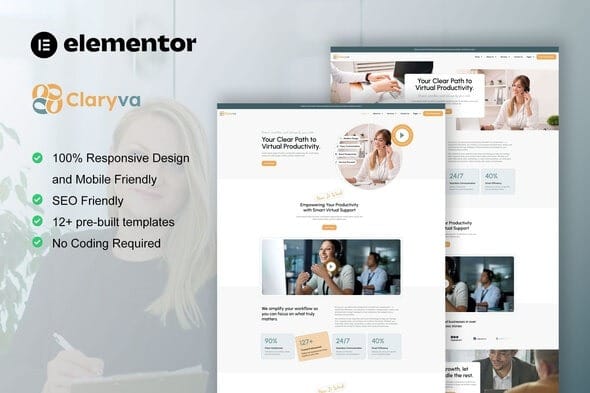
Overview of Claryva
Welcome to the future of professional online presence with Claryva – Virtual Assistant Elementor Template Kit. Designed specifically for virtual assistants, freelancers, and agencies offering administrative or creative support, Claryva provides a sleek, modern, and highly functional website solution. This comprehensive template kit empowers you to showcase your services, highlight your expertise, and connect with potential clients effortlessly, all built with the intuitive power of Elementor.
Key Features of Claryva
- Professional Design: Claryva boasts a clean, contemporary aesthetic that immediately conveys professionalism and trustworthiness, perfect for establishing your brand identity.
- Fully Responsive Layouts: Ensure your website looks flawless and functions perfectly on any device, from desktops to tablets and smartphones, providing an optimal user experience with Claryva.
- Elementor Pro Compatibility: While not required, Claryva is optimized for Elementor Pro, allowing for even greater customization and dynamic content capabilities if you choose to use it.
- Pre-built Pages & Sections: Jumpstart your website creation with essential pages like Home, About, Services, Portfolio, Contact, and more, all meticulously designed within Claryva.
- Customizable Global Styles: Easily modify fonts, colors, and overall styling across your entire site from one central place, ensuring brand consistency with Claryva.
- Drag-and-Drop Editing: Leverage Elementor’s powerful visual editor to customize every aspect of your site without needing any coding knowledge. Claryva makes website building accessible.
- Service Showcase Layouts: Dedicated sections to clearly outline your virtual assistant services, pricing, and unique value propositions, making Claryva ideal for service providers.
- Client Testimonial Integration: Build trust and credibility with stylish sections designed to display glowing reviews from satisfied clients, enhancing the appeal of Claryva.
Why Choose Claryva?
Choosing Claryva means investing in a robust, professional, and easy-to-manage online platform for your virtual assistant business. In today’s competitive landscape, a strong digital presence is non-negotiable, and Claryva delivers just that. It eliminates the need for expensive web developers or complex coding, allowing you to focus on what you do best: assisting your clients. With Claryva, you gain a powerful tool that not only looks great but is also engineered for optimal user experience and conversion, helping you attract and retain more clients.
Claryva is more than just a template kit; it’s a strategic asset for your business growth. Its intuitive design and Elementor integration mean you can launch a stunning website in a fraction of the time it would take from scratch. The carefully crafted layouts within Claryva are designed with the specific needs of virtual assistants in mind, ensuring that your services are presented clearly and your professionalism shines through. Furthermore, the responsive nature of Claryva guarantees that your site will always look its best, regardless of how your potential clients access it.
By opting for Claryva, you’re choosing flexibility, scalability, and a modern aesthetic that reflects the high standards of your virtual assistant services. This kit empowers you to maintain complete control over your website, enabling quick updates and changes as your business evolves. Claryva truly simplifies the journey to a professional online presence, making it an invaluable addition to your business toolkit.
Who Should Use Claryva?
Claryva is perfectly suited for a wide range of professionals and businesses within the virtual assistance and freelance sectors. This includes independent virtual assistants, small to medium-sized virtual assistant agencies, administrative support freelancers, online business managers, personal assistants, and even creative freelancers looking to showcase their service-based offerings. If you provide remote services and need a sophisticated, easy-to-manage website to attract clients, Claryva is designed for you.
How to Install Claryva
- Install Elementor: Ensure you have the free Elementor plugin installed and activated on your WordPress website. Claryva relies on Elementor for its functionality.
- Install Envato Elements Plugin: Download and install the Envato Elements plugin from the WordPress plugin repository. This plugin is essential for importing Claryva.
- Import Kit Template: Navigate to Elementor > Tools > Import/Export Kit. Upload the provided Claryva .zip file and follow the on-screen instructions to import the entire template kit.
- Adjust Global Settings: After import, go to Elementor > Site Settings to customize global fonts, colors, and site identity to match your brand. Claryva’s global settings are easily modifiable.
- Customize Pages: Open each page with Elementor and replace the demo content with your own text, images, and service details. Claryva makes customization intuitive.
Frequently Asked Questions About Claryva
Is Claryva compatible with the free version of Elementor?
Yes, Claryva is designed to work seamlessly with the free version of Elementor. While it is optimized for Elementor Pro and will utilize its features if available, it does not strictly require the Pro version for its core functionality.
Can I change the colors and fonts in Claryva to match my brand?
Absolutely! Claryva is fully customizable. You can easily adjust all global colors, fonts, and typography settings through Elementor’s Site Settings to perfectly align with your brand identity and preferences.
Does Claryva include images and demo content?
Claryva comes with placeholder images and demo content that you can easily replace with your own. Please note that some images may be licensed and are for demonstration purposes only, requiring you to source your own for commercial use.
Get Claryva Today
Elevate your virtual assistant business with a professional, high-converting website powered by Claryva. This Elementor Template Kit offers everything you need to establish a strong online presence, showcase your expertise, and attract your ideal clients. Don’t miss out on the opportunity to transform your digital footprint. Explore Claryva and other premium WordPress Themes and GPL WordPress Products to find the perfect tools for your online success today!
Related Products You May Like
Here's everything you need to know about your purchase:
- 100% original files — Every product is the genuine, virus-free file, exactly as released by the original developer.
- Instant download — Access your files immediately after purchase from your account.
- Lifetime access — Re-download your purchased files anytime. No expiry, no limits.
- Free updates — Newer version released? Just request an update from us, free for all customers.
- Dedicated support — Our team is available 24/7 for installation and file-related help.
- Easy refunds — Not satisfied? Review our Refund Policy. We offer a hassle-free 7-day guarantee.
$49.00 Original price was: $49.00.$1.99Current price is: $1.99.
Version
1.0
Last Updated
07/07/2026
License
GPL v2
Compatibility
WordPress 5.0+
Need latest version?
Newer version released? Request an update from us — free for all customers!
Request Update →🎁 Your Purchase Includes
Overview of Claryva
Welcome to the future of professional online presence with Claryva – Virtual Assistant Elementor Template Kit. Designed specifically for virtual assistants, freelancers, and agencies offering administrative or creative support, Claryva provides a sleek, modern, and highly functional website solution. This comprehensive template kit empowers you to showcase your services, highlight your expertise, and connect with potential clients effortlessly, all built with the intuitive power of Elementor.
Key Features of Claryva
- Professional Design: Claryva boasts a clean, contemporary aesthetic that immediately conveys professionalism and trustworthiness, perfect for establishing your brand identity.
- Fully Responsive Layouts: Ensure your website looks flawless and functions perfectly on any device, from desktops to tablets and smartphones, providing an optimal user experience with Claryva.
- Elementor Pro Compatibility: While not required, Claryva is optimized for Elementor Pro, allowing for even greater customization and dynamic content capabilities if you choose to use it.
- Pre-built Pages & Sections: Jumpstart your website creation with essential pages like Home, About, Services, Portfolio, Contact, and more, all meticulously designed within Claryva.
- Customizable Global Styles: Easily modify fonts, colors, and overall styling across your entire site from one central place, ensuring brand consistency with Claryva.
- Drag-and-Drop Editing: Leverage Elementor’s powerful visual editor to customize every aspect of your site without needing any coding knowledge. Claryva makes website building accessible.
- Service Showcase Layouts: Dedicated sections to clearly outline your virtual assistant services, pricing, and unique value propositions, making Claryva ideal for service providers.
- Client Testimonial Integration: Build trust and credibility with stylish sections designed to display glowing reviews from satisfied clients, enhancing the appeal of Claryva.
Why Choose Claryva?
Choosing Claryva means investing in a robust, professional, and easy-to-manage online platform for your virtual assistant business. In today’s competitive landscape, a strong digital presence is non-negotiable, and Claryva delivers just that. It eliminates the need for expensive web developers or complex coding, allowing you to focus on what you do best: assisting your clients. With Claryva, you gain a powerful tool that not only looks great but is also engineered for optimal user experience and conversion, helping you attract and retain more clients.
Claryva is more than just a template kit; it’s a strategic asset for your business growth. Its intuitive design and Elementor integration mean you can launch a stunning website in a fraction of the time it would take from scratch. The carefully crafted layouts within Claryva are designed with the specific needs of virtual assistants in mind, ensuring that your services are presented clearly and your professionalism shines through. Furthermore, the responsive nature of Claryva guarantees that your site will always look its best, regardless of how your potential clients access it.
By opting for Claryva, you’re choosing flexibility, scalability, and a modern aesthetic that reflects the high standards of your virtual assistant services. This kit empowers you to maintain complete control over your website, enabling quick updates and changes as your business evolves. Claryva truly simplifies the journey to a professional online presence, making it an invaluable addition to your business toolkit.
Who Should Use Claryva?
Claryva is perfectly suited for a wide range of professionals and businesses within the virtual assistance and freelance sectors. This includes independent virtual assistants, small to medium-sized virtual assistant agencies, administrative support freelancers, online business managers, personal assistants, and even creative freelancers looking to showcase their service-based offerings. If you provide remote services and need a sophisticated, easy-to-manage website to attract clients, Claryva is designed for you.
How to Install Claryva
- Install Elementor: Ensure you have the free Elementor plugin installed and activated on your WordPress website. Claryva relies on Elementor for its functionality.
- Install Envato Elements Plugin: Download and install the Envato Elements plugin from the WordPress plugin repository. This plugin is essential for importing Claryva.
- Import Kit Template: Navigate to Elementor > Tools > Import/Export Kit. Upload the provided Claryva .zip file and follow the on-screen instructions to import the entire template kit.
- Adjust Global Settings: After import, go to Elementor > Site Settings to customize global fonts, colors, and site identity to match your brand. Claryva’s global settings are easily modifiable.
- Customize Pages: Open each page with Elementor and replace the demo content with your own text, images, and service details. Claryva makes customization intuitive.
Frequently Asked Questions About Claryva
Is Claryva compatible with the free version of Elementor?
Yes, Claryva is designed to work seamlessly with the free version of Elementor. While it is optimized for Elementor Pro and will utilize its features if available, it does not strictly require the Pro version for its core functionality.
Can I change the colors and fonts in Claryva to match my brand?
Absolutely! Claryva is fully customizable. You can easily adjust all global colors, fonts, and typography settings through Elementor’s Site Settings to perfectly align with your brand identity and preferences.
Does Claryva include images and demo content?
Claryva comes with placeholder images and demo content that you can easily replace with your own. Please note that some images may be licensed and are for demonstration purposes only, requiring you to source your own for commercial use.
Get Claryva Today
Elevate your virtual assistant business with a professional, high-converting website powered by Claryva. This Elementor Template Kit offers everything you need to establish a strong online presence, showcase your expertise, and attract your ideal clients. Don’t miss out on the opportunity to transform your digital footprint. Explore Claryva and other premium WordPress Themes and GPL WordPress Products to find the perfect tools for your online success today!
Related Products You May Like
Here's everything you need to know about your purchase:
- 100% original files — Every product is the genuine, virus-free file, exactly as released by the original developer.
- Instant download — Access your files immediately after purchase from your account.
- Lifetime access — Re-download your purchased files anytime. No expiry, no limits.
- Free updates — Newer version released? Just request an update from us, free for all customers.
- Dedicated support — Our team is available 24/7 for installation and file-related help.
- Easy refunds — Not satisfied? Review our Refund Policy. We offer a hassle-free 7-day guarantee.